
shootsta.
9 creative video ideas to wow your audience
By joelwarren · Published July 5, 2023 · Updated October 2026
If you need creative video ideas for marketing, social or internal content, this list has nine you can produce. They are whiteboard videos, tips and tricks, behind-the-scenes, time-lapse, animation, storytelling, parody, publicity stunts and employee spotlights. Each one works across channels, and you can shoot most of them without a big-budget crew.
We know how hard it is to keep coming up with fresh video ideas week after week. The well runs dry for everyone sooner or later. The nine formats below are ones we see work for businesses, and each comes with an example you can watch before you plan your own.
Contents:
1. Create a whiteboard video
Whiteboard videos offer a dynamic approach to engage your audience while delivering informative content. Inspired by renowned publishers such as Moz, AsapSCIENCE, and more, these videos are a form of explainer content that employs hand-drawn or animated illustrations to educate viewers on various subjects. With their concise format, whiteboard videos effectively convey information and conclude with a compelling call to action.
Whiteboard Video Example
2. Offer tips and tricks
Tips and tricks videos have a surprising range, from super-short snackable videos on YouTube to longer pieces that give advice a viewer can repeat on their own. They're also good at building brand trust, as it's easy to establish subject matter expertise when you're problem-solving.
Tips and Tricks Video Example
3. Get behind-the-scenes
Behind-the-scenes videos let viewers see how your work gets made, which feels more personal than a polished ad. Whether it's a product, event or project, pick out the interesting details. Keep the funny or surprising moments in, and show the people who did the work.
Behind-The-Scenes Video Example
4. Record a time-lapse
Time-lapse videos squeeze hours, days or even months into a short clip. That shows changes the eye would miss in real time, like a store fit-out, a building going up or an event venue filling with people. Clouds moving over a city skyline are the classic shot, and viewers still stop scrolling to watch them.
Time-Lapse Video Example
5. Use animation
You can use animated videos in lots of different ways, from simple typography animations to animated illustrations, flat icons, even full character animation videos. Animation is good at explaining ideas that are hard to film, so it suits explainers and story-based videos. Its cartoon feel also works well with younger audiences.
Animated Video Example
6. Tell a story
A story makes a business video easier to remember. People recall a customer who had a problem and solved it long after they forget a list of features. When you build your video around a person and a change, your brand's message rides along with it, and viewers feel something about it.
That said, storytelling for short online videos is different from other formats. Learn how the 'emerging' story arc differs from the traditional one before you write your script.
Storytelling Video Example
7. Make a parody
Parody videos use comedy to poke fun at people or situations. If you're a brand, it pays to be aware of fair use guidelines for parodying pre-existing content; however, a brand that parodies itself wins people over because it shows it can laugh at itself. Check out our 'Shootsta: The Movie' parody below, which pokes fun at our company's founders:
Parody Video Example
8. Shoot a publicity stunt
Publicity stunt videos are pre-planned events to attract attention and raise awareness, often for a brand or new product. The best stunts are big, bold and have creative flair, the type of videos that go viral, especially in marketing, thanks to their originality or sheer nerve. If you go down this route, think big, because a small stunt rarely gets shared.
Publicity Stunt Video Example
9. Employee Spotlight Videos
Employee spotlight videos lift morale and show the faces behind your brand. Each short clip features one person: their role, a story from their work or a talent their colleagues might not know about. You could give each video to a different team member and let them talk about their career so far, the projects they're proud of and what they add to the culture.
These videos show the range of people and skills on your team, and staff tend to share them with pride. Customers see them too, which makes the brand feel more human. Use them on social media, in newsletters or on your "About Us" page.
Need a Partner to Create Your AMAZING Videos?
Shootsta helps businesses turn their video content ideas into finished videos. We work with you through pre-production, the shoot and the edit.
What Shootsta provides: You can film with a custom-built camera kit that captures high-quality footage. A team of editors then cuts it for you, whether this is your first video or your five hundredth.
Why teams use one partner: We aim for videos your audience remembers and acts on. Shootsta is a one-stop solution, so you brief, film, edit and approve in one place.
Check out 9 more creative video ideas to wow your audience now!
How to come up with video ideas that work
When ideas dry up, the cause is usually that each video gets planned as a one-off project. Creativity is rarely the problem. The fastest way to generate video ideas is to start from the audience and the channel, then work backwards to the format:
- Pick the audience. It might be sales prospects, employees, customers or job candidates, and each group cares about different things.
- Pick the channel. A LinkedIn post needs a 15-30 second hook. A landing page can hold 60-90 seconds. An internal town hall can run 3-5 minutes.
- Pick the job to be done. Explain, demonstrate, persuade, celebrate, or teach. The job sets the format.
- Match to a proven format. Explainer, testimonial, behind-the-scenes, how-to, animated, employee spotlight, product demo, founder story.
If you want a structured generator, the Video Brief Planner walks you through audience, channel, and format in under five minutes.
How-to video ideas for business
How-to videos pull more weight than any other format for sales, support, training and onboarding, because they answer a question the viewer already has. The best how-to video ideas come from your inbox, your help docs and the objections your sales team hears.
- How to onboard with our product in 10 minutes - a screen-recorded walkthrough for new customers, replaces a live kickoff call.
- How to set up [feature] correctly - the top three support tickets, turned into 90-second screencasts.
- How to use [tool] for [job-to-be-done] - role-specific tutorials that pull in target accounts via search.
- How to read [report or dashboard] - turns a complex deliverable into something a customer can act on.
- How to interview for [role] - candidate-facing recruitment content that doubles as employer brand.
- How to brief a video project - an internal how-to that lifts the quality of every brief that lands on the production team.
- How to film yourself on a phone - a how-to-shoot video that lets people self-shoot at scale across the business.
- How to deliver a piece to camera - the executive-coaching version, 60 seconds, used as a primer before a town hall recording.
For more how-to video ideas tied to a specific function, see our 30+ B2B video ideas by function guide, and for training-specific how-to formats, see 15 training video ideas your L&D team can produce this month.
How to film a video idea once you have one
The fastest path from idea to finished video has three steps: brief it (audience, channel, message, length), shoot it (self-shoot on a phone, a Shootsta kit, or a videographer), edit it (in-house, with software, or with a production partner). The brief is the step people skip, and they pay for it later in extra edit rounds. A short, structured brief written before the shoot saves far more time than it takes.
For more guidance, see how to enable non-creatives to create on-brand video and how to produce a corporate video using online tools.
Keep reading
- 9 More Creative Video Ideas to Wow Your Audience
- Creative Video Ideas for UK Businesses
- 5 Corporate Videos You Need to Create
For B2B and enterprise teams
The ideas above work for almost any audience. If you produce video for a B2B or enterprise audience, though, the formats and benchmarks differ, and we have written a deeper set of guides for that:
- B2B video ideas: 30+ examples by function - the full hub, organized by marketing, sales, internal comms, product, customer, HR, and leadership.
- 25 marketing video ideas that drive pipeline
- 20 sales video ideas reps actually send
- 25 internal comms video ideas that land
- 20 product launch video ideas for B2B
More from Shootsta Academy
Related reading
- For longer-form formats that scale across cuts, a podcast gives you more output per shoot than most formats. Read about planning an engaging business podcast.
Take this article with you
Read the latest at shootsta.com/blog/9-creative-video-ideas-to-wow-your-audience
You might also like
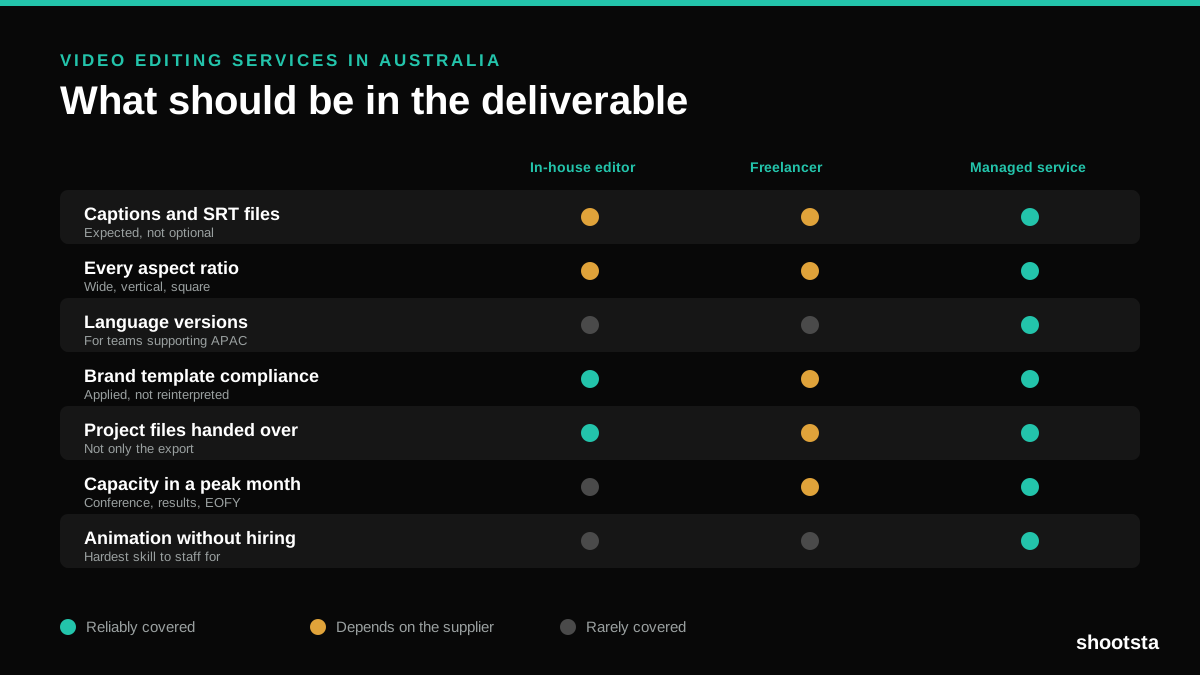
Video Editing Services in Australia
Australian teams are spread across time zones and offices, so the editing queue matters more than the editing. Here is what to expect on cost and turnaround.
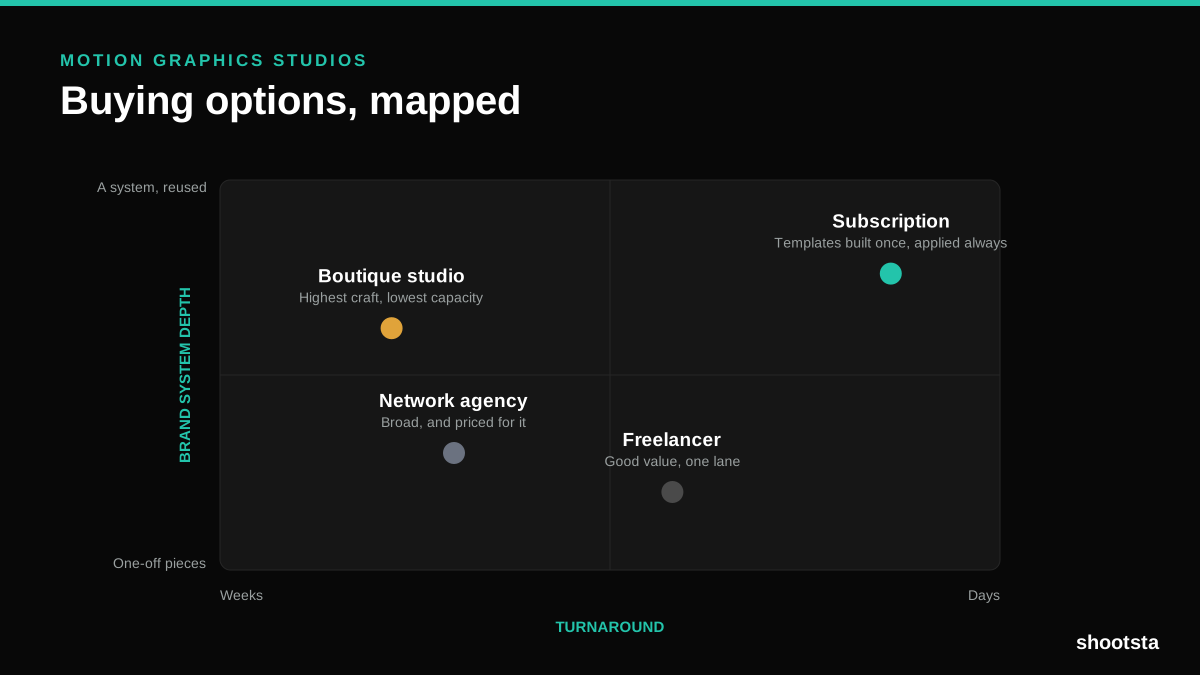
How to Choose Between Motion Graphics Studios
Every motion graphics studio has a good reel. The reel is the one thing that will not tell you how the fifth project goes. These ten criteria will.
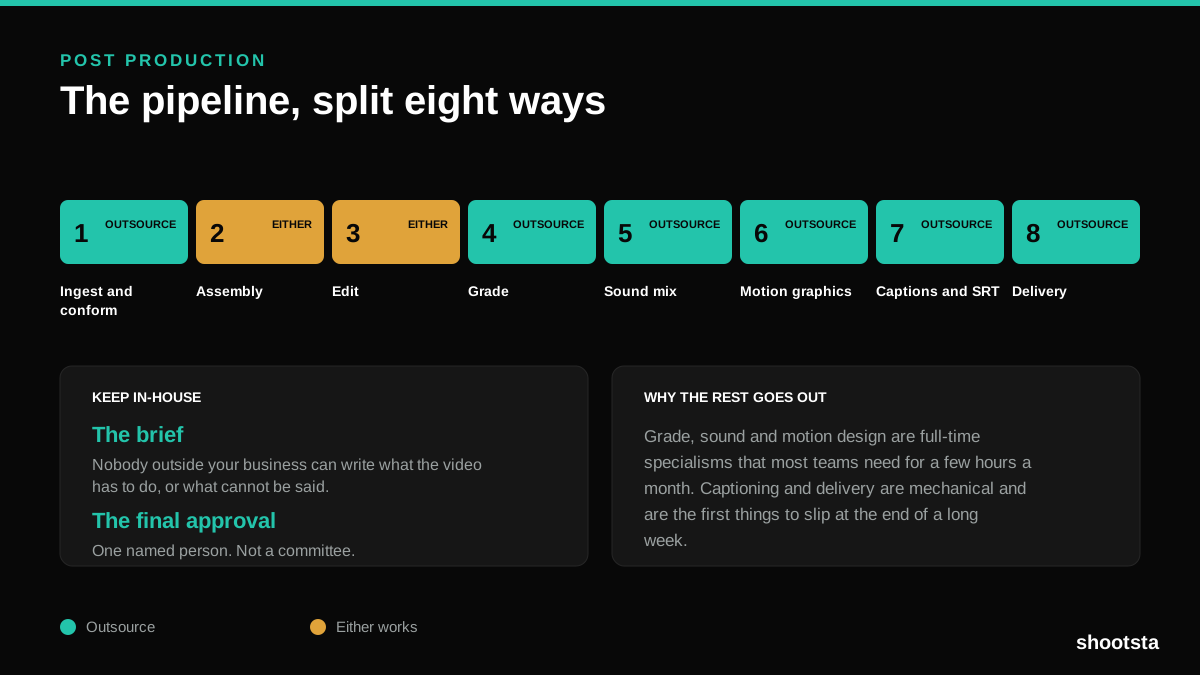
Post Production Agency or In-House Team?
Post production is eight stages, not one. Some of them need context only your team has. The rest are mechanical and are the first things worth handing over.
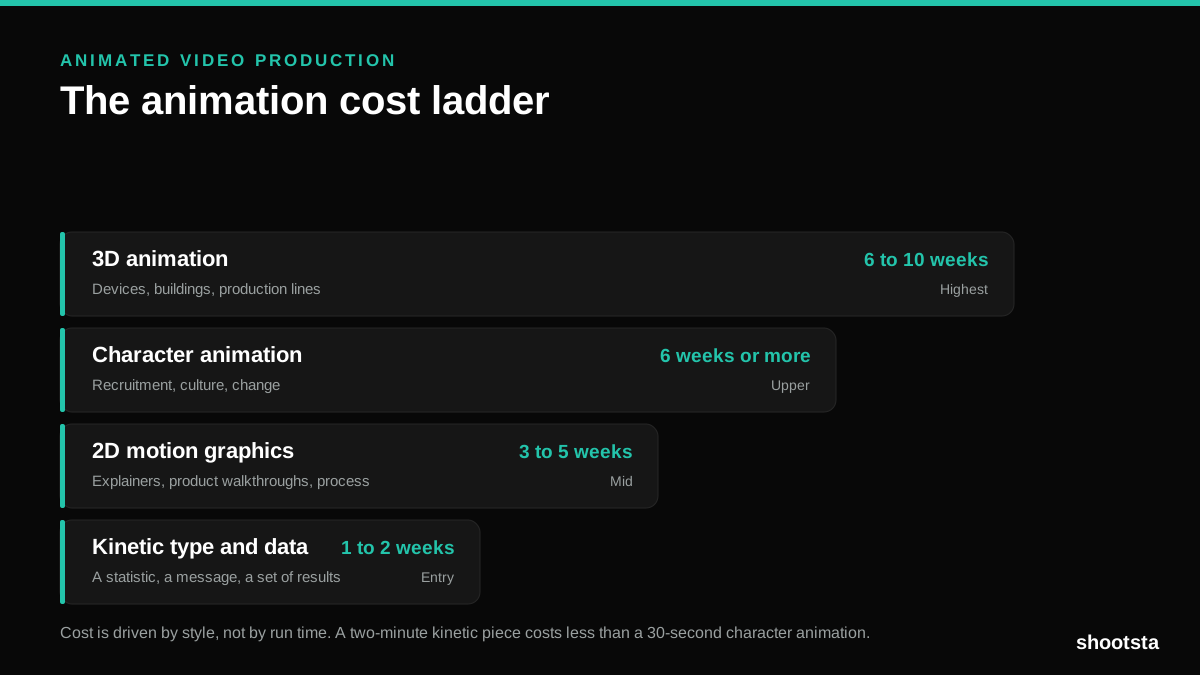
Animated Video Production Cost in the US
Animated video production costs move with style, not with length. Kinetic type, 2D motion, character and 3D sit on four rungs of a ladder. Here is what separates them.
How to Commission Medical Training Animation
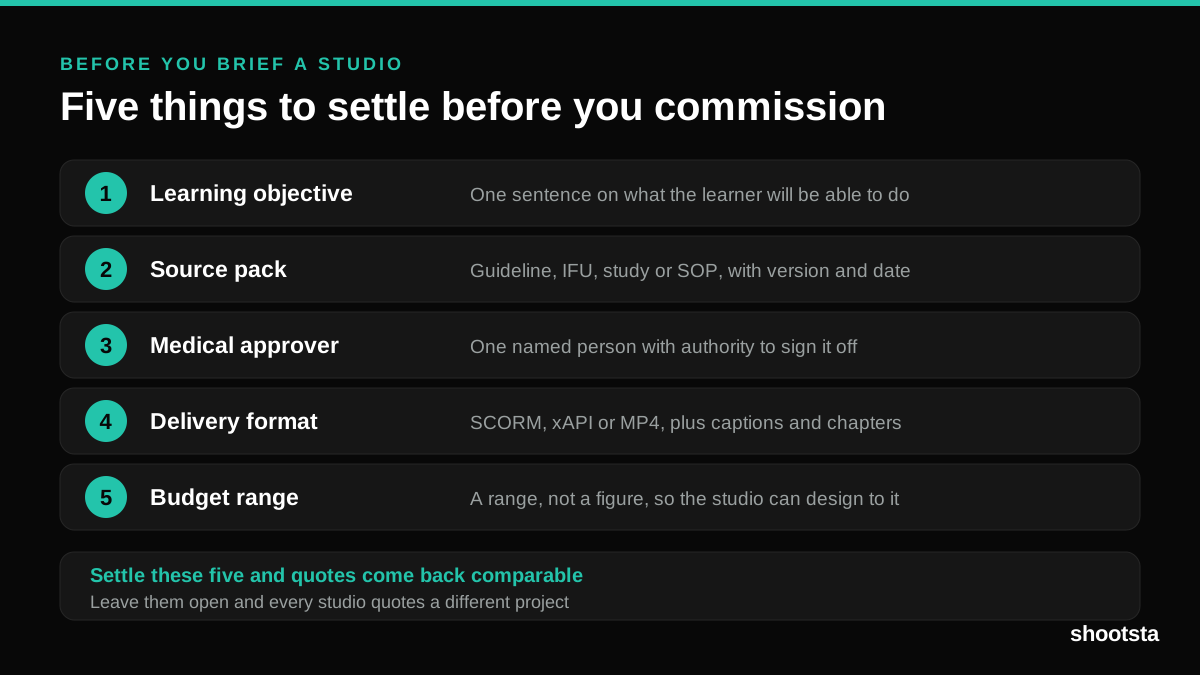
Commissioning a medical training animation is mostly decisions you make before anyone animates a frame. The brief fields that matter, what to ask a studio, how much expert time to budget, and the contract terms that stop a rebuild in two years.
How to Write an Animation Brief
How to Write an Animation Brief
Most animation briefs cause delays because they over-specify the visual style and under-specify the outcome. Here are the nine fields an animation production team needs to quote accurately and start without rework.