
How to Localize Animated Video at Scale
shootsta.
How to Localize Animated Video at Scale
By Shootsta · Published July 28, 2026 · Updated October 2026
Animated video is the easiest format to localize because text and audio live in editable layers. Here is how to scale it across languages cleanly.
How do you localize animated video at scale?
You localize animated video by keeping every language-dependent element on its own editable layer, then swapping voiceover and on-screen text per market from a single project file. Because there is no presenter to lip-sync and no footage to reshoot, animation is the most re-versionable format you can build.
Teams often discover this the easy way, by accident, when a finished animation turns out to take a new language in hours rather than weeks. That speed comes from how animation is built. It is made of layers, and layers are what make localization fast.
Why is animation easier to localize?
Live action bakes language into the recording. The narrator speaks, the signage is in the shot, and changing either means new footage. Animation keeps those parts apart from the start. The voice sits on its own audio track, while captions and on-screen labels are editable text layers. When you swap them, the visuals stay exactly as approved.
This is the same re-versioning principle behind our pillar on how to localize video for global markets, applied to a format where the layers already exist. For a broader view of where animation fits in an enterprise library, see animation use cases for enterprise teams.
What should you plan at the design stage?
Localization-ready animation is mostly a matter of foresight in the first build:
- Keep all text as editable layers, never flattened into the artwork.
- Leave space in panels and lower thirds for languages that run longer than English.
- Record narration separately so each language is a clean audio swap.
- Use a shared motion and color template so every version reads as one brand.
Our enterprise animation playbook covers the production standards that make this repeatable across a whole library.
How does this lower cost per language?
Because the visuals never change, the per-language work is translation, voiceover and a text refresh. That is a small unit of effort compared to a live-action reshoot, so each added market costs a fraction of a fresh production. We put numbers on this in how much video localization costs, where animation consistently comes out as the cheapest format to scale.
How do you keep quality consistent across versions?
Consistency comes from working off one source file and one template instead of rebuilding each version by hand. When every language is generated from the same master, the timing, the motion and the brand stay identical and only the words differ. That is the foundation of a managed multilingual video library, and it is supported by the Shootsta platform, which keeps masters, versions and approvals in one place.
How do you start?
Take one animated explainer that matters across markets and rebuild it as a layered, localization-ready master. Ship two or three language versions and time how long each takes. Once the pattern is set, scaling it across your library is straightforward. Shootsta can build that first layered master and re-version it for you; start with a free consultation.
Sources
- CSA Research: share of buyers who prefer content in their own language.
- Shootsta multilingual production across 70,000+ videos.
- Shootsta regional delivery hubs in Sydney, London, Singapore and San Diego.
If you are planning a bigger animation program, The Business Animation Playbook covers the operating model behind one.
Take this article with you
Read the latest at shootsta.com/blog/localize-animated-video-at-scale
You might also like
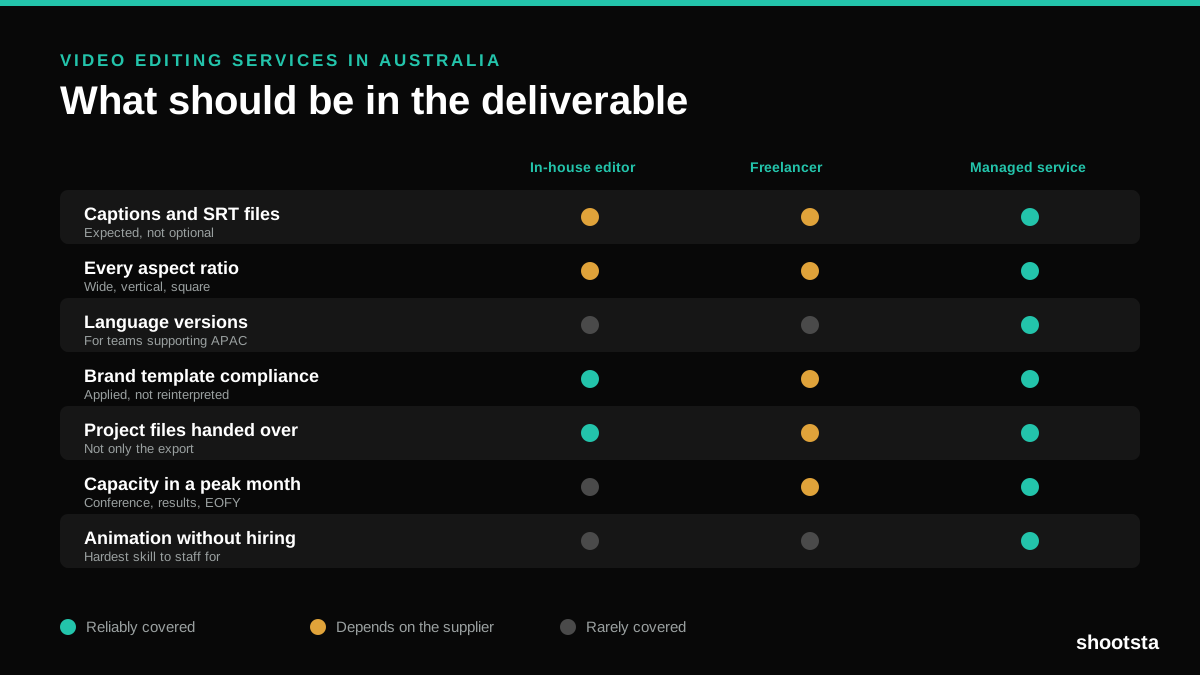
Video Editing Services in Australia
Australian teams are spread across time zones and offices, so the editing queue matters more than the editing. Here is what to expect on cost and turnaround.
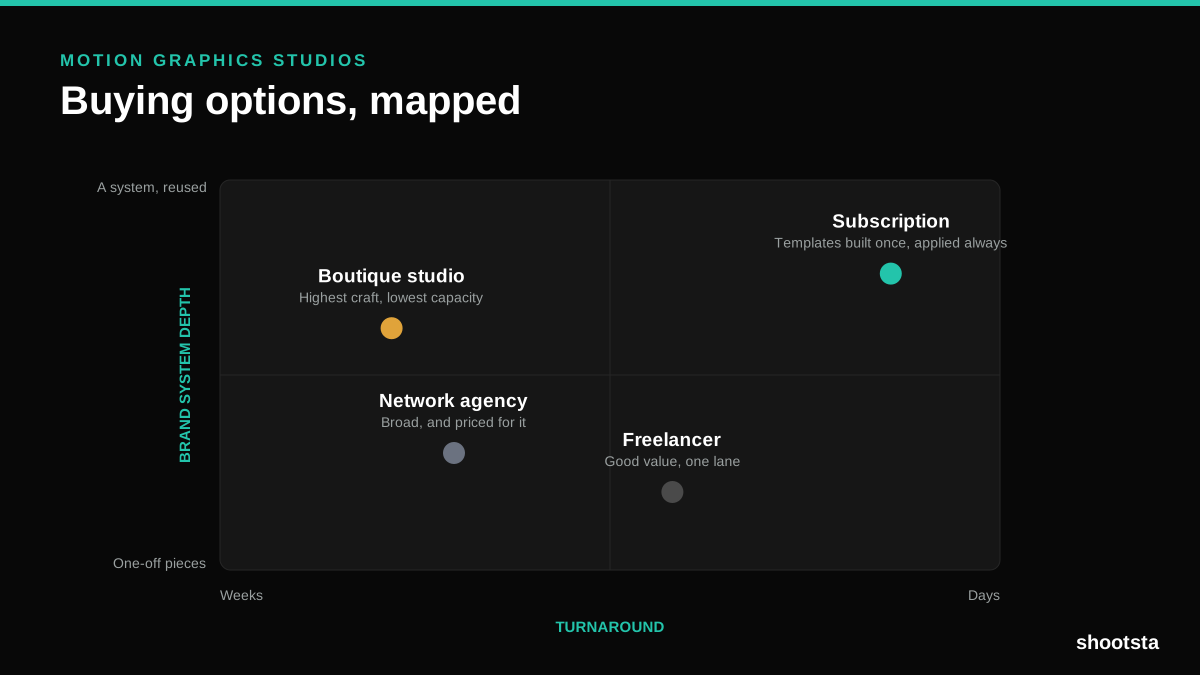
How to Choose Between Motion Graphics Studios
Every motion graphics studio has a good reel. The reel is the one thing that will not tell you how the fifth project goes. These ten criteria will.
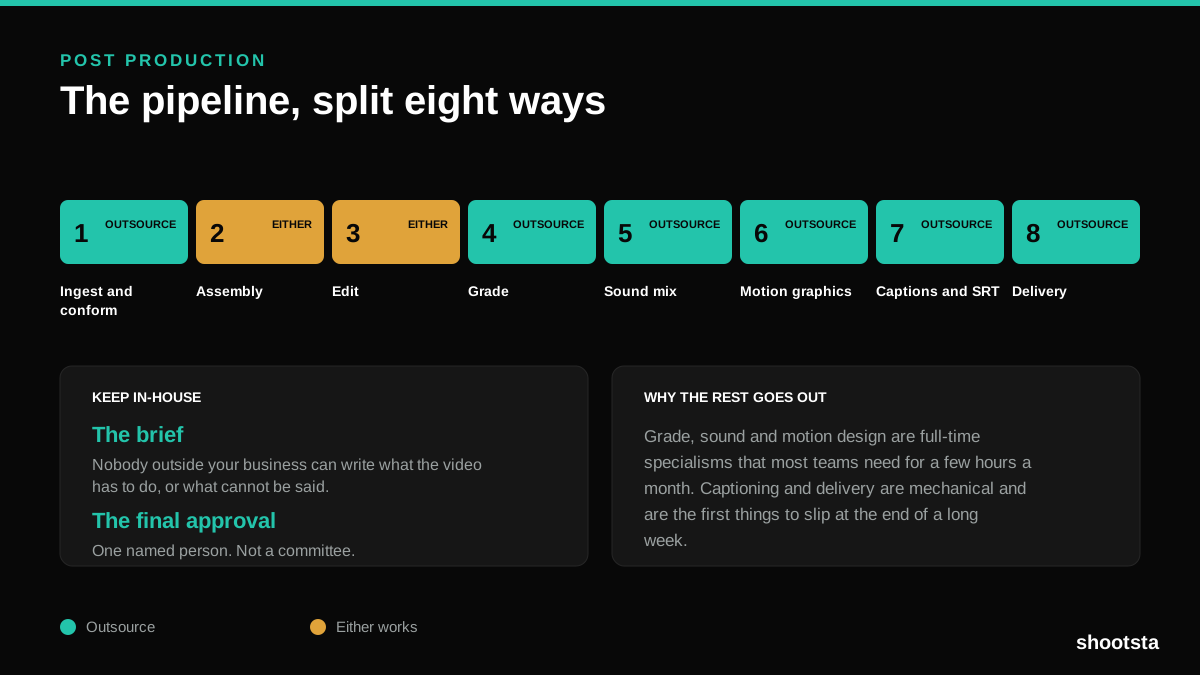
Post Production Agency or In-House Team?
Post production is eight stages, not one. Some of them need context only your team has. The rest are mechanical and are the first things worth handing over.
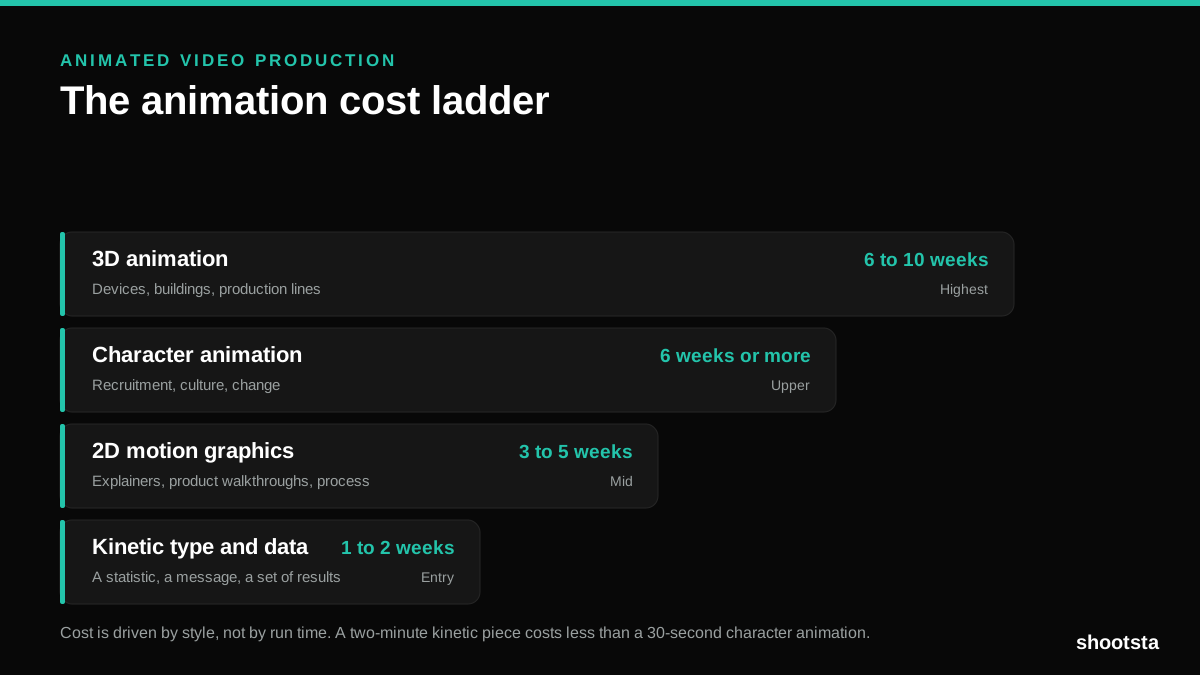
Animated Video Production Cost in the US
Animated video production costs move with style, not with length. Kinetic type, 2D motion, character and 3D sit on four rungs of a ladder. Here is what separates them.
How to Commission Medical Training Animation
Commissioning a medical training animation is mostly decisions you make before anyone animates a frame. The brief fields that matter, what to ask a studio, how much expert time to budget, and the contract terms that stop a rebuild in two years.
How to Write an Animation Brief
How to Write an Animation Brief
Most animation briefs cause delays because they over-specify the visual style and under-specify the outcome. Here are the nine fields an animation production team needs to quote accurately and start without rework.