
shootsta.
5 Corporate Video Ideas for Your Business
By joelwarren · Published September 20, 2023 · Updated October 2026
Video is a vital part of communication for any business, no matter the size. From communicating with your audience, to attracting new customers, or keeping your brand at the top of people's minds - you'll never be without corporate video ideas to create once you get started.
Getting started can feel like a lot, so we've made it easy for you to start creating by highlighting 5 types of videos that every business should be creating:
Each type does a different job for your business. Below we cover why each one is worth making and how to go about it.
Educational Videos
Educational videos build your reputation as an industry expert. You do it by sharing what you know.
Why Create Educational Videos?
If you want to make a mark in your industry and keep your audience watching, educational videos should be your go-to. These are the three main reasons.
Establishing Thought Leadership
Making educational videos helps you stand out as a leader in your field. When you share your expertise and insights, people start to see you as an authority. That lifts your reputation and builds trust with viewers.
Providing Value to Viewers
People love content that helps them solve a problem or learn something new. By creating valuable educational videos, you are giving your audience something they can use. This is a great way to attract new viewers and keep current ones coming back for more.
Driving Long-Term SEO Benefits
Educational videos keep paying off for years, and search is where you see it most. Quality educational content is often evergreen, meaning it stays relevant for a long time. This can lead to higher search rankings and more visibility for your brand, attracting a steady stream of viewers long after the video is published.
Types of Educational Videos
If you've decided educational videos are worth making, the next choice is the format. Here are several types to consider, and each one has its own purpose.
01
How-To's and Tutorials
These are step-by-step guides that walk the viewer through a process or task. Whether it's how to assemble a piece of furniture or use a specific software feature, these videos are immensely practical and often sought after by people looking for solutions to specific problems.
02
Explainers
Explainer videos go into detail on one subject or idea. They're designed to clarify complex ideas in an easy-to-understand way. Using animations, infographics, and real-life examples can help to get your points across.
03
Webinars
Webinars are long-form educational videos that usually run between 30 minutes to an hour. They provide an excellent platform for discussing topics in depth and often include guest speakers who specialise in the topic, Q&A sessions, and interactive elements to engage the audience.
04
Industry Insights
These videos provide an overview of trends, news, or updates in a specific industry. They can help position you as a thought leader who is up-to-date with the latest happenings, and they provide valuable insights to your audience.
05
FAQ Videos
Frequently Asked Questions (FAQ) videos address common queries or misconceptions about your product, service, or a relevant topic. They're a proactive way to provide information and clear up confusion, making them extremely useful for both existing and potential customers.
Shootsta's Educational Video Example
Tips for Creating Effective Educational Videos
Now that you're aware of the different types of educational videos you can create, it's time to look at some good habits. Making a video that's both engaging and informative can be challenging, but with the following tips, you'll be well on your way to crafting effective educational content.
- Research Your Audience's Needs - Before you even hit the record button, take some time to understand what your audience is looking for. Find out which problems they face and which topics they care about. Tailoring your content to address specific needs or questions will make your video much more valuable to viewers.
- Keep it Simple and Straightforward - Your aim is to educate, not to confuse. Keep your language simple and your explanations clear. Avoid jargon or overly technical terms unless absolutely necessary. Break down complex ideas into smaller, easy-to-understand parts.
- Use On-Screen Graphics and Animations - Visual aids like graphics, charts, or animations can make your video more engaging and help clarify the points you're making. They're particularly useful for explaining complex concepts or when you're discussing data and statistics.
- Keep it Engaging - Even the most educational content can lose its audience if it's dull. Use real-world examples, tell stories, or even include a bit of humor to keep viewers engaged. Switching between formats such as talking-head shots, screen shares and animated segments also helps hold interest.
- Plan Your Video Structure - Before filming, outline the structure of your video to make sure it flows logically. Decide on the key points you want to cover and the best order to present them in. This will help keep your video focused and ensure you don't miss any important details.
- End with a Call to Action - After providing valuable information, guide your viewers on what to do next. Whether it's visiting your website for more information, signing up for a webinar, or watching another educational video, a strong call to action can help you maintain engagement beyond just one video.
Follow these tips and your audience will learn something they remember, which builds trust in your brand. Start planning your first educational video this week.
Update Videos
Update videos keep your audience up to date with news about your brand. They are quick to make and easy to share.
Why Create Update Videos?
Things change fast, and your audience wants to hear about it from you. Update Videos fill that gap. These are short, timely videos designed to keep your audience up-to-date about what's new and what's next for your business.
Keeping Your Audience Informed
The first and most obvious benefit is communication. People like to be in the know about the brands and communities they care about. Update videos offer a direct channel to share important news, be it a new product launch, a policy change, or simply what's been going on behind-the-scenes.
Building Trust
Transparency goes a long way in building trust. By sharing updates, even if it's just to say that a project is still in progress, you're showing that you value openness and honesty. This creates a sense of reliability and can deepen the relationship you have with your audience.
Creating Anticipation and Excitement
Update videos can also build excitement by acting as teasers for what's coming up, creating a sense of anticipation that can boost engagement and even drive conversions. Whether it's a sneak peek at a new feature, a countdown to a big event, or just some exciting news, a well-crafted update video can stir up enthusiasm and keep your audience eagerly waiting for what's next.
Types of Update Videos
Just like with educational videos, there are various types of update videos that serve different purposes. Let's look at a few popular categories:
01
Product Updates
When you roll out a new feature, service or product, a product update video is a good way to introduce it. Show what's new, explain how it works, and highlight the benefits to get your audience excited about trying it out.
02
Company Announcements
Whether it's a new office location, an award, or a major change in leadership, company announcements give you a chance to share milestones and important news. These videos keep your audience following your brand's story as it grows.
03
Milestones
Reaching a big goal can be a real moment for your business. It might be a subscriber count, an anniversary or a sales target. Milestone videos allow you to share these successes with your community, and it's also an opportunity to thank them for their support.
04
Seasonal or Themed Updates
If the holiday season is coming up or you're launching a summer sale, seasonal or themed updates can add a fun twist while keeping your audience informed about timely events or promotions.
05
Behind-the-Scenes
People love to know how things work behind the curtain. Whether it's a tour of your new office, a day in the life of a team member, or the process of creating a product, behind-the-scenes updates add a layer of transparency and authenticity.
Shootsta's Update Video Example
Tips for Creating Update Videos
Creating an update video may seem straightforward, but there's an art to making it both informative and engaging. To ensure your update videos hit the mark, here are some tips to consider:
- Be Clear and Concise - Time matters with updates more than most videos. Get to the point quickly, clearly state what the update is about, and avoid going off-topic. The shorter and more focused the video, the more likely viewers will watch it in its entirety.
- Use a Consistent Format - Using a consistent format or template for your update videos helps your audience know what to expect. Whether it's the same intro music or a familiar set, consistency makes your updates easy to spot and more professional.
- Add Visual Aids - Much like in educational videos, visual aids can help clarify your updates. Use graphics, text overlays, or even short clips to stress key points and make the information more digestible.
- Put People in Front of Your Brand - Updates don't have to be dry and corporate. Show the faces behind the brand, whether it's a CEO giving the update or team members sharing news. This adds a personal touch and can make the update more relatable and engaging.
- Involve the Community - If applicable, include user-generated content or community shoutouts in your update videos. This builds community and shows that you value your audience's input.
- End with Next Steps - Just like any other type of video, it's good to end with a call-to-action (CTA). Whether you're asking viewers to subscribe for more updates, share the video, or check out a new feature, make sure to guide them on what to do next.
Follow these tips and your updates will be short, clear and worth watching, which keeps your audience coming back. Start planning your next update video this week.
Event Wrap-Up Videos
Event wrap-up videos capture the key moments of an event. They let people who were there relive it and show everyone else what they missed.
Why Create Event Wrap-Up Videos?
Events, whether virtual or in-person, are highlights that bring audiences and brands together. They offer unique experiences, networking opportunities, and tons of valuable content. But once the event is over, how do you keep the momentum going? That's where Event Wrap-Up Videos come in.
Capture the Excitement
Events are often buzzing with energy and enthusiasm. A wrap-up video allows you to capture that same excitement and share it with those who couldn't attend. It's a way to extend the event's reach and impact, long after it's over.
Showcase Key Moments
Every event has moments that stand out, such as the keynote speech, a surprise announcement or a fun interactive session. A wrap-up video that features them lets you repeat the main messages and show the best of the day.
Build Your Brand
Event wrap-up videos are also a powerful branding tool. They show that your company can host and run an event people value, which adds to your brand's reputation. Seeing real people enjoy your event also puts a human face on your brand.
Engage a Wider Audience
Not everyone can attend your event, but many might be interested in what happened. Sharing a wrap-up video extends the life of your event by making it accessible to a broader audience. This can attract new followers, customers, or partners who get to experience a bit of the event through your video.
Types of Event Wrap-Up Videos
You've seen the value in creating Event Wrap-Up Videos, but what kind should you focus on? There are various formats and styles that can serve different purposes. Here are some popular types to consider:
01
Highlight Reels
These are fast-paced, energetic videos that pull together the best moments from your event. From key speakers to audience reactions, highlight reels sum up the event in a quick, easy format. They work well on social media.
02
Interview Segments
Interview attendees, speakers or the people who ran the event about what they took away. Interviews offer authentic insights into the event's impact and can be interspersed with other footage for a well-rounded wrap-up.
03
Panel Summaries
If your event included panel discussions, consider creating a summary video that encapsulates the key points and arguments made. This helps people who missed the panel, and it is a good resource for anyone interested in the topic.
04
Behind-the-Scenes
These videos give viewers a look at what it takes to pull off the event. From setting up stages to the backstage hustle, a behind-the-scenes video adds a human, fun side to your wrap-up.
05
Thematic Clips
If your event covered multiple themes or topics, you might create individual wrap-up videos for each. These can be targeted at specific audience segments who may only be interested in particular aspects of the event.
06
Audience Testimonials
Capture real-time reactions from your audience to include in your wrap-up video. Testimonials offer social proof and can make your event more attractive to potential attendees in the future.
Shootsta's Event Wrap-Up Video Example
Tips for Creating Event Wrap-Up Videos
A good Event Wrap-Up Video takes more work than stringing a few clips together. You need a plan, the right moments on camera and an edit that holds them together. Here are some tips to guide you through the process:
- Plan Ahead - Before the event even starts, know what kind of wrap-up video you want to create. Make a shot list, decide on the key moments you need to capture, and brief your team so each person knows their role.
- Use High-Quality Equipment - The quality of your video reflects on your brand, so make sure to use good equipment. High-resolution cameras, proper lighting, and clear audio are non-negotiables for capturing professional footage.
If you need a camera kit for your events, get in touch to find out more about Shootsta's custom-built camera kit. - Include Diverse Perspectives - Try to capture the event from multiple angles and perspectives. Include footage of speakers, attendees, the people running the event and even behind-the-scenes staff to offer a well-rounded view of the event.
- Edit Thoughtfully - Editing is where the magic happens. Stitch together your footage in a way that tells a coherent story. Use music, transitions, and text overlays to enhance the narrative and make the video more engaging.
- Keep It Short and Sweet - Wrap-up videos are often shared on social media, so aim for a runtime that's easy to watch. A few minutes is usually enough. Put the strongest moments first to keep your audience's attention.
- End with a Call to Action - Invite viewers to engage further with your brand. Whether it's subscribing for future event updates, checking out event photos, or visiting your website, a clear call to action keeps the engagement going.
Follow these tips and your wrap-up video will sum up your event and keep your audience talking about your brand afterward. We hope your next shoot goes well.
Culture Videos
Culture videos give people a look behind the scenes at your company. They show the people behind your brand.
Why Create Culture Videos?
Your products and services help you stand out, and so does your brand's culture. People want to know who they're doing business with, and Culture Videos are a direct way to show them.
Put a Face on Your Brand
At its core, every business is about people: your team, your customers, and your stakeholders. Culture Videos give a face and personality to your brand, making it more relatable and authentic in the eyes of your audience.
Attract Talent
When job seekers understand your culture, they're more likely to see if they'd be a good fit. A strong Culture Video can be a useful recruiting tool because it shows your work environment and the values that guide your team.
Build Customer Trust
Consumers increasingly make buying decisions based on a brand's values and mission. Showing what you stand for and how you operate internally can go a long way in building trust and loyalty.
Show Diversity and Inclusion
In our globalised world, diversity and inclusion are more important than ever. Culture Videos offer an opportunity to show how these elements are integrated into your daily operations, attracting a wider audience who identifies with your brand's values.
Enhance Employee Engagement
Employees love to see their workplace celebrated and their efforts acknowledged. Sharing a Culture Video can lift morale and build a sense of community among your team members.
Types of Culture Videos
The right type of Culture Video depends on what you want people to feel about your company. Here are the main types and the goals each one suits.
01
Office Tours
An office tour video can give an intimate look at your workspace, whether it's a bustling open-office or a cozy remote setup. This format helps viewers visualise where and how your team operates, making your brand more relatable.
02
Day in the Life
This style follows a typical day for one or more of your team members. From morning meetings to project work to happy hour, a 'Day in the Life' video offers a comprehensive look at what it's really like to work at your company.
03
Team Interviews
Short interviews with team members can provide personal insights into your company culture. Ask questions that prompt thoughtful answers, like "What do you love most about working here?" or "How would you describe our company values?"
04
Company Events
If your company hosts retreats, volunteer days or other special events, capture them in a Culture Video. It shows the fun and meaningful things your team does, promoting your brand as one that values work-life balance and social responsibility.
05
Mission and Values Explainers
Your mission statement and company values aren't just text on a website; they guide your actions and decisions. Create a video that dives into what these mean, using real-world examples and testimonials to bring them to life.
06
Employee Spotlights
Highlight exceptional team members and their stories. Employee Spotlights can focus on achievements, unique skills, or even personal hobbies, providing a well-rounded view of the people who make up your company.
07
Diversity and Inclusion Features
In these videos, focus specifically on your company's efforts towards diversity and inclusion. Discuss programs, initiatives, and goals that demonstrate your commitment to an inclusive workforce.
Shootsta's Culture Video Example
Tips for Creating Culture Videos
Creating an engaging and authentic Culture Video is an art in itself. These tips will help you make a video your team is proud to share.
- Be Authentic - The key to a successful Culture Video is authenticity. Don't stage scenes or force employees to say scripted lines. Let the natural dynamics of your workplace shine through.
- Plan Your Shots - While spontaneity is important, having a plan helps ensure you capture all the key parts of your culture. Make a list of scenes, people, or elements you want to include so you don't miss anything important.
If you need a camera kit for the shoot, get in touch to find out more about Shootsta's custom-built camera kit. - Focus on Storytelling - Your Culture Video should tell a story. That could be the history of your company, the growth of a team member, or how a typical day unfolds. Narrate it well to make it engaging and relatable.
- Keep It Short - Aim for a video length that's digestible but still comprehensive. A 2-5 minute video usually offers enough time to convey your message without losing the viewer's interest.
- Use High-Quality Equipment - Good production values can make or break your video. Use a good camera, proper lighting, and clear audio recording devices to make your video look and sound professional.
- Add Subtitles or Captions - This makes your video more accessible and also allows people to watch it in noisy or quiet environments. Plus, subtitles can help reinforce your message.
- Involve the Team - The people who live your company culture every day are the best ones to show it. Include a diverse range of employees in your video to present a fuller picture of your company.
- Include a CTA (Call to Action) - Whether you want viewers to visit your careers page, follow you on social media, or another action, make sure to include a clear call to action at the end of the video.
- Review and Revise - Once the initial cut is ready, review it with multiple team members to ensure it accurately represents your culture. Make revisions as needed before releasing it to the world.
Follow these tips and your Culture Video will give candidates and customers a fair picture of your team. It also gives your own people something they want to share.
Testimonial Videos
Testimonial videos put happy customers or clients on screen. Their words carry more weight than yours.
Why Create Testimonial Videos?
People are often looking for social proof to guide their decisions, whether they are giving you their time or money. Testimonial Videos make that decision easier. They do more than pat you on the back, because they build trust and shape what buyers choose.
Boost Credibility
When a satisfied customer speaks positively about your product or service, it adds a layer of credibility that simple marketing messages can't achieve. Real people vouching for you is convincing evidence of your brand's worth.
Create Emotional Connections
Testimonials offer a human element that can evoke emotional responses. Whether it's relief at solving a problem or the joy of an excellent customer experience, capturing these emotions on video makes your brand more relatable.
Enhance Trust
Trust is a precious commodity in any business relationship. Seeing and hearing people praise your product can significantly boost your audience's confidence in choosing your brand.
Increase Conversions
Videos are known to be more engaging than text, and that holds true for testimonials. Viewers are more likely to take action, such as making a purchase or filling out a contact form, after watching a persuasive testimonial video.
Provide Real-World Context
Testimonial Videos often show your product or service in action, offering potential customers a glimpse into how it can fit into their lives. This practical perspective can be incredibly influential.
Amplify Reach
Happy customers sharing their testimonials can lead to increased visibility for your brand. You can use these videos on your website and in marketing campaigns, and you can share them across social platforms so more people see them.
Types of Testimonial Videos
Testimonial Videos come in several formats. Depending on your goals, target audience, and the specific products or services you offer, you might choose one format over another. Here's a breakdown of different types of Testimonial Videos you can consider:
01
Customer Testimonials
This is the most straightforward format, featuring satisfied customers who discuss their experiences with your product or service. These are powerful because they offer a relatable, first-person account of what you offer.
02
Expert Endorsements
If an industry expert or influencer sings your praises, capturing this on video can provide a significant boost to your credibility. Expert testimonials usually resonate well with people familiar with your industry.
03
Case Studies
These are in-depth videos that cover a customer's journey from problem to solution, all thanks to your product or service. These often include interviews and real-world examples, providing a comprehensive look at your value proposition.
04
Employee Testimonials
Your team knows your business better than anyone, so employee testimonials offer an inside look at your company culture and the benefits of your products, often adding an extra layer of authenticity and credibility.
05
Social Proof Compilation
This style aggregates multiple short testimonials into one video. It's a good way to show that your product or service has widespread approval, increasing its perceived value.
06
Product Reviews
Though not a traditional testimonial, user-generated content like product reviews can serve the same purpose. These are often unsolicited and offer an unbiased look at your product, making them highly trustworthy in the eyes of consumers.
07
Before and After Stories
This type shows the change a customer goes through thanks to your product or service. From weight loss stories to home renovations, the 'before and after' format provides compelling visual evidence of your product's effectiveness.
Shootsta's Testimonial Video Example
Tips for Creating Testimonial Videos
A good Testimonial Video takes more work than pointing a camera at a happy customer. Here are some tips to ensure your Testimonial Videos hit the mark and serve their purpose effectively:
- Choose the Right Participants - Your testimonial is only as good as the person delivering it. Choose participants who are happy with your product and can articulate their thoughts clearly.
- Plan Your Questions - While you want the testimonial to feel spontaneous, having a set of planned questions can guide the conversation and ensure you cover key points.
- Keep It Real - Viewers can tell when a customer is reading lines, so avoid overly scripted or rehearsed testimonials. The more natural the delivery, the more trustworthy the video will appear.
- Focus on Benefits, Not Features - Your questions should encourage participants to talk about how your product or service solved a problem or improved their life, rather than just listing features.
- Use High-Quality Equipment - Good lighting, clear audio, and high-definition video are essential for making your testimonial appear professional.
- Edit for Clarity and Impact - Your raw footage will likely need editing to get to the point and maintain viewer interest. Keep the video short but impactful, aiming for a duration of 2 to 3 minutes.
- Include B-Roll Footage - Film your customer at work or using your product, as well as sitting down for the interview. Cutting to this footage keeps the video moving and shows the story as well as telling it.
- Add Text Overlays or Graphics - Use text to highlight key statements or to introduce the participant. This adds a layer of context and reinforces important points.
- Include a Call to Action - Tell viewers what to do once the video ends. That might be booking a demo, reading the full case study or contacting your sales team.
- Share Across Platforms - Once your Testimonial Video is polished and ready, don't limit it to just one platform. Share it on social media, include it in email campaigns, and feature it on your website so it reaches as many people as possible.
By following these tips, you'll be well on your way to creating a Testimonial Video that looks professional and convinces potential customers of the value of your product or service.
Keep reading
Take this article with you
Read the latest at shootsta.com/blog/5-videos-you-need-to-create-for-business
You might also like

How to Plan Video Team Capacity Around Leave
Your only editor just booked two weeks off, and you already know which projects will slip. Chad Lakin explains how to plan video team capacity so the work keeps moving when someone is away.
Corporate Video Editing Standards: Full Guide
A two-page editing standard does more for consistency than a forty-page brand book. Here is what it should cover, who owns each part, and how to enforce it with an in-house editor or an outside partner.
Quality Control in Outsourced Video Editing
When editing leaves the building, quality has to be checked by a system rather than by whoever happens to look. Here is the system: acceptance criteria, two QA gates, counted revision rounds and a quarterly audit.
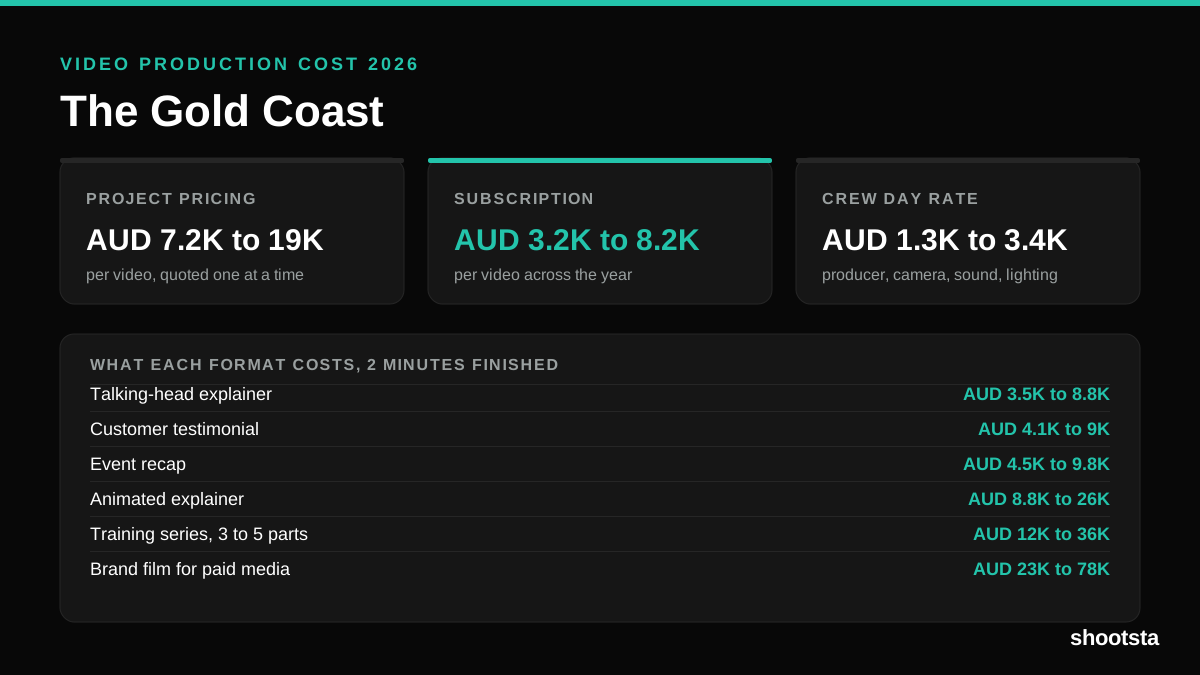
Video Production Cost on the Gold Coast 2026
Video production in the Gold Coast costs AUD 3,200 to AUD 8,200 per finished video on a subscription model, and AUD 7,200 to AUD 18,500 for one-off project work. Here is what you are paying for, and how the three pricing models compare.
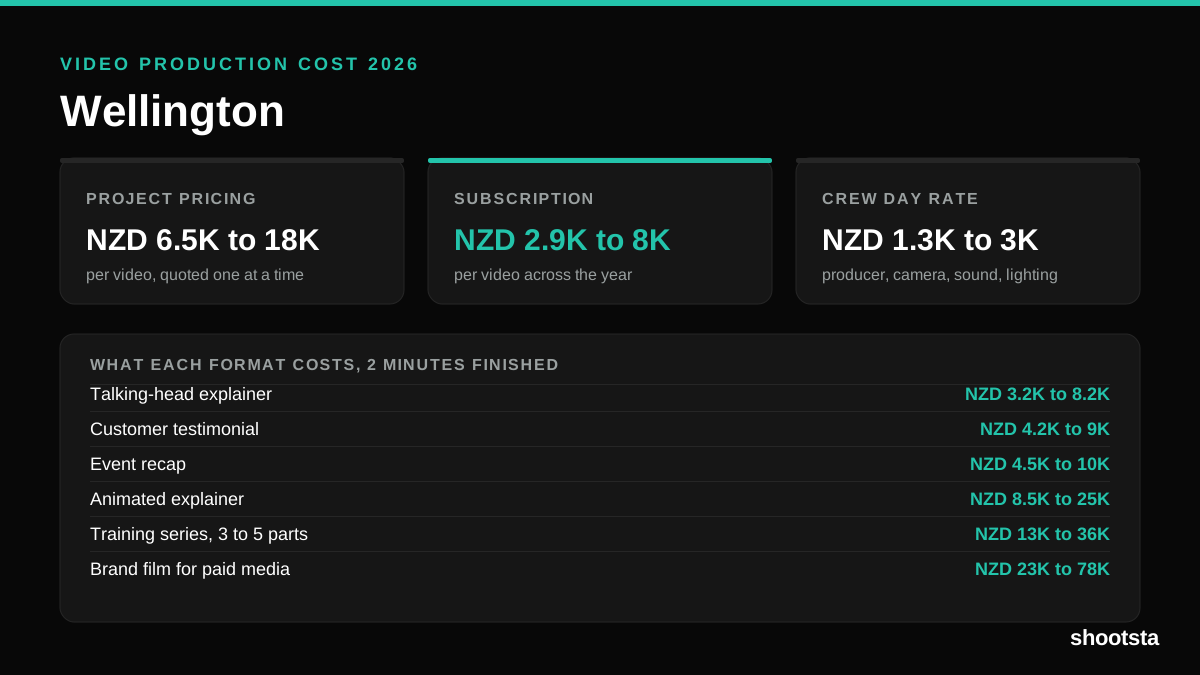
Video Production Cost in Wellington (2026)
Video production in Wellington costs NZD 2,900 to NZD 8,000 per finished video on a subscription model, and NZD 6,500 to NZD 18,000 for one-off project work. Here is what you are paying for, and how the three pricing models compare.
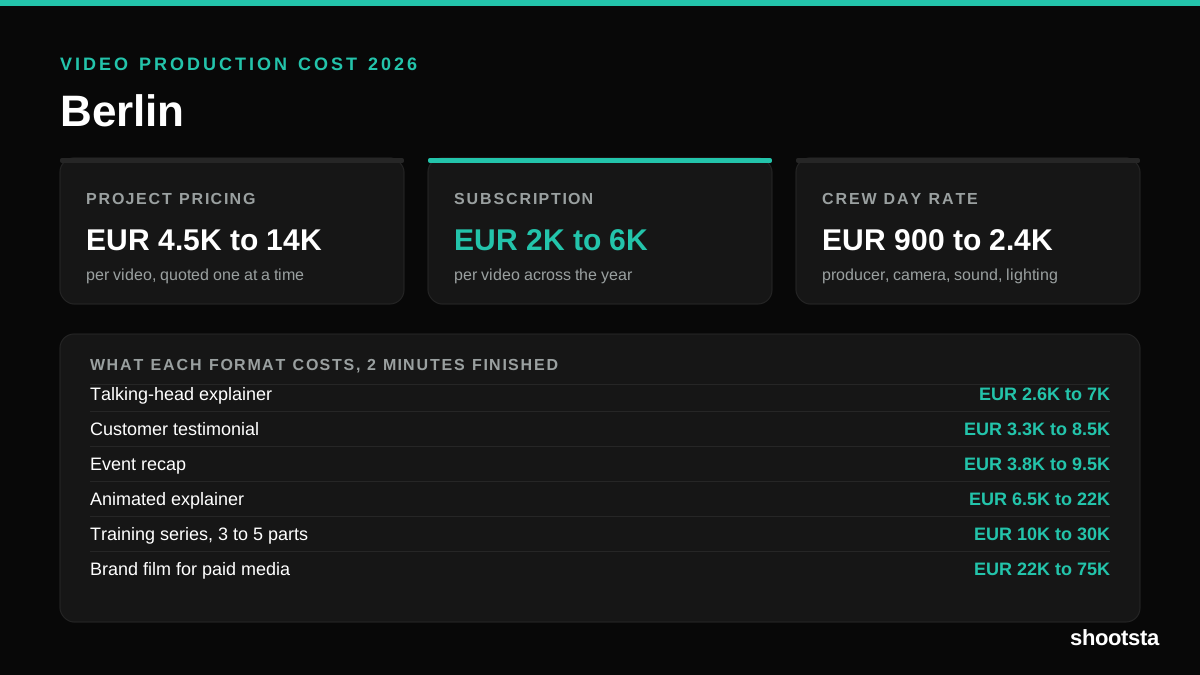
Video Production Cost in Berlin (2026)
Video production in Berlin costs EUR 2,000 to EUR 6,000 per finished video on a subscription model, and EUR 4,500 to EUR 13,500 for one-off project work. Here is what you are paying for, and how the three pricing models compare.