
Why Enterprise Video Editing Is Hard to Scale
shootsta.
Why Enterprise Video Editing Is Hard to Scale
By Shootsta · Published April 24, 2026 · Updated October 2026
Enterprise teams hit a ceiling with video production not because editing is hard, but because approvals, brand drift, and unpredictable costs make scaling painful. Here is what causes the bottleneck and how to fix it.
Short answer. Enterprise teams hit the same five enterprise video editing challenges at volume. Editing is a bigger bottleneck than shooting. Each video runs as a one-off project instead of a repeatable workflow, and brand and stakeholder review takes longer than the edit itself. Per-project pricing makes high volume uneconomic, and regional teams cannot reach the central video function. Producing one good video is easy; producing 20 to 50 a month across departments is where these break. Teams that find the constraint and fix it move from a few videos a quarter to a monthly cadence without adding headcount.
An enterprise team can usually produce one good video. The hard part is producing 20 or 50 good videos every month, across several departments and regions, with all of them looking like they came from the same brand.
The editing itself is rarely what breaks down. It's everything around the editing: the approvals, the briefing, the feedback loops, the budget conversations, the scramble to find an available editor or agency. These operational bottlenecks compound as volume increases. They are why so many enterprise video programs level off at a fraction of what they could produce.
What makes it hard for enterprises to manage enterprise video editing internally?
Internal video teams face a structural problem because they are built for quality rather than volume. A two-person video team can produce excellent content. They become a bottleneck the moment several departments need videos in the same month.
Capacity doesn't flex. You can't hire a half-time editor for three months during a product launch and then scale back. Full-time editors are either overloaded or underutilized, and both states are expensive. During a busy quarter, the team falls behind and everyone's content gets delayed. During a quiet quarter, you're paying salaries for capacity you're not using.
Approvals create traffic jams. A video that takes 4 hours to edit can take 2 weeks to approve. Legal needs to check the claims. Brand needs to verify the visual identity. The exec who appears on camera wants changes to their sound bites. Each reviewer adds days, and they rarely review in parallel. Production bottlenecks like these kill more video programs than any technical limitation.
Editors become project managers. Internal editors spend a surprising amount of time on non-editing work: chasing briefs, scheduling shoots, tracking feedback, managing asset libraries, exporting for different platforms. Editing itself takes up a smaller share of their day as volume increases.
Quality varies without systems. When the same editor handles each video, consistency happens naturally. But the moment you add a second editor, a freelancer, or an agency to handle overflow, outputs start diverging. Without templates and brand guardrails baked into the editing process, each person's interpretation of "on brand" is slightly different.
Why do marketing teams struggle to scale professional video editing?
Marketing teams face an additional challenge on top of the operational ones: their video production model was designed for a different era.
The traditional approach - write a creative brief, hire an agency, wait 4-6 weeks, receive a polished hero video - worked when video was a campaign asset. You'd produce a brand film, a product launch video, maybe a few testimonials per year. The budget was big, the timeline was long, and that was fine because you only needed a handful of videos.
Today the same team needs video for LinkedIn, YouTube, the website and email. Sales enablement, internal comms and training want it too, and so do webinars, events, customer stories and product updates, every week. The agency model doesn't scale to that volume, and many teams have not yet replaced it with a repeatable system.
Per-project costs cap volume. When each video requires a separate quote, scope negotiation, and purchase order, the procurement friction alone limits output. Teams unconsciously ration video to "important" projects because the effort of commissioning each one is so high. A subscription model where the cost is fixed - whether you produce 10 or 50 videos - removes this friction entirely.
No repeatable formats. Each video starts from zero: new brief, new creative direction, new feedback cycle. Marketing teams that successfully scale build a library of repeating formats ("customer story," "feature highlight," "team update," "social clip") with pre-defined templates. A new video becomes an instance of an existing format, so nobody starts from a blank page.
Filming is the wrong bottleneck to solve. Many teams invest in expensive cameras, lighting rigs, and production gear thinking that filming quality is the constraint. A modern smartphone captures usable footage for most corporate video. The tighter constraint is post-production capacity and consistency. Managed editing services solve this by letting teams film on whatever device is available and handling everything in post.
How do you find the bottleneck that is slowing your team down?
Before you fix anything, find the constraint. Pick three recent videos. For each one, note the date the brief was approved and the date it went live. Split that gap into four phases and count the days in each.
- Brief to footage. How long did it take to shoot or record what was needed?
- Footage to first cut. How long did the editor hold the files before returning version one?
- First cut to final cut. How many revision rounds happened, and how long did each one sit in review?
- Final cut to publish. How long did the last sign-off and distribution take?
The phase that eats the most days is your bottleneck. For most enterprise teams, the third phase (first cut to final cut) accounts for more than half the total timeline. The editor is almost never the constraint, and the review queue usually is. Once you know which phase is slow, you know which of the fixes below to start with.
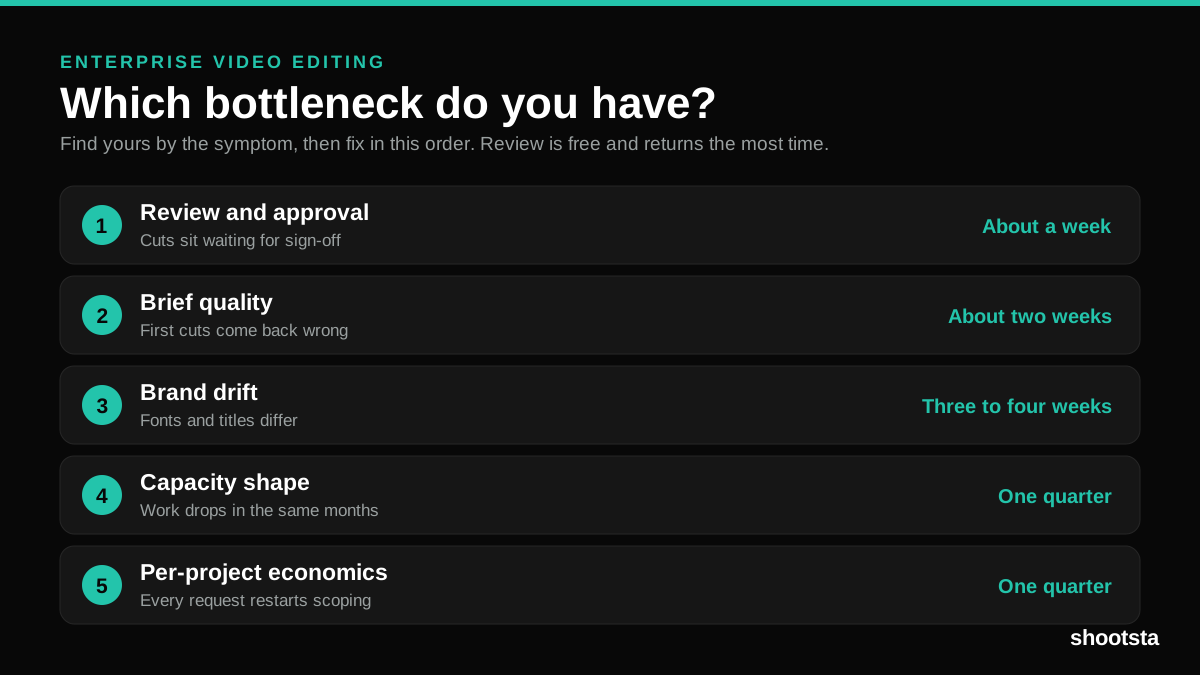
Which enterprise video editing bottleneck do you have?
Five bottlenecks account for almost every stalled enterprise video editing program. Find yours by the symptom you see rather than by theory.
| Bottleneck | The symptom you will notice | The fix | Time to fix |
|---|---|---|---|
| Review and approval | Finished cuts sit for days waiting on sign-off. | Parallel review, one named approver, a two-round cap. | About a week |
| Brief quality | First cuts come back wrong, and round one is spent explaining. | A brief template with mandatory fields. | About two weeks |
| Brand drift | Fonts, titles and end cards differ across videos. | Templates locked at the editor level. | Three to four weeks |
| Capacity shape | Work gets dropped in the same three or four months a year. | Baseline team in-house, elastic capacity for spikes. | One quarter |
| Per-project economics | Each video restarts scoping, quoting and invoicing. | Move recurring formats to a fixed-volume model. | One quarter |
Work down the table in order. Review comes first in enterprise video editing. It is free to fix and it returns the most calendar time. That matches the flow thinking behind value stream mapping.
How do you fix the five most common editing bottlenecks?
Across the teams Shootsta works with, five constraints come up over and over. Here is what moves each one.
1. Approvals. Five reviewers each adding two days in series is ten days of clock time on a video that took four hours to cut. Three changes fix it. Move review off email into one timecoded comment tool, so each note lands in the same place. Send the first cut to legal, brand and the featured exec at once, with a 48-hour window each, rather than one after another. Then pre-approve recurring formats once, so a new instance only needs sign-off on what is new. Parallel review alone can turn a cycle of more than a week into a few days.
2. Brief quality. A vague brief turns a two-day edit into a two-week back-and-forth. The fix is a tighter brief rather than a longer one. A good enterprise brief answers five questions in about 200 words. It says who the video is for and what they should think or do after watching. It names the three moments that must be in it, the length and platform, and the brand and legal limits. Thirty-field templates get filled out badly; five-question briefs get filled out well. See video briefs that editors get right for the format.
3. Brand consistency at volume. No brand manager can review every frame across every region, so consistency has to be built into the tools instead of checked by hand. Push logos, color palettes, fonts, lower thirds, intros, outros, approved music, and motion templates into the editor's workspace so they apply by default. A non-compliant output then requires an editor to actively override the defaults, which makes drift the exception. The full method is in brand consistency across outsourced video editing.
4. Regional time zones. A US team sending footage to one London editor at 5pm loses most of a day each cycle. Across revision rounds that is three or four working days per video. The fix is editors in more than one region, which beats faster editors in one. Shootsta runs editors in Sydney, London, Singapore and San Diego. Footage uploaded at 5pm in New York is picked up the same hour, and the first cut is waiting the next morning. Clean handoff notes matter as much as coverage. The scaling video across global offices guide covers the operating side.
5. Per-project pricing. Each quote, scope call and purchase order adds two to five days before editing starts. Teams end up quietly rationing video to the projects worth that overhead. Subscription pricing removes the per-video procurement step: the contract is signed once, and a new project starts by uploading a brief. Output usually climbs after the switch, even though editing did not get any faster. What changed is that starting each project no longer costs days of paperwork. The numbers behind that sit in the business case for enterprise video.
Which fixes look like progress but make it worse?
Some moves feel like rigor but slow the program down. Here are three worth avoiding.
Hiring another internal editor. One more editor clears the queue for a while, and then the team hits the next constraint: approvals, brand drift or brief quality. The new salary becomes fixed cost that is not fully used. Editor capacity is rarely the constraint that matters at enterprise scale.
Buying better cameras. Phone footage is more than good enough for most enterprise video. Investing in cinema cameras to fix a workflow problem solves the wrong constraint, because the footage was never the bottleneck.
Building a longer brief template. A thirty-question brief feels thorough and produces worse briefs, because no one completes it and the editor still has to guess. A five-question brief, filled out well, beats it every time.
What professional video editing services help enterprises scale content production?
The services that help enterprises scale share a few traits that set them apart from traditional production:
Subscription pricing instead of per-project fees. Volume requires predictable costs. If every additional video triggers a new invoice, teams will always underproduce relative to their needs. The best enterprise editing services charge a flat monthly fee and let you produce as much as you need within that.
Built-in brand governance. At scale, you can't rely on briefs and human memory to maintain brand consistency. The editing service needs brand templates, preset motion graphics, approved music libraries, and locked-in style guidelines that apply automatically to every project. Shootsta's platform was built around this principle: brand elements are built into the workspace instead of described in a PDF.
Fast, predictable turnaround. Enterprise teams can't wait 3-4 weeks for a video. Content needs to be timely, tied to product launches, company announcements, market events, or seasonal campaigns. A 48-hour turnaround for a first cut, with quick revisions after it, is the standard that keeps production flowing.
Decentralized input, centralized output. The best model for enterprise video is one where anyone in the organization can contribute footage (phone recordings, screen captures, webcam interviews) but all editing flows through a single system that applies consistent quality and branding. This is how companies operationalize video production without building massive internal teams. For a service built specifically around this model, see Shootsta's enterprise video editing.
How much does enterprise video editing cost?
The cost depends entirely on the model:
Traditional agencies usually charge $5,000-30,000+ per video, and a 2-minute brand film might cost $15,000. At 20 videos per month, that adds up to $100,000-300,000 monthly, which few budgets can sustain for content at scale.
Freelance editors charge $50-150 per hour, with a typical corporate video taking 8-20 hours of editing time. Freelancers cost less than agencies, but quality varies and turnaround is hard to predict. Brand consistency depends on how well you brief each freelancer.
Internal editors cost $60,000-100,000+ per year in salary and benefits, plus software, equipment, and management overhead. One editor can handle maybe 8-15 videos per month depending on complexity. Scale requires hiring more people.
Managed editing subscriptions charge a fixed monthly fee regardless of volume. Per-video costs decrease as production increases, the opposite of every other model. For teams producing 15+ videos per month, this is typically the most cost-effective option, often landing 50-60% below comparable agency rates on a per-video basis.
See how subscription editing compares to agency pricing in detail, or check Shootsta's pricing for your team size.
Interactive calculator
What does staffing your video spikes actually cost?
Set your baseline and peak monthly demand. The calculator compares hiring permanent staff to handle the peak vs keeping the in-house team at baseline and using a partner for the spikes.
Your demand profile
3.0x peak vs baselineYour spike months run 3.0x your baseline. Total demand for the year is 216 videos (108 in normal months + 108 across 3 spike months).
Hire to peak
8 permanent editors
$880K
per year, loaded
264 video slots / year sit idle in normal months
Baseline + partner
3 permanent + flexible partner
$431K
per year ($330K in-house + $101K burst)
No wasted capacity. No turndowns.
What this means
The baseline-plus-partner model serves the same demand for $449K less per year than hiring to the peak. You also keep elastic capacity for months you did not forecast, instead of carrying permanent headcount that sits idle.
And if demand drops? Subscription tier scales down. Hiring decisions do not.
See how burst capacity is pricedIf you stay at baseline with no partner
At baseline-only headcount, around 36 videos a year that the business is asking for will not get made. Other teams stop asking, or they go around central and make worse work themselves. That is the most expensive failure mode of all.
Assumptions: $110K USD loaded annual cost per in-house editor (salary, benefits, gear, software, management). Per-editor output is 5 finished videos per month at quality. Partner burst pricing uses Shootsta subscription tier rates. Numbers are guides.
What does a scalable enterprise video editing workflow look like?
Teams that scale past 20+ videos per month typically follow this pattern:
1. Standardize formats. Define 5-8 recurring video types (customer stories, product demos, team updates, social clips, training modules) with templates for each. New projects slot into an existing format rather than starting from scratch.
2. Equip people to film. Train team members across departments to record usable footage on their phones or webcams. Provide simple guidelines on lighting, audio, and framing rather than expensive equipment. Video kits can help teams capture better footage with minimal setup.
3. Centralize editing. Route all footage to a single editing pipeline with brand templates pre-loaded. Whether you use an internal team or a managed editing service, make sure each video passes through the same quality and branding standards.
4. Simplify approvals. Move feedback to a centralized platform with time-coded comments. Set clear SLAs for each approval stage (24 hours for stakeholder review, 48 hours for legal) so videos don't sit in someone's inbox for weeks.
5. Measure and iterate. Track production efficiency (time from brief to delivery, revision rounds, bottleneck points) alongside video performance (views, engagement). Use this data to keep improving the workflow.
How long does it take to remove the biggest bottleneck?
It usually takes less time than leaders expect, with two to six weeks being typical for the first constraint.
The approval bottleneck moves fastest. Switching to parallel review with 48-hour SLAs and a timecoded review tool can cut the average revision cycle from well over a week to a few days inside the first month. The brief-quality fix takes one workshop with the team that briefs videos, then about three projects before the new template becomes muscle memory. Brand consistency and time zones take a little longer because they involve changing the editing model, with consistency improving in the first month and the full per-video cost benefit landing in months two and three.
Frequently asked questions
What is the single biggest enterprise video editing bottleneck?
The approval cycle is the biggest bottleneck. The time from first cut to final approved video is usually the longest part of the project timeline, and editing itself is rarely the constraint. The fix is parallel review with 48-hour SLAs and timecoded review tools, which can cut the revision cycle from well over a week to a few days.
How do you measure an enterprise video editing bottleneck?
Break the production timeline into four phases: brief to footage, footage to first cut, first cut to final cut, and final cut to publish. Measure days spent in each phase across three recent videos. The phase with the most days is the bottleneck. For most enterprise teams, the review and revision phase accounts for more than half the total time.
Can AI editing tools solve enterprise video bottlenecks?
AI speeds up specific tasks like rough cuts, captioning, and translation, but it does not solve the operational bottlenecks of approvals, brand consistency, brief quality, and procurement. AI inside a clean workflow accelerates the program; AI bolted onto a broken workflow just speeds up the wrong step. The operating model has to change first. See how AI fits inside enterprise video workflows.
How many videos a month can an enterprise team produce without bottlenecks?
With a clean workflow, a two-person internal team using a brand-governed editing service can produce 30 to 50 videos a month across multiple formats and regions. Without a clean workflow, the same team plateaus at five to eight a month no matter how many editors it hires. The workflow is the constraint, and adding people does not change it.
What is the difference between a video editing service and a video production agency?
An agency handles full end-to-end production (concept, script, crew, shoot, edit, delivery) at project-based pricing, usually $10,000 to $50,000 per video on a four to eight week timeline. A video editing service like Shootsta separates filming and editing: your team captures footage with guidance, and the service handles editing, brand governance, and platform delivery. Editing services are built for high volume at low per-video cost, with a 48-hour turnaround on first cuts.
We already have an in-house video team. Does a service replace them?
No. A service works best as elastic capacity around the people you already have. Your in-house team keeps the work that needs their context and creative judgment, and the service absorbs volume, overflow, and the editing that would otherwise force a hire. There is more on that split in how a video partner extends your in-house team.
Why do enterprise teams struggle to scale video editing?
The constraints that appear at volume are different from the ones that appear on a single video. One video needs an editor. Forty videos a month need an intake process, a brief standard, a brand system that survives staff turnover, a review loop that runs in parallel, and a cost model that does not restart with every request. Enterprise teams usually have the editor and none of the other five, which is why output plateaus at a handful of videos a quarter no matter how good the editing is. For the stage-by-stage version, read what slows scalable corporate video editing.
What should you look for in a partner once you have found the bottleneck?
There are ten things to check, starting with turnaround stated as a commitment and capacity in your spike months, then working through brand enforcement, the review loop, revision counting, pricing shape, file ownership, security and offboarding. The full checklist with the good answer and the warning sign for each is in the ten checks for corporate video editing services.
Where to go next
- Shootsta's enterprise video editing for the service built around brand-governed editing at volume.
- The enterprise video production bottleneck for the same problem from a marketing leader's seat.
- The enterprise video operating model for the full system that replaces one-off projects.
- The business case for enterprise video if you need the numbers for an internal pitch.
- Talk to Shootsta to map your team's specific bottleneck.
Sources and further reading
These challenges line up with how B2B teams report video output and capacity gaps. For wider context:
- Wistia State of Video report on how many videos brands publish and how that keeps rising.
- Vidyard business video benchmarks on production volume and engagement by company size.
- Content Marketing Institute research on content team capacity and the resourcing gap behind most plateaus.
On Shootsta's side, see how to speed up corporate video review workflows and why marketing teams cannot scale video editing.
For the stage-by-stage version of where the time goes, read what slows scalable corporate video editing. If you have already decided to bring in a partner, run the ten checks for corporate video editing services before you shortlist.
Wider reading on enterprise video editing
- Volume and turnaround: see Wistia State of Video, Vidyard benchmarks, HubSpot research and Statista.
- Workflow and flow: see Lean Enterprise Institute and Scrum.org.
- Content operations: see Content Marketing Institute, MIT Sloan, Forrester and eMarketer.
- Buying a service: see CIPS and PwC Media Outlook.
- Delivery standards: see WCAG 2.2, W3C captions, Google video docs, SMPTE and ITU-R BT.709.
Take this article with you
Read the latest at shootsta.com/blog/why-enterprise-video-editing-hard-to-scale
You might also like

How to Plan Video Team Capacity Around Leave
Your only editor just booked two weeks off, and you already know which projects will slip. Chad Lakin explains how to plan video team capacity so the work keeps moving when someone is away.
Corporate Video Editing Standards: Full Guide
A two-page editing standard does more for consistency than a forty-page brand book. Here is what it should cover, who owns each part, and how to enforce it with an in-house editor or an outside partner.
Quality Control in Outsourced Video Editing
When editing leaves the building, quality has to be checked by a system rather than by whoever happens to look. Here is the system: acceptance criteria, two QA gates, counted revision rounds and a quarterly audit.
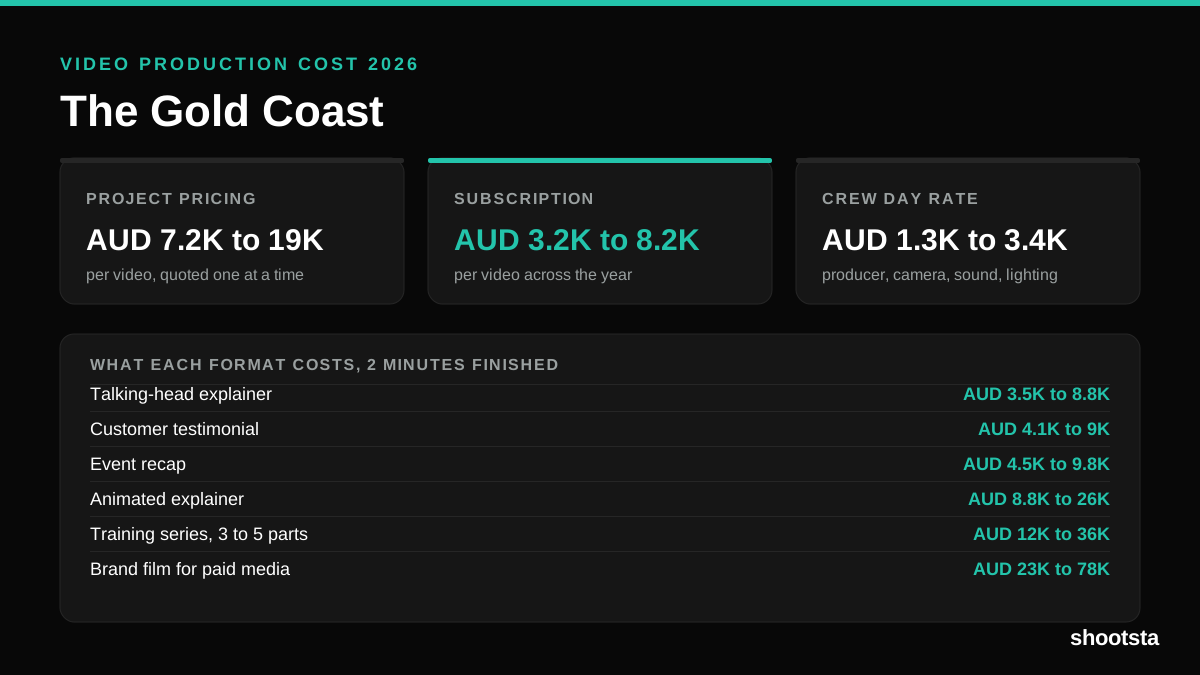
Video Production Cost on the Gold Coast 2026
Video production in the Gold Coast costs AUD 3,200 to AUD 8,200 per finished video on a subscription model, and AUD 7,200 to AUD 18,500 for one-off project work. Here is what you are paying for, and how the three pricing models compare.
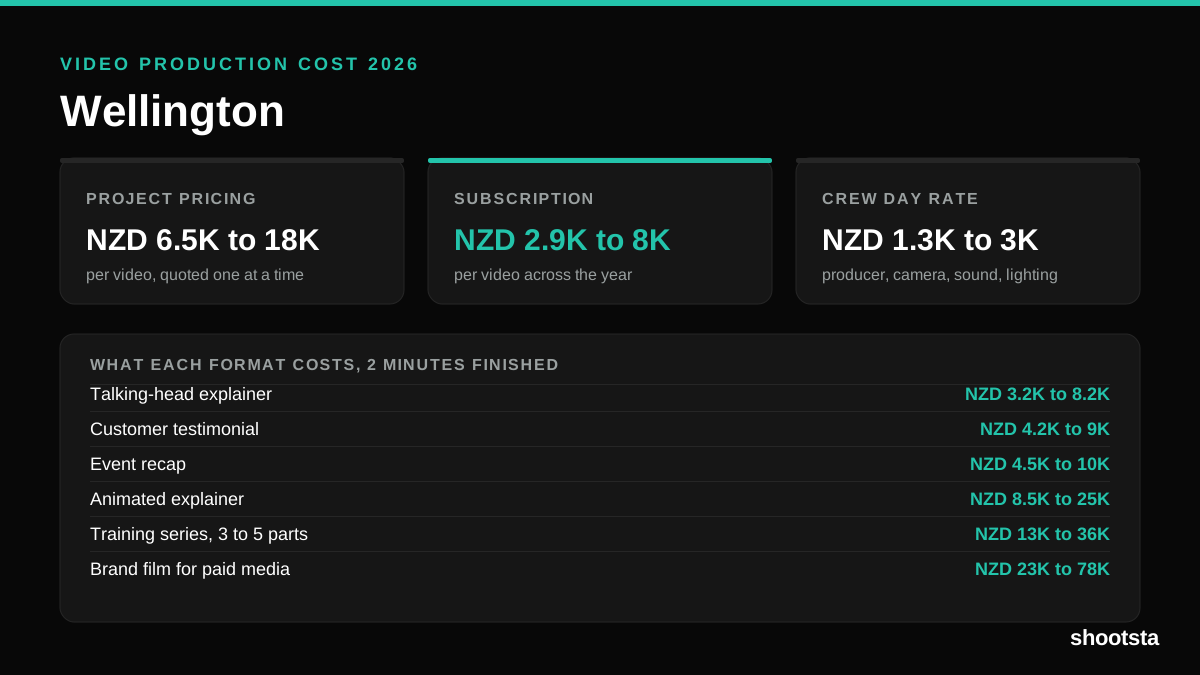
Video Production Cost in Wellington (2026)
Video production in Wellington costs NZD 2,900 to NZD 8,000 per finished video on a subscription model, and NZD 6,500 to NZD 18,000 for one-off project work. Here is what you are paying for, and how the three pricing models compare.
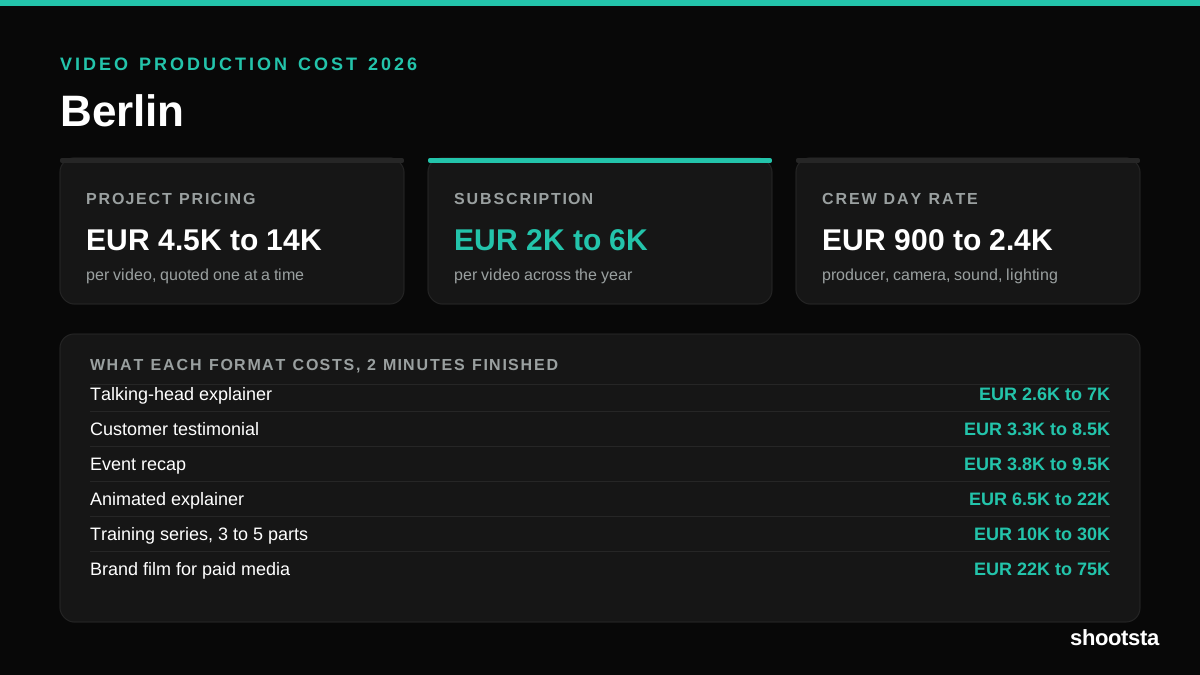
Video Production Cost in Berlin (2026)
Video production in Berlin costs EUR 2,000 to EUR 6,000 per finished video on a subscription model, and EUR 4,500 to EUR 13,500 for one-off project work. Here is what you are paying for, and how the three pricing models compare.