
How to Build a Multilingual Video Library
shootsta.
How to Build a Multilingual Video Library
By Shootsta · Published July 31, 2026 · Updated October 2026
A multilingual video library turns one-off translations into a managed system of masters and versions. Here is how to structure one that scales.
How do you build a multilingual video library?
You build a multilingual video library by organizing content as masters with linked language versions, holding it all in one managed workspace, and governing brand and approvals across every market. A library is the system that turns scattered translations into an asset you can grow and reuse.
You probably reach this point after a run of one-off translations. You have localized a handful of videos, the files are spread across drives and inboxes, and no one is quite sure which version is current in which market. The library is what fixes that, and it is the natural endpoint of treating localization as a system.
Why is a library different from a folder of files?
A folder only stores videos, while a library tracks how they relate to each other. It knows that a Spanish version belongs to an English master, that the master has an approved brand template, and that a new language can be generated from it without a rebuild. That structure is what lets you re-version at scale, which is the whole premise of our pillar on how to localize video for global markets.
Without that structure, each new language starts with a hunt for the right file. With it in place, your team starts from a known master and gets to work.
How should you structure the library?
A clear structure keeps the library usable as it grows:
- One master per asset, with editable text and swappable audio built in.
- Language versions linked to their master, not stored as orphan files.
- Locked brand templates attached to each master so versions stay on brand.
- Status and approval history visible, so teams know what is current and signed off.
This structure is also what keeps the brand intact, the subject of brand consistency across localized video.
What does a library do for cost and speed?
A library makes the cost of each new language predictable, because the master and template already exist and only the audio and text change. That is the same economics behind how much video localization costs: re-version from a master for a fraction of a fresh shoot per market. Speed improves too, since regional teams pull a ready master instead of rebuilding from scratch.
How does a platform run the library?
A managed library needs a home that everyone uses. A shared workspace keeps masters, every language version and the approval trail in one place, which removes stale files and wrong-version mistakes. That is the role of the Shootsta platform. Delivery into the library can run through regional hubs, as in multilingual APAC video production, so local teams produce inside one shared system.
Where do you start?
Take your existing localized videos, group them under their masters, and put them in one workspace with templates and approvals attached. That single step turns a pile of files into a working library. From there, each new language and each new market plugs into a structure that already holds. Shootsta produces affordable, on-brand video at scale globally and can stand up your multilingual library with you; start with a free consultation.
Sources
- CSA Research: share of buyers who prefer content in their own language.
- Shootsta multilingual production across 70,000+ videos.
- Shootsta regional delivery hubs in Sydney, London, Singapore and San Diego.
Take this article with you
Read the latest at shootsta.com/blog/multilingual-video-library
You might also like
How to Plan Video Team Capacity Around Leave
Your only editor just booked two weeks off, and you already know which projects will slip. Chad Lakin explains how to plan video team capacity so the work keeps moving when someone is away.
Corporate Video Editing Standards: Full Guide
A two-page editing standard does more for consistency than a forty-page brand book. Here is what it should cover, who owns each part, and how to enforce it with an in-house editor or an outside partner.
Quality Control in Outsourced Video Editing
When editing leaves the building, quality has to be checked by a system rather than by whoever happens to look. Here is the system: acceptance criteria, two QA gates, counted revision rounds and a quarterly audit.
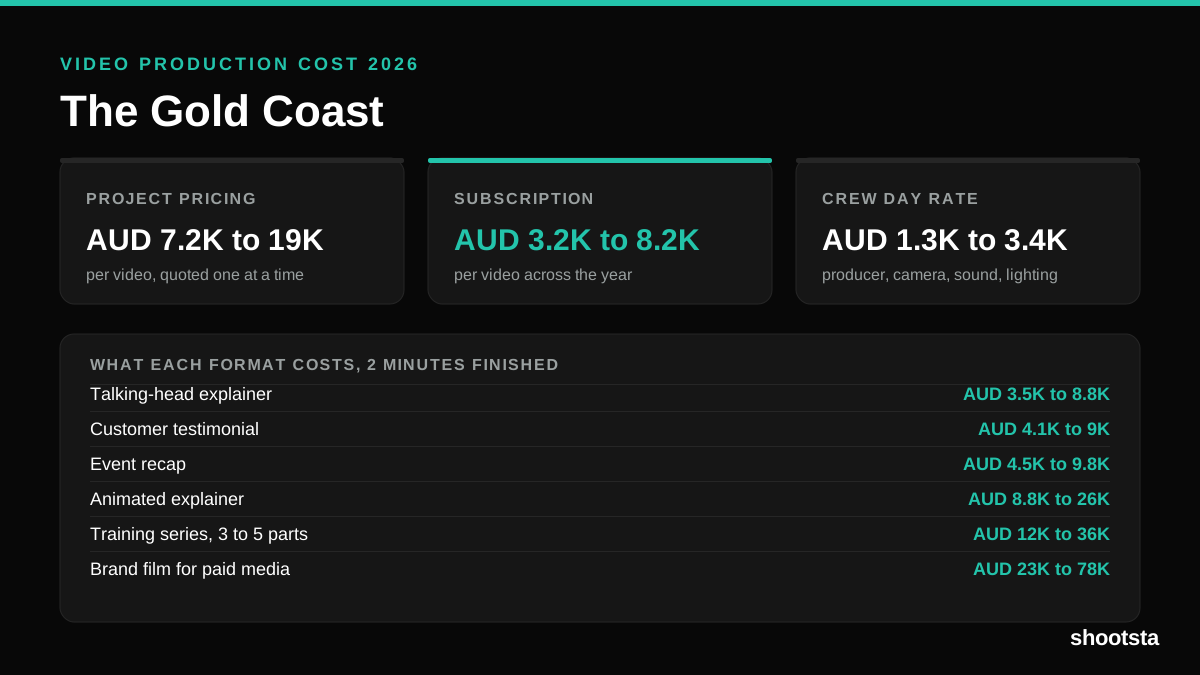
Video Production Cost on the Gold Coast 2026
Video production in the Gold Coast costs AUD 3,200 to AUD 8,200 per finished video on a subscription model, and AUD 7,200 to AUD 18,500 for one-off project work. Here is what you are paying for, and how the three pricing models compare.
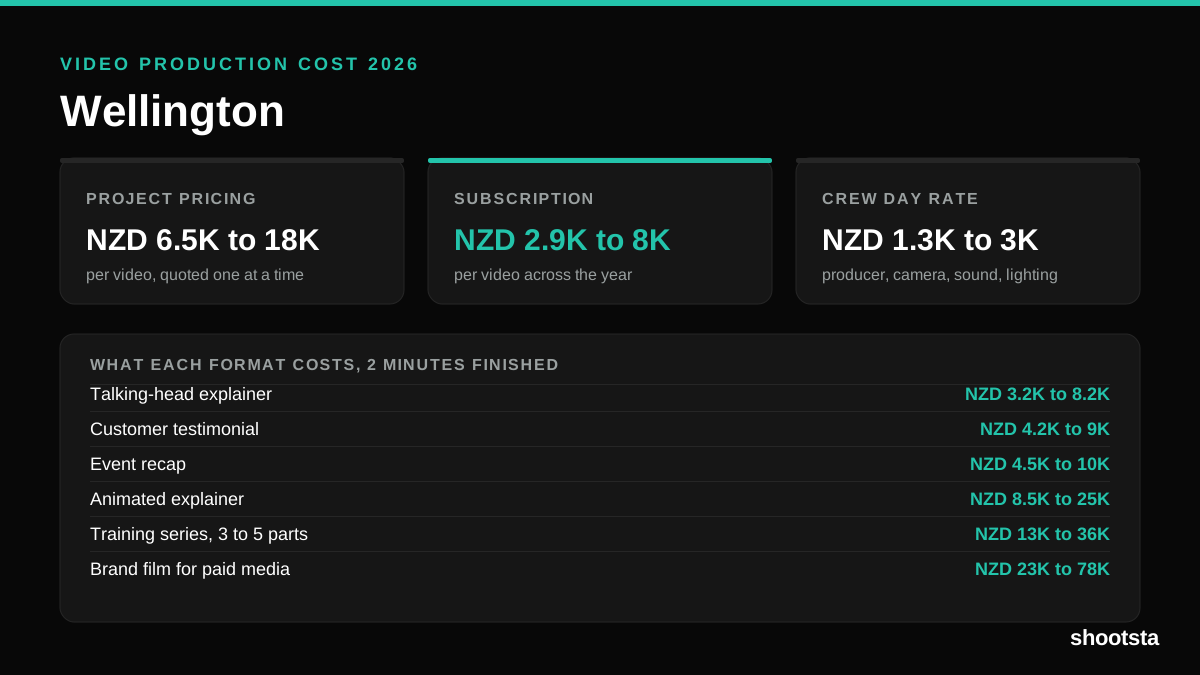
Video Production Cost in Wellington (2026)
Video production in Wellington costs NZD 2,900 to NZD 8,000 per finished video on a subscription model, and NZD 6,500 to NZD 18,000 for one-off project work. Here is what you are paying for, and how the three pricing models compare.
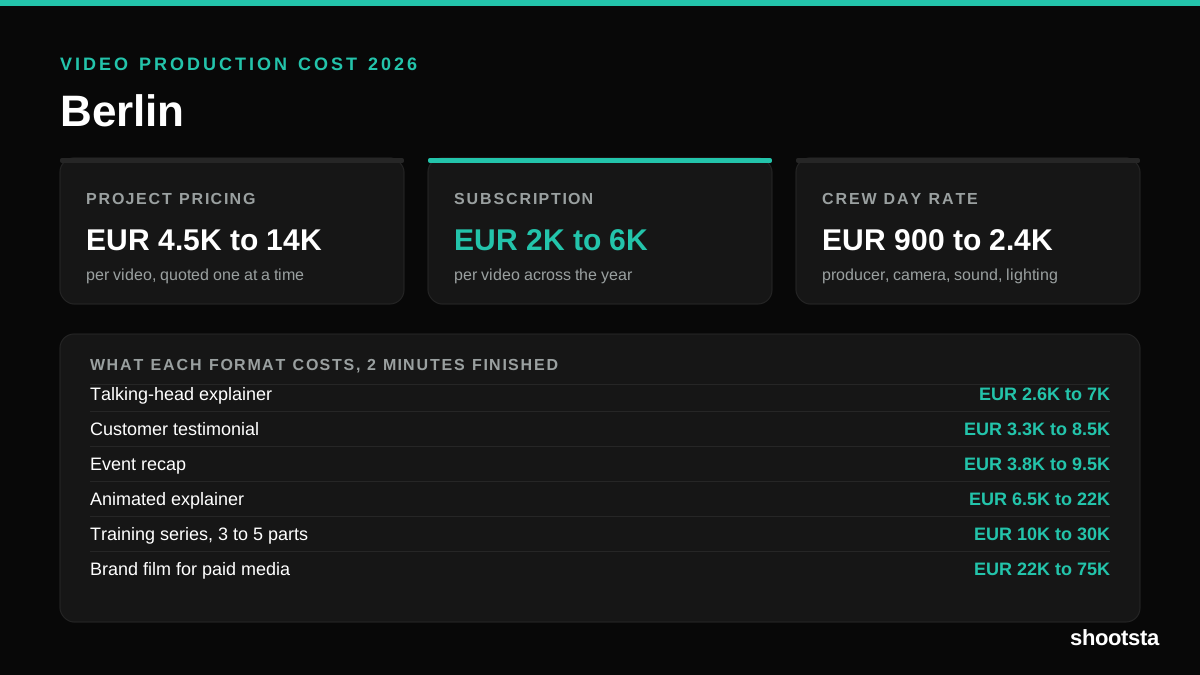
Video Production Cost in Berlin (2026)
Video production in Berlin costs EUR 2,000 to EUR 6,000 per finished video on a subscription model, and EUR 4,500 to EUR 13,500 for one-off project work. Here is what you are paying for, and how the three pricing models compare.