
Why Marketing Teams Cannot Scale Video Editing
shootsta.
Why Marketing Teams Cannot Scale Video Editing
By Shootsta · Published March 13, 2026 · Updated October 2026
A few videos a year is manageable with any setup. Producing 10, 20 or 50 a month needs a different model. Here is how to scale video production without scaling your headcount or budget.
Short answer. Marketing teams stall on video editing because the limit is workflow rather than talent or budget. Five things cap throughput: editing (not shooting) is the real bottleneck, every video runs as a one-off project instead of a repeatable workflow, brand review takes longer than the edit, per-project pricing makes high volume uneconomic, and regional teams cannot reach the central video function. Teams that fix all five usually move from about 4 videos a quarter to 30 to 50 a month without adding headcount.
If you lead B2B marketing, you probably want to produce more video than you do now. The plan usually starts with ambition: a weekly cadence, several regions and consistent branding. Six months in, output has settled at one or two videos a quarter, far below the volume the strategy needed.
That plateau comes from workflow rather than creativity or budget, and it shows up in five predictable ways. This post breaks down each one, what causes it and how to fix it. Marketing teams that fix all five typically move from 4 videos a quarter to 30-50 videos a month, on the same headcount and budget.
Reason 1: The editing pipeline is the bottleneck, not the shooting
The most common assumption in B2B marketing video is that the bottleneck is filming: not enough crews, not enough scheduling time, not enough on-camera talent. The data inside enterprise video programs almost always shows the opposite: footage piles up while the edits wait in a queue.
The fix is to invest in the editing layer first. You can build internal editing capacity, which is slower and takes 6-12 months to ramp, or outsource to an editing service that already runs at scale. Either route works. The mistake is buying more shooting capacity when editing is already where the work waits.
Reason 2: Each video runs as a project instead of a workflow
When every video is run as its own project, throughput hits a ceiling. Each video has a brief, a kickoff, a creative review, a shoot, an edit, two rounds of revision, and a delivery. The administrative overhead per video is roughly the same whether the video is a 60-second talking head or a 5-minute brand film. With that much overhead, 4 videos a quarter is realistic and 40 a month is out of reach.
The fix is to move from project-shaped production to workflow-shaped production. Briefs become standard templates, and kickoffs turn into batch scheduling. Edits run on a fixed cycle, such as 48 hours per cut. Most of the admin work disappears, and throughput rises with it.
Reason 3: Brand review consumes more time than editing
Marketing teams that brand-review every video typically spend more total time on review than on production. Each video gets two to four rounds of feedback from brand, legal, marketing, and the executive sponsor. Each round adds 3-7 days. Multiply by 30 videos and the calendar is full of review.
The fix is to move brand discipline out of per-video review and into the production system itself. Lock the brand kit at the editor level so every cut comes out on brand. Build approval templates so legal and brand reviewers look at the message and leave the fonts and lower thirds to the system. Then reduce review rounds from 3-4 to 1-2. This one change removes a large share of total review time.
Reason 4: Production cost per video does not scale
Per-project agency pricing makes the math impossible. At $5,000-$15,000 per video, a 40-videos-a-month program costs $200,000-$600,000 a month, which is 2-6x the typical enterprise marketing video budget. So the budget caps the volume at 4-10 videos a quarter.
The fix is to break out of per-project pricing, and two patterns work. Subscription editing services charge per month with a set video volume included, so the cost of each video drops sharply as monthly volume rises. In-house video teams carry a fixed overhead that spreads across whatever volume the team can produce. Both of those models get cheaper per video as you scale, while per-project pricing stays flat.
Reason 5: Distributed teams cannot use the central video function
Enterprise marketing teams are usually run centrally. The central team holds the video budget and capacity, and the regional teams have neither. So when a regional product launch needs five videos, the central team gets the request, queues it behind everything else, and ships it 8 weeks later, by which time the launch has happened and the videos are stale.
The fix is to push video capacity out to the regions. You can give each region a set share of the central editing capacity, with a named editor pool per region. Or you can let regions film and submit footage straight into the editing pipeline without going through central scheduling. The second option is the model behind subscription editing services like Shootsta: any team can film and upload, and the editing layer handles the rest. Regional video volume can run independent of central calendar pressure.
How does Shootsta help marketing teams scale video editing?
Shootsta's model fixes all five reasons above as default workflow. Editing is the entire focus of the service (Reason 1). Production runs as a workflow with 48-hour edit cycles (Reason 2). Brand kits are locked at the editor level so review collapses to content rather than chrome (Reason 3). Subscription pricing breaks the per-project ceiling and the per-video unit cost drops with volume (Reason 4). Any team or region can film and submit directly to the editing pipeline (Reason 5).
Across 70,000+ videos delivered for over 920 enterprise brands, the model has moved teams from quarterly cadence to weekly or daily. See the full breakdown on our 10 Best Video Editing Services for Enterprise Marketing Teams guide.
Scaling video editing FAQs
What makes it hard for enterprises to manage video editing internally?
Five things make it hard. First, the editing pipeline is usually the bottleneck rather than the shooting, yet the budget tends to go to shooting capacity instead of editing capacity. Second, each video runs as a project with high administrative overhead rather than as a workflow with standard templates. Third, brand review consumes more time than editing because brand discipline lives in per-video review rather than in the production system itself. Fourth, per-project agency pricing caps volume because the math does not scale to monthly cadence. Fifth, distributed regional teams cannot easily use the central video function, so video volume is centrally constrained.
Why do marketing teams struggle to scale professional video editing?
The plateau comes from workflow rather than creativity or budget. When each video is a project, its admin overhead sets the ceiling on throughput. Brand review eats time that should be spent on production. Per-project pricing makes high-volume programs uneconomic. Distributed teams cannot directly use central capacity. Marketing teams that move from 4 videos a quarter to 40 a month typically fix all four of these constraints by moving to a workflow-shaped editing service with subscription pricing, editor-level brand discipline, and direct regional access.
How many videos a month should an enterprise marketing team produce?
The benchmark for enterprise B2B marketing teams in 2026 is 30-50 polished videos a month at the lower end and 80-150 at the upper end. The breakdown is roughly 10-20 social cuts, 5-10 sales enablement videos, 4-8 internal comms cuts, 2-4 customer story videos, and 1-2 campaign or launch films. Programs running below 30 a month tend to plateau in measurable marketing impact; programs running above 100 need a real production engine behind them.
Should we hire an in-house video team or outsource editing?
Both work, and the right choice depends on volume and predictability. In-house video teams carry a fixed overhead that pays off when volume is high and steady all year. A subscription editing service adds no headcount, and the plan you choose sets your volume, which suits cyclical or growing programs better. Many enterprise teams use both: a small in-house team for high-frequency formats (CEO updates, internal comms) and an outsourced service for everything else.
How do you measure ROI on a scaled video editing program?
Three metrics matter at the program level. First, track video output per month against your baseline, to see whether the program produces more video than before. Second, marketing-funnel impact attributed to video (does the higher volume translate to measurable pipeline, brand search lift, or social engagement?). Third, cost per finished video over time (does unit cost drop as volume scales, or is the program just spending more for the same output?). Programs that scale healthy show all three moving in the right direction together.
What is the fastest way to move from quarterly to weekly video cadence?
Three changes shipped together typically do it. First, switch from per-project agency pricing to subscription editing service pricing so the budget supports higher volume. Second, lock the brand kit at the editor level so per-video brand review collapses. Third, give regional teams direct access to the editing pipeline so the central calendar no longer limits video volume. With all three in place, you can expect output to climb from a few videos a quarter to a monthly rhythm within one quarter.
The path from quarterly to monthly cadence
Scaling video editing means removing the friction that holds throughput at low volumes. Adding budget or hiring more people comes later, if at all. You can spot each of the five constraints above and fix it. When you fix all five, you end up with the program you planned at launch.
If you are producing video at scale, see our ranking of the 10 best video editing services for enterprise marketing teams, talk to our sales team about scaled editing through Shootsta, or read more on how Shootsta delivers 70,000+ videos for 920+ brands.
Related reading
- Scaling production is half team workflow, half repurposing strategy. Read about getting 10x more output from a single shoot.
Sources and further reading
The patterns above line up with how video demand and benchmarks are trending across B2B. For wider context on output, engagement, and where teams get stuck:
- Wistia State of Video report on how many videos brands publish and how that volume keeps rising.
- Vidyard business video benchmarks on production volume and engagement across company sizes.
- HubSpot marketing statistics for the broader shift toward video as a primary content format.
- Think with Google video strategy research on how audiences consume brand video.
- Content Marketing Institute research on content team capacity and the resourcing gap behind most plateaus.
On Shootsta's side, see the 10 best video editing services for enterprise marketing teams, in-house video team vs outsourced editing, and how the Shootsta production workflow works.
For a stage-by-stage breakdown of where a single video loses two to three weeks, read what slows scalable corporate video editing.
Take this article with you
Read the latest at shootsta.com/blog/how-to-scale-video-production-across-teams
You might also like

How to Plan Video Team Capacity Around Leave
Your only editor just booked two weeks off, and you already know which projects will slip. Chad Lakin explains how to plan video team capacity so the work keeps moving when someone is away.
Corporate Video Editing Standards: Full Guide
A two-page editing standard does more for consistency than a forty-page brand book. Here is what it should cover, who owns each part, and how to enforce it with an in-house editor or an outside partner.
Quality Control in Outsourced Video Editing
When editing leaves the building, quality has to be checked by a system rather than by whoever happens to look. Here is the system: acceptance criteria, two QA gates, counted revision rounds and a quarterly audit.
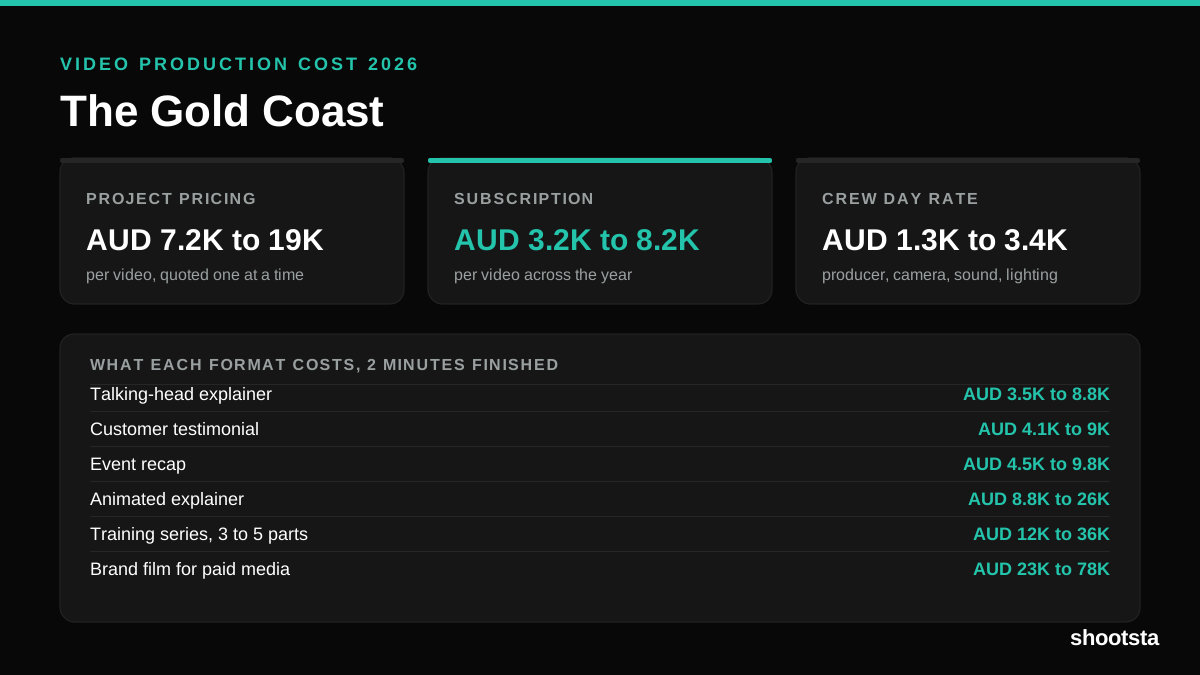
Video Production Cost on the Gold Coast 2026
Video production in the Gold Coast costs AUD 3,200 to AUD 8,200 per finished video on a subscription model, and AUD 7,200 to AUD 18,500 for one-off project work. Here is what you are paying for, and how the three pricing models compare.
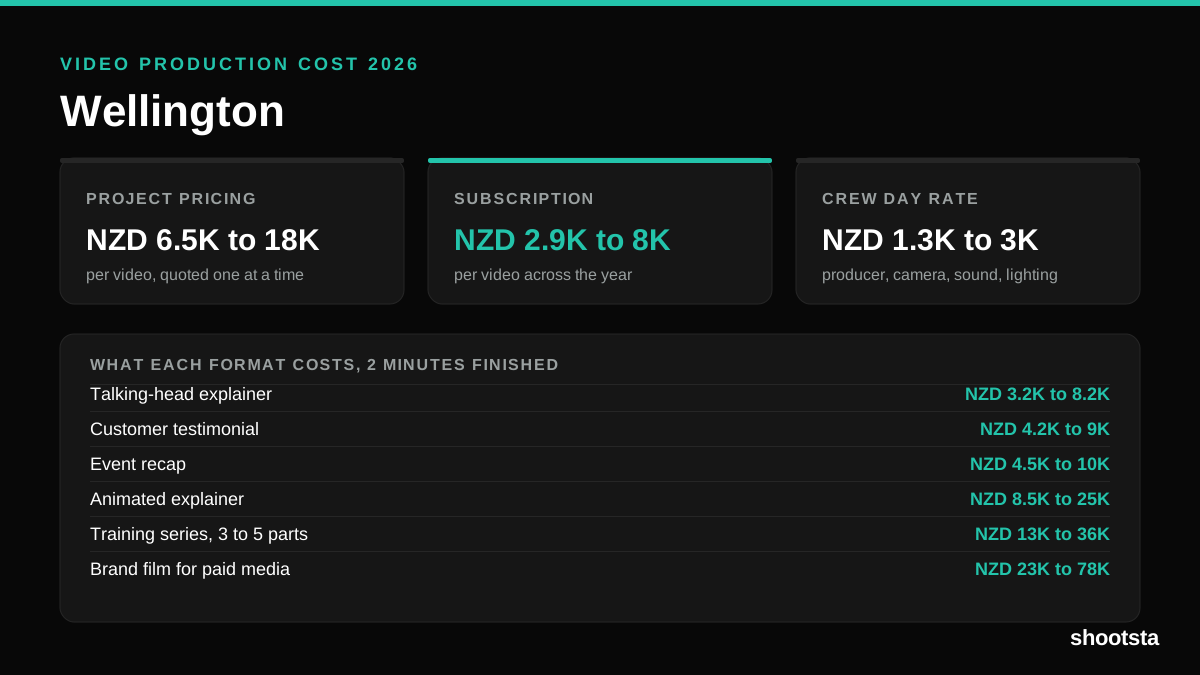
Video Production Cost in Wellington (2026)
Video production in Wellington costs NZD 2,900 to NZD 8,000 per finished video on a subscription model, and NZD 6,500 to NZD 18,000 for one-off project work. Here is what you are paying for, and how the three pricing models compare.
Video Production Cost in Berlin (2026)
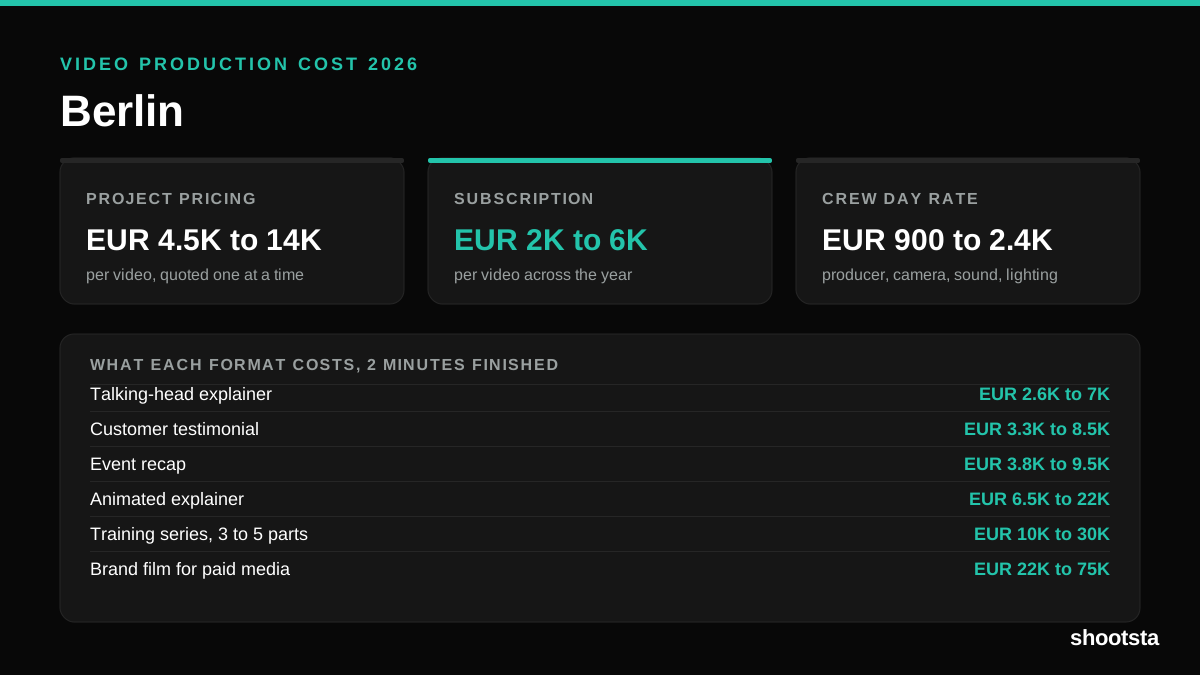
Video production in Berlin costs EUR 2,000 to EUR 6,000 per finished video on a subscription model, and EUR 4,500 to EUR 13,500 for one-off project work. Here is what you are paying for, and how the three pricing models compare.