
How L&D leaders replace classroom with video
shootsta.
How L&D leaders replace classroom with video
By Shootsta · Published June 1, 2026 · Updated October 2026
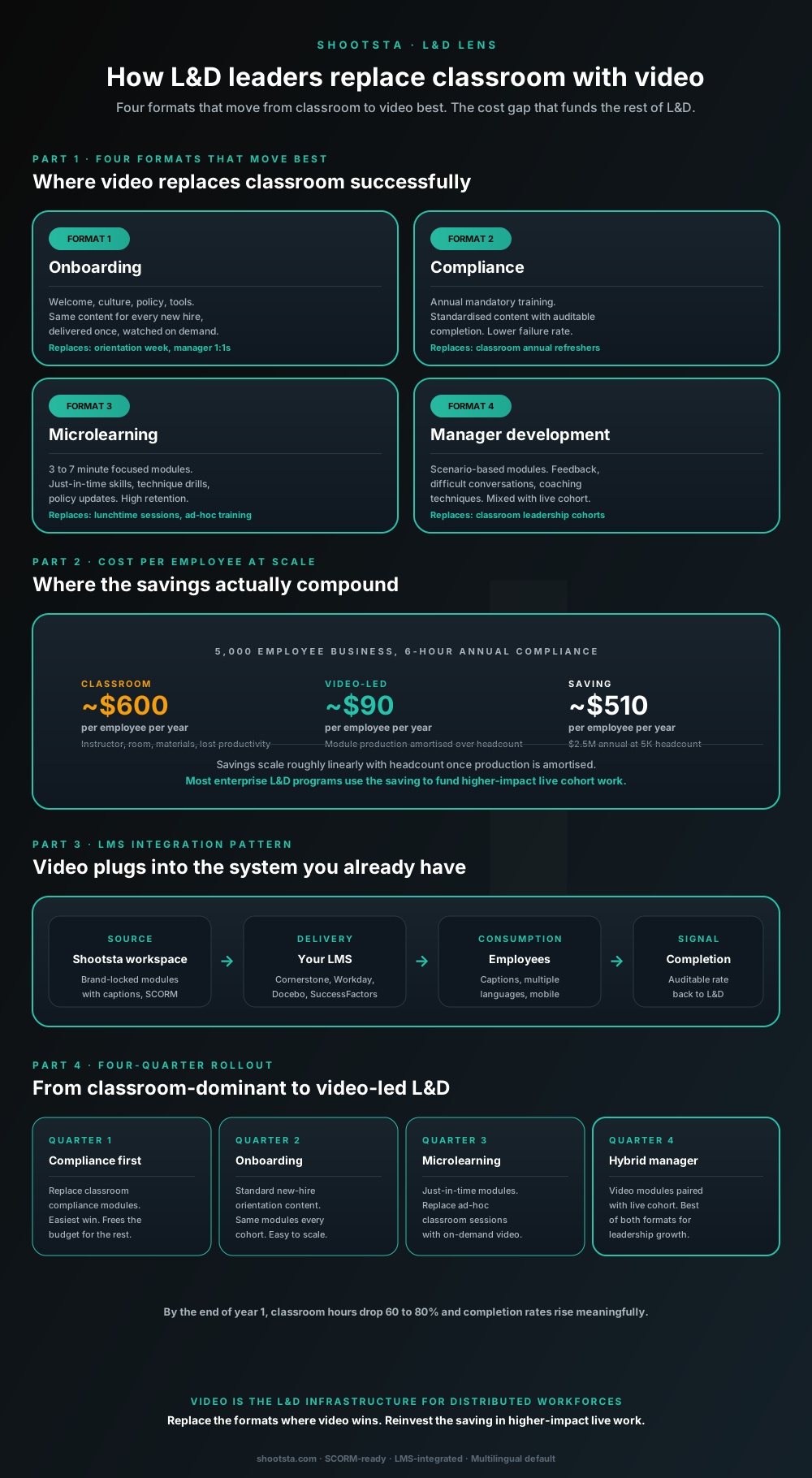
L&D leaders running classroom-heavy training programs typically have the largest single opportunity in the business to free budget through format change. Four training formats move from classroom to video cleanly; the savings fund higher-impact live work. Here is the rollout that compounds learner adoption over four quarters.
Why L&D usually has the largest single budget-shift opportunity in the business
If you run a classroom-heavy training program, you may hold the largest single chance in the business to free budget by changing format. Picture a 5,000-employee enterprise with several hours of mandatory classroom training per person each year. Once you count instructor time, rooms, materials and the hours people spend away from their jobs, that one program can cost millions. Moving a large share of those hours to video-led delivery frees much of that money and tends to lift completion.
This is a question of using each format where it earns its place. Classroom still wins for scenario-based manager development, sensitive interpersonal work and high-stakes simulation. For most of the content-heavy training that remains, video does the job at a lower cost per learner.
The four training formats that move from classroom to video best
Format 1: Onboarding
Onboarding covers welcome content, a culture overview, policy and tools training, and introductions to each function. Every new hire needs the same material, so you can make it once and let people watch on demand. It can replace orientation week and much of the induction content managers repeat in 1:1s. Completion usually improves over the classroom version, partly because video fits the new hire's schedule and partly because every cohort hears the same message. It is often the easiest first move, since the ROI is clear and the political friction is low.
Format 2: Compliance
Compliance means the annual mandatory modules: anti-bribery, data privacy, security awareness and sector-specific rules. The content is the same for everyone, and completion has to be auditable. Failure rates tend to fall because employees can re-watch the sections they did not understand. The LMS records completion data on its own, and auditors find that trail easier to check than attendance sheets. In regulated industries, compliance is often the first program to move to video in full.
Format 3: Microlearning
Microlearning modules run 3 to 7 minutes and focus on one thing. They suit just-in-time skills, technique drills, policy updates and product refreshers. Retention is high because each module keeps the cognitive load small, which a full-day classroom session rarely does. Microlearning can replace lunch-and-learn sessions, ad-hoc product training and the long tail of short mandatory courses. Once the format is in place, the module count tends to grow quickly because each one is cheap to add.
Format 4: Manager development (hybrid)
Manager development uses scenario-based modules on feedback conversations, difficult discussions and coaching. You mix them with live cohort work where peer interaction matters most. The video modules carry the theory and pre-work, and the live sessions carry role-play and feedback. On long-term measures such as manager NPS from the team, retention of high-potential staff and promotion rate, the hybrid usually does better than either format alone.
The cost-per-employee comparison that lands with finance
The figures below are illustrative assumptions for a 5,000-employee business running 6 hours of mandatory training a year; swap in your own rates.
Classroom: ~$600 per employee per year. This assumes 1 hour of trainer time per 20 employees, plus rooms and materials. It also counts the hours people spend in the session at their fully loaded rate.
Video-led: ~$90 per employee per year. Here the production cost is spread across the whole headcount. Adding the 5,001st employee to a video module costs close to nothing, while adding them to a classroom session costs one-twentieth of a trainer day.
Saving: ~$510 per employee per year. Under these assumptions, that comes to $2.5 million a year at 5,000 employees and $12.5 million at 25,000. Once production is paid for, the saving grows roughly in line with headcount, so the largest enterprises see the biggest dollar return.
You do not have to hand the saving back as a budget cut. Many L&D leaders reinvest it in live cohort work such as manager development, high-potential programs and scenario-based simulations, where the classroom still gives the best learning outcome.
Interactive calculator
What would moving classroom hours to video save per year?
Set headcount, current classroom training hours per employee, and the share you would convert to video. The calculator returns annual saving and classroom hours reclaimed for higher-impact use.
Net saving / employee
$1,134
per year, after video cost
Annual net saving
$5.7M
at 5,000 employees
Classroom hours reclaimed
36,000
for higher-impact live work
How most L&D leaders use the saving
The $5.7Mannual saving is rarely taken as a budget cut. Most L&D leaders reinvest it in higher-impact live cohort work (manager development, high-potential programs, scenario-based simulations) where classroom format still produces the best learning outcome. The shift is not classroom-bad-video-good; it is using each format where it earns its place.
Talk through your L&D planAssumptions: classroom hour cost includes instructor, room, materials and lost productivity at typical fully-loaded rates. Video production cost amortised at ~$30 per employee per year based on subscription production at enterprise scale. Numbers are guides.
How video plugs into your existing LMS
The integration is usually simpler than it looks. Production happens in the Shootsta Workspace, and delivery happens in whichever LMS you already use. Employees watch on their own devices with captions and language options, and completion data flows back to the LMS for audit.
Common LMS targets include Cornerstone, Workday Learning, Docebo, SuccessFactors, Litmos, SAP Learning and Moodle. The files follow standard LMS specifications: SCORM 1.2 or SCORM 2004 modules with completion tracking, plus standalone MP4 files and SRT or VTT captions. Many large enterprise LMS deployments also accept xAPI for richer analytics.
Some sectors have stricter rules. Financial services may need FINRA-aligned record-keeping, healthcare may need HIPAA-aligned access controls, and pharma may need FDA 21 CFR Part 11 e-signatures. In those cases the workflow captures the extra metadata your compliance team asks for. We covered the regulated content workflow in brand control with a video production partner.
The four-quarter rollout that compounds learner adoption
A four-quarter rollout works well because it orders the moves by difficulty and political friction.
Quarter 1: Compliance first
Start by replacing the classroom compliance modules. This is the easiest win, because compliance is heavy on content and light on interpersonal work, and completion is auditable. The budget it frees is often large enough to fund the rest of the rollout, and classroom hours start to fall in the first quarter.
Quarter 2: Onboarding
Next, move standard new-hire orientation to video. Every cohort sees the same modules, however many people the business hires. Onboarding is usually the second-easiest move because it has a defined audience and clear measures, such as time to productivity and new-hire NPS at 30 and 90 days. Classroom hours drop again.
Quarter 3: Microlearning
In the third quarter, just-in-time modules replace ad-hoc classroom sessions, lunch-and-learns and the long tail of small courses. This quarter usually needs the most design work, because microlearning at scale is a different skill from long-form video. The production cost per module is lower, though, because each one is shorter.
Quarter 4: Hybrid manager development
Finally, manager development moves to a hybrid of video modules and live cohort sessions. The video modules cover theory, and the live cohorts cover practice and feedback. By the end of year 1, most of your classroom hours have moved to video, completion rates are higher and the budget has shifted toward live cohort work where it has the most impact.
What happens to existing classroom trainers in this shift
Moving to video rarely means cutting trainer headcount. Your trainers move toward higher-value work: live cohort facilitation, content design for the video modules and scenario coaching for manager development. Video frees them from delivering the same intro session for the 50th time, and that time goes into the parts of L&D that improve learner outcomes over the long run.
How you present the change matters. Frame it internally as "trainers become learning designers" rather than "we are replacing trainers with video". Many trainers prefer the new role, since designing content is more strategic and more interesting than repeating intro lectures.
Frequently asked questions
Does video learning retention beat classroom?
For factual and procedural content such as compliance, product, policy and system training, it usually does. Video-led modules tend to hold up better than the classroom 30 days later for content-heavy material, because learners can pause and re-watch. For interpersonal and scenario-based content, the classroom still wins, since the practice and feedback loop is hard to copy in video alone. A hybrid format is the right answer for that category.
What is the right module length for microlearning?
For most content, 3 to 7 minutes per module gives the best retention. Past 10 minutes, completion rates drop sharply, and under 2 minutes the audience loses the thread. Compliance-heavy content is the exception, because regulators may require a minimum amount of coverage. Build that as a 15-20 minute module with chapter markers rather than one continuous 20 minute video.
How do we measure learning outcomes beyond completion?
Add three measures. Assessment scores right after the module show comprehension, and scores 30 days later show retention. Observable change in how people work shows transfer. The first two come from assessments inside the LMS, while the third needs managers or peers to score what they see. Many enterprise L&D programs track the first two on everything and the third on selected high-stakes content.
What languages should we offer training in?
Add subtitles in every language that a large part of your workforce speaks. Use replacement voiceover for high-impact content, such as mandatory compliance, executive comms training and leadership development, in languages with 1,000+ employees. For flagship content where cultural fit matters, make full language versions with a reshoot. We covered the multilingual production layer in how to scale video across global offices.
How does the production partner integrate with our learning designers?
Your learning designers brief the work as they would for any other production method, with learning objectives, key messages, assessment hooks and brand standards. The partner handles production, which covers scripting with the designer, capture, editing, brand templates, captions and language versions. The designer keeps control of the program, and the partner carries out the production.
Will employees watch the videos instead of skimming?
Many LMS deployments set a minimum watch time before a module counts as complete, which stops people from skipping to the end. The bigger point is that employees skim when the content is dull or irrelevant to them. When a video respects their time, they watch it, so production quality and content design do more than enforcement.
Where to go next
For the working pattern alongside an existing L&D team, read how a video partner extends your in-house team. For the measurement framework that maps to learning outcomes, read how to measure enterprise video success. For the accessibility workflow that LMS-delivered content must meet, read how to make enterprise video accessible.
To structure a classroom-to-video rollout for your L&D program, book a free consultation.
Take this article with you
Read the latest at shootsta.com/blog/how-ld-leaders-replace-classroom-with-video
You might also like
How to Brief an Animation Project
How to Brief an Animation Project
An animation brief is the document you send to your production partner before work starts. Get it right and you cut revision cycles in half. Get it wrong and you discover mid-production that everyone disagrees on what the video is for. This is what a complete brief looks like.
Animation for change management comms
Animation for change management comms
Animation handles change management communications better than live video for three reasons: no on-camera executives required during sensitive periods, scene-level updates when plans shift, and a single production that works across global teams with voiceover-only language swaps.
How sales leaders should use video at scale
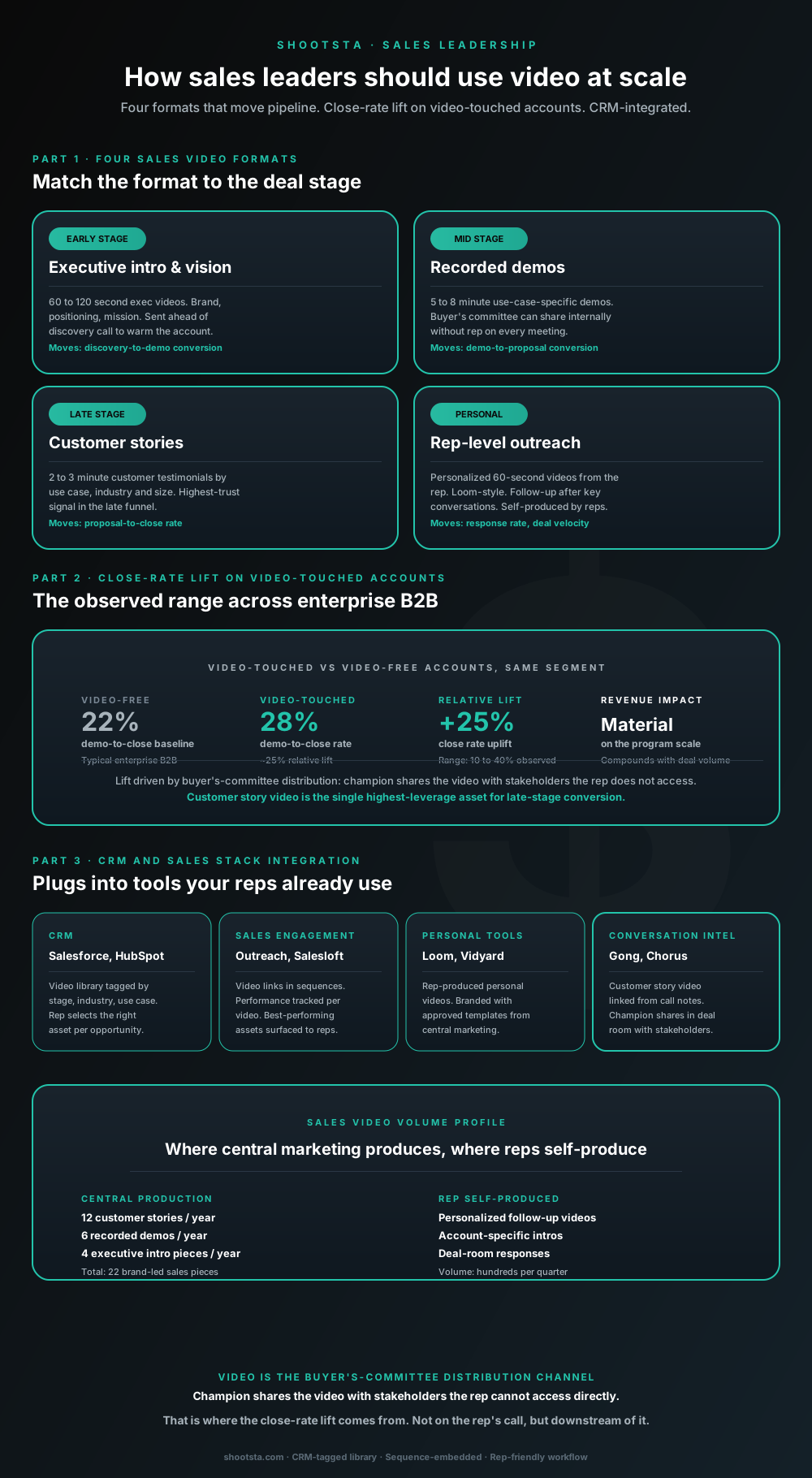
Sales leaders mostly think about video as personalized rep outreach (Loom, Vidyard) or as marketing-produced customer stories. Both are useful. The bigger opportunity is the buyer's-committee distribution layer: assets the champion shares internally with stakeholders the rep does not access directly. That is where the close-rate lift compounds.
How customer success leaders should use video
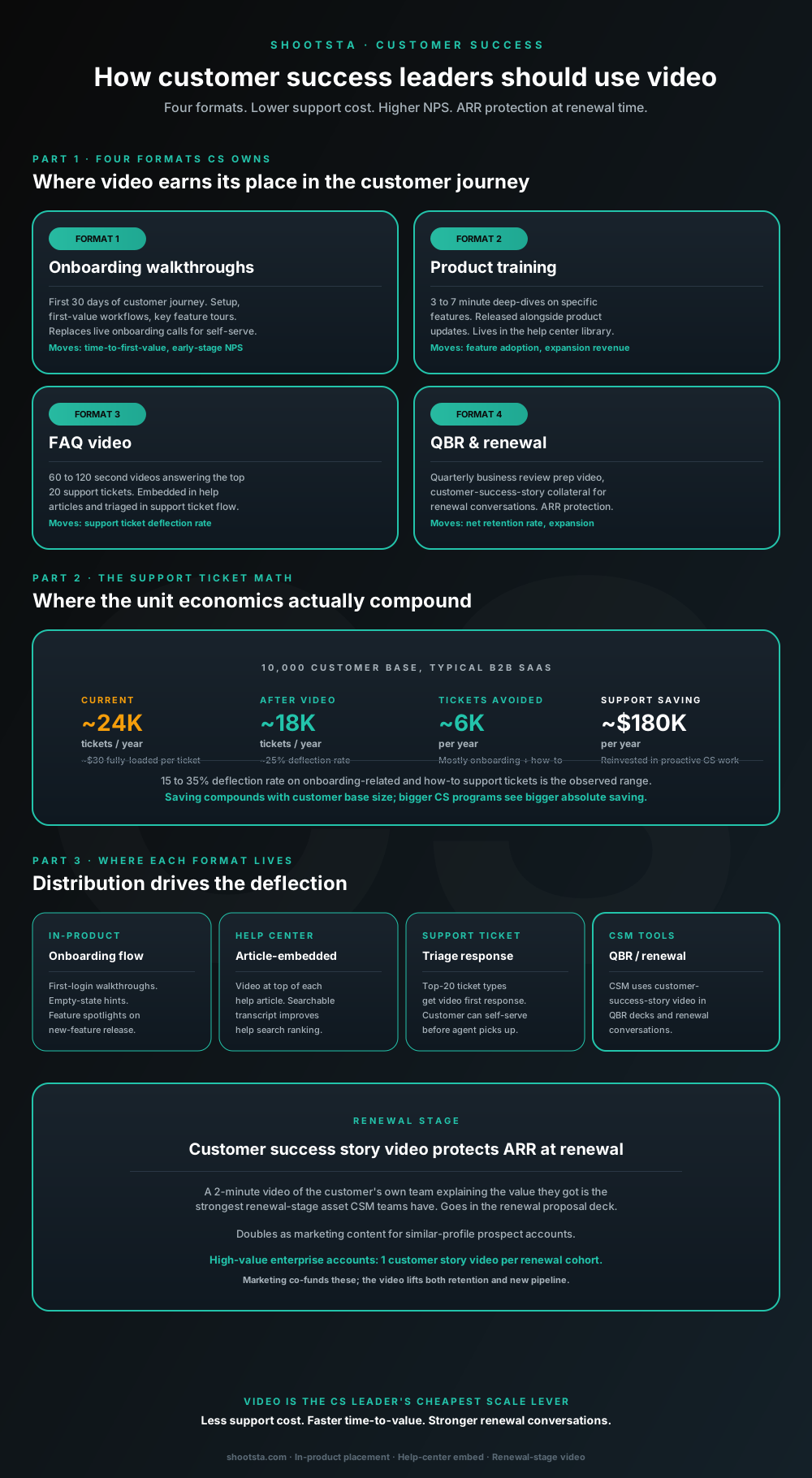
Customer success leaders are usually under-resourced for both reactive support volume and proactive retention work. Video is the cheapest lever to fix both - 15 to 35% deflection on onboarding and how-to tickets, faster time-to-value, and renewal-stage customer story video that lifts net retention. Here is the four-format model and where each piece earns its place.
How internal comms leaders should use video
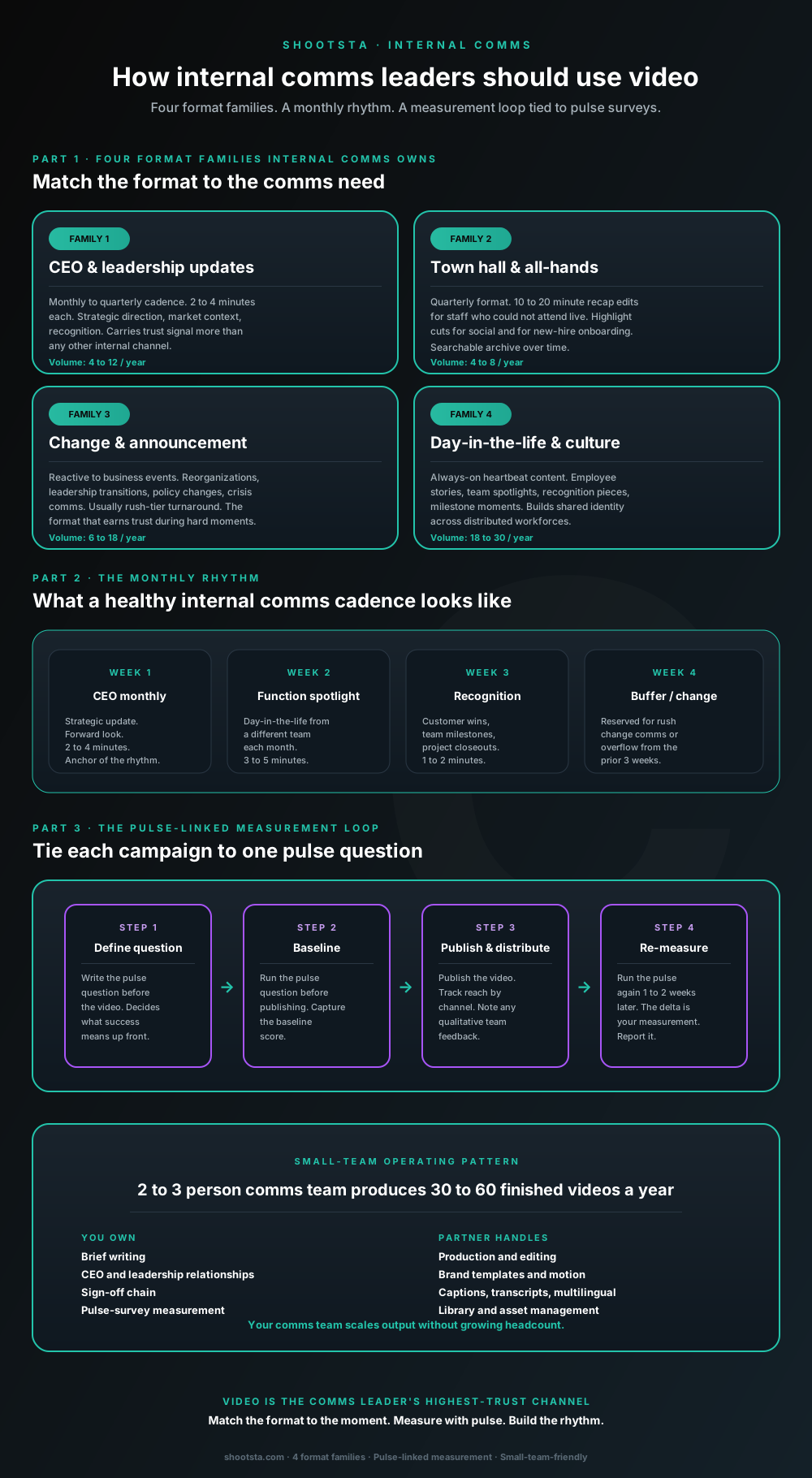
Internal comms leaders are usually under-resourced for the volume of video the business wants. The fix is not more headcount; it is structuring the program around four format families, a monthly rhythm, and a pulse-survey-linked measurement loop. Here is the operating pattern that lets a small comms team produce 30 to 60 finished videos a year.
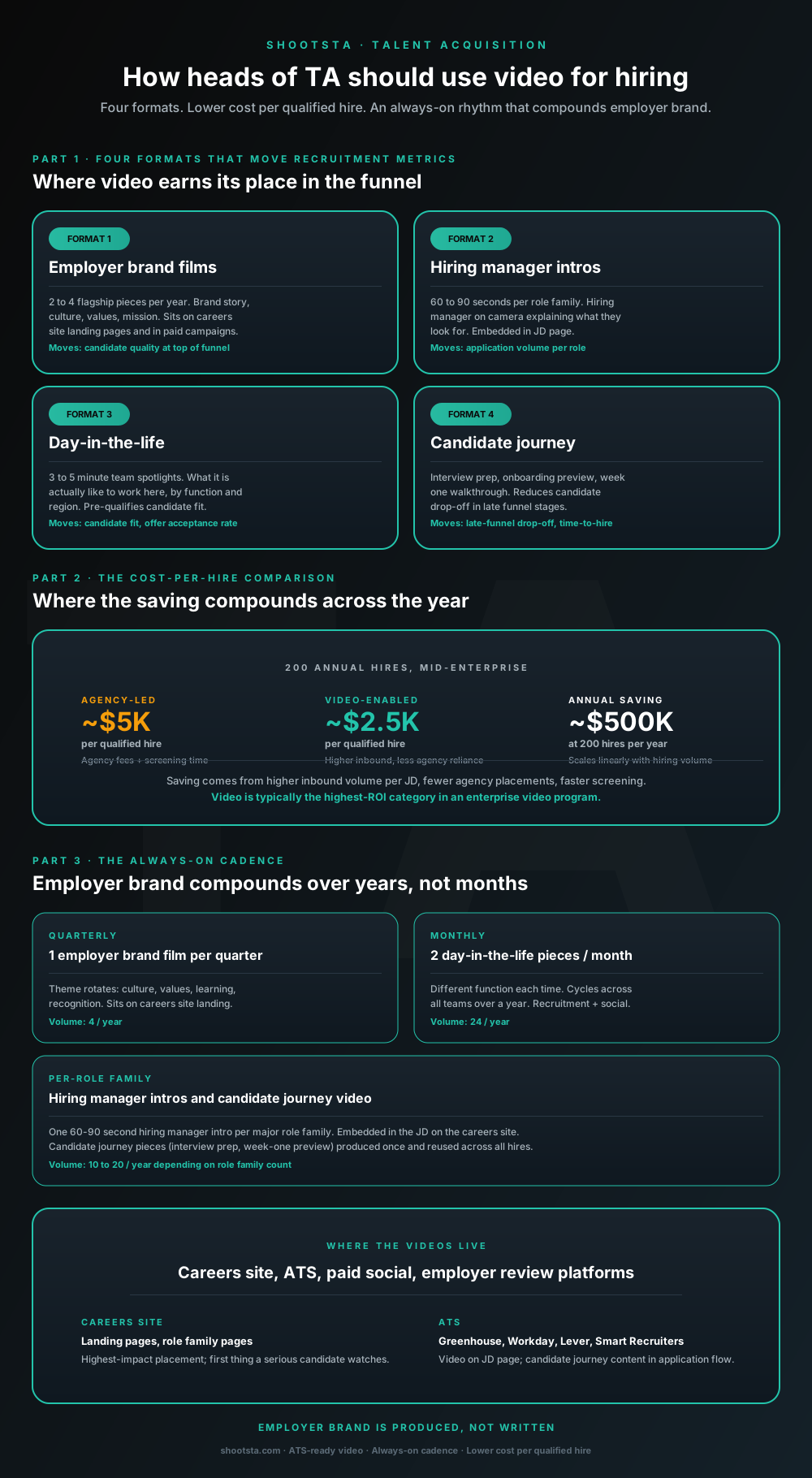
How heads of TA should use video for hiring
Heads of talent acquisition running agency-heavy hiring funnels usually have the highest-ROI video opportunity in the business. Four formats move recruitment metrics most, the cost-per-qualified-hire drops 35 to 60 percent at scale, and the rhythm compounds employer brand over years rather than months.