
Brand control with a video production partner
shootsta.
Brand control with a video production partner
By Shootsta · Published May 15, 2026 · Updated October 2026
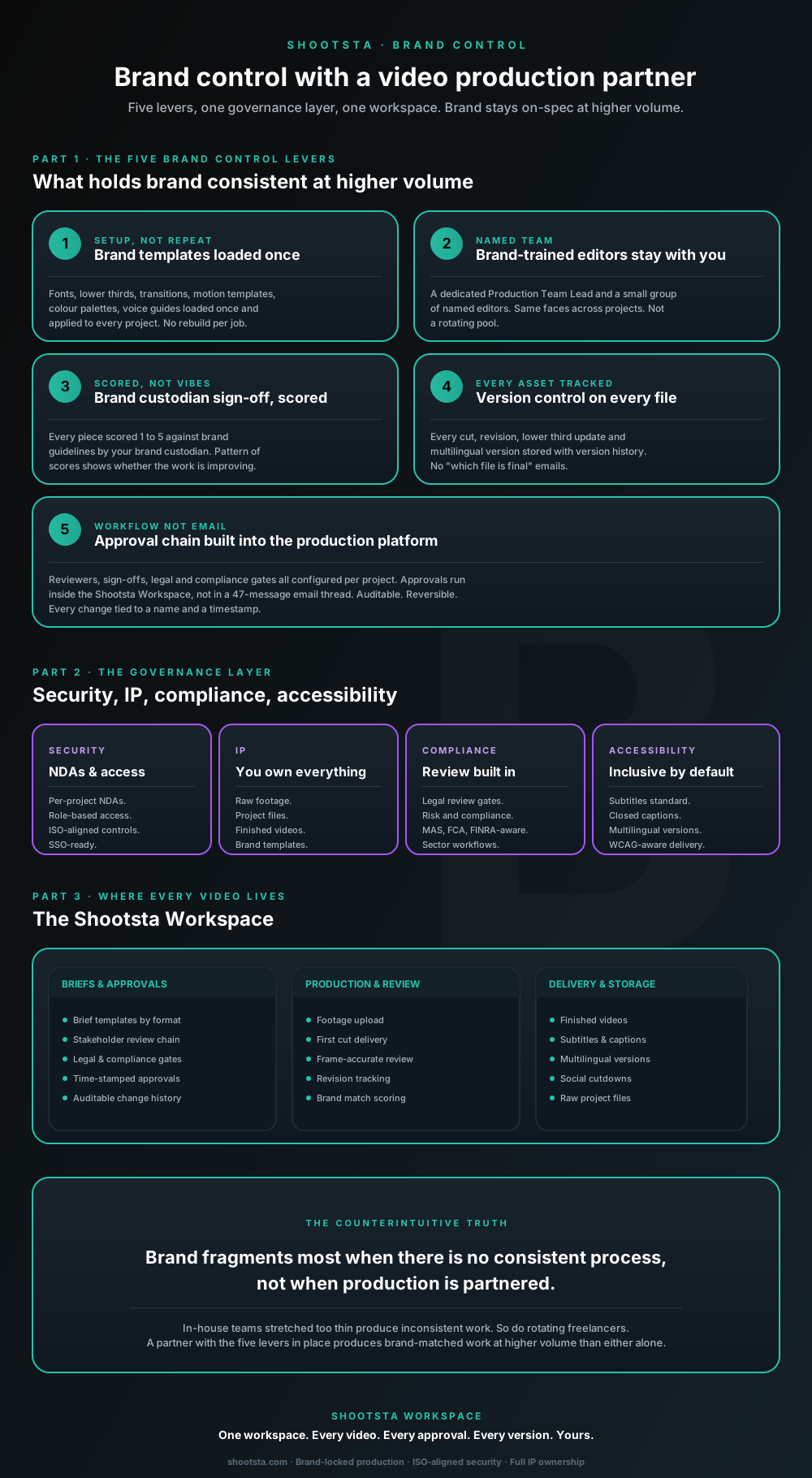
The worry about brand drift when you work with a production partner is reasonable. Brand fragments most when there is no consistent process. Here are the five levers, the governance layer and the workspace that keep brand on-spec at higher volume.
Why brand control is the right thing to worry about
The worry about brand drift when production is partnered is reasonable. If you lead marketing or comms in a large company, you probably have a story about a video that went out off-brand. It might have used the wrong font, an unbranded lower third or a grade nobody signed off, or the tone did not sound like the business. Your instinct to keep tight control is the right one.
The instinct that is wrong is "the only way to control brand is to keep production in-house". Brand breaks apart most when production has no consistent process, whoever does the work. A stretched in-house team producing inconsistent work, or a rotating list of freelancers each interpreting brand differently, drifts faster than a partner with the right five levers in place.
The five brand control levers
These five hold brand consistent at higher video volume. If a production partner has them, brand stays on-spec. If they do not, brand drifts regardless of how strict the brief is.
1. Brand templates loaded once, not rebuilt per project
Fonts, lower thirds, transitions, motion templates, brand palettes, voice guides and brand-approved music get loaded once and applied to every project from then on. Nobody rebuilds them per job, and no editor has to guess at the brand on the fly. Your brand custodian signs off the templates once, and every later piece inherits them.
This is the biggest single predictor of brand consistency at scale. When a project agency rebuilds the brand setup for each engagement, small differences creep in within the first few pieces. Production that runs on locked templates holds steady instead.
2. Brand-trained editors who stay with you
You get a dedicated Production Team Lead and a small group of named editors. They are trained on your brand and stay with you across projects, so you deal with the same people each time. The fifth video comes back faster and closer to brand than the first, because the editors already know how you sign off a grade and what your legal team will flag.
This is the second biggest predictor of consistency. Brand lives in a set of judgments that change over time as well as in a guidelines document. Editors who have made dozens of videos for your brand will catch things a freelancer brought in for one job will miss.
3. Brand custodian sign-off, scored 1 to 5
Every piece is scored 1 to 5 by your brand custodian against brand guidelines, which turns a matter of opinion into a number. The pattern of scores across a quarter shows whether the work is improving, holding steady or drifting. A rising average tells you the program is healthy. A low or falling one tells you something needs fixing in the brand template or the brief.
With those scores in hand, you can bring evidence to the brand conversation with leadership instead of gut feel.
4. Version control on every file
Every cut, revision, lower third update and multilingual version is stored with version history. That ends the "which file is final" emails and the folders full of final_v2_actual_FINAL.mp4. When the legal team asks which version they approved, the answer is one click away.
For regulated sectors (financial services, pharma, healthcare, government) this matters even more. Compliance review cycles depend on knowing exactly which version went out, who approved it, and when.
5. Approval chain built into the production platform
Reviewers, sign-offs, and legal and compliance gates are all set up per project. Approvals run inside the Shootsta Workspace rather than in a long email thread. Every change is tied to a name and a timestamp, so you can audit it and reverse it.
This is the lever that scales. You can run two videos a quarter through email, but that breaks down once you are making several a week. The platform-based approval chain is the reason brand stays consistent at the volumes a subscription model produces.
Interactive scorecard
How much brand drift is your video program exposed to?
Toggle the five brand control levers you have in place today and set your annual volume. The scorecard estimates how many off-brand assets the program is producing and what it costs to remediate.
Levers in place today
Brand maturity
0%
0 of 5 levers in place
Off-brand pieces / year
9
18% drift rate at this maturity
Annual rework cost
$7.2K
~$800 per remediation
Brand is exposed
Without the five levers in place, an estimated 9 of your 48 annual videos will drift off-brand. At higher volume this is the most expensive failure mode in a video program. The five levers are how a partner closes the gap.
See how Shootsta covers the missing leversAssumptions: drift rate is an industry benchmark, scaling from around 18% off-brand assets per year with no levers in place to around 2% with all five in place. Remediation cost is approximate per piece (editing time, re-approvals, distribution updates). Numbers are guides, not warranties.
The governance layer that sits around brand control
Brand control is the visible layer. Underneath it sits a governance layer that legal, IT and compliance care about more than marketing does.
Security and NDAs
Per-project NDAs are standard. Role-based access control inside the Workspace means a freelancer brought on for one shoot does not see anything outside that project. Files move between your team and our editors over encrypted transfer, and the platform is SSO-ready for enterprise IT. For sensitive internal comms (executive scripts, change management, regulatory disclosures) tighter access tiers are configurable per project.
IP ownership
You own everything produced: raw footage, project files, finished videos, brand templates and edit decision lists. This is written into the engagement agreement rather than left as a verbal promise. If the engagement ends, the assets are still yours. Some enterprise teams have found a supplier holding their footage at renewal time, and the default Shootsta arrangement takes that risk off the table.
Compliance review built into the workflow
Legal review, risk review and compliance sign-off are gates inside the workflow rather than separate steps added afterward. For regulated sectors, the gates can map directly to the requirements (MAS in Singapore, FCA in the UK, FINRA and SEC in the US, ASIC in Australia, sector-specific rules for pharma and healthcare). The aim is to make compliance the easiest path through the project, so nobody is tempted to route around it.
Accessibility scoped in by default
Subtitles, closed captions, and transcripts are standard outputs. Multilingual versions (Mandarin, Bahasa, Vietnamese, Thai, Spanish, French and others) are available per project. Delivery is WCAG-aware for internal training and customer-facing content. If accessibility is a hard requirement in your sector (government, education, healthcare, financial services), it can be wired into the production workflow rather than retro-fitted after delivery.
Where every video lives: the Shootsta Workspace
Every brief, every approval, every cut, every finished video and every project file lives in the Shootsta Workspace. Role-based access decides who sees what, and the full version history is kept, so the audit trail is one click away.
For many enterprise customers, the Workspace becomes the single source of truth for video across the business. Marketing, sales, comms, L&D and HR all brief into the same workflow, and legal and compliance review in the same place. Finished assets are stored, tagged and open to the teams that need them. Nobody has to ask where that video from last quarter went.
If your business has its own MAM, DAM or storage system (Brightcove, Wistia, Vimeo Enterprise, AWS, internal SharePoint), finished video deliverables can be pushed there directly. The Workspace then handles production, and your existing systems keep handling distribution.
What about quality? How do we know the work will be good?
Buyers ask this question often, and the honest answer is to judge a partner on what they produce in the first 90 days. Score that work against agreed success metrics rather than taking the partner's promises on trust. Track brand match scored 1 to 5 by your brand custodian, the first-cut acceptance rate and the turnaround time. Then ask your internal team whether they would brief in another project tomorrow. Numbers settle the quality question faster than reels and case studies do.
The deeper version of this answer lives in our piece on how to pilot a video production partner, which walks through the 90-day structure and the four metrics that prove whether a partner is up to enterprise quality before you commit to a 12-month program.
Frequently asked questions
How do you make sure videos match our brand?
Brand templates, fonts, lower thirds, motion graphics and voice guides are loaded once during onboarding and applied to every project. A small named team of brand-trained editors stays with your account, so their brand judgment builds over time. Your brand custodian scores every piece 1 to 5 against the guidelines, so the pattern of brand match shows up as a number you can track.
Who owns the IP on videos produced?
You do. Raw footage, project files, finished videos and brand templates are yours from day one, and they stay yours if the engagement ends. The IP transfer is written into the agreement and does not depend on the contract continuing.
Can legal and compliance review be built into the workflow?
Yes. Reviewers, sign-offs and compliance gates are configured per project inside the Shootsta Workspace. For regulated sectors (financial services, pharma, healthcare, government), the gates map to sector-specific requirements. Every approval is timestamped and auditable.
How secure is the platform?
The platform runs role-based access control and encrypted file transfer, and it is SSO-ready. Per-project NDAs are standard. For sensitive content (executive scripts, regulatory disclosures, internal change announcements), tighter access tiers are configurable so even named editors only see what they need to.
Do you handle accessibility requirements?
Subtitles, closed captions and transcripts are standard. Multilingual versions are available per project across major business languages including Mandarin, Bahasa, Vietnamese, Thai, Spanish, French and German. WCAG-aware delivery is wired into the workflow for sectors where it is a hard requirement.
Where do the finished videos live?
Inside the Shootsta Workspace by default, with role-based access. If you have your own MAM, DAM or storage system (Brightcove, Wistia, Vimeo Enterprise, AWS, SharePoint), finished video deliverables can be pushed there directly. The Workspace stays as the production and approval environment.
What happens if a piece goes out off-brand?
The brand custodian score catches it before delivery. If a piece slips through (rare but possible), version control means the off-brand version can be replaced inside the workflow and the audit trail captures what happened. Patterns of low brand-match scores trigger a review of the brand templates or the brief, and the conversation stays on fixing the cause.
How we built the numbers in this post
The brand control mechanics and governance layer here reflect how we run brand setup with enterprise teams, plus public regulator guidance. We quote no Shootsta customer outcome figures, and the sources for each claim are listed below.
- Brand match scoring (a 1 to 5 score per piece, and drift when templates are not locked). The 1 to 5 score is a simple scale we suggest you use to rate each piece against your brand guidelines, and it is not a Shootsta customer average. Programs that skip template lock-in produce visible brand drift faster than programs that lock once and iterate.
- Regulated-sector compliance mapping (MAS, FCA, FINRA, SEC, ASIC, sector rules for pharma, healthcare and government). Compiled from regulator public guidance in each jurisdiction. Specific compliance requirements should always be confirmed with your own legal team; this piece flags the regulators that matter rather than the exact rule each one enforces.
- Security and IT controls. Per-project NDAs, role-based access control, encrypted file transfer and SSO support are standard, as listed on the Shootsta for internal comms page. Raise any certification your IT review requires at the start of procurement.
- Accessibility coverage. Subtitles, closed captions and transcripts are standard outputs. Multilingual support across major business languages (Mandarin, Bahasa, Vietnamese, Thai, Spanish, French, German and others) is routine production; less common languages are scoped per project. WCAG-aware delivery is wired into the workflow for sectors where it is a hard requirement.
Editorial standards
- Numbers cited are the most up-to-date figures we had at the time of writing. The "last updated" date on this page is when the numbers and sources were last reviewed.
- External benchmarks come from publicly available salary, labor and industry data. We name the source where possible and summarize where the underlying data sits behind a paywall.
- Figures and ranges come from the public sources cited on this page and from published market rates. We do not quote any Shootsta customer outcome figures here.
- Where ranges are given, they cover variability across sector, geography and program maturity. Treat them as starting hypotheses to test in your own program rather than as guarantees.
- Spotted a number you would challenge? Let our editorial team know what you are seeing in your business and the data behind it. Material updates get credited in the post footer.
Where to go next
If you are evaluating Shootsta against the brand and quality bar, the how to pilot a video production partner piece walks through the 90-day structure and the four success metrics that prove brand and quality before you commit. For the working pattern alongside an existing in-house team, read how a video partner extends your in-house team. For the budget and ROI framing leadership will ask for, read the business case for enterprise video.
To see the Workspace and the brand control workflow in action, book a free consultation with the Shootsta team.
Take this article with you
Read the latest at shootsta.com/blog/brand-control-with-a-video-production-partner
You might also like
How to Brief an Animation Project
How to Brief an Animation Project
An animation brief is the document you send to your production partner before work starts. Get it right and you cut revision cycles in half. Get it wrong and you discover mid-production that everyone disagrees on what the video is for. This is what a complete brief looks like.
Animation for change management comms
Animation for change management comms
Animation handles change management communications better than live video for three reasons: no on-camera executives required during sensitive periods, scene-level updates when plans shift, and a single production that works across global teams with voiceover-only language swaps.
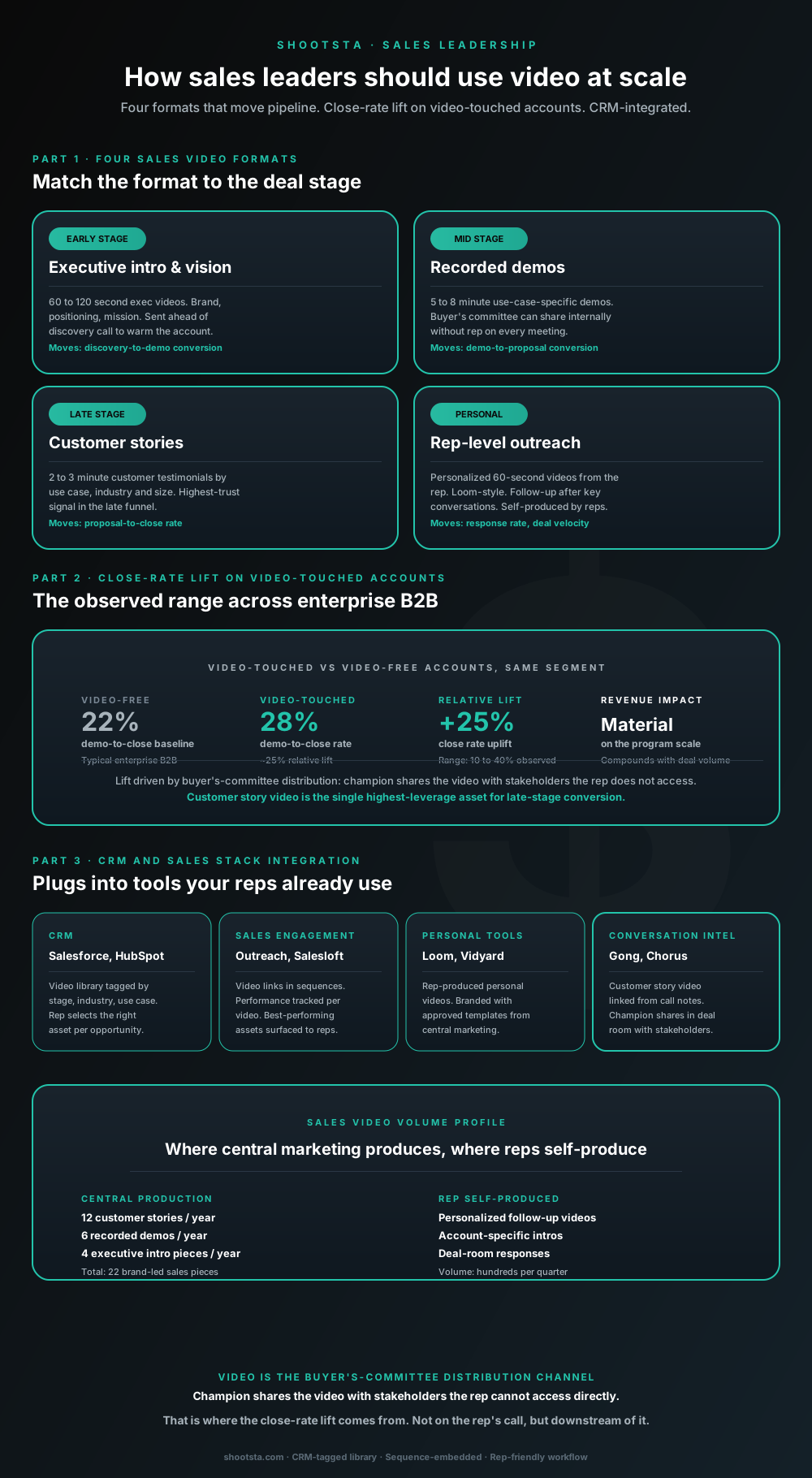
How sales leaders should use video at scale
Sales leaders mostly think about video as personalized rep outreach (Loom, Vidyard) or as marketing-produced customer stories. Both are useful. The bigger opportunity is the buyer's-committee distribution layer: assets the champion shares internally with stakeholders the rep does not access directly. That is where the close-rate lift compounds.
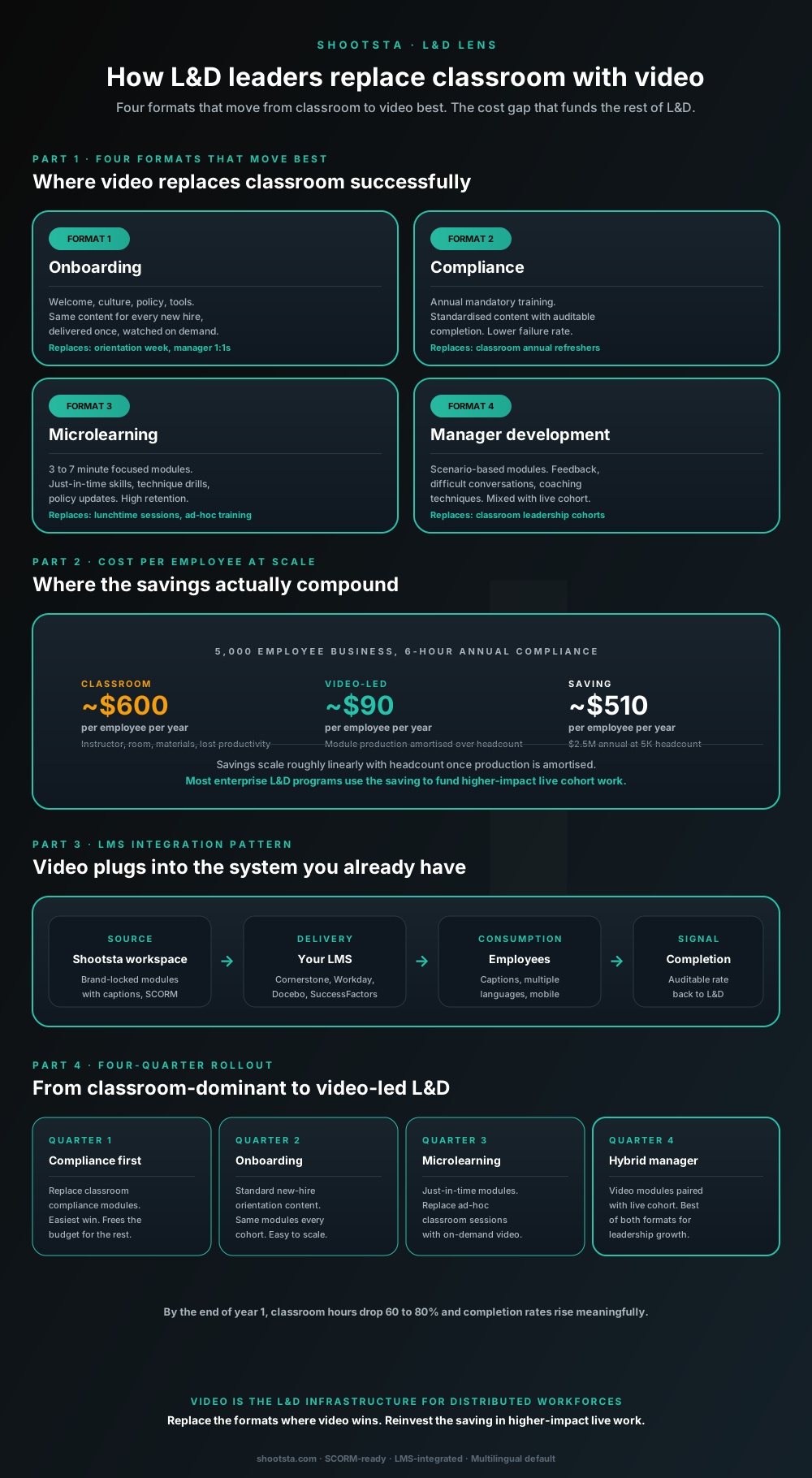
How L&D leaders replace classroom with video
L&D leaders running classroom-heavy training programs typically have the largest single opportunity in the business to free budget through format change. Four training formats move from classroom to video cleanly; the savings fund higher-impact live work. Here is the rollout that compounds learner adoption over four quarters.
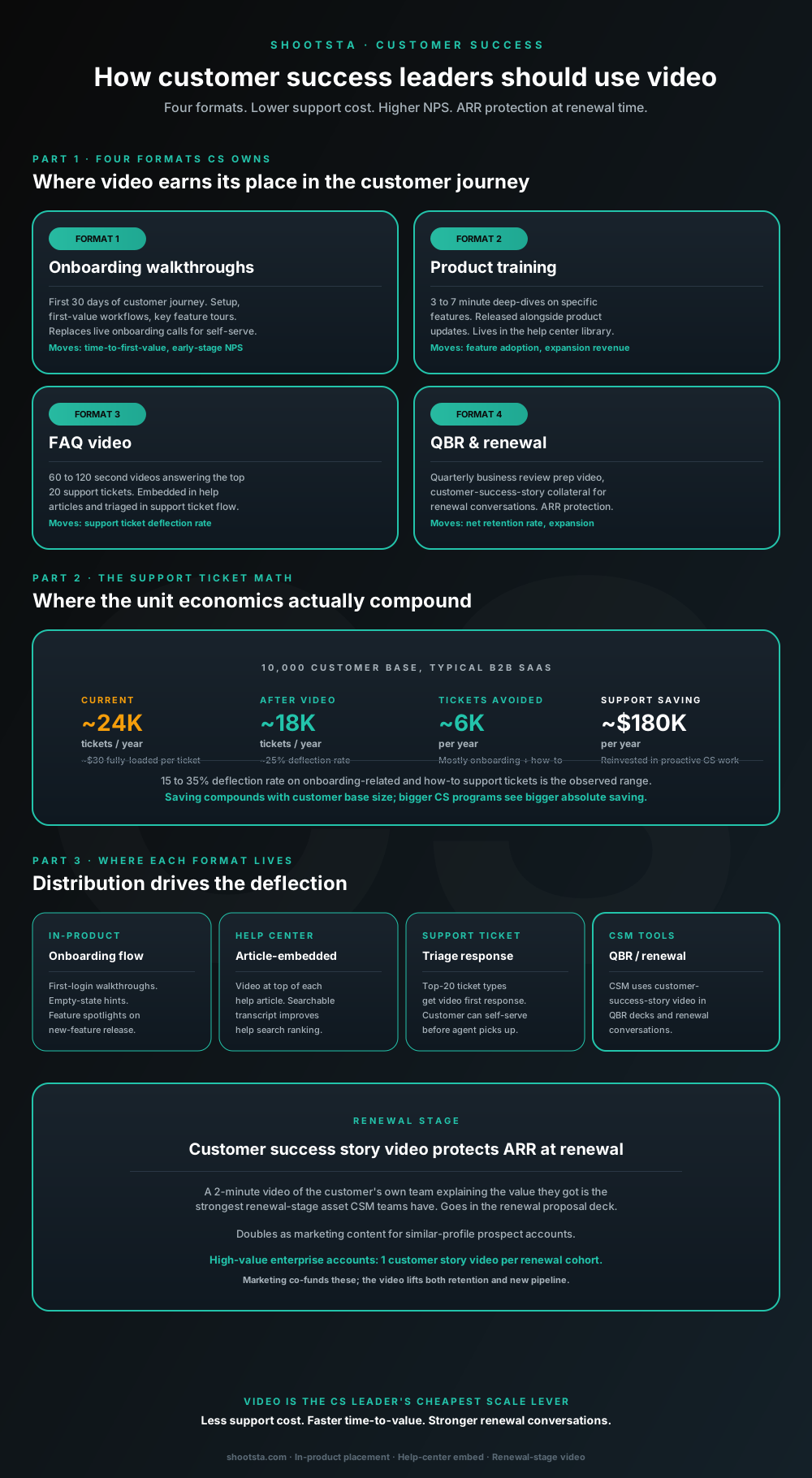
How customer success leaders should use video
Customer success leaders are usually under-resourced for both reactive support volume and proactive retention work. Video is the cheapest lever to fix both - 15 to 35% deflection on onboarding and how-to tickets, faster time-to-value, and renewal-stage customer story video that lifts net retention. Here is the four-format model and where each piece earns its place.
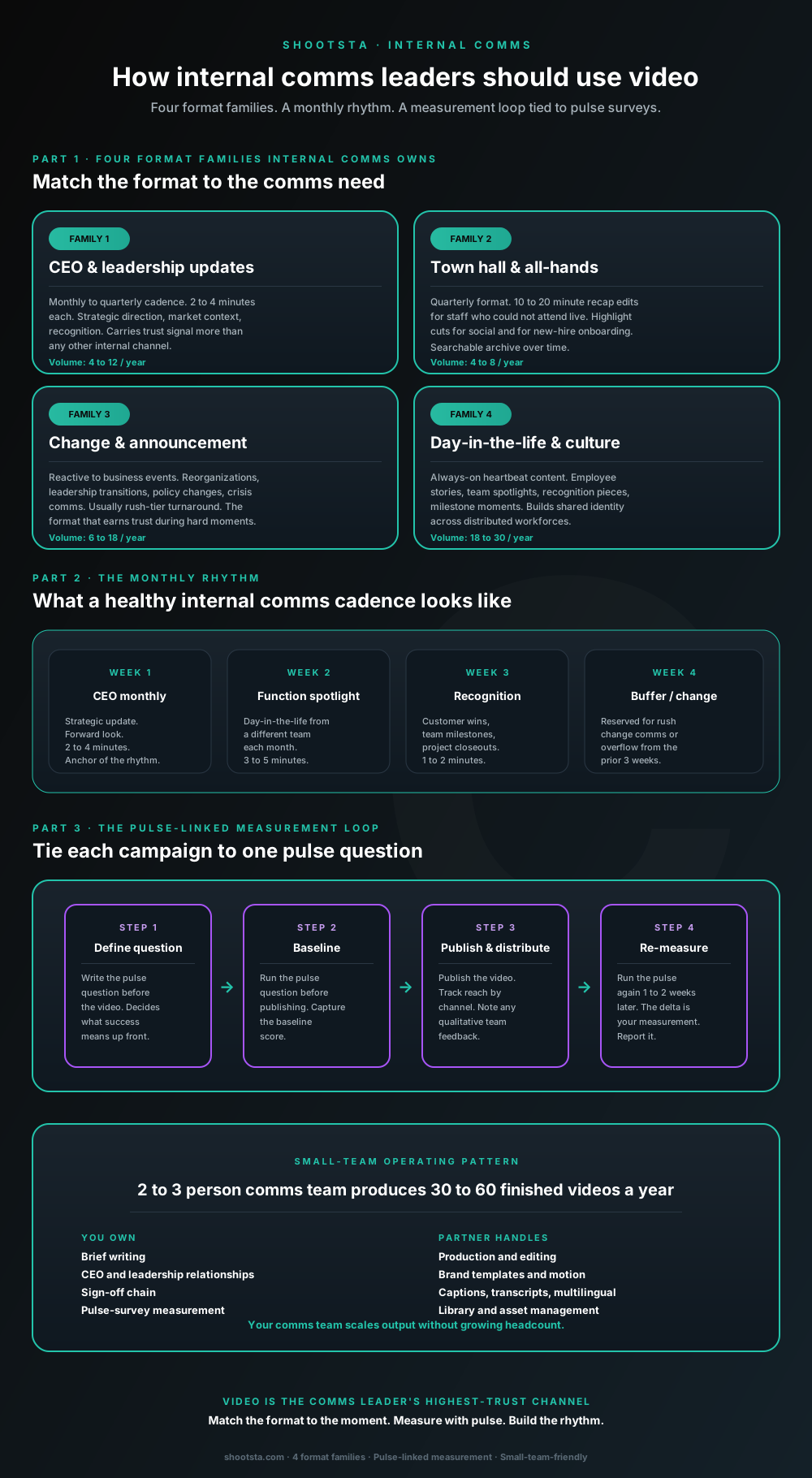
How internal comms leaders should use video
Internal comms leaders are usually under-resourced for the volume of video the business wants. The fix is not more headcount; it is structuring the program around four format families, a monthly rhythm, and a pulse-survey-linked measurement loop. Here is the operating pattern that lets a small comms team produce 30 to 60 finished videos a year.