
How to make enterprise video accessible
shootsta.
How to make enterprise video accessible
By Shootsta · Published May 16, 2026 · Updated October 2026
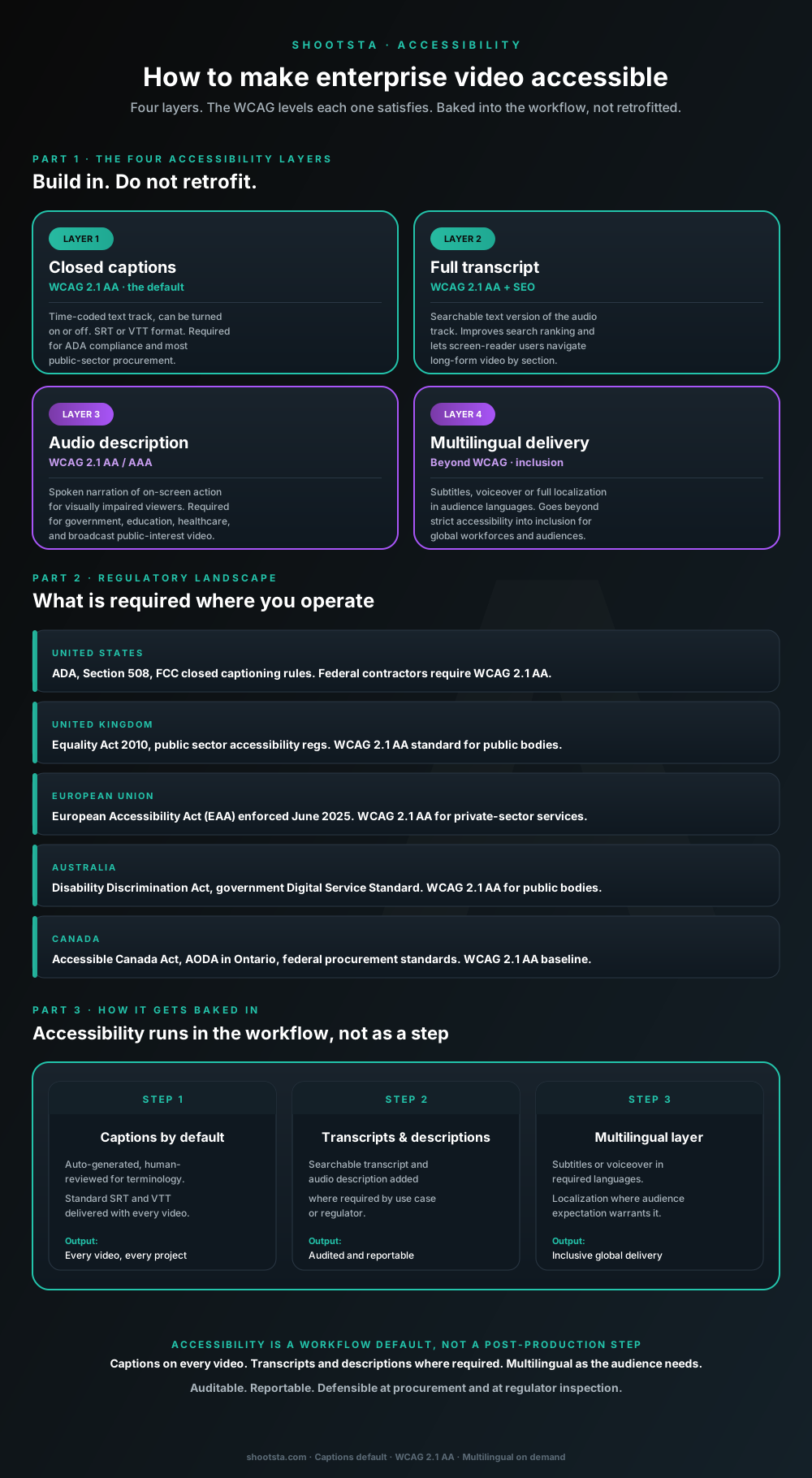
Accessibility is now a procurement default, not an after-thought. Four layers (captions, transcripts, audio description, multilingual delivery) map to the WCAG levels regulators require across the US, UK, EU, Australia and Canada. Here is the workflow that builds it in rather than retrofits it.
Why accessibility went from nice-to-have to procurement-default
Three shifts in the last 24 months turned video accessibility from an after-thought into a procurement requirement. Enforcement of the European Accessibility Act went live in June 2025, expanding WCAG 2.1 AA obligations to most private-sector services in the EU. US federal contracting now requires WCAG 2.1 AA across digital services including video. UK and Australian public-sector procurement standards have hardened around the same baseline.
In practice, enterprise procurement teams now ask about video accessibility during vendor selection. If your program treats captions and transcripts as add-on services, it pays for that in procurement. Programs that build accessibility into the workflow as a default get through procurement faster and hold up at audit.
The four accessibility layers
Enterprise video accessibility breaks into four layers. Each one solves a different access need and maps to different WCAG criteria.
Layer 1: Closed captions
Closed captions are a time-coded text track that viewers can turn on or off, delivered as an SRT or VTT file. They cover WCAG 2.1 Success Criterion 1.2.2 and are the accessibility requirement enterprise procurement asks about most. ADA compliance, Section 508, the EAA, AODA and most public-sector vendor approvals require them. Treat them as the minimum bar for any video headed for the public web in 2026.
Layer 2: Full text transcripts
A transcript is a searchable text version of the audio track, delivered alongside the video file. It covers WCAG 2.1 Success Criterion 1.2.1. Transcripts help audio-only and screen-reader users, and they lift search ranking because search engines can crawl the text. The transcript is also the source-of-truth for the caption track, so adding transcripts is usually marginal cost on top of captions.
Layer 3: Audio description
Audio description is spoken narration of on-screen action (text on slides, visual demonstrations, key visual cues) for viewers who are blind or have low vision. It covers WCAG 2.1 Success Criterion 1.2.5 (AA) and 1.2.7 (AAA). Most jurisdictions require it for government, education, healthcare and broadcast public-interest content. Corporate video often skips it, but regulated sectors now expect it more and more for L&D and customer-facing content.
Layer 4: Multilingual delivery
This layer means subtitles, voiceover replacement or full language versions for each audience. It goes beyond strict WCAG into inclusion, and it reaches global workforces, multilingual customers and markets where the master language would not land. The procurement bar for multilingual support has risen alongside the accessibility bar, especially for organizations operating across the EU and APAC. We covered the multilingual production layer in how to scale video across global offices.
The regulatory landscape in 2026
Five major jurisdictions each have their own accessibility framework. All five end up at WCAG 2.1 AA as the baseline for digital content, including video.
United States
The main rules are the Americans with Disabilities Act (ADA), Section 508 of the Rehabilitation Act and the FCC closed captioning rules for broadcast and online video. Federal contractors require WCAG 2.1 AA conformance across digital services. State-level frameworks (California Unruh Act, others) extend reach to private-sector consumer-facing content.
United Kingdom
The main rules are the Equality Act 2010 and the Public Sector Bodies (Websites and Mobile Applications) Accessibility Regulations 2018. WCAG 2.1 AA is the public-sector standard and the procurement baseline for vendors selling into government bodies. Accessibility case law is holding private-sector consumer services to a similar bar.
European Union
European Accessibility Act (EAA) enforcement began June 2025, requiring WCAG 2.1 AA across a broad set of private-sector services including financial services, e-commerce, transport ticketing, and audiovisual media. The Web Accessibility Directive covers the public sector. By 2027, EAA is expected to expand further into enterprise digital content.
Australia
The main rules are the Disability Discrimination Act 1992 and the Digital Service Standard for federal government. WCAG 2.1 AA is the public-sector baseline. State and federal procurement standards apply WCAG 2.1 AA to vendor digital deliverables. Private-sector consumer services are increasingly subject to similar bars through case law.
Canada
The main rules are the Accessible Canada Act, AODA (Accessibility for Ontarians with Disabilities Act) and federal procurement standards. WCAG 2.1 AA is the baseline across federal and Ontario provincial procurement. Other provinces are moving toward the same standard.
How accessibility gets baked into the workflow
Three operating moves make accessibility a default rather than a retrofit.
1. Captions as the production default
Write captions into the standard deliverable for every video, with auto-generated captions reviewed by a person for terminology accuracy. Ask for them as SRT, VTT and burned-in versions. For which of those to lead with by video type, see when to use burned-in vs SRT subtitles. Once they are part of the deliverable, nobody has to request captions on each project. Making captions a default rather than an add-on is the biggest single cost saving, since retrofitting them piece by piece costs far more.
2. Transcripts and audio description added by use case
Add transcripts by default for longer videos and for any video headed for public web search. Audio description is scoped per project for content destined for regulated audiences (government, education, healthcare) or where the visual layer carries information the audio does not. The decision happens at brief stage so the audio description script is built into the video rather than retrofitted after delivery.
3. Multilingual scoping at the program level, not per-project
Languages are agreed during onboarding based on audience footprint. A program serving APAC enterprise customers might scope Mandarin, Bahasa, Vietnamese, Thai, Japanese and Korean as available languages from day one. Subtitles in those languages are produced on every relevant piece without a separate procurement event per project. Voiceover replacement is added selectively for L&D and executive content where reading subtitles undermines the format.
What auditable accessibility delivery looks like
For regulated customers and public-sector procurement, the accessibility deliverable has to be documented and defensible at audit. Every program should produce the four records below.
The first is per-video conformance documentation. It states which WCAG criteria the piece meets, backed by the captions, transcripts, audio description and contrast checks done during production. It takes the form of a one-page conformance note attached to each finished video.
The second is standardized SRT/VTT files that follow each platform's own requirements. Different distribution platforms (YouTube, LinkedIn, internal LMS, Brightcove, Wistia) have slightly different caption format expectations. Using the standard industry formats prevents platform-specific rework.
The third is an auditable change history on the caption and transcript files. It records who edited each caption for accuracy, when they did it and what they changed. Compliance teams want this trail for any video that goes into formal accessibility audit.
The fourth is a regular accessibility review between your team and your production partner, held on a schedule you set. It covers the conformance rate, any accessibility complaints from end users and the plan for adding new layers. This review keeps the accessibility commitment visible at program-management level rather than buried in production detail.
The cost framing that lands with finance
Accessibility framed as a retrofit cost looks expensive, because every video needs captions, transcripts and audio description added after delivery as separate jobs. Framed as a workflow default, it looks cheap. The extra cost per video is small because captions and transcripts come from the same transcription source that production already uses for search and asset tagging.
The gap grows with volume. A program that makes a few dozen videos a year sees a clear difference in accessibility spend, and a program making hundreds sees a much larger one. Bring this framing to finance when you scope the accessibility budget, because built-in costs much less than bolted-on.
What this means for in-house teams handling some video themselves
The accessibility default has to cover video your in-house team makes as well as video from a partner. Three practical moves help in-house teams do this.
Use the same caption and transcript tools the production partner uses, so the output format is consistent across in-house and partner-produced video. Many enterprise transcription tools offer service levels that make this straightforward.
Train internal video producers on the four-layer model so they brief in accessibility requirements from day one rather than discovering them at delivery. A retrofit usually happens because the original brief did not mention accessibility.
Keep the conformance documentation in one central place. Whether the video comes from your team or a partner, the conformance note attaches to the asset in the same library. An audit then takes one query instead of a reconciliation across several vendors.
Frequently asked questions
Are auto-generated captions WCAG-compliant?
Auto-generated captions on their own usually do not meet WCAG 2.1 AA, because the test is whether the captions are accurate. The bar is high accuracy across the whole video, which auto-transcription reaches on clean audio but not consistently on noisy audio, multilingual content, or content with technical terminology. Human review of auto-generated captions is the practical standard.
What is the difference between captions and subtitles?
Closed captions include non-speech information (speaker identification, sound effects, music cues) and are designed for deaf and hard-of-hearing viewers. Subtitles assume the viewer can hear and are designed primarily for translation. Both are produced from the same transcript source but with different annotation layers. WCAG references captions specifically; subtitles are an inclusion feature beyond strict WCAG.
How does WCAG 2.2 affect video?
WCAG 2.2 (October 2023) is an extension of WCAG 2.1 - all 2.1 success criteria still apply, with nine new criteria added that are mostly UI-focused rather than video-specific. For practical purposes, an enterprise program that meets WCAG 2.1 AA also meets the video-relevant portion of WCAG 2.2. Procurement standards are slowly updating to reference WCAG 2.2.
Do we need audio description on every video?
No. Audio description is required where the visual layer carries information that is not in the audio (slides with key data, visual demonstrations of products, on-screen text that is not spoken). For talking-head video where the audio describes everything visible, audio description adds little. The brief stage is when to decide whether audio description is needed.
How fast can captions be delivered?
For standard subscription production, captions arrive with the finished video in about 48 hours. When a project is turned around faster, the captions come with it inside the same window. There is no separate delivery timeline, because captions are part of the standard deliverable.
What if our customers are in a language not covered by your standard multilingual list?
Raise less common languages when you scope the program, so coverage and timing can be confirmed for each one before work starts. Less common languages can add time to the schedule. Hold them to the same quality bar as your main languages, including a review of the captions by a fluent speaker.
How is accessibility delivery audited?
It can be audited in two ways. You can check it yourself (sample-test caption accuracy, verify file formats, confirm the conformance documentation matches the finished asset), or you can use a third-party accessibility audit firm if your procurement requires it. Before the first project, agree with your production partner what conformance documentation each video ships with and which audit framework it needs to fit.
Where to go next
For the multilingual production layer that overlaps with accessibility, read how to scale video across global offices. For the brand-control discipline that holds quality consistent including on accessibility delivery, read brand control with a video production partner. For the workflow that lets accessibility default into every project, read how a video partner extends your in-house team.
To scope an accessibility plan that fits your regulatory exposure, book a free consultation.
Take this article with you
Read the latest at shootsta.com/blog/how-to-make-enterprise-video-accessible
You might also like
How to Brief an Animation Project
How to Brief an Animation Project
An animation brief is the document you send to your production partner before work starts. Get it right and you cut revision cycles in half. Get it wrong and you discover mid-production that everyone disagrees on what the video is for. This is what a complete brief looks like.
Animation for change management comms
Animation for change management comms
Animation handles change management communications better than live video for three reasons: no on-camera executives required during sensitive periods, scene-level updates when plans shift, and a single production that works across global teams with voiceover-only language swaps.
How sales leaders should use video at scale
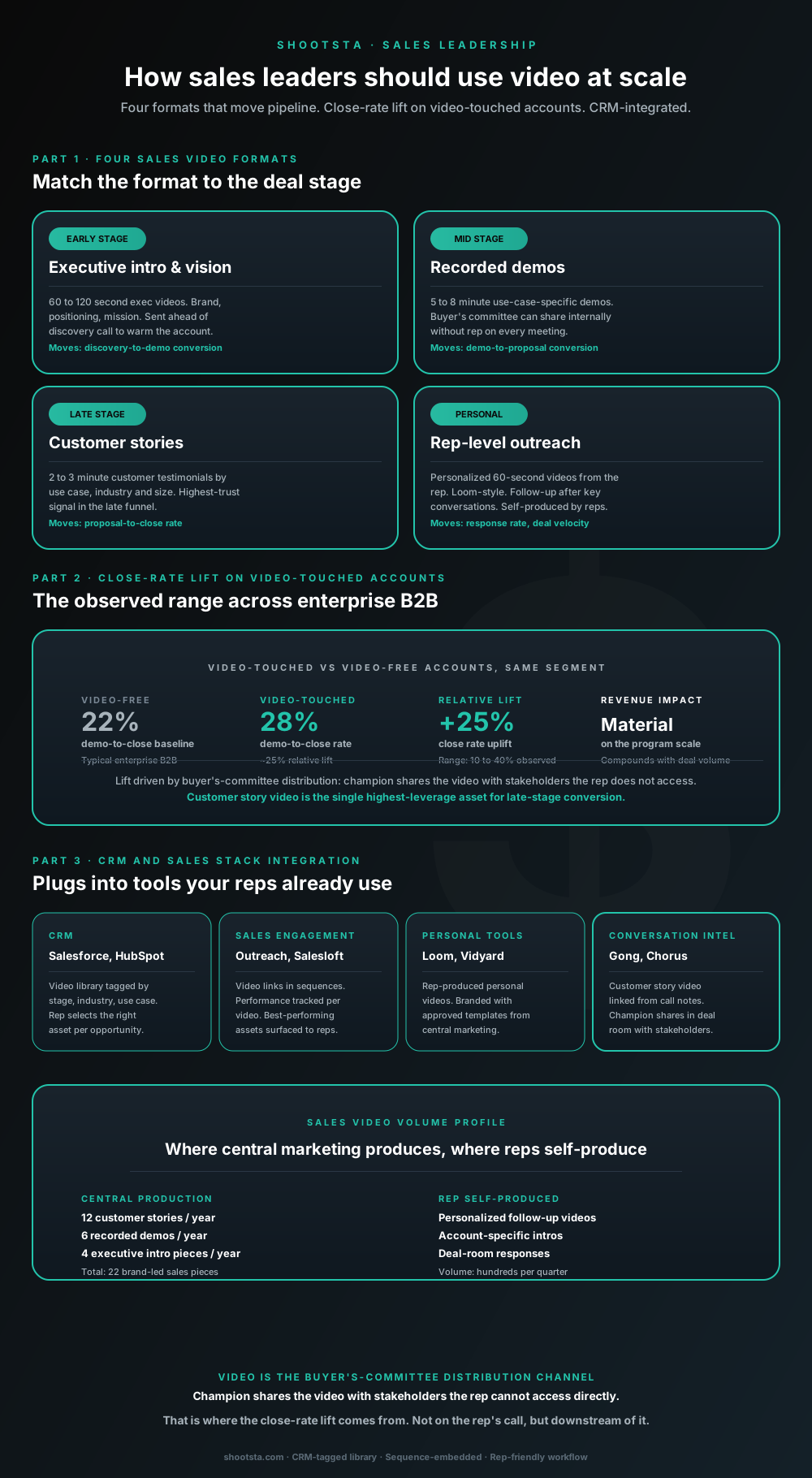
Sales leaders mostly think about video as personalized rep outreach (Loom, Vidyard) or as marketing-produced customer stories. Both are useful. The bigger opportunity is the buyer's-committee distribution layer: assets the champion shares internally with stakeholders the rep does not access directly. That is where the close-rate lift compounds.
How L&D leaders replace classroom with video
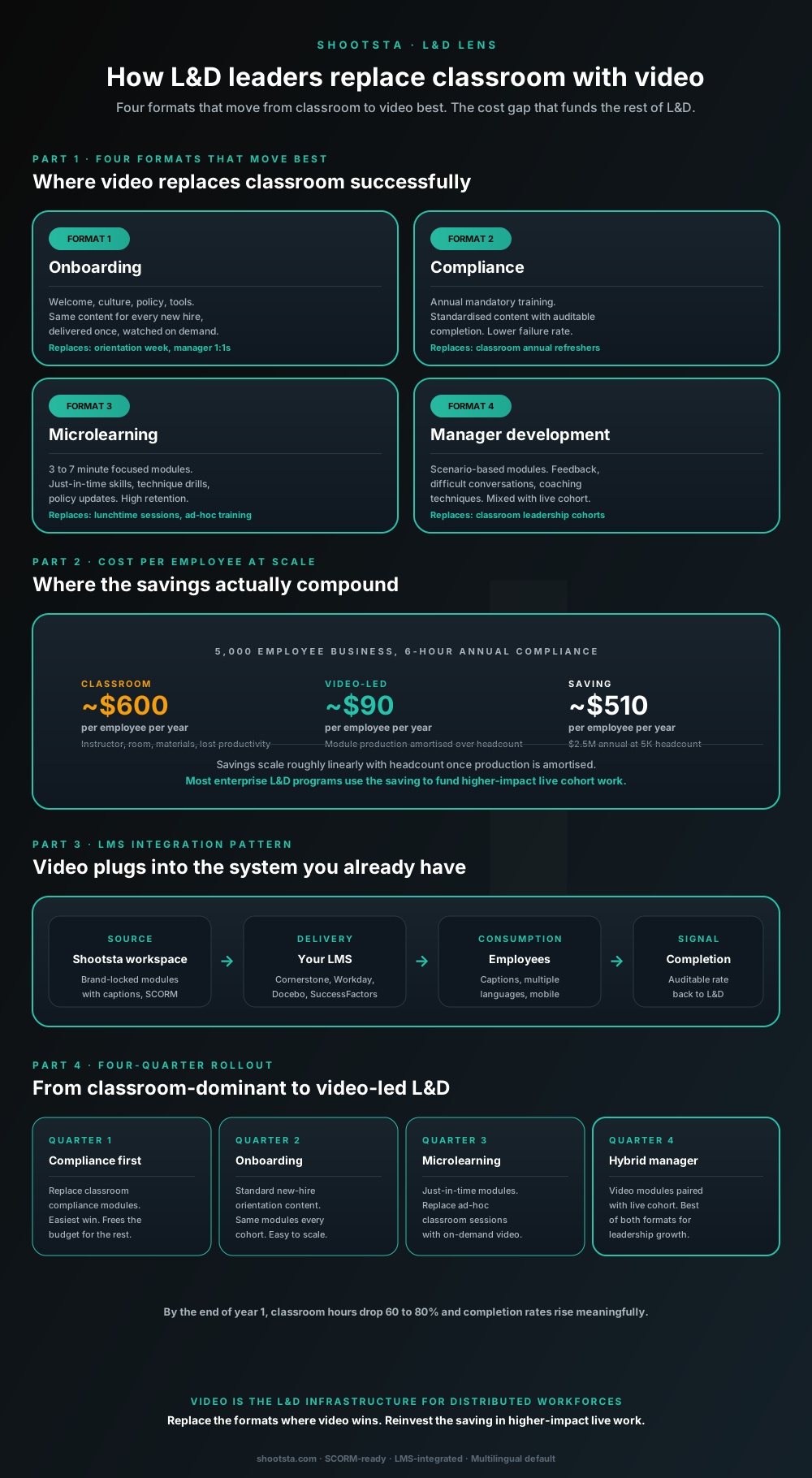
L&D leaders running classroom-heavy training programs typically have the largest single opportunity in the business to free budget through format change. Four training formats move from classroom to video cleanly; the savings fund higher-impact live work. Here is the rollout that compounds learner adoption over four quarters.
How customer success leaders should use video
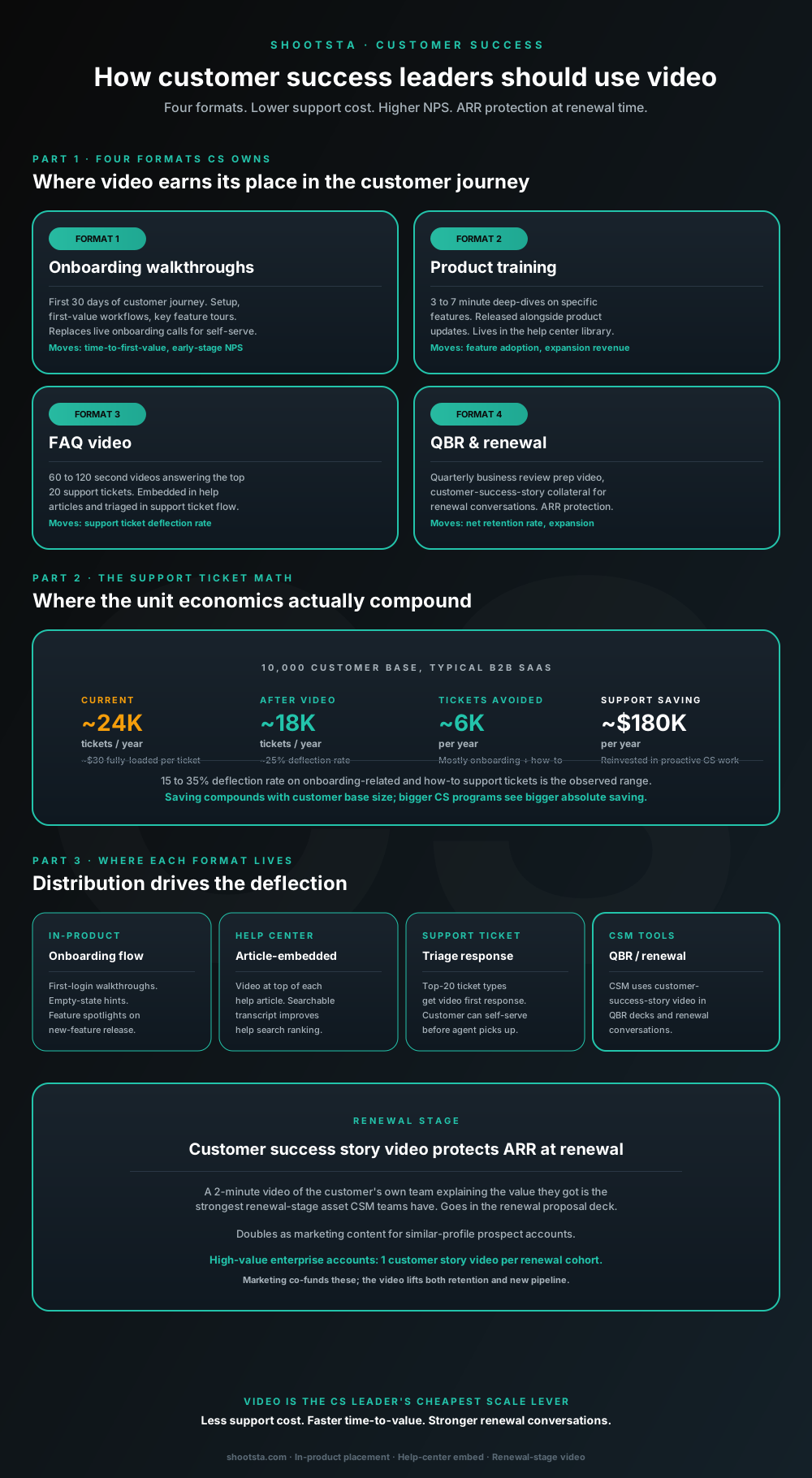
Customer success leaders are usually under-resourced for both reactive support volume and proactive retention work. Video is the cheapest lever to fix both - 15 to 35% deflection on onboarding and how-to tickets, faster time-to-value, and renewal-stage customer story video that lifts net retention. Here is the four-format model and where each piece earns its place.
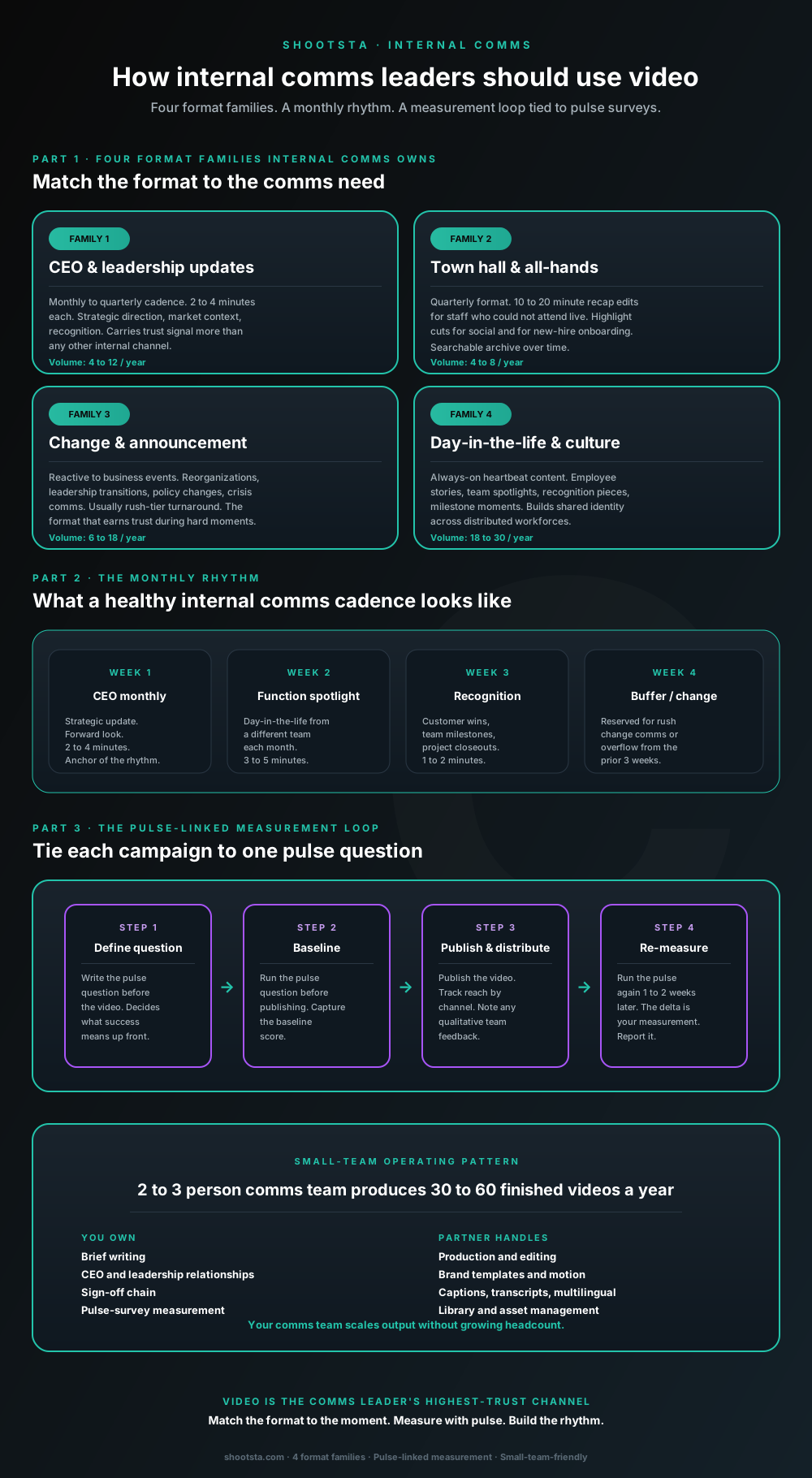
How internal comms leaders should use video
Internal comms leaders are usually under-resourced for the volume of video the business wants. The fix is not more headcount; it is structuring the program around four format families, a monthly rhythm, and a pulse-survey-linked measurement loop. Here is the operating pattern that lets a small comms team produce 30 to 60 finished videos a year.