
How customer success leaders should use video
shootsta.
How customer success leaders should use video
By Shootsta · Published May 31, 2026 · Updated October 2026
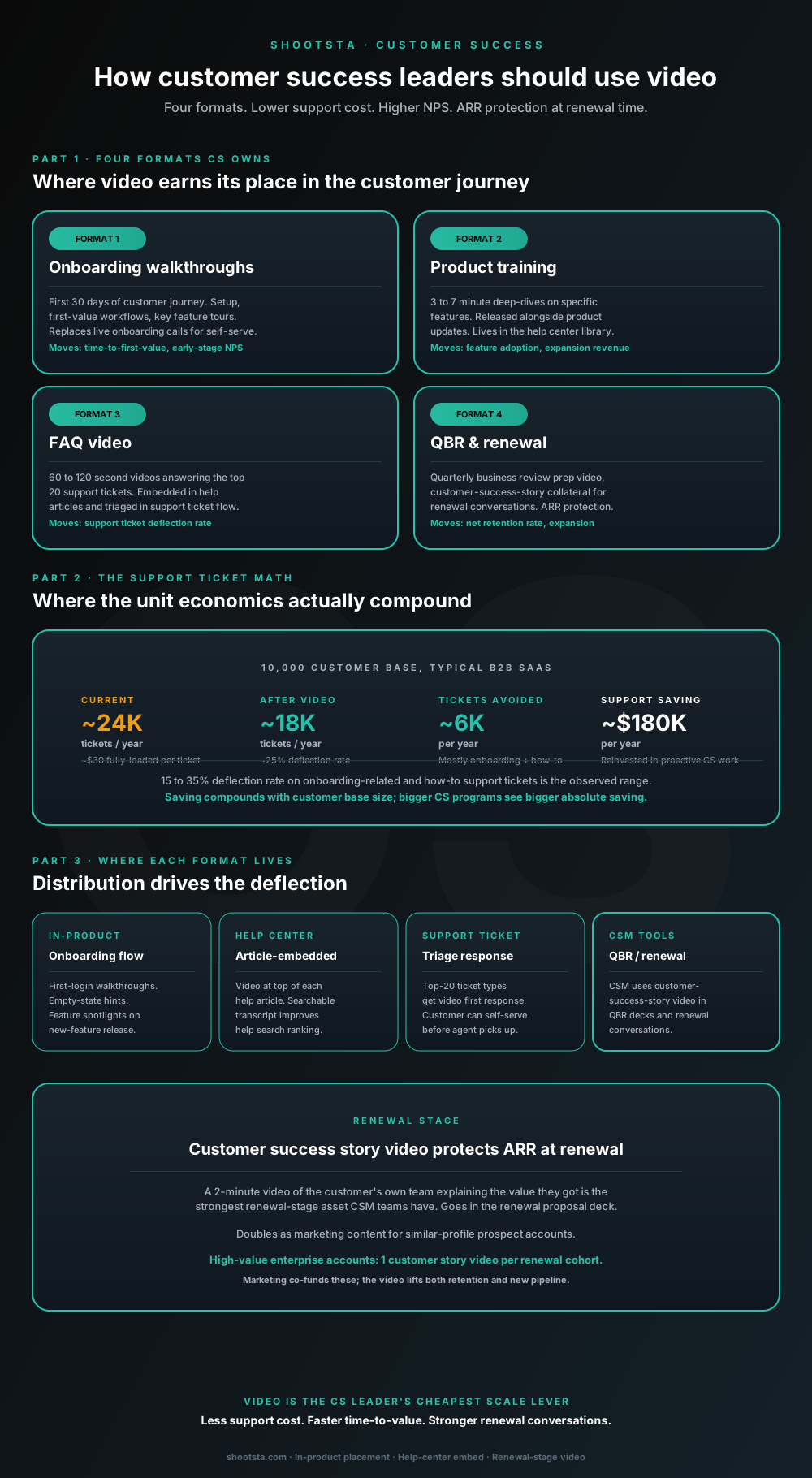
Customer success leaders are usually under-resourced for both reactive support volume and proactive retention work. Video is the cheapest lever to fix both - 15 to 35% deflection on onboarding and how-to tickets, faster time-to-value, and renewal-stage customer story video that lifts net retention. Here is the four-format model and where each piece earns its place.
Why CS leaders have the highest dollar-return opportunity for video
Customer success teams own two outcomes that video moves directly. Support costs fall when customers can answer their own questions, and customers reach value sooner when setup is easy to follow. Both feed net revenue retention. Any one of these can justify the spend on video, and together they make one of the easiest internal business cases to defend.
CS video keeps the CSM and the support agent in their jobs. It takes the repeatable work off the CSM's day, such as onboarding walkthroughs, product training and FAQ explanations. That frees them for the work that moves retention: account health, executive sponsor relationships and expansion plays. Video absorbs the volume, and your CSM team spends the recovered hours where they count.
The four video formats CS owns
Format 1: Onboarding walkthroughs
Onboarding walkthroughs cover the first 30 days of the customer journey. They walk through setup steps, first-value workflows and tours of the main features. For self-serve and mid-market segments they can replace or support live onboarding calls. The customer goes at their own pace and watches the right module at the moment they need it, so customers who use the library tend to reach first value sooner than those who do not.
Format 2: Product training
Product training videos are 3 to 7 minute deep-dives on specific features. You release them alongside product updates as part of the launch flow, and they stay in the help center library for good. They lift feature adoption, because customers who see a feature explained are more likely to use it. Adoption in turn drives expansion revenue, since it is one of the clearest early signs that an account will upgrade.
Format 3: FAQ video
FAQ videos run 60 to 120 seconds and answer the top 20 support tickets your team receives. They sit inside the related help center articles. The ticket flow also sends them automatically before an agent picks up the ticket. This category gives the best deflection return of any, because the volume is concentrated in a small number of repeat questions.
Format 4: QBR and renewal customer story video
Customer success story videos go into QBR decks and renewal conversations. A 2-minute video of the customer's own team explaining the value they got carries more weight in a renewal review than any number of CSM-produced slides. The same video works as marketing material for prospect accounts with a similar profile. Marketing often co-funds these because the asset works on both sides of the retention-acquisition fence.
The support ticket math at scale
Here is a worked example with assumed inputs, so you can swap in your own. Take a B2B SaaS business with 10,000 customers that each raise 2.4 support tickets a year on average.
Current state: ~24,000 tickets a year at ~$30 fully-loaded per ticket = $720K annual support cost. Fully-loaded includes agent time, tooling, escalation cost and the opportunity cost of slow first response.
After video program: ~18,000 tickets at the same cost-per-ticket = $540K. This assumes a 25% deflection rate on onboarding and how-to tickets, and that those tickets make up half of total volume. Other ticket categories (bugs, billing, escalations) are not addressed by FAQ video and stay in the support queue.
Net annual saving: ~$180K after an assumed $90K a year to produce the CS video program. Net retention often rises alongside the cost reduction because the customers who self-serve through video are also the customers who reach first-value faster, which correlates with renewal rates.
The saving compounds with customer base size. A 30,000-customer business sees roughly 3x the absolute saving for similar per-customer ticket volumes. A 1,000-customer business sees roughly $25K to $40K net saving, which is still worth it but reads as smaller than the retention impact.
Interactive calculator
What could a CS video program deflect from support?
Set your customer base, average tickets per customer, the share that is onboarding or how-to in nature, and the cost per ticket. The calculator returns expected support cost saving from the observed 25% deflection rate.
Tickets avoided / year
3,000
25% deflection on 12,000 deflectable tickets
Support cost saving
$90K
at this cost-per-ticket
Net annual value
$0
after CS video program cost
What the saving usually funds
Most CS leaders do not take the support saving as a budget cut. They reinvest it in proactive CS work (account health monitoring, executive sponsor programs, expansion plays) where the time saved by ticket deflection has higher impact. Net new retention typically rises in parallel with the cost reduction, so the saving compounds two ways.
Scope a CS video programAssumptions: 25% deflection on onboarding and how-to tickets is the observed midpoint across enterprise customers (range 15 to 35%). Annual CS video program cost estimated at ~$90K for a subscription producing 30-50 finished pieces a year. Numbers are guides.
Where each format lives in the customer journey
In-product
Onboarding walkthroughs play inside the application's first-login flow. Empty states can carry a short video for features the customer has not used yet, and new releases can open with a feature spotlight. In-product placement gives the best deflection, because the customer sees the video at the exact moment they need it.
Help center
Video at the top of each help article, with the article text below as searchable backup. Adding video transcripts to the help articles also improves search ranking inside the help center because the article picks up additional searchable text. Time on page drops as well, which here is a good sign because customers find the answer faster.
Support ticket triage
The top 20 support ticket types get an automated first response with a link to the relevant FAQ video. The customer can self-serve before an agent picks up the ticket. When they do, the ticket either closes or rolls over to the agent with the customer already partway through the workflow. You configure the triage step once, and the deflection keeps paying back for as long as the videos stay current.
CSM tools
CSMs use QBR and renewal customer story videos in proposal decks and renewal conversations. The videos live in the CSM's deck library tagged by industry, use case and customer size so the right asset is one click away.
How the renewal-stage video protects ARR
The piece with the biggest payoff in a CS video library is a 2-minute video of a successful customer's team explaining the value they got. It earns its keep in three places.
The first is renewal proposal decks for accounts with a similar profile. The current customer hears another customer like them talk about ROI - the most credible source of validation possible.
The second is the regular QBR for healthy accounts. The video reminds the customer's stakeholders why they bought in the first place, which matters because staff turnover at the customer often surfaces "why are we paying for this" questions at QBR time.
The third is marketing nurture for prospect accounts with a similar profile. The same video is a strong asset for new pipeline against accounts with the same profile.
For high-value enterprise accounts, the math usually justifies producing one customer story video per major renewal cohort. The video lifts both retention (ARR protected) and new pipeline (ARR added), which is why marketing is often willing to co-fund it.
How CS video integrates with your existing tools
Three integration points cover most of the implementation. The first is the in-product video player. Many SaaS applications either have a native video player in the onboarding component (Appcues, Pendo, WalkMe) or render embedded MP4 from a CDN. The Shootsta workflow delivers MP4 files with captions to whichever endpoint your product team specifies.
The second is your help center CMS, whether that is Zendesk, Intercom, HubSpot Knowledge Base, Document360 or a tool built in-house. Standard help article templates put a video block at the top. The transcript sits below it for search and accessibility.
The third is automation in your support ticket platform. Zendesk macros, Intercom replies and Salesforce Service Cloud automated responses can all include video links keyed to the ticket category. The configuration is per-ticket-type and rarely changes once set up.
What changes for the CSM team
The CSM does fewer repetitive onboarding calls, fewer how-to walkthroughs over screenshare, and fewer "let me show you that feature" interruptions. Time recovered usually goes to executive sponsor relationships, account health intervention, and expansion plays - the work that has been on the CSM's roadmap but bumped by reactive support.
Position the change carefully inside the team. CSMs are the strategic relationship layer, and video is the volume layer. The CSM owns the customer; the video library handles the repeatable knowledge transfer. CSMs tend to welcome this shift, because the repeatable work is rarely the part of the job they enjoy.
Frequently asked questions
Will customers watch the videos instead of opening tickets?
Many will, especially for the top 20 most common ticket types. The deflection rate varies by category. It is highest on onboarding and setup questions where the answer is procedural. It is lower on how-to questions where the customer is unsure if their question matches the video, and lowest on edge cases. The triage step matters: customers who get a relevant video link in the first ticket response self-serve more often than customers who have to find the video on their own.
Should we replace live onboarding calls entirely?
That depends on the segment. Enterprise customers usually still want a live onboarding kickoff with their CSM; the video library supplements but does not replace the relationship. Mid-market and self-serve customers often prefer the video-first onboarding because it respects their schedule. Match the model to the segment.
How do we measure the impact?
Track four numbers. Support tickets per customer per quarter and time-to-first-value should both trend down over the rollout. Feature adoption for features with a training video should trend up, and net retention should rise on a slower horizon. Each metric is in the system you already use; the video program shifts them rather than creating new dashboards. We covered the broader measurement framework in how to measure enterprise video success.
What about edge cases and product bugs?
Those sit outside the video library, which covers the repeatable knowledge transfer and leaves per-customer edge cases alone. Bugs and one-off issues still go through the support agent queue and the engineering escalation path. The library reduces the volume of the deflectable category; the rest of the support stack handles everything else.
How fresh does the content need to be kept?
Product training video for major feature areas needs refreshing whenever the feature changes in a way the customer would notice. Review onboarding walkthroughs each quarter to catch UI changes. FAQ video has the longest shelf life because the underlying questions change slowly. Budget for a share of the library to be refreshed each year as part of the production plan, and set that share from your release calendar.
Can marketing reuse the CS-funded video assets?
Yes, and they should. The customer story videos in particular work as both renewal-stage and new-acquisition assets. The product training video can be repurposed into marketing demo content. The cross-functional reuse is one of the reasons consolidating to a single video operating model is worth it. We covered the use-case-by-function map in how enterprise teams actually use video.
Where to go next
For the working pattern with marketing co-funding renewal-stage customer story videos, read how a CMO should think about enterprise video. For the operating model alongside an existing CS team, read how a video partner extends your in-house team. For the measurement framework that maps to retention metrics, read how to measure enterprise video success.
To scope a CS video program for your customer base, book a free consultation.
Take this article with you
Read the latest at shootsta.com/blog/how-customer-success-leaders-should-use-video
You might also like
How to Brief an Animation Project
How to Brief an Animation Project
An animation brief is the document you send to your production partner before work starts. Get it right and you cut revision cycles in half. Get it wrong and you discover mid-production that everyone disagrees on what the video is for. This is what a complete brief looks like.
Animation for change management comms
Animation for change management comms
Animation handles change management communications better than live video for three reasons: no on-camera executives required during sensitive periods, scene-level updates when plans shift, and a single production that works across global teams with voiceover-only language swaps.
How sales leaders should use video at scale
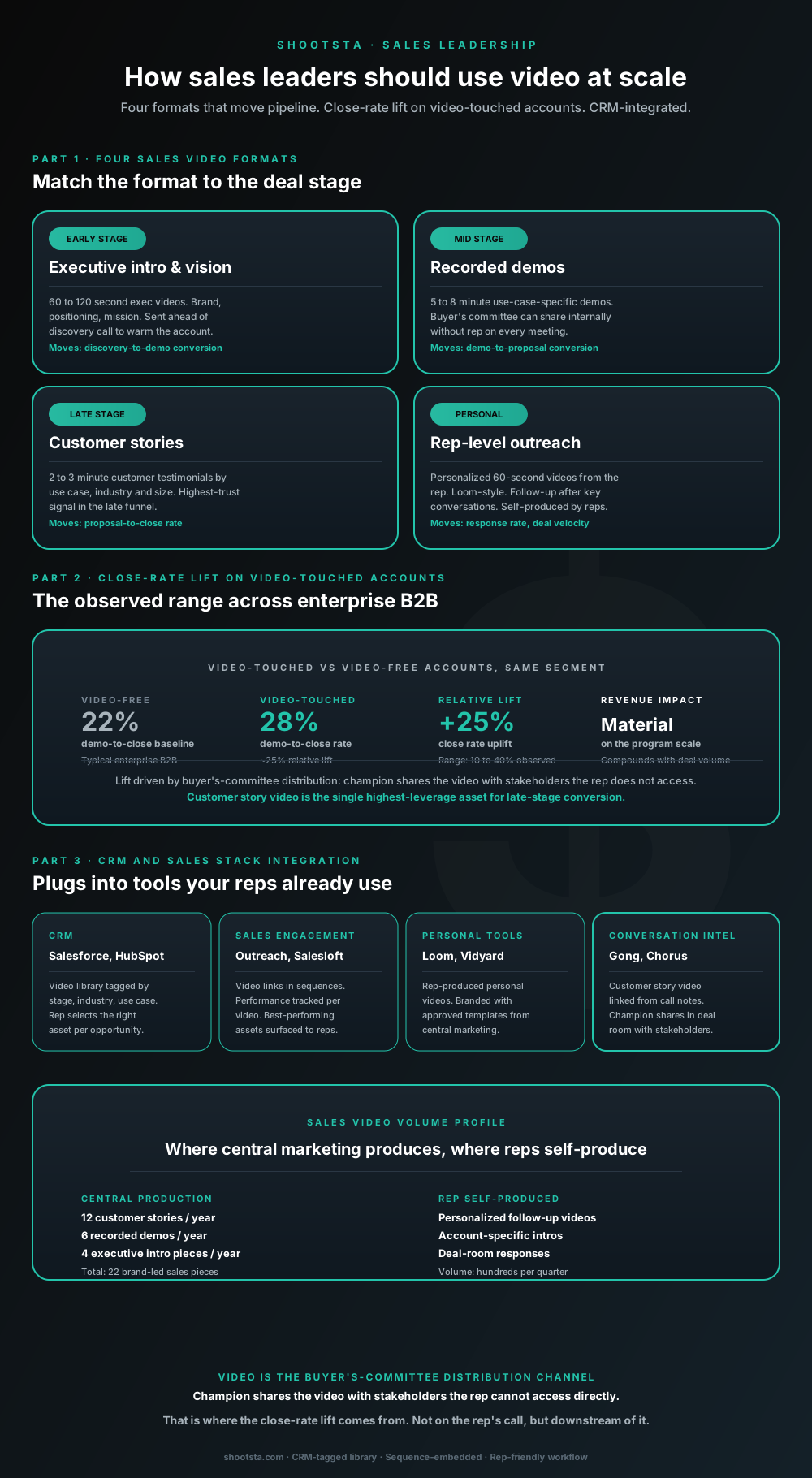
Sales leaders mostly think about video as personalized rep outreach (Loom, Vidyard) or as marketing-produced customer stories. Both are useful. The bigger opportunity is the buyer's-committee distribution layer: assets the champion shares internally with stakeholders the rep does not access directly. That is where the close-rate lift compounds.
How L&D leaders replace classroom with video
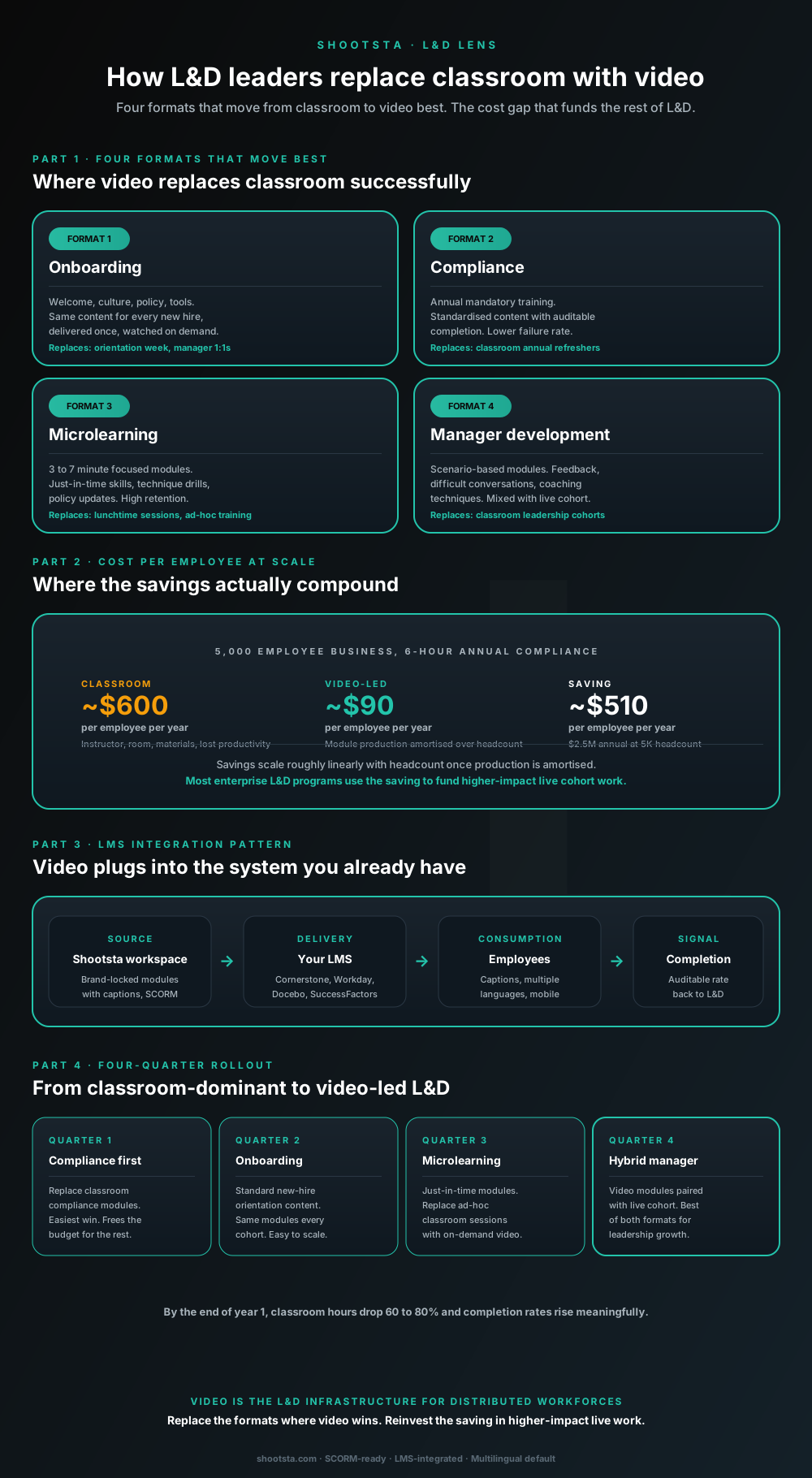
L&D leaders running classroom-heavy training programs typically have the largest single opportunity in the business to free budget through format change. Four training formats move from classroom to video cleanly; the savings fund higher-impact live work. Here is the rollout that compounds learner adoption over four quarters.
How internal comms leaders should use video
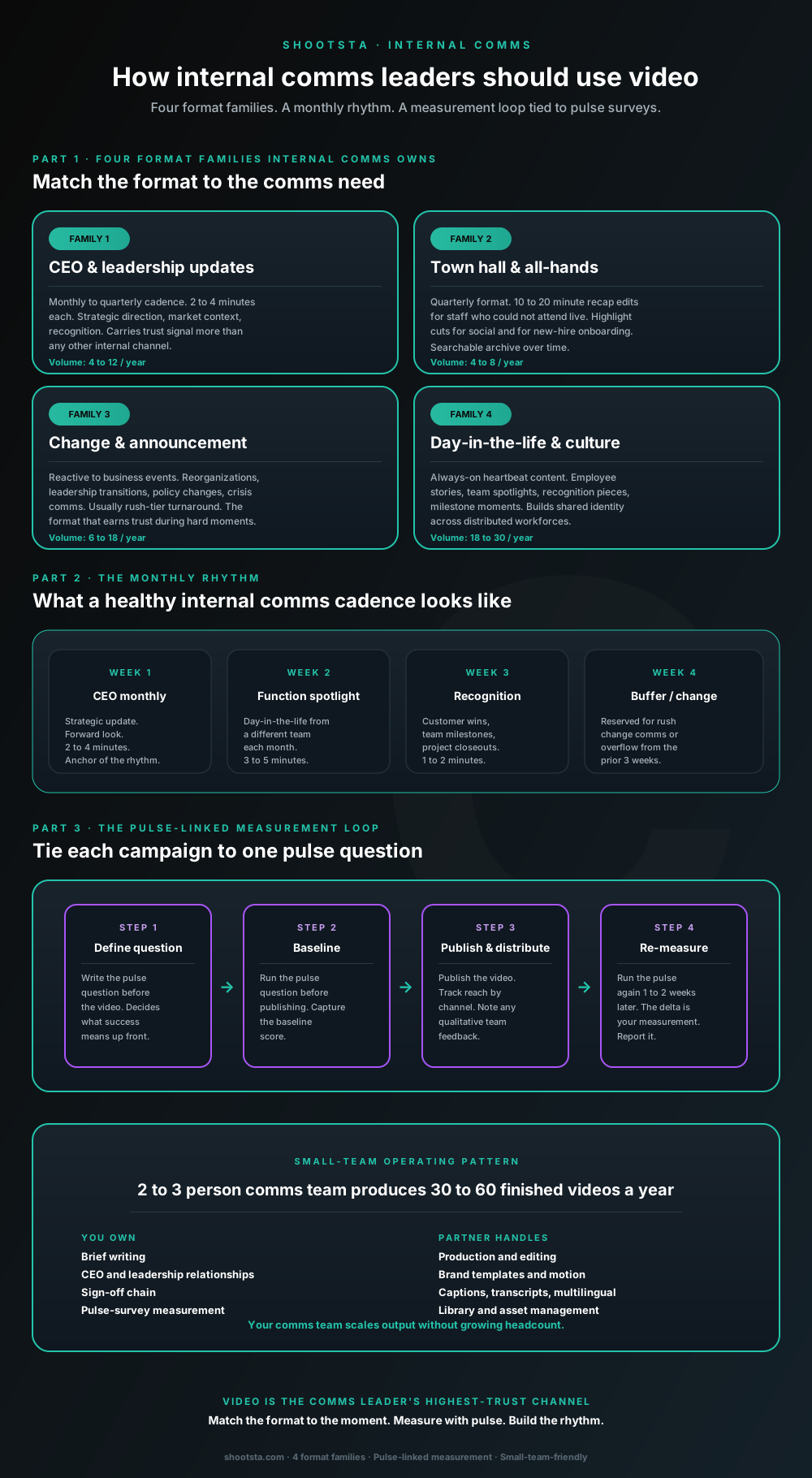
Internal comms leaders are usually under-resourced for the volume of video the business wants. The fix is not more headcount; it is structuring the program around four format families, a monthly rhythm, and a pulse-survey-linked measurement loop. Here is the operating pattern that lets a small comms team produce 30 to 60 finished videos a year.
How heads of TA should use video for hiring
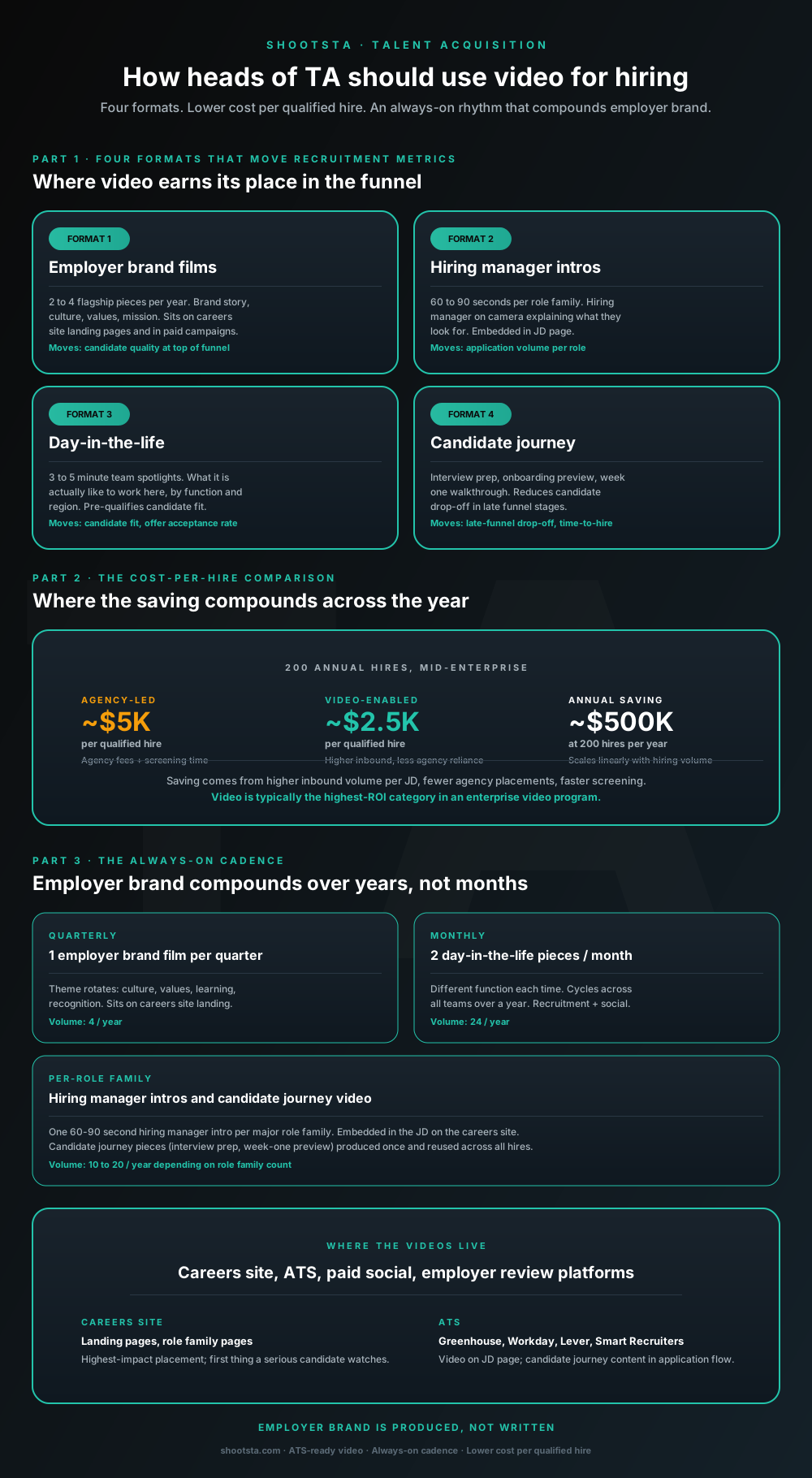
Heads of talent acquisition running agency-heavy hiring funnels usually have the highest-ROI video opportunity in the business. Four formats move recruitment metrics most, the cost-per-qualified-hire drops 35 to 60 percent at scale, and the rhythm compounds employer brand over years rather than months.