
How to produce event recap video at scale
shootsta.
How to produce event recap video at scale
By Shootsta · Published April 30, 2026 · Updated October 2026
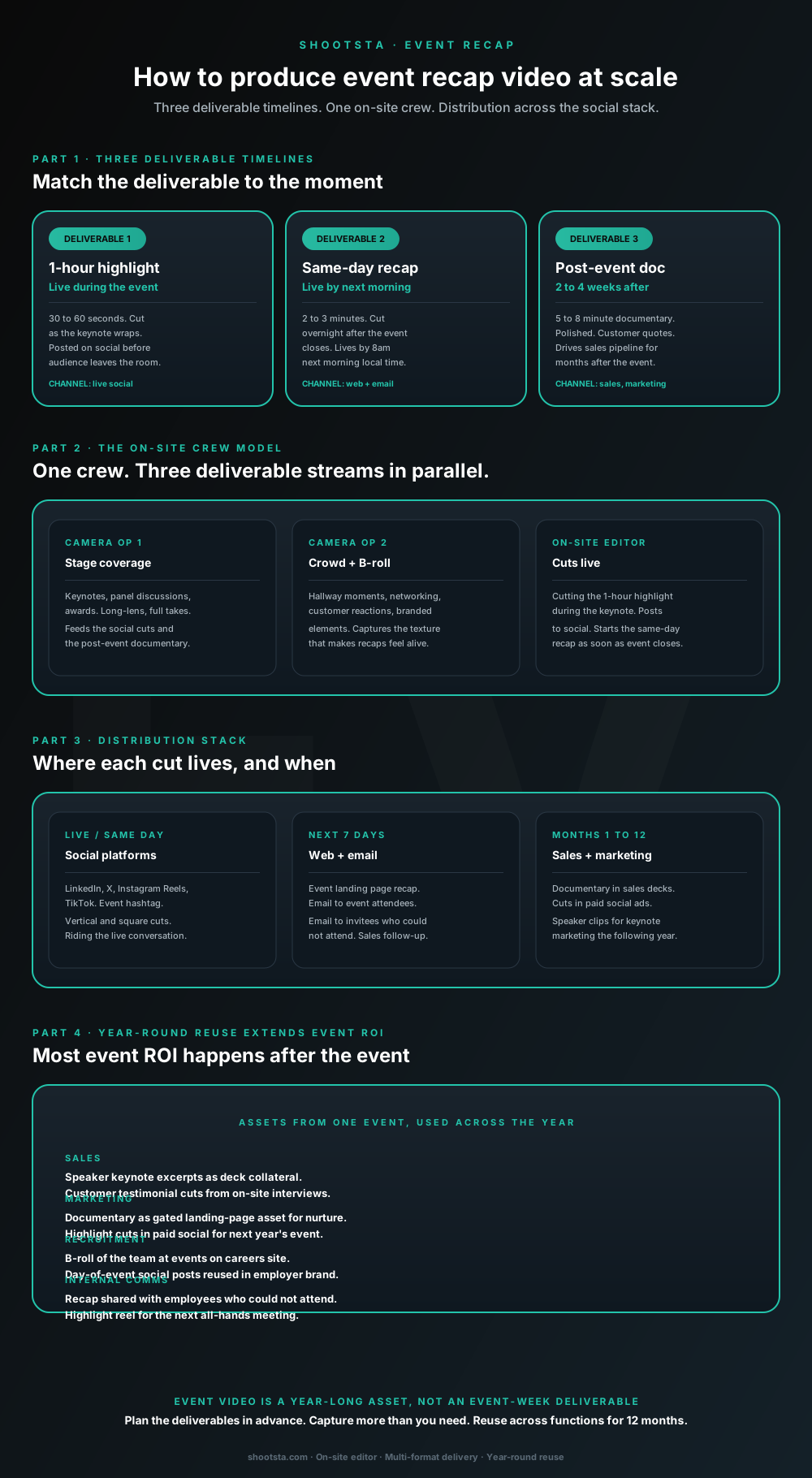
Most enterprise event recap programs treat video as an event-week deliverable. The structural shift is treating it as a year-long asset that compounds. Three deliverable timelines from one on-site crew, captured with the post-event reuse pattern in mind, produces 10x the reach the in-person event alone delivers.
Why most event recap video underdelivers on the event budget
A common event recap pattern goes like this. Your marketing team books a video crew through the event vendor and gets a 90-second highlight reel two weeks after the event closes. It goes on LinkedIn once and is never used again. The ROI conversation struggles because the video was scoped as an event deliverable, when it could have been a year-long asset.
The fix is to treat event video as a marketing asset that happens to be captured at an event. You keep the same crew but change the brief, so it asks for several formats and a distribution plan that runs all year. When you design the deliverable model in advance, the same event video budget reaches far more people.
The three deliverable timelines
One event produces three distinct video deliverables, each on its own timeline and each serving a different distribution channel.
1-hour highlight (live during the event)
This is a 30 to 60 second cut produced by an on-site editor as the keynote wraps. It goes to social before the audience leaves the room, runs on the event hashtag and drives event-week conversation. It tells people who are not there that the event is happening and worth following. Plan on 2 to 4 of these per event day, depending on the session count.
Same-day recap (live by next morning)
This 2 to 3 minute recap is cut overnight after the event closes and goes live by 8am the next morning, local time. You post it to the event landing page and email it to attendees and to invitees who could not attend. It is the format that turns "I missed it" into "tell me more", and it gives sales a reason to follow up with people who stayed home.
Interactive calculator
What reach does event recap video add beyond in-person?
Set in-person event audience, social follower base, and email distribution list. The calculator returns incremental reach across the three recap deliverable channels.
Social reach (event week)
12,500
from live + same-day cuts
Email recap reach
5,000
open + watch in week 1
12-month documentary reach
2,200
from post-event documentary
Total incremental reach beyond the in-person event
Total incremental reach from event recap video: ~19,700 people (39.4x the in-person audience). For most enterprise events the recap reach exceeds the in-person attendance by 5 to 20x because the recap travels to invitees who could not attend, social audiences not at the event, and prospect accounts who watch the documentary over the following year.
Scope event recap for your next eventAssumptions: social reach ~25% of follower base over event week on live + same-day cuts. Email recap ~25% open + watch in week 1. Documentary ~40% reach across attendees + email list over 12 months. Numbers are guides; your actual reach depends on distribution discipline and content quality.
Post-event documentary (2 to 4 weeks after)
This is a 5 to 8 minute polished documentary built from customer quotes in on-site interviews and cinematic b-roll. It is the asset that supports sales and marketing for the next 12 months. It lives on the event landing page all year and appears in sales decks. You can also run it in paid social for next year's event and in gated nurture pages for similar prospect accounts.
The on-site crew model that captures all three from one event
The right crew structure for enterprise event recap video is three people working in parallel. One camera operator covers the stage, a second covers the crowd and b-roll, and an on-site editor cuts live.
Camera operator 1: stage coverage
This operator covers keynotes, panel discussions, awards and on-stage demonstrations, shooting long-lens full takes. The footage feeds the social cuts, with a single insight per cut from the keynote. It also feeds the post-event documentary, where full keynote excerpts are edited with b-roll for narrative. This is the camera that records what was said at the event.
Camera operator 2: crowd and b-roll
The second operator shoots hallway moments, networking, customer reactions, branded set shots, queues before sessions and breakout rooms. That footage makes a recap feel like an event rather than a series of slides. The operator can often pick up short customer testimonial interviews during breaks. This footage feeds the same-day recap and the post-event documentary equally.
On-site editor
The editor cuts the 1-hour highlight during the keynote and posts it to social. They start the same-day recap as soon as the event closes. Having an editor on site is what lets a recap ship the next morning instead of the next week. With a 3-person crew, the goal is a same-day recap ready to post by early the next morning, local time.
The distribution stack across timelines
Event week: social platforms
In event week, post to LinkedIn, X, Instagram Reels and TikTok where they fit your audience, and tag every post with the event hashtag. Use vertical and square cuts. The live and same-day deliverables ride the conversation around that hashtag while it is active, which is the window when social reach is easiest to earn.
Next 7 days: web and email
Your event landing page hosts the same-day recap and a placeholder for the documentary. Send the recap to attendees as a thank-you that sums up what you covered. Send it to invitees who could not attend as a make-up. Sales follow-up sequences should include the recap link for every open opportunity in the event audience.
Months 1 to 12: sales and marketing
The post-event documentary goes into sales decks as proof of the event's scale and of customer interest. Speaker keynote excerpts help market next year's event when registration opens. Customer testimonial clips from on-site interviews become standalone customer stories. Your asset library keeps growing for 12 months instead of fading after 2 weeks.
How to plan the event capture in advance
The biggest production decision comes 4 to 6 weeks before the event, when you set the deliverable plan. Programs that underperform often leave this until 2 weeks out and settle on "highlight reel and recap". A plan that pays off all year is set 6 weeks out and covers the points below.
Decide which sessions need stage coverage from camera op 1 and which moments need b-roll from camera op 2. Confirm which customers and partners have agreed to on-camera interviews during breaks. Choose what the 1-hour highlight should center on, and share it before the keynote so the editor cuts the right material. Draft the same-day recap's narrative arc with placeholders before the event. Write down the documentary's main idea, so the cutting room has more direction than "make it look good".
Spending 1 to 2 hours on this plan with the event marketing team lifts the quality of the whole recap program. It moves the effort into pre-production planning, where it is cheap, and away from scrambling in post-production, where it is expensive.
The year-round reuse pattern
One event produces assets that do several jobs across the next 12 months.
Sales
Sales teams can use speaker keynote excerpts as deck material with prospects who look like the speakers' companies. Customer testimonial cuts from on-site interviews become standalone customer story videos. Both work in deal-room follow-up and in proposal decks.
Marketing
The documentary works as a gated landing-page asset for nurture campaigns aimed at similar accounts. Highlight cuts run in paid social when registration opens for next year's event. Speaker quotes feed blog posts and other written marketing through the year.
Recruitment
B-roll of your team at the event becomes employer brand footage. Day-of-event social posts can be reused for "what it's like to work here" posts. Conference panels with your own staff give hiring managers a ready-made intro to share with candidates.
Internal comms
Share the recap with employees who could not attend, especially in regional offices. Play the highlight reel at the next all-hands meeting. Add the event to the annual review video as one of the year's highlights.
The volume profile for an annual event program
This profile assumes you run 2 to 4 flagship events per year.
Each event produces 8 to 20 distinct cuts. The 1-hour highlight stream gives you 2 to 4 social cuts per day, and the same-day recap is one cut. The documentary is one cut plus 3 to 6 speaker excerpt cuts. Standalone customer testimonials from on-site interviews add another 2 to 6 pieces, depending on how many interviews you book.
Across 2 to 4 events, the annual total comes to 20 to 80 distinct video pieces. That volume fits inside a broader video subscription, so you don't need a separate project budget for every event.
Frequently asked questions
What is the right crew size for an enterprise event?
Plan on 3 people minimum for a single-stage event: camera op 1, camera op 2 and an on-site editor. Multi-stage events with breakout sessions need 4 to 5. Add a dedicated audio engineer for keynote stages where sound quality matters most. A smaller crew can cover the event, but the deliverable mix has to shrink, which means dropping either the live highlight or the same-day recap.
How fast can the same-day recap land?
For an event that wraps at 6pm local, the same-day recap can be in the platform for your review by 11pm and posted by 8am the next morning. That needs an on-site editor and cutting decisions agreed in advance, such as the narrative arc, music and lower thirds template. The schedule is tight, but it is routine for events that run this model.
Should we hire crew through the event vendor or through the video partner?
Book through the video partner if you have one. Event vendors who include video usually run it as a side service, and the quality of what they deliver varies. A video partner with a hub close to the event can book a crew with enterprise experience, and it will use the same brand templates as your standard video program. We covered the multi-region operating model in how to scale video across global offices.
What about virtual or hybrid events?
The deliverable model stays the same. The 1-hour highlight cuts from the live stream feed, and the same-day recap is edited from the stream archive overnight. The post-event documentary uses the stream footage plus pre-recorded customer interviews. Virtual events cost less to produce because there is no on-site crew, but the deliverables and distribution plan are identical.
How do we measure event recap video ROI?
Track reach by deliverable: social reach in event week, email click-through and watch rate in week 1, and documentary view rate over 12 months. In your CRM, track pipeline-influenced revenue from accounts that watched the documentary. Tie next year's registrations back to recap distribution where you can. We covered the broader measurement framework in how to measure enterprise video success.
What about customer permission for on-stage and audience footage?
The usual approach is for event registration to include a media release covering on-camera capture during the event. On-stage speakers sign individual releases. Customers interviewed during breaks give verbal consent first and then sign a written release. Audience b-roll needs clear signage at the event saying that recording is happening. Event marketing teams usually have these processes in place already, and the video crew works inside them.
Where to go next
For the rush production model that the 1-hour and same-day deliverables depend on, read how rush video production actually works. For the broader customer story production approach that the on-site interview model feeds into, read how to produce customer story video at scale. For the marketing-level framing that event video fits into, read how a CMO should think about enterprise video.
To scope event recap for your next flagship event, book a free consultation.
Take this article with you
Read the latest at shootsta.com/blog/how-to-produce-event-recap-video-at-scale
You might also like
How to Brief an Animation Project
How to Brief an Animation Project
An animation brief is the document you send to your production partner before work starts. Get it right and you cut revision cycles in half. Get it wrong and you discover mid-production that everyone disagrees on what the video is for. This is what a complete brief looks like.
Animation for change management comms
Animation for change management comms
Animation handles change management communications better than live video for three reasons: no on-camera executives required during sensitive periods, scene-level updates when plans shift, and a single production that works across global teams with voiceover-only language swaps.
How sales leaders should use video at scale
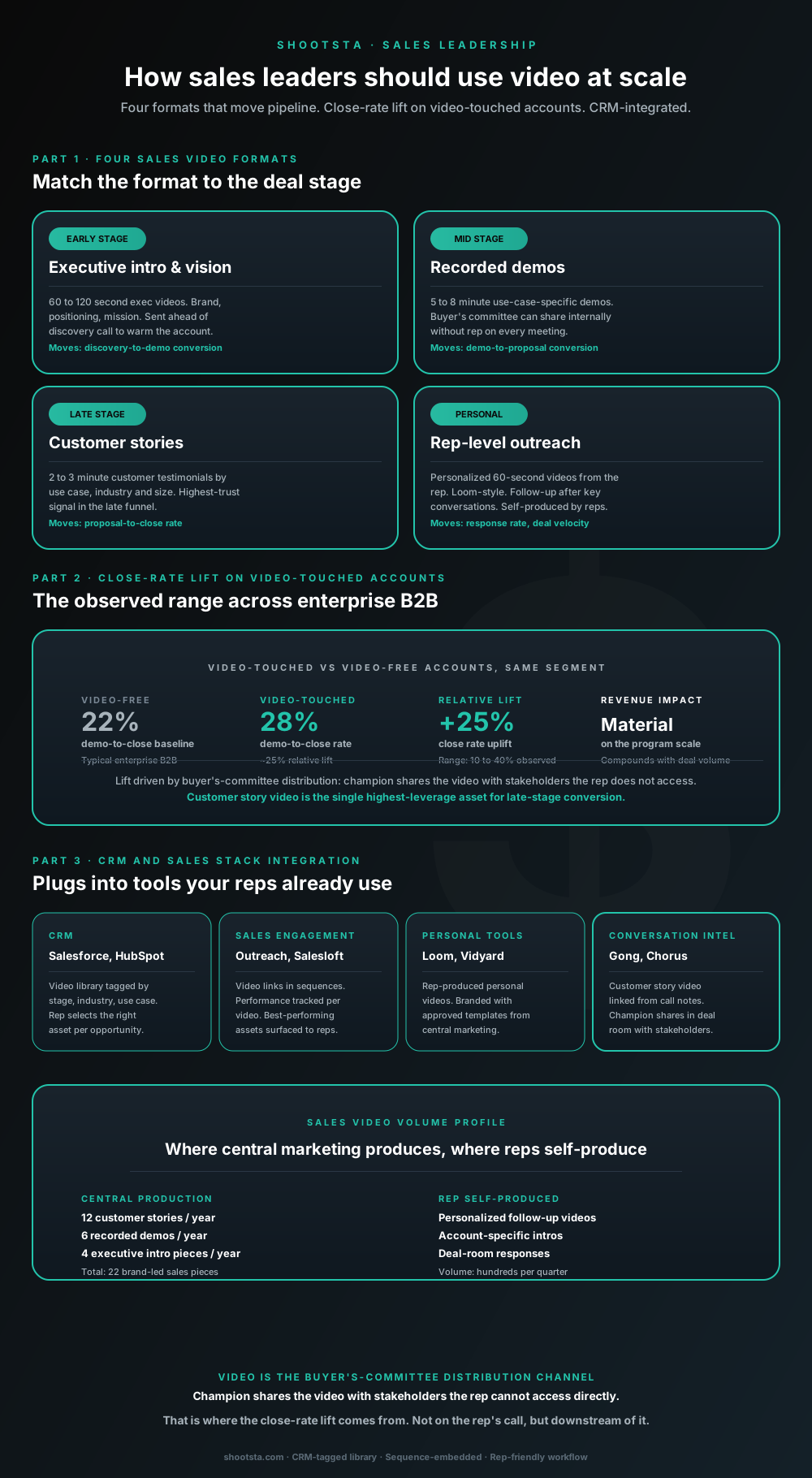
Sales leaders mostly think about video as personalized rep outreach (Loom, Vidyard) or as marketing-produced customer stories. Both are useful. The bigger opportunity is the buyer's-committee distribution layer: assets the champion shares internally with stakeholders the rep does not access directly. That is where the close-rate lift compounds.
How L&D leaders replace classroom with video
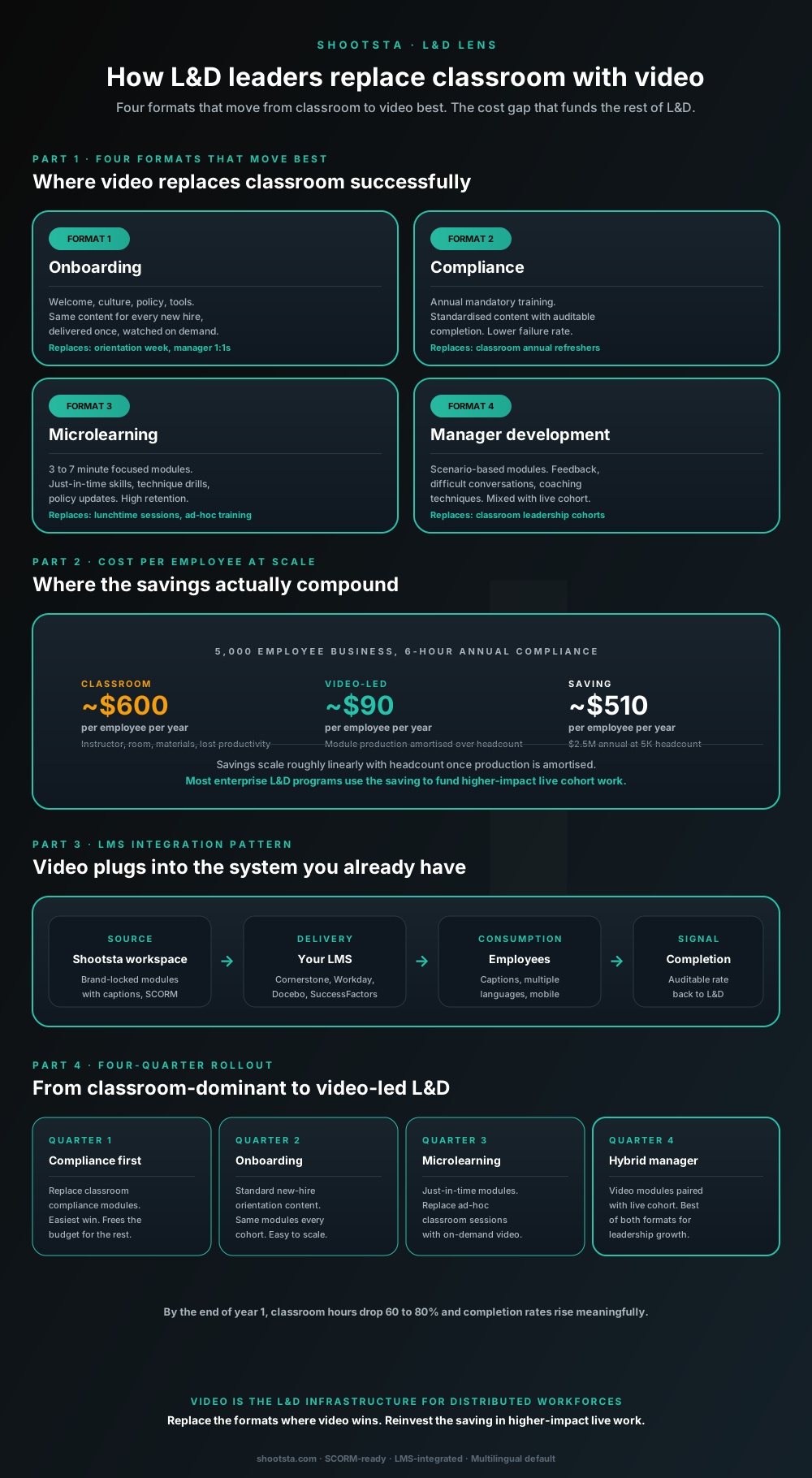
L&D leaders running classroom-heavy training programs typically have the largest single opportunity in the business to free budget through format change. Four training formats move from classroom to video cleanly; the savings fund higher-impact live work. Here is the rollout that compounds learner adoption over four quarters.
How customer success leaders should use video
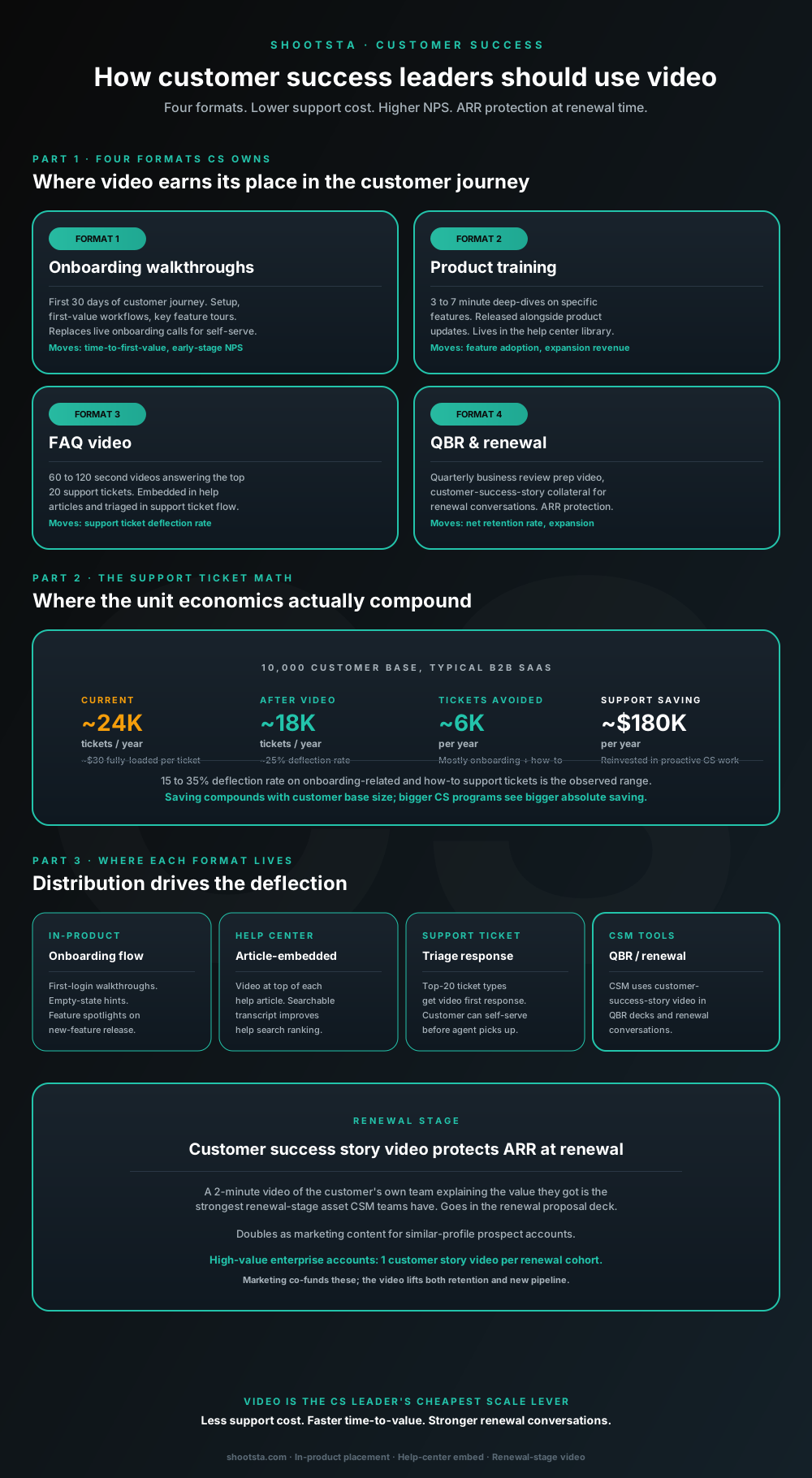
Customer success leaders are usually under-resourced for both reactive support volume and proactive retention work. Video is the cheapest lever to fix both - 15 to 35% deflection on onboarding and how-to tickets, faster time-to-value, and renewal-stage customer story video that lifts net retention. Here is the four-format model and where each piece earns its place.
How internal comms leaders should use video
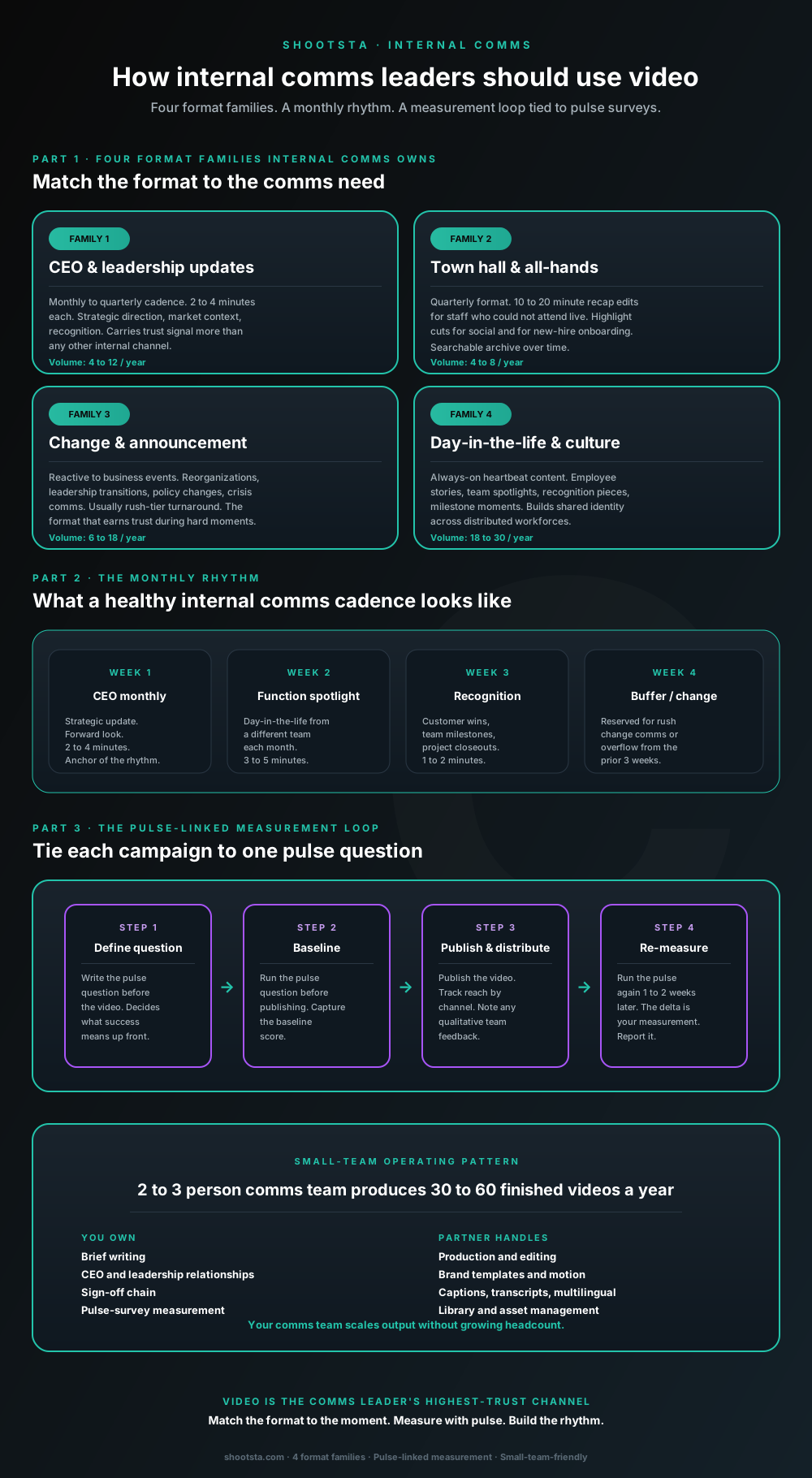
Internal comms leaders are usually under-resourced for the volume of video the business wants. The fix is not more headcount; it is structuring the program around four format families, a monthly rhythm, and a pulse-survey-linked measurement loop. Here is the operating pattern that lets a small comms team produce 30 to 60 finished videos a year.