
How rush video production actually works
shootsta.
How rush video production actually works
By Shootsta · Published May 14, 2026 · Updated October 2026
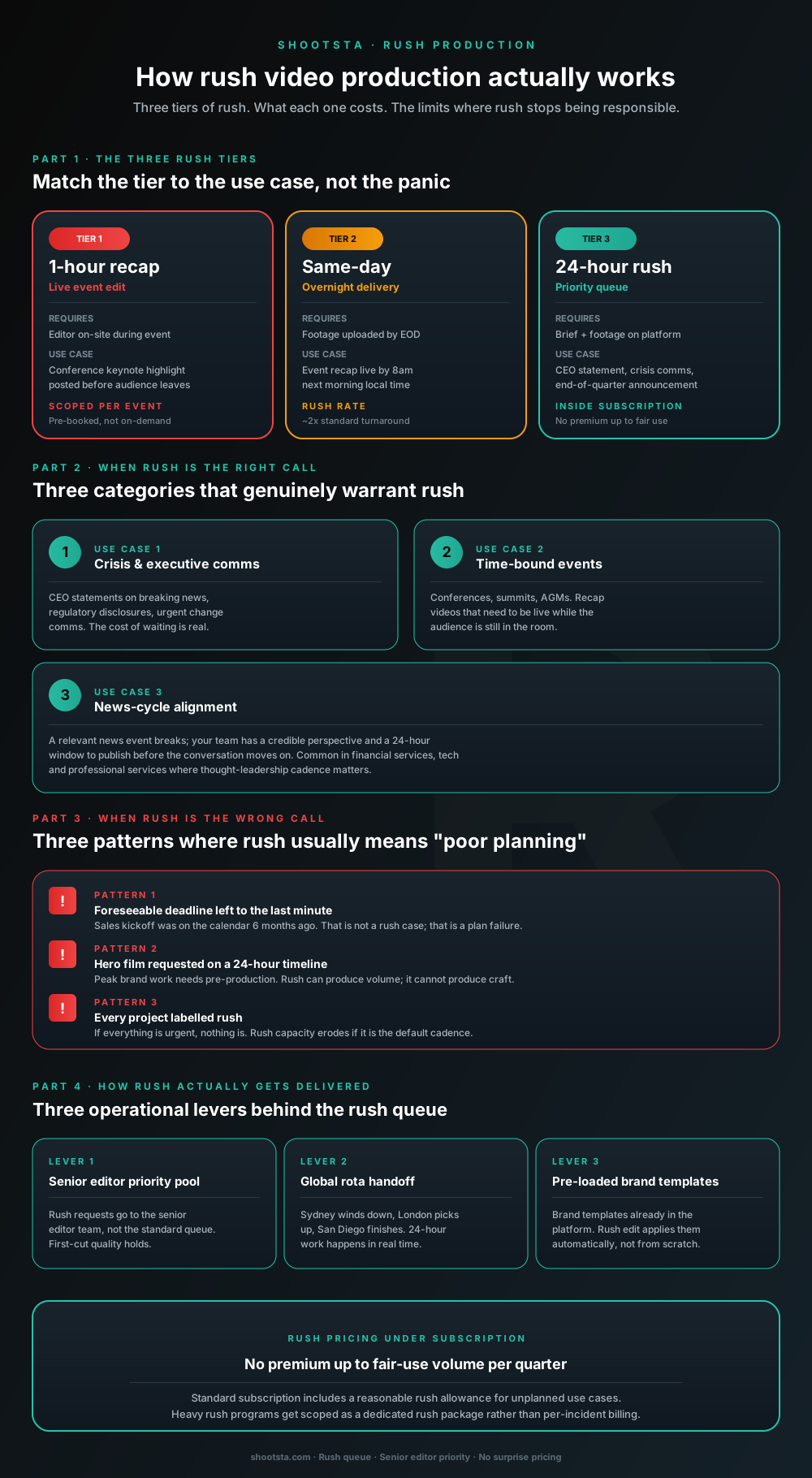
Three rush tiers - 1-hour event recap, same-day overnight, and 24-hour rush. Each has a different operating cost and a different fit. Three categories of work justify rush; three patterns mean it is the wrong call. Here is how the rush queue works inside an enterprise subscription.
The honest version of "we need this fast"
An enterprise video program will sooner or later get a piece that has to ship faster than the standard 48-hour cadence. It might be a crisis statement, a comment on breaking news or a recap of an event that ended an hour ago. You then need to work out whether it is a real rush case or a planning gap dressed up as one. You also need to know how the rush queue gets staffed without slowing the standard program for everyone else.
Rush production works, and it also has limits. Those limits deserve more of your planning time than the headline turnaround number does.
The three rush tiers
Rush comes in three tiers. Each one has its own operating needs and suits a different kind of job.
Tier 1: Same-day event highlight reels
This is the fastest option, and it is built for time-sensitive events. Shootsta offers same-day highlight reels, so the recap of a conference, partner summit or customer event can go out while people are still talking about it. Book the coverage as part of event planning, because the crew, the brief and the brand templates all need to be in place before the day. The output is usually a short recap for social channels and the intranet.
Tier 2: Expedited turnaround
Expedited turnaround moves a project ahead of the standard cadence when a deadline is fixed. Flag the deadline when you brief the work, and agree the delivery time with us at that point. Use case: an event recap that has to be live before the next business day, or a launch asset that slipped upstream and still has to ship on time. Scope it in advance where you can, because it uses editor capacity that would otherwise go to standard projects.
Tier 3: 24-hour rush turnaround
Depending on your package, Shootsta edits come back within 24 to 48 hours. If your package includes the 24-hour turnaround, flag the brief as urgent and the first cut can be in the platform the next day. Use case: CEO statements on breaking news, regulatory disclosures, urgent change communications, end-of-quarter announcements. The work runs on your plan's video credits, and anything needed inside 48 hours is quoted when you brief it.
Interactive planner
How much urgent video capacity does your program need?
Set the rush events you expect per year and the tier most of them fall into. The planner returns whether rush sits inside your plan or whether to plan capacity for urgent work up front.
Standard turnaround
Annual rush volume
6
events per year
Cadence
~2 / mo
Occasional
Plan fit
Inside subscription
Covered by your plan
What this means for your engagement
At this cadence (under 8 urgent pieces a year), your standard plan covers the volume. Flag each piece as urgent when you brief it, and anything needed inside 48 hours is quoted at the time.
Plan your urgent video volumeThe thresholds here are planning guides for how often urgent work comes up, and they are not plan limits. Turnaround inside 48 hours is quoted separately, and same-day highlight reels for events are arranged with your team before the event.
Three use cases that justify rush
Plenty of "we need this fast" requests are not real rush cases. The three patterns below are.
1. Crisis and executive communications
This group covers CEO statements on breaking news and regulatory disclosures with a same-day filing requirement. It also covers urgent change announcements, such as a leadership transition, a security incident or a major customer change. In each case, waiting has a real cost you can measure. Rush production exists for exactly this use case; the rest of the program is built so that when this case lands, the workflow can absorb it.
2. Time-bound events
Conferences, summits, AGMs and partner events all fall here. A recap video that goes live the same evening or the next morning reaches far more people than one published two weeks later, when the moment has passed. For organizations that run flagship annual events, the recap layer is usually scoped into the event budget as a separate line item.
3. News-cycle alignment
A relevant news event breaks; your team has a credible perspective and a 24-hour window to publish before the conversation moves on. Common in financial services, technology and professional services where thought-leadership cadence matters. Done well, this is a multiplier on the rest of the content program; done poorly, it produces unbranded reactive content.
Three patterns where rush is the wrong answer
In these three cases, a rush request usually points to a planning gap rather than a real emergency.
1. Foreseeable deadlines left to the last minute
Sales kickoff was on the calendar six months ago. The Q4 launch was approved in Q2. The CEO town hall is the same Wednesday every quarter. Rush production for these is a symptom of planning failure rather than a structural urgent comms need. The fix is not more rush capacity; it is earlier scoping.
2. Hero or Peak work on a 24-hour timeline
Brand films, hero recruitment pieces and investor day anthems are Peak work, which needs pre-production: creative direction, storyboards, casting, location scouting. Rush helps with volume, but craft needs time that a 24-hour window does not give. Peak work delivered on a 24-hour timeline ships at lower quality than the same piece given 2 to 3 weeks, and both brand custodians and leadership will notice the gap.
3. Every project labelled rush
If everything is urgent, nothing is. Rush capacity erodes if it becomes the default cadence rather than the exception. When a large share of monthly volume is tagged rush, the cause is usually a cadence problem upstream rather than a turnaround problem downstream. That calls for a planning conversation rather than a tier increase.
How rush gets delivered inside the workflow
The rush queue runs on three operational levers. Each one removes a delay that would otherwise push a 24-hour job past its deadline.
Lever 1: Urgent briefs are scheduled first
Flag a request as urgent when you brief it, and your account manager schedules editor time around it. Expedited turnaround is quoted at the time, and standard projects keep running alongside the urgent one.
Lever 2: Global rota handoff
The 24-hour bar counts wall-clock time rather than hours of work. Sydney winds down at 6pm SGT; London picks up at 9am GMT; San Diego finishes at 5pm PST. The same edit progresses across three time zones without anyone working overnight. We covered the mechanics in how a video partner ships in 48 hours.
Lever 3: Pre-loaded brand templates
Brand templates are already in the platform from day one. Rush edits apply them automatically rather than rebuilding from scratch. Lower thirds, motion graphics, fonts and grading presets all carry over, so the editor can spend the time on cut decisions instead of brand setup.
How rush is priced under subscription
Pricing follows one of two patterns, depending on how often you need rush.
For occasional rush, the standard subscription includes a reasonable rush allowance. There is no separate package and no per-incident charge. You use the priority queue when an event comes up, and the quarterly QBR checks that the allowance still fits.
Some programs need rush often, because urgent comms is a regular part of the job. For them, we plan the extra editor capacity into the subscription up front. The cost stays predictable and there are no per-event surprises, which procurement and finance teams like because the invoice does not swing.
When rush becomes most of what you order, the conversation shifts from "we need more rush capacity" to "we need to rebalance the program". Rush at that volume is usually a cadence problem upstream; we cover it openly in the QBR rather than absorb it silently.
What the rush queue cannot do
The rush queue has three hard limits, and it helps to know them before a crisis lands.
Pre-production cannot be compressed past a structural minimum. A complex shoot with on-camera talent, several stakeholders and location needs will take days to set up. Rush speeds up post-production and leaves pre-production as it is.
Compliance review takes the time it takes. Rush production can hand a finished cut to legal in 24 hours; the legal team's review window is independent of the editor speed. For regulated content, the time you save comes before compliance review and has no effect on the legal sign-off step.
Bespoke creative direction cannot be rushed. A piece that requires the brand custodian or the CMO to make several creative judgment calls during the edit needs time for those calls. Rush works best for content where the creative direction is already settled and the editor's job is execution to a known brand template.
How to set up a program that handles rush well
You can make three structural moves at onboarding that make rush easier later.
Identify the predictable rush windows up front. Much of your rush volume is predictable at the calendar level even if individual events are not (Q4 launch month, conference week, results day). Pre-flagging those windows lets the editor team hold capacity proactively.
Pre-approve brand templates for rush formats. Customer stories, executive updates, event recaps, social cutdowns are the formats that most often hit rush. Having the templates locked, the music cleared and the lower thirds pre-built means a rush request opens at hour zero rather than at hour four.
Train one or two SMEs on phone capture for crisis cases. When a CEO statement is needed in 24 hours, the bottleneck is often "we cannot get a crew there in time". A trained SME with a phone, a lavalier and a Shootsta brief template solves the capture side in under an hour; the editor team handles the rest. We covered the hybrid model in phones vs a video production partner.
Frequently asked questions
What is the fastest you can deliver finished video?
For time-sensitive events, Shootsta offers same-day highlight reels, booked as part of event planning. For other projects with a fixed deadline, expedited turnaround is available, and we agree the delivery time when you brief the work. From a written brief, edits come back within 24 to 48 hours depending on your package, with in-platform review on top.
What if we need rush on a regulated piece?
The production side runs at rush pace. The compliance review takes the time it takes; we cannot compress legal review windows on your behalf. Most regulated rush projects end up at 48 to 72 hours total wall-clock time even when the editor delivers in 24, because legal needs a working day to sign off.
Do rush projects sacrifice quality?
On Pulse and Presence formats (customer stories, exec updates, social cutdowns, event recaps), no. Pre-loaded brand templates keep the quality steady. On Peak formats (hero brand films, full creative campaigns), yes - rush compresses the creative judgment time and the work shows. Match the tier to the format.
Can we book an editor on-site for an event ahead of time?
Yes, and you should. Same-day highlight reels (Tier 1) are always booked ahead, so the crew and the brand templates are ready on the day. Whether an editor works on-site depends on the event, so raise it when you scope coverage. Event scoping goes into your regular planning with your account manager, or into a dedicated event package, depending on volume. For organizations with multiple flagship events per year, on-site editor capacity gets scoped at the annual planning stage.
What does "fair use" mean for rush inside the subscription?
There is no fair-use quota for rush to track. Urgent work runs on the same video credits as everything else on your plan, with turnaround inside 48 hours quoted separately. If urgent requests start to crowd out planned work, talk to your account manager about the credit volume your plan needs.
How fast can a Shootsta crew get to a shoot in another city?
Inside the regional hub coverage (Sydney, London, Singapore, San Diego and their served cities), 24 to 72 hours for a standard crew, 24 hours for urgent. Outside standard coverage, 72+ hours plus travel time. The fix for tighter timelines is often a self-shoot kit at the office plus phone capture by SMEs.
Where to go next
For the standard 48-hour cadence that rush sits alongside, read how a video partner ships in 48 hours. For the burst capacity model that handles predictable spike windows (which often overlap with rush), read how to absorb video demand spikes. For the hybrid capture-and-finish workflow that helps when the bottleneck is crew availability, read phones vs a video production partner.
To scope a rush plan for your program, book a free consultation.
Take this article with you
Read the latest at shootsta.com/blog/how-rush-video-production-actually-works
You might also like
How to Brief an Animation Project
How to Brief an Animation Project
An animation brief is the document you send to your production partner before work starts. Get it right and you cut revision cycles in half. Get it wrong and you discover mid-production that everyone disagrees on what the video is for. This is what a complete brief looks like.
Animation for change management comms
Animation for change management comms
Animation handles change management communications better than live video for three reasons: no on-camera executives required during sensitive periods, scene-level updates when plans shift, and a single production that works across global teams with voiceover-only language swaps.
How sales leaders should use video at scale
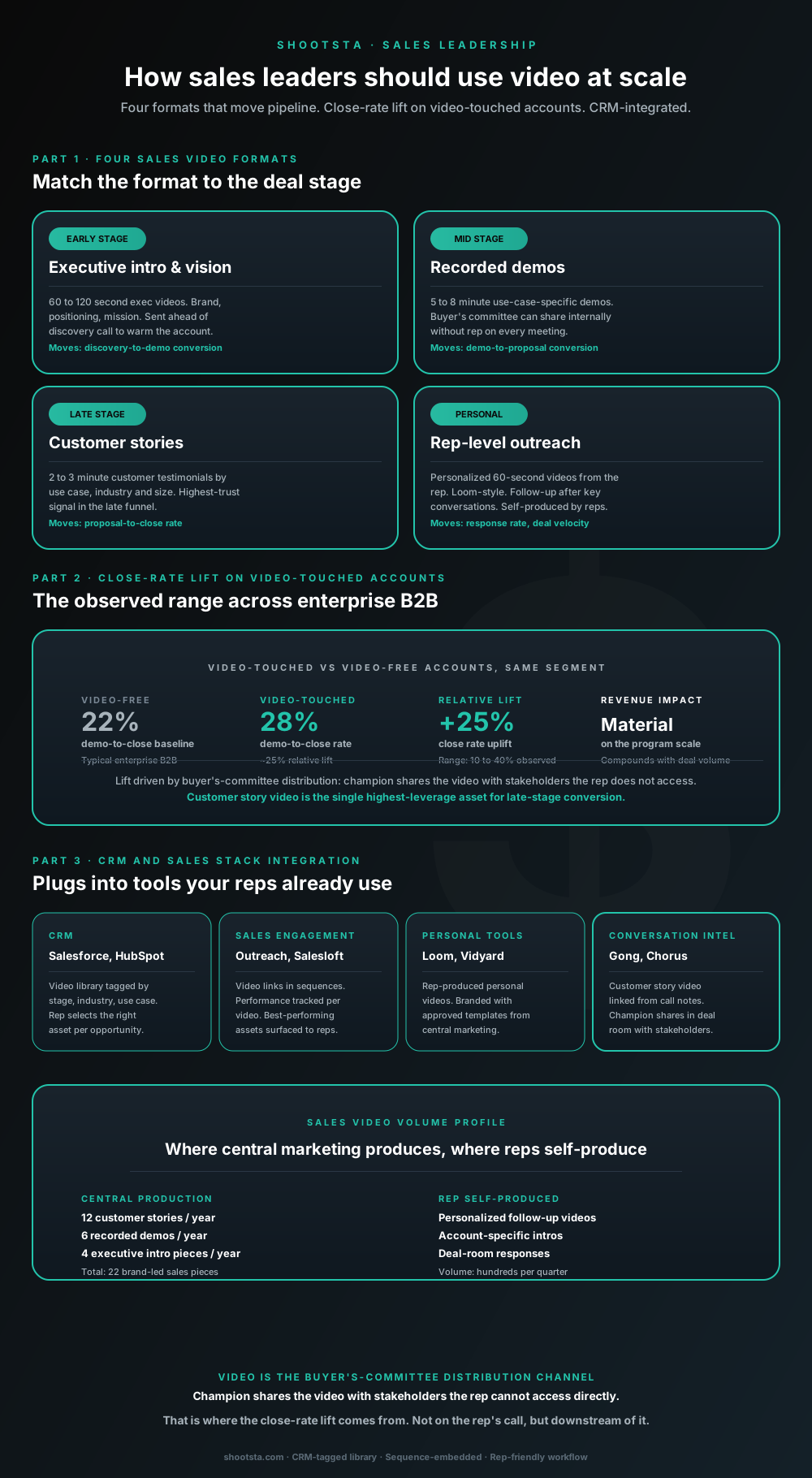
Sales leaders mostly think about video as personalized rep outreach (Loom, Vidyard) or as marketing-produced customer stories. Both are useful. The bigger opportunity is the buyer's-committee distribution layer: assets the champion shares internally with stakeholders the rep does not access directly. That is where the close-rate lift compounds.
How L&D leaders replace classroom with video
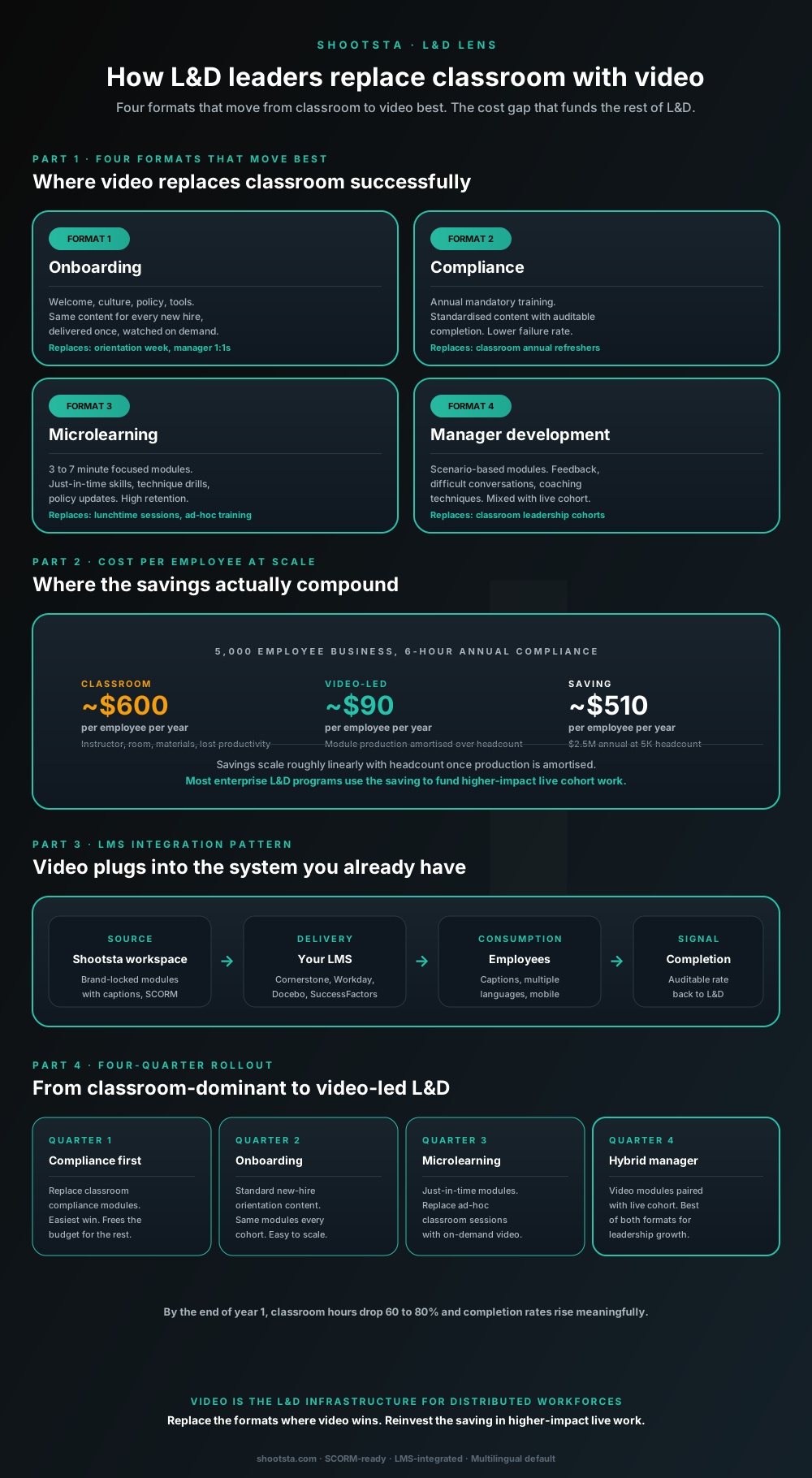
L&D leaders running classroom-heavy training programs typically have the largest single opportunity in the business to free budget through format change. Four training formats move from classroom to video cleanly; the savings fund higher-impact live work. Here is the rollout that compounds learner adoption over four quarters.
How customer success leaders should use video
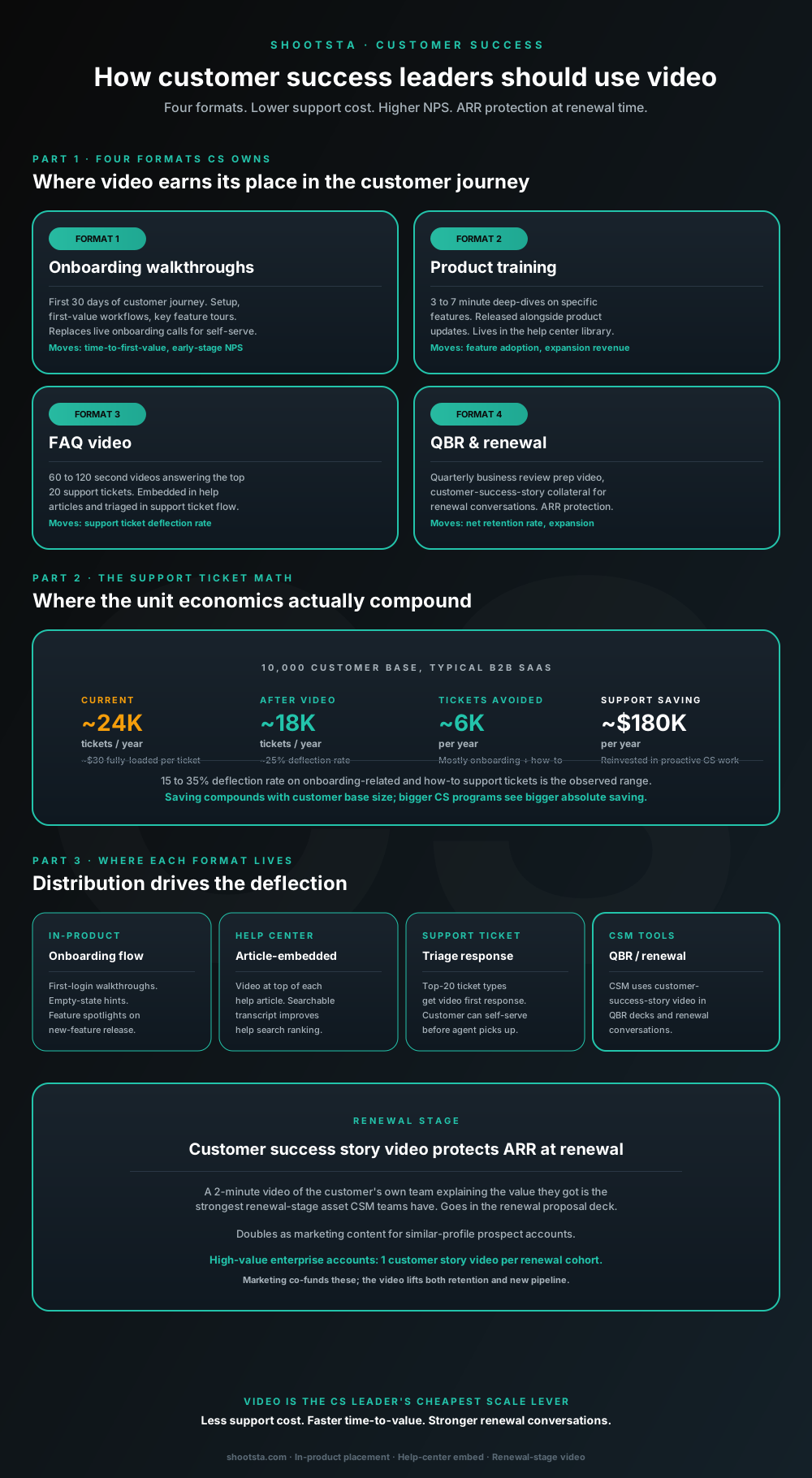
Customer success leaders are usually under-resourced for both reactive support volume and proactive retention work. Video is the cheapest lever to fix both - 15 to 35% deflection on onboarding and how-to tickets, faster time-to-value, and renewal-stage customer story video that lifts net retention. Here is the four-format model and where each piece earns its place.
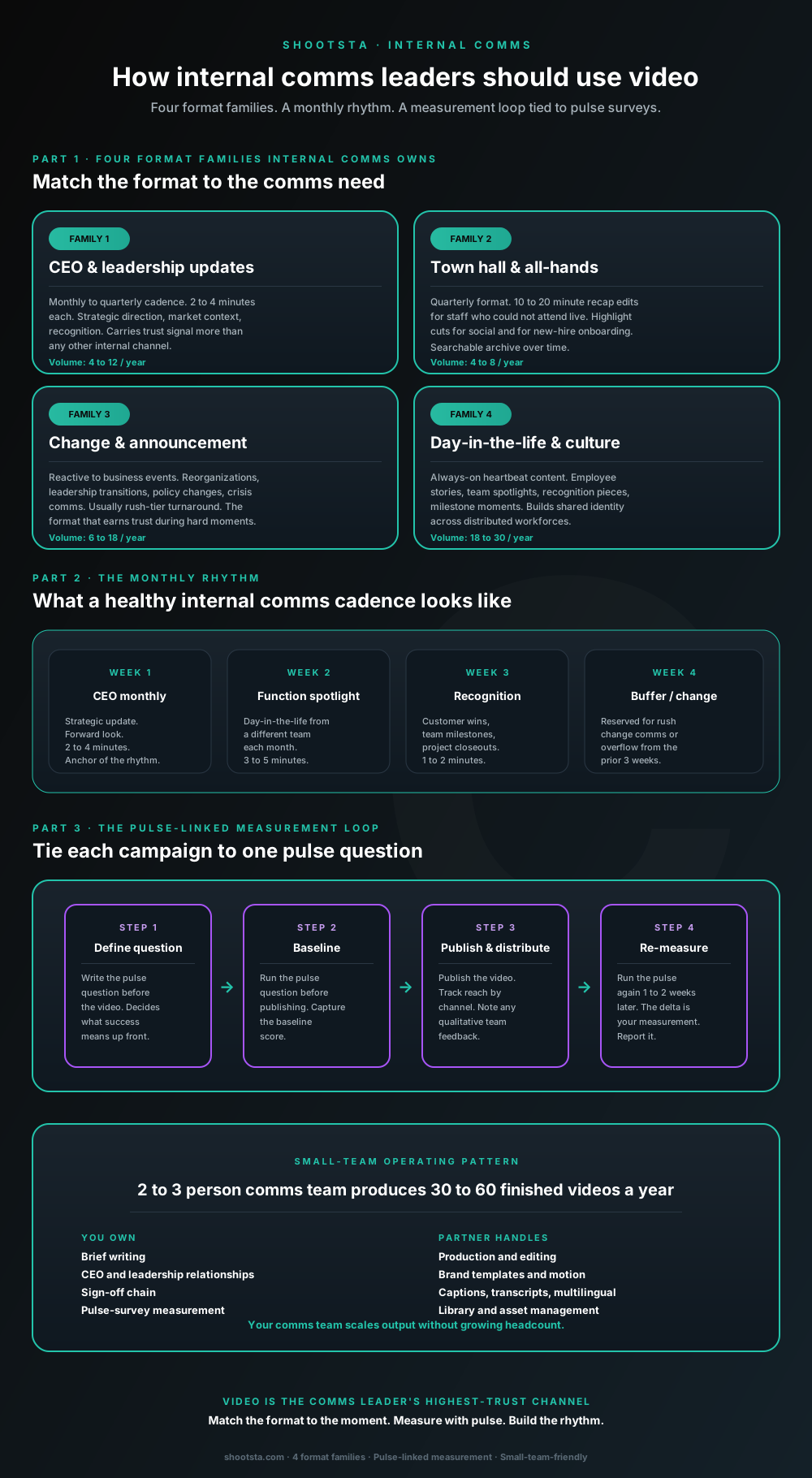
How internal comms leaders should use video
Internal comms leaders are usually under-resourced for the volume of video the business wants. The fix is not more headcount; it is structuring the program around four format families, a monthly rhythm, and a pulse-survey-linked measurement loop. Here is the operating pattern that lets a small comms team produce 30 to 60 finished videos a year.