
How to produce animated explainer video
shootsta.
How to produce animated explainer video
By Shootsta · Published April 26, 2026 · Updated October 2026
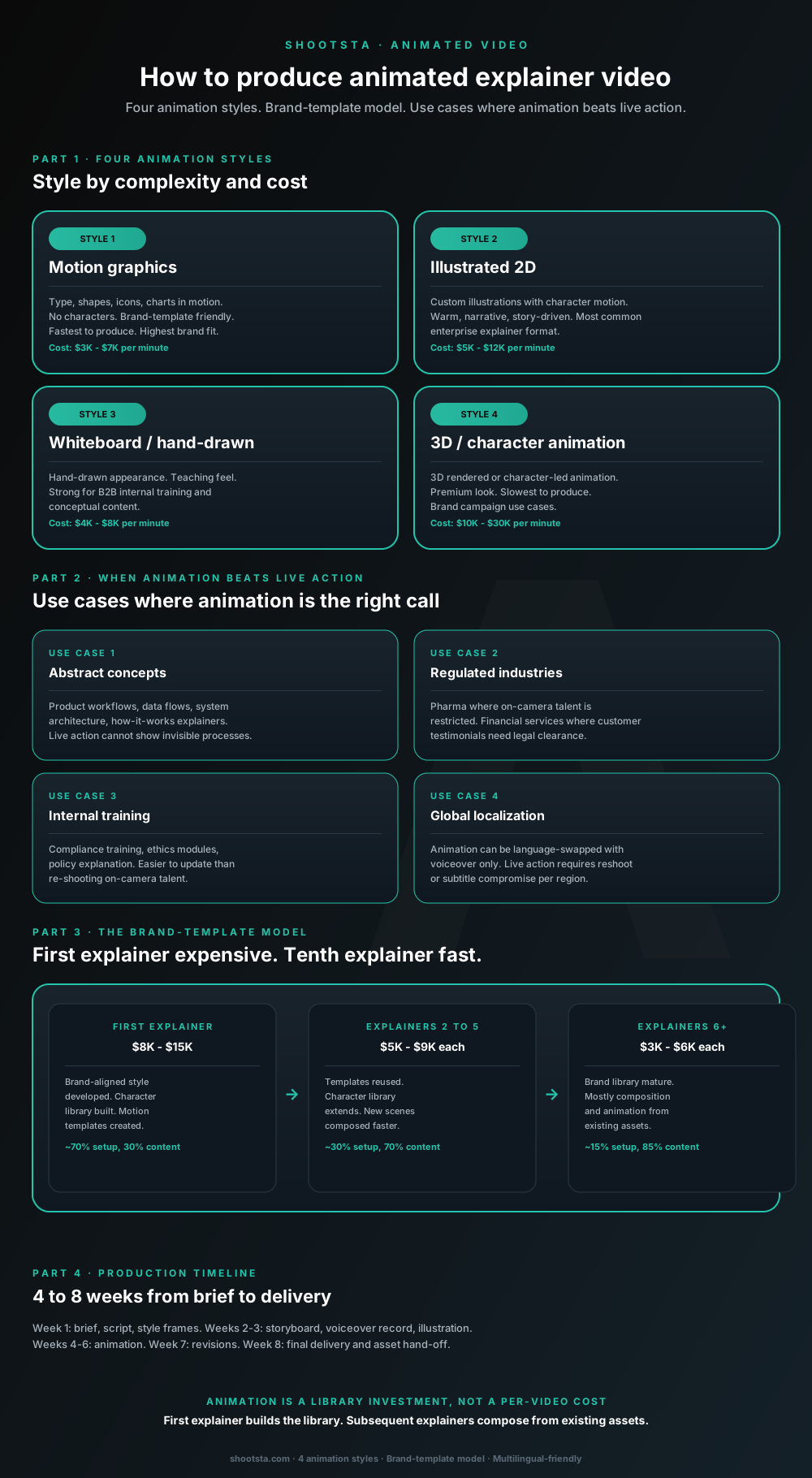
Animated explainer video is the right call for abstract concepts, regulated industries, internal training and multi-region localization. The structural insight: animation is a library investment, not a per-video cost. The first explainer builds the style library; subsequent explainers compose from existing assets at 30 to 50% of the first-piece cost.
Why animation is a library investment, not a per-video cost
A common pricing mistake with animated explainer video is to assume every piece costs as much as the first. That math holds for the first explainer. For every explainer after it, the cost drops by a wide margin.
The first explainer in a program pays for a style library built around your brand. It holds the character designs, motion templates, scene layouts, type, palette and recurring icons. Most of the first explainer's cost goes into those assets, and a smaller share goes into the story of that one piece. Later explainers reuse the library and only pay for new scenes, so by the sixth explainer the cost per piece is a fraction of the first. This brand-template model is what makes an animated program affordable at enterprise scale.
The four animation styles
Style 1: Motion graphics
Motion graphics put type, shapes, icons and charts into motion, with no characters. The style suits brand templates because it is built from the fonts, palette and icons you already own. It is the fastest and cheapest style to produce. Use it for product feature explainers, data stories and executive summaries, or anything that should feel native to your brand.
Style 2: Illustrated 2D
Illustrated 2D uses custom illustrations with characters that move, and it tells a warm, story-led narrative. This is the format enterprise B2B audiences usually picture when they hear "explainer video". It works well for product overviews, customer journey explainers and internal culture videos. It costs more per minute than motion graphics, and enterprise animation programs we work with tend to use it for the bulk of their library.
Style 3: Whiteboard / hand-drawn
This style looks hand-drawn, with ideas building up on a virtual whiteboard or paper background. Its teaching feel tells the viewer the video is there to educate. Use it for B2B internal training and for concept explainers where you want people to follow the thinking instead of the visuals. It often pairs with a subject-matter expert's voiceover for credibility.
Style 4: 3D / character animation
This covers 3D rendered scenes and fully character-led animation, and it has the most premium look. It is the slowest style to produce, because 3D modeling and rendering add technical work that 2D does not need. It is also the most expensive per minute. Save it for brand campaigns, flagship launches and ad-style pieces.
Use cases where animation beats live action
Abstract concepts
Think of product workflows, data flows, system architecture and how-it-works explainers. A camera cannot film an invisible process or an abstract relationship, but animation can draw it. SaaS product overviews, fintech transaction flows and healthcare patient journeys all work better as animation than as live action.
Regulated industries
In pharma, regulators often restrict who can appear on camera. In financial services, customer testimonials need legal clearance, and the risk of a misstatement can be too high. Animation removes the on-camera talent risk while keeping the video credible. That is why pharma and financial services teams often make animation their default for product and education videos.
Internal training
Animation suits compliance training, ethics modules and policy explainers. It is easier to update than re-shooting on-camera talent when policy changes; you swap the relevant scene or voiceover line rather than reconvening a shoot. We covered the training library production model in how to produce a training video library.
Global localization
You can swap the language of an animation by changing only the voiceover, while the visuals stay the same in every regional version. Live action needs a reshoot for each region with different on-camera talent, or it falls back on subtitles that weaken the experience. If you send the same video out in five or more languages, animation usually costs less than live action by the second or third language version.
The brand-template model in detail
First explainer: build the library
The first piece is usually a 60 to 90 second 2D illustrated explainer, and it costs the most. Most of that budget builds the style library. The library covers character designs (the people who appear in your animation) and motion templates (how transitions, builds and emphasis work). It also holds your brand's type and palette, plus the recurring icons your animation uses for repeated ideas. A smaller share pays for the story of the first piece.
Explainers 2 to 5: reuse and extend
Each of these costs noticeably less than the first. The templates get reused and the character library grows, with new characters added as the stories need them. New scenes come together faster because the team no longer starts from a blank canvas.
Explainers 6 and beyond: compose from library
By this point the brand library is mature and the cost per piece is at its lowest. Most of the work is assembling and animating existing assets instead of creating new ones. At this stage the cost per explainer compares well with high-end motion design done in-house.
Interactive planner
What does an animated explainer program cost over a year?
Pick a style and set annual volume. The planner returns total cost on the brand-template model (first explainer expensive, subsequent compose from the library) versus standalone per-explainer pricing.
Typical explainer: 2 min
Total annual cost
$75K
6 explainers on brand template
Average per explainer
$13K
amortised across the year
Savings vs standalone
$33K
vs producing each at $18K
Why the brand-template model works
The first explainer pays for the brand-aligned style library: character set, motion templates, scene compositions, color and typography systems. Subsequent explainers reuse the library and compose new scenes faster. At 6 explainers per year the program lands at roughly $13K per piece on average, saving $33K per year versus per-piece standalone production.
Scope an animation programAssumptions: first explainer includes brand library setup (character design, style frames, motion templates). Explainers 2-5 reuse the library at midpoint cost. Explainers 6+ compose mostly from existing assets at mature cost. Standalone pricing assumes each explainer rebuilds the brand setup. Numbers are guides.
The production timeline
A single custom explainer usually takes 4 to 8 weeks from brief to delivery, depending on how complex it is.
Week 1 covers the brief, the script and the style frames you approve for brand fit. Getting the style frames right here saves rework across the whole project.
In weeks 2 to 3, the team builds the storyboard, records the voiceover and illustrates any new assets such as characters, props and backgrounds. This is where the work specific to your story happens.
Weeks 4 to 6 are for animation, which is the longest phase. Animators bring the storyboard and assets together into finished motion.
Week 7 is for revisions after you review the rough cut. One round of changes is typical, and a second round adds about a week.
Week 8 is final delivery, with master video files, other aspect ratios for social and source files for your archive.
Once the brand library is in place, each later explainer takes 3 to 5 weeks, because the style and asset work is already done.
How animation integrates with the broader video program
Animation sits alongside live action instead of replacing it. In the enterprise programs we work with, live action usually makes up the largest share, followed by screen recordings and motion graphics, with custom animation as the smallest slice. The mix tilts toward animation in regulated industries, in deeply technical SaaS and in global enterprises that deliver in many languages.
The operating model that works best has one production partner handling live action, motion graphics and custom animation inside one engagement. That way the brand templates carry across, the editing voice stays consistent and the asset library grows across every format. When separate vendors handle animation and live action, the brand starts to drift, and your brand team spends its time policing the gaps.
What to brief into an animated explainer
Confirm five things before anyone writes the script. Start with the audience, meaning who needs to take the message away, and the outcome, meaning what they should think, feel or do after watching. Then agree the key message as one sentence that has to land. List the constraints, including brand voice, length, format and the channels you will use. Finally, set the hand-off: the file formats and aspect ratios you need delivered.
The most common brief failure is over-specifying the visual style and under-specifying the audience and outcome. The animation team can design the visual style if the strategic ask is clear; they cannot design the strategic ask if the brief is only about visual preferences.
Frequently asked questions
How do we know if animation is the right call vs live action?
Run three quick tests. First, if you are explaining an invisible process that a camera cannot capture, animation is the better choice. Second, if regulators restrict who can appear on camera, choose animation. Third, if the video will go out in three or more language versions with the same visuals, animation usually costs less overall. If none of these apply, live action is usually the better call, because real people on camera build a kind of trust that animation finds hard to match.
Can we use AI-generated animation?
For on-brand production work in 2026, AI-generated animation does not yet meet the quality bar enterprise brands set. The tools are improving, but brand consistency and motion quality still fall short, and viewers can often tell the result was made by AI. AI is useful inside the production workflow (asset generation, animation timing assistance) but not as a primary production method for brand-led content. We covered the AI framing in how AI fits inside enterprise video workflows.
Should we develop the brand library in-house and outsource production?
Both models can work. Building the library in-house and outsourcing production suits teams with a strong internal design group and a high animation volume, around a dozen or more pieces a year. The risk is brand drift if the production partner does not follow the library closely. The other model has the partner build the library and produce the videos, which suits teams that want consistency without managing the assets themselves.
How long should an animated explainer be?
Aim for 60 to 90 seconds for marketing use, such as a landing page, paid social or a sales follow-up. Product explainers and internal training can run 2 to 4 minutes. An explainer longer than 4 minutes is rarely justified, because the material is usually two or three explainers rather than one long one.
What deliverable formats should we ask for?
Ask for a 16:9 master (1080p, MP4) for web and YouTube, a 9:16 vertical cut for mobile and stories, and a 1:1 square cut for paid social. Each one should also come with a captioned version for silent autoplay. Finally, request the reusable source file in After Effects or a similar tool for future edits. Asking for all five at delivery is standard, while asking later means reopening the project at extra cost.
How does animation handle accessibility?
Captions and transcripts come as standard. Audio description can be added on request for highly visual pieces where the audio narration does not describe what is happening on screen. We covered the full accessibility specs in how to make enterprise video accessible.
Where to go next
For the broader operating model that supports animation alongside live action, read how a video partner extends your in-house team. For the brand-control discipline that holds animation on-brand at scale, read brand control with a video production partner. For the multilingual delivery layer that animation makes economical, read how to scale video across global offices.
To scope an animated explainer program for your business, book a free consultation.
For the frameworks behind scaling this kind of work, read The Business Animation Playbook.
Take this article with you
Read the latest at shootsta.com/blog/how-to-produce-animated-explainer-video
You might also like
How to Brief an Animation Project
How to Brief an Animation Project
An animation brief is the document you send to your production partner before work starts. Get it right and you cut revision cycles in half. Get it wrong and you discover mid-production that everyone disagrees on what the video is for. This is what a complete brief looks like.
Animation for change management comms
Animation for change management comms
Animation handles change management communications better than live video for three reasons: no on-camera executives required during sensitive periods, scene-level updates when plans shift, and a single production that works across global teams with voiceover-only language swaps.
How sales leaders should use video at scale
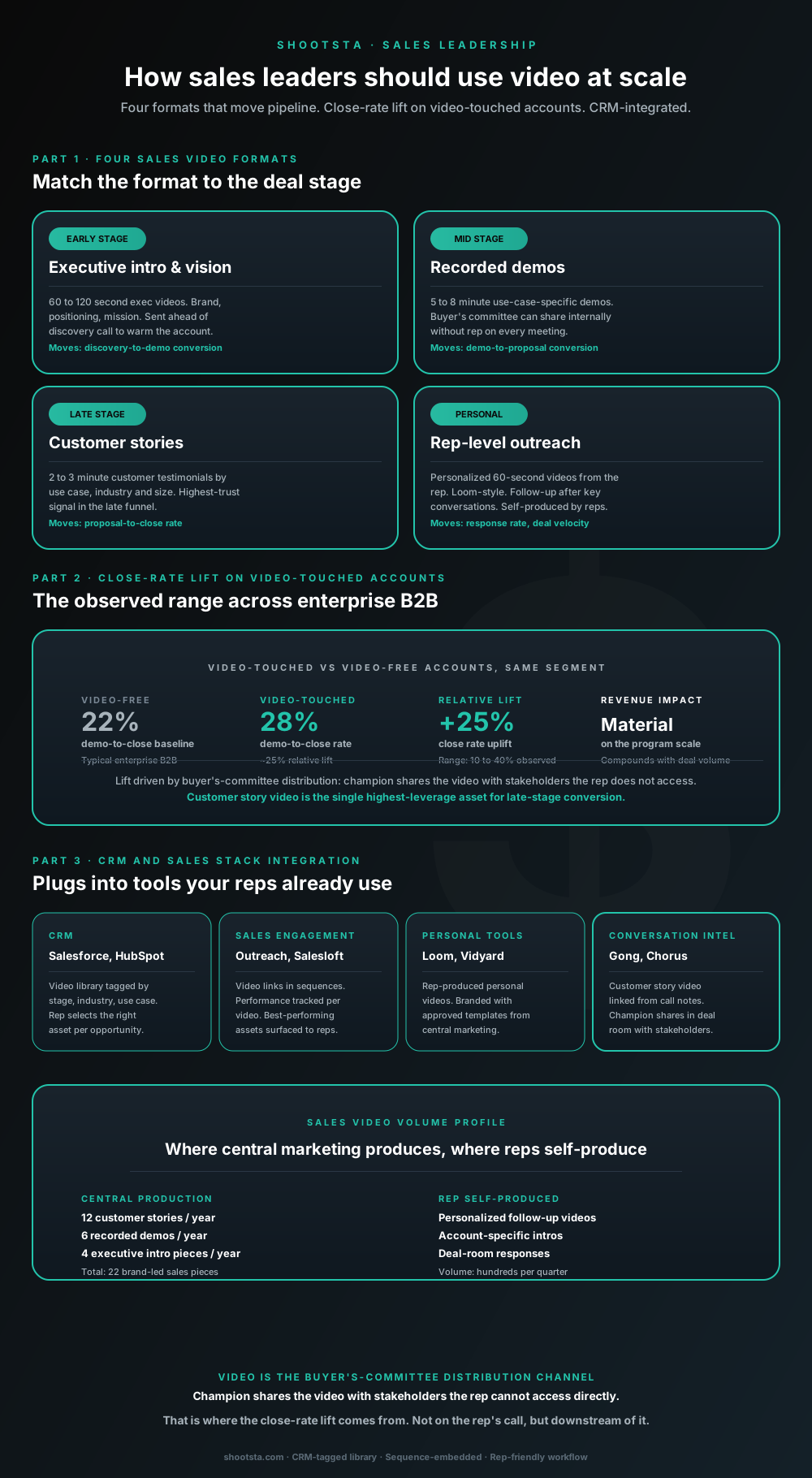
Sales leaders mostly think about video as personalized rep outreach (Loom, Vidyard) or as marketing-produced customer stories. Both are useful. The bigger opportunity is the buyer's-committee distribution layer: assets the champion shares internally with stakeholders the rep does not access directly. That is where the close-rate lift compounds.
How L&D leaders replace classroom with video
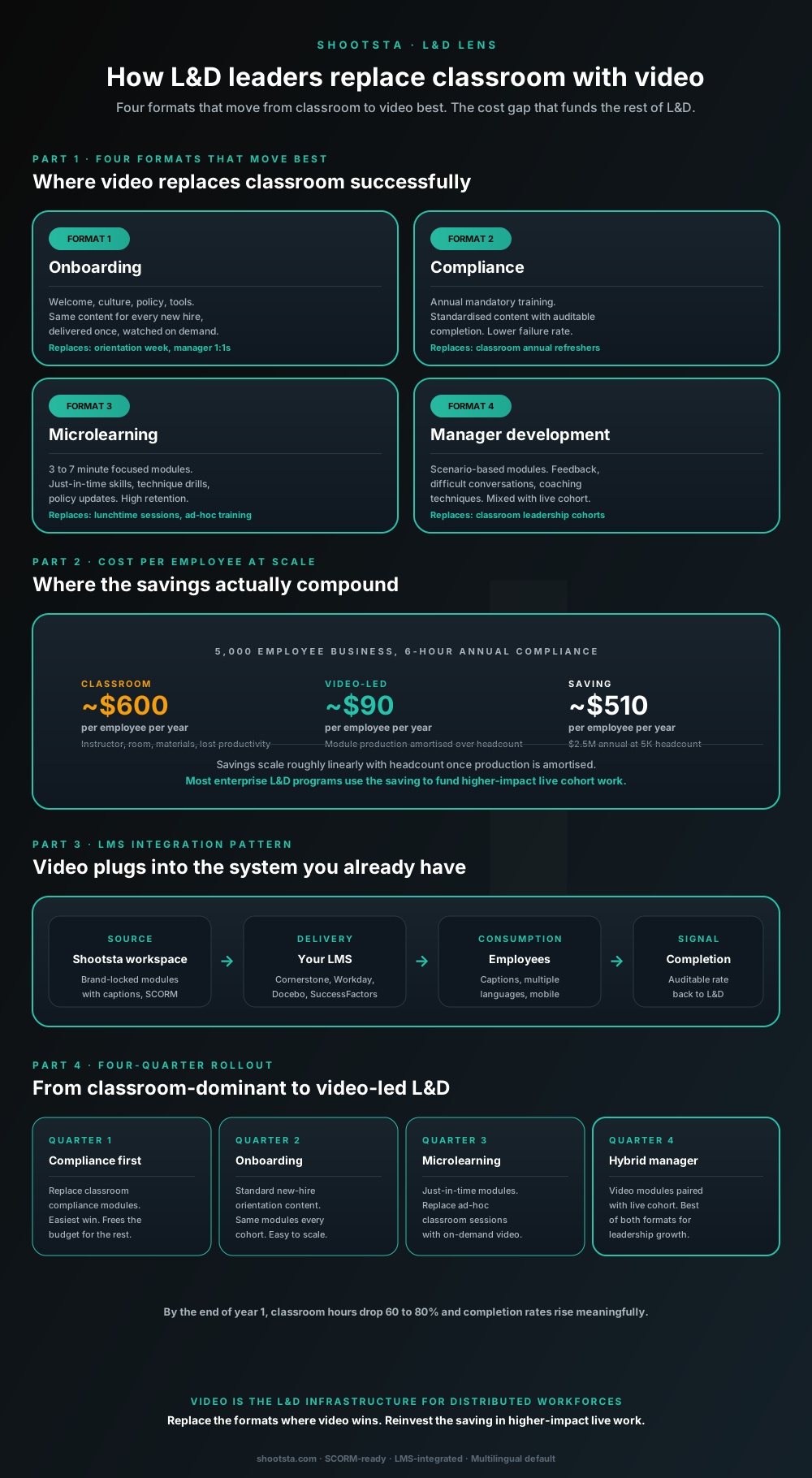
L&D leaders running classroom-heavy training programs typically have the largest single opportunity in the business to free budget through format change. Four training formats move from classroom to video cleanly; the savings fund higher-impact live work. Here is the rollout that compounds learner adoption over four quarters.
How customer success leaders should use video
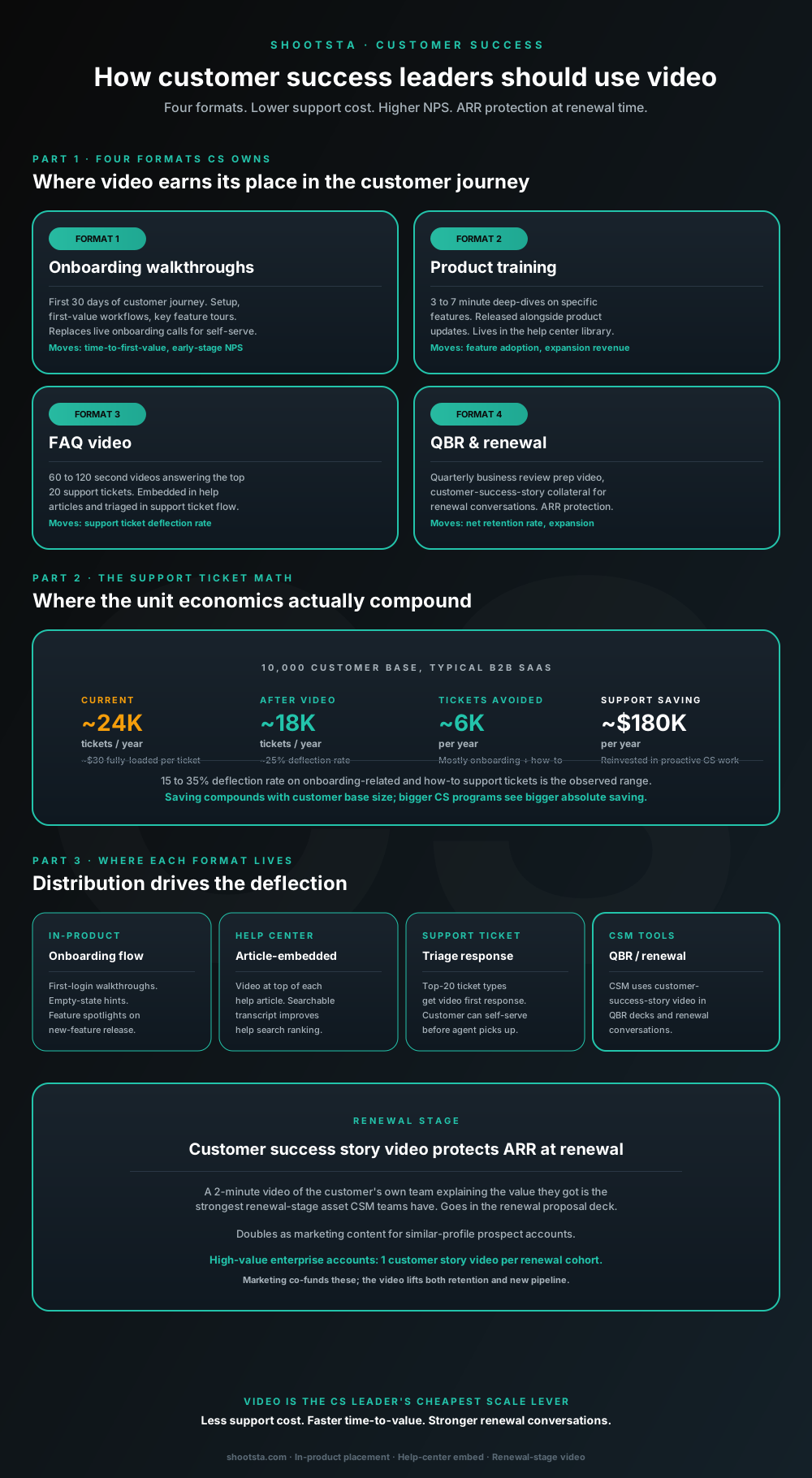
Customer success leaders are usually under-resourced for both reactive support volume and proactive retention work. Video is the cheapest lever to fix both - 15 to 35% deflection on onboarding and how-to tickets, faster time-to-value, and renewal-stage customer story video that lifts net retention. Here is the four-format model and where each piece earns its place.
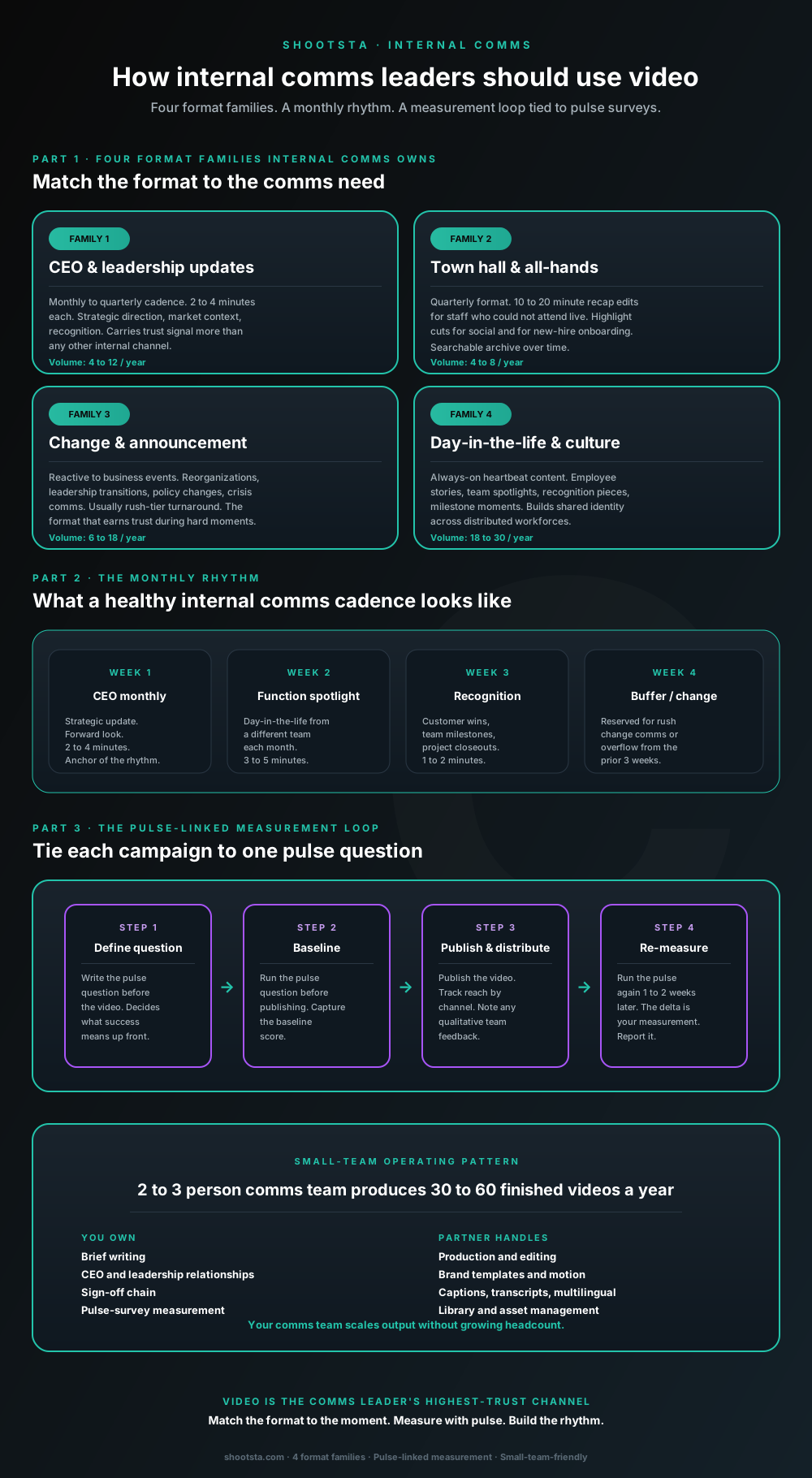
How internal comms leaders should use video
Internal comms leaders are usually under-resourced for the volume of video the business wants. The fix is not more headcount; it is structuring the program around four format families, a monthly rhythm, and a pulse-survey-linked measurement loop. Here is the operating pattern that lets a small comms team produce 30 to 60 finished videos a year.