
How to produce a training video library
shootsta.
How to produce a training video library
By Shootsta · Published April 27, 2026 · Updated October 2026
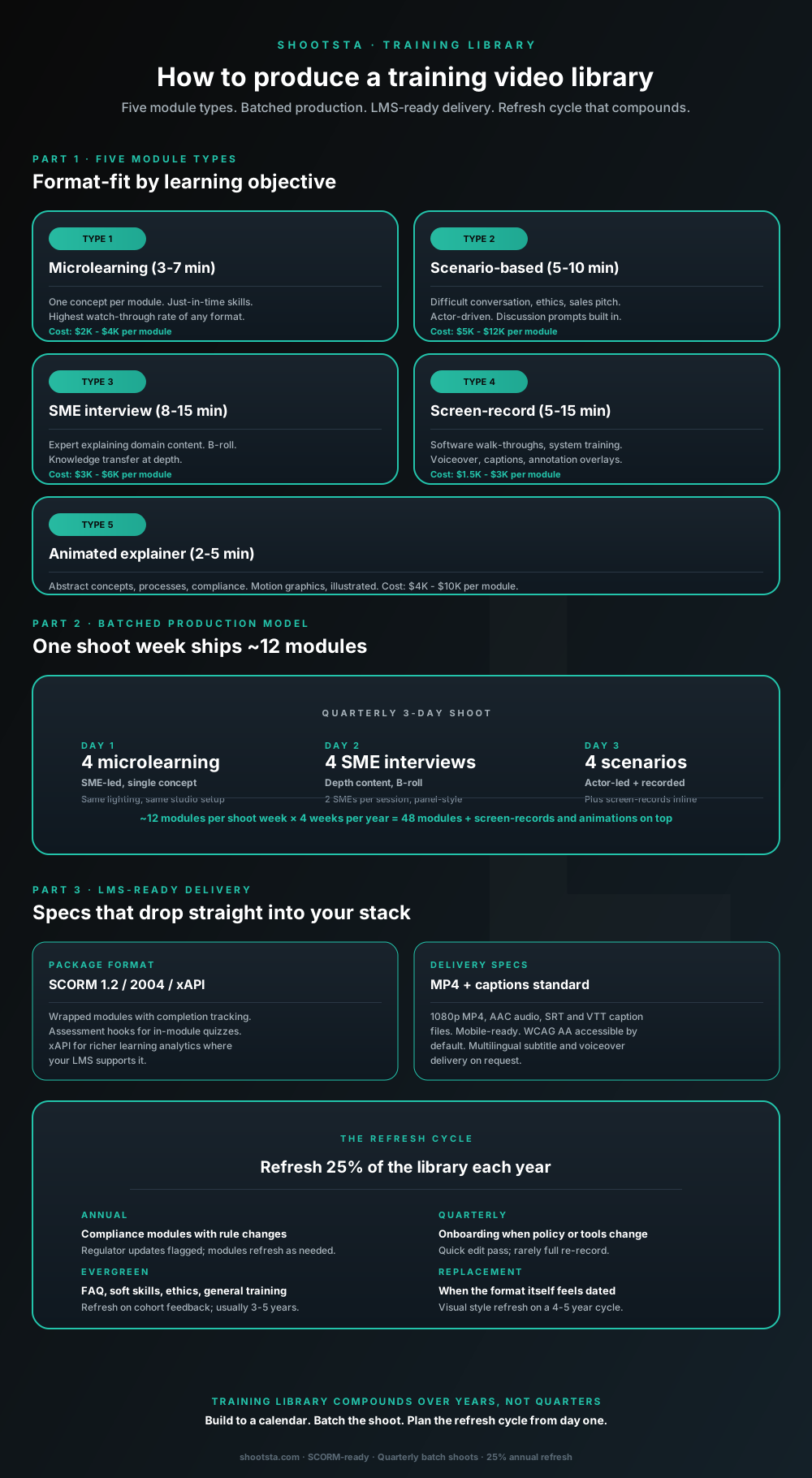
L&D programs that try to produce training video on a per-module basis end up with high per-module cost and inconsistent library quality. The structural shift is batching production into quarterly shoot weeks producing 8 to 16 modules each. Five format types, LMS-ready delivery, and a refresh cycle that keeps the library current without rebuilding.
Why per-module production fails at training library scale
Many enterprise L&D programs produce training video on a per-project basis. When you need a compliance module, you brief a vendor. An onboarding video goes to a different vendor (or the same one, as a separate job), and a leadership module gets scoped all over again. Each project carries its own setup cost (lighting, sound, location, brand templates) so the per-module cost stays high and the library quality drifts because every project rebuilds the production approach from scratch.
The structural shift is batched production: shoot weeks instead of per-module projects. One shoot week produces 8 to 16 modules, the setup cost amortises across all of them, and the brand and quality stay consistent because the same crew shoots the same way for everything. Most enterprise programs that move to batched production see per-module cost drop 30 to 50% and quality consistency go up materially.
The five module types
Type 1: Microlearning (3 to 7 minutes)
Each module covers one concept, so learners get a skill at the moment they need it. A single SME speaks on camera against a clean studio look, with captions and a mobile-ready format. It has the highest watch-through of the five types because the time investment is small. The workhorse of an enterprise training library because most learning needs are micro by nature. Cost: $2K to $4K per module in batched production.
Type 2: Scenario-based (5 to 10 minutes)
Scenario modules cover moments like a difficult conversation, an ethics call, a sales pitch or a customer escalation. They are actor-driven, with discussion prompts built into the module. Higher production cost because actors and scripted scenes require more pre-production. Used most for manager development, sales training and compliance categories where the right answer is interpersonal rather than procedural. Cost: $5K to $12K per module.
Type 3: SME interview (8 to 15 minutes)
Subject-matter expert explaining domain content. Two-camera setup, B-roll, lower thirds with name and role. Knowledge transfer at depth for content that requires explanation rather than demonstration. Cost: $3K to $6K per module in batched production.
Type 4: Screen-record (5 to 15 minutes)
Software walk-throughs, system training, configuration guides. Voiceover, captions, annotation overlays highlighting the relevant UI. Lowest production cost per module because no on-camera talent or studio time. The default for all software training in modern L&D programs. Cost: $1.5K to $3K per module.
Type 5: Animated explainer (2 to 5 minutes)
Abstract concepts, business processes, compliance topics where the visual explanation matters more than human delivery. Motion graphics, illustration, character animation depending on style. The format for content that does not fit any of the other four well. Cost: $4K to $10K per module depending on animation complexity.
The batched production model
One shoot week, three days of capture, ships ~12 modules. Repeated quarterly produces ~48 modules per year through the live-action formats. Screen-records and animations sit outside the shoot weeks because they do not need crew on-site.
Day 1: 4 microlearning modules
Each of these modules is SME-led and covers a single concept. The studio setup, the lighting and the lower-third template stay the same all day. The first day is the most production-efficient because the setup and look stays constant; the SME rotates but the production approach does not.
Day 2: 4 SME interview modules
The second day is for depth content. Two SMEs sit in each session, panel-style, with one moderator. B-roll captured around the interviews to support the post-production edit. The day produces 4 modules but the captured footage often supports microlearning cuts and clip reuse later.
Day 3: 4 scenario modules
The third day runs actor-led scenes, which are rehearsed in the morning and shot through the afternoon. Screen-record voiceover sessions are captured in the same day when the SMEs also narrate the screen recordings. The day is logistically heavier than the first two but the deliverable count per crew hour stays comparable.
Total: 12 modules per shoot week. Add 4 to 8 screen-records produced asynchronously per quarter. Add 2 to 4 animated explainers produced asynchronously per quarter. Annual total: ~70 to 90 modules per year produced under a single batched program.
Interactive planner
What does a training video library actually cost to build?
Set annual modules and the format mix across the five types. The planner returns annual production cost, recommended shoot weeks, and the implied refresh budget for an active library.
Format mix (must total 100%; current total: 100%)
Annual production cost
$215K
48 modules at chosen mix
Recommended shoot weeks
4 / year
~12 modules per shoot week
Refresh budget (year 3+)
$97K
refresh 36 modules / year
How the library compounds
Year 1 the library has 48 modules. Year 3 it has roughly 144 modules in active use. The refresh budget kicks in around year 3 when older modules need updates for policy changes, tool changes or visual style. Most mature libraries we work with run roughly 60% production / 40% refresh once the library size stabilises.
Scope a training library programAssumptions: per-module costs at midpoints. Microlearning $3K, Scenario $8.5K, SME interview $4.5K, Screen-record $2.25K, Animated $7K. Batched production at quarterly shoot weeks reduces per-module cost ~15-20% versus per-module project pricing. Numbers are guides.
LMS-ready delivery specifications
The training video has to plug into your existing LMS without engineering work. Standard package formats:
SCORM 1.2 or SCORM 2004 wrapped modules with completion tracking and assessment hooks. Most enterprise LMS platforms (Cornerstone, Workday Learning, Docebo, SuccessFactors, Litmos) accept SCORM natively. xAPI for richer learning analytics where the LMS supports it.
Standalone MP4 + caption files (SRT and VTT) for content used outside the LMS (intranet hosting, Teams or Slack share-outs, ad-hoc training emails). Same source asset, two delivery formats.
1080p MP4, AAC audio, captions burned-in optional or closed-caption track only. Mobile-ready (most enterprise training is consumed on mobile devices outside the office). WCAG 2.1 AA accessible by default; audio description added on request for visually-intensive modules. We covered the accessibility specs in how to make enterprise video accessible.
Multilingual subtitle delivery in major workforce languages; voiceover replacement in languages with 1,000+ employees on flagship modules. We covered the multilingual production layer in how to scale video across global offices.
The library refresh cycle that compounds
A training video library is not static; it requires refresh to stay current. The pattern that works:
Annual refresh: compliance modules
This group covers anti-bribery, data privacy, security awareness and sector-specific compliance. Regulator updates flag what changes; affected modules get a quick edit pass or full re-record. Typically 4 to 8 modules per year affected.
Quarterly refresh: onboarding
When policy or tools change, onboarding modules need quick updates to reflect the new state. Usually a light edit pass (10 to 20% of the module) rather than a full re-record. Onboarding refresh cycles often coincide with quarterly product releases.
Evergreen: soft skills and ethics
Manager development, difficult conversations, leadership skills, ethics training. These age more slowly because the underlying content is durable. Refresh on cohort feedback, usually a 3 to 5 year cycle for a full re-record.
Visual style replacement
The library look (lower thirds, transitions, motion graphics templates) goes stale on a 4 to 5 year cycle as design fashion moves. Replace the visual layer without re-recording the content; this is a post-production project rather than a shoot.
For a library that grows to ~150 to 200 modules in active use, the steady-state refresh budget runs ~25% of new-production cost per year. That is the number to plan for once the library matures past year 2 to 3.
How the SME contribution scales
The biggest practical constraint on training library production is SME time. Most enterprise SMEs can give 2 to 3 hours of on-camera time per quarter; getting more from them requires negotiating with their function leadership. The batched production model is designed to use SME time efficiently.
In a 3-day shoot week, each SME is on-camera for 90 to 120 minutes total across multiple modules. That is sustainable on a quarterly basis for most SMEs. Without batching, each module requires its own SME session and the time commitment becomes unsustainable.
The political handling matters: SMEs are positioned as subject matter experts whose time the L&D function is investing in efficiently, not as content producers whose schedule the L&D function is colonising.
Frequently asked questions
How does this compare to off-the-shelf training video libraries?
Off-the-shelf libraries (LinkedIn Learning, Coursera for Business, Udemy Business) are cost-effective for generic skills training (Excel, basic management, sales fundamentals) but cannot cover company-specific content (your products, your processes, your compliance requirements, your culture). Most enterprise programs we work with use a hybrid: off-the-shelf for generic, custom-produced for company-specific. The library scopes only cover the custom layer.
What is the right balance between video and other formats?
Video works best for procedural, demonstration, and interpersonal content. Text and interactive modules work better for reference content (policies, decision trees, lookup tables) and assessments. Most mature enterprise L&D programs run 40 to 60% video, 20 to 30% interactive, 20 to 30% text. Video should not be the only format.
How long does it take to get the first modules into the LMS?
For a new batched program, first shoot week typically lands 4 to 6 weeks after the engagement starts (briefing, SME scheduling, brand template setup, scripting). Modules from that shoot week land in the LMS 2 to 3 weeks after the shoot. So 6 to 9 weeks total from start to first modules live.
What does ongoing production cost compare to in-house?
For a library producing 48+ modules per year, batched external production typically costs less than equivalent in-house production at the same quality. The in-house team has to spread studio cost, equipment and editor headcount over the modules it ships each year. Below 24 modules per year, in-house may be cheaper depending on existing capacity. We covered the unit economics in the business case for enterprise video.
How do we handle compliance content with strict regulatory review?
Compliance content goes through additional review gates: legal review at script stage, compliance review at first-cut stage, regulator approval where required (financial services, pharma, government). Build 4 to 8 weeks extra into the timeline for compliance categories. The production workflow handles the gates inside the platform; the L&D team and compliance team work through review in one place rather than across multiple tools.
Can SMEs record their own modules on phones?
For low-stakes microlearning where production polish does not affect credibility, yes. The hybrid model (SME captures on a phone with a Shootsta-supplied lavalier mic; production partner finishes the edit to brand) works well for high-volume internal content. We covered this in phones vs a video production partner. For external-facing or high-stakes content, batched studio production produces better results.
Where to go next
For the L&D leader-level view of how the library fits into a broader L&D strategy, read how L&D leaders replace classroom with video. For the accessibility specs the library must hit, read how to make enterprise video accessible. For the multilingual delivery layer at global enterprise scale, read how to scale video across global offices.
To scope a training video library for your L&D program, book a free consultation.
Take this article with you
Read the latest at shootsta.com/blog/how-to-produce-a-training-video-library
You might also like
How to Brief an Animation Project
How to Brief an Animation Project
An animation brief is the document you send to your production partner before work starts. Get it right and you cut revision cycles in half. Get it wrong and you discover mid-production that everyone disagrees on what the video is for. This is what a complete brief looks like.
Animation for change management comms
Animation for change management comms
Animation handles change management communications better than live video for three reasons: no on-camera executives required during sensitive periods, scene-level updates when plans shift, and a single production that works across global teams with voiceover-only language swaps.
How sales leaders should use video at scale
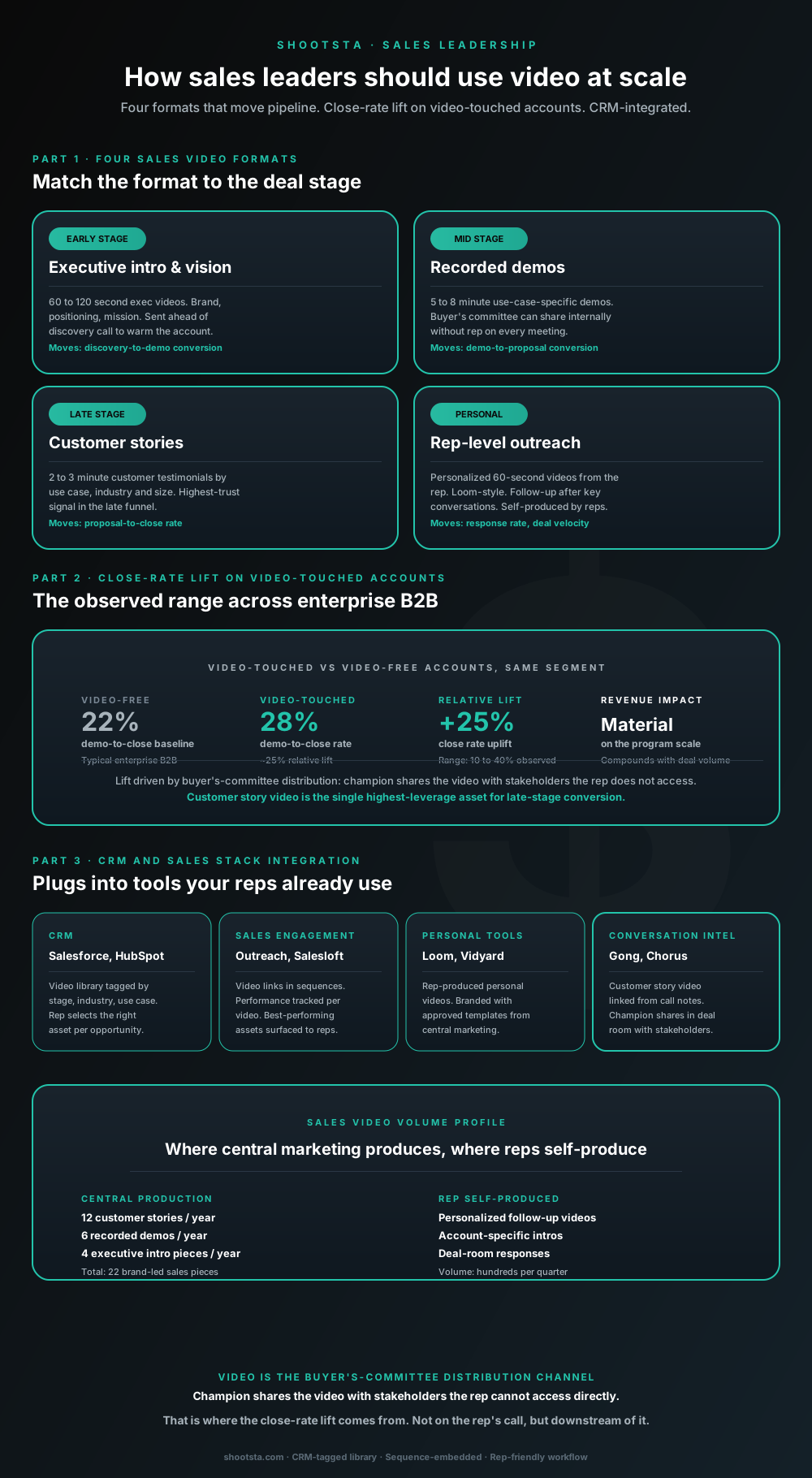
Sales leaders mostly think about video as personalized rep outreach (Loom, Vidyard) or as marketing-produced customer stories. Both are useful. The bigger opportunity is the buyer's-committee distribution layer: assets the champion shares internally with stakeholders the rep does not access directly. That is where the close-rate lift compounds.
How L&D leaders replace classroom with video
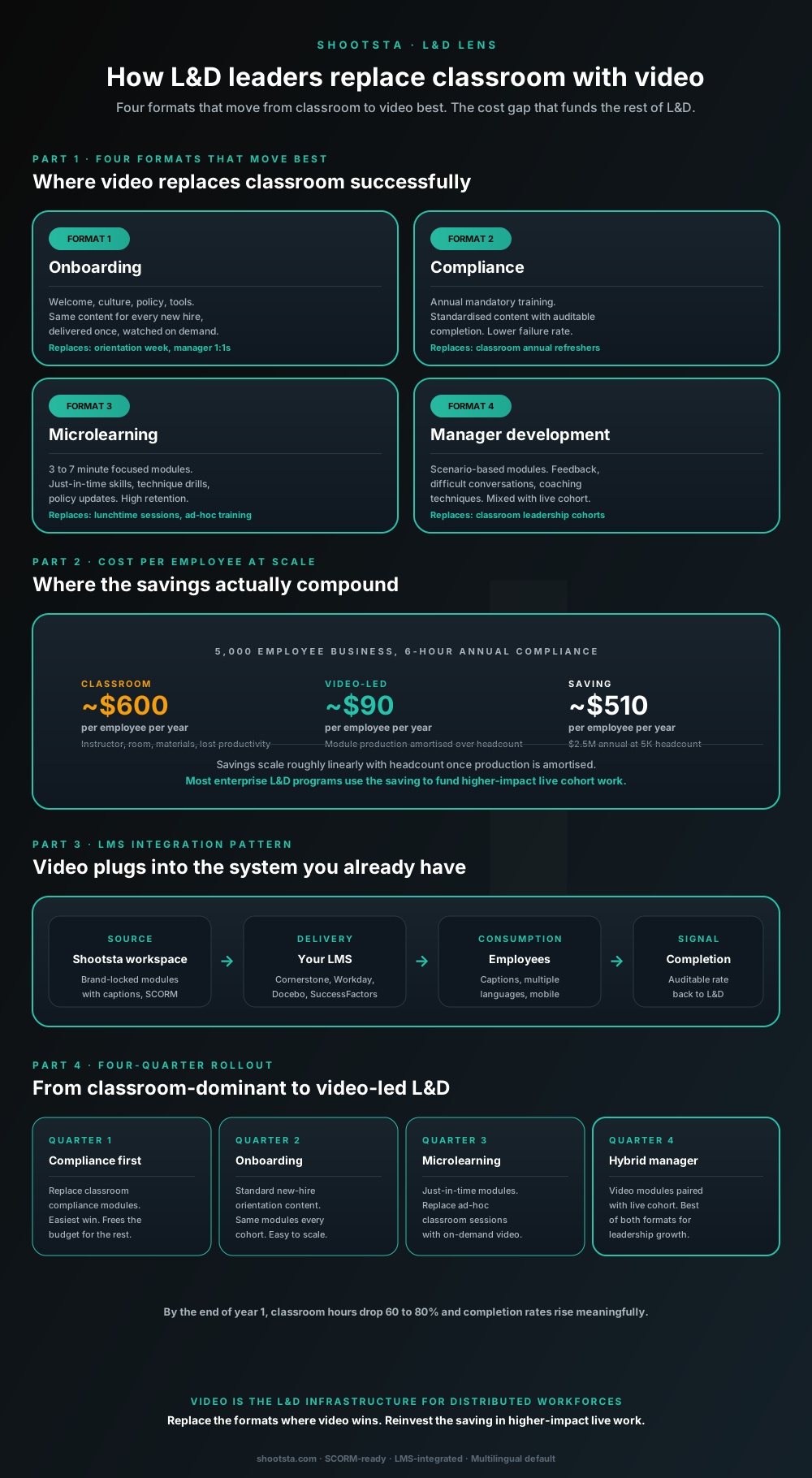
L&D leaders running classroom-heavy training programs typically have the largest single opportunity in the business to free budget through format change. Four training formats move from classroom to video cleanly; the savings fund higher-impact live work. Here is the rollout that compounds learner adoption over four quarters.
How customer success leaders should use video
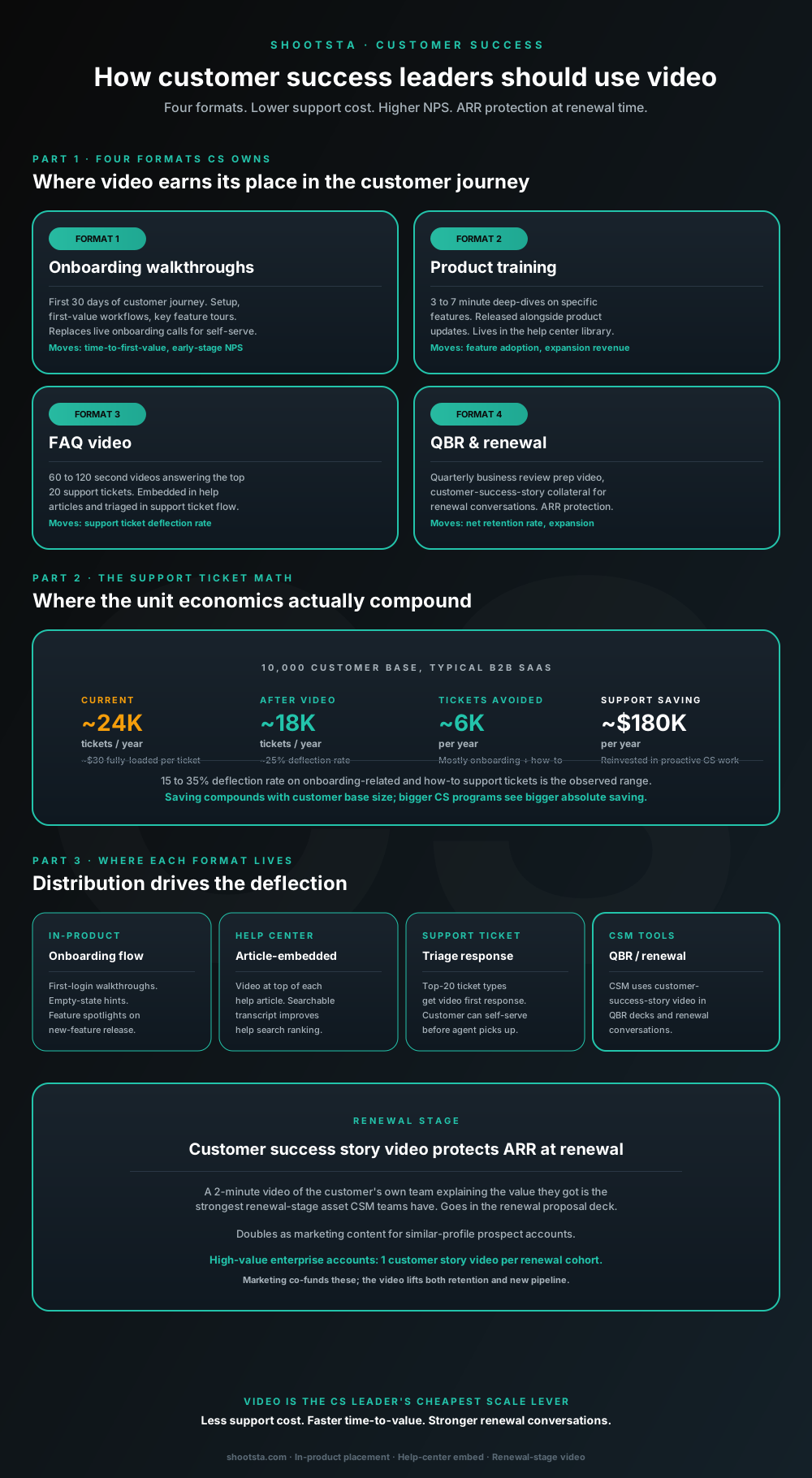
Customer success leaders are usually under-resourced for both reactive support volume and proactive retention work. Video is the cheapest lever to fix both - 15 to 35% deflection on onboarding and how-to tickets, faster time-to-value, and renewal-stage customer story video that lifts net retention. Here is the four-format model and where each piece earns its place.
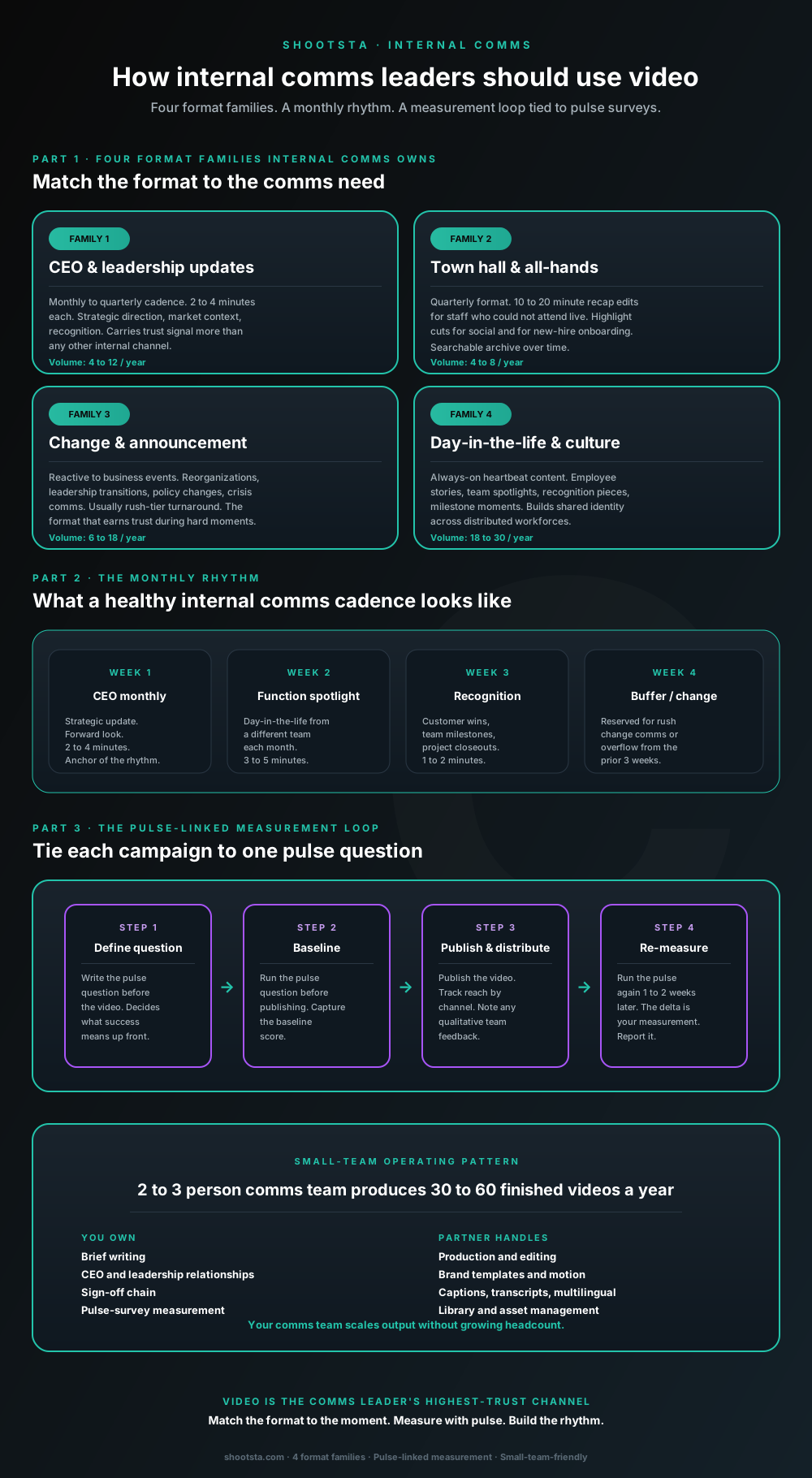
How internal comms leaders should use video
Internal comms leaders are usually under-resourced for the volume of video the business wants. The fix is not more headcount; it is structuring the program around four format families, a monthly rhythm, and a pulse-survey-linked measurement loop. Here is the operating pattern that lets a small comms team produce 30 to 60 finished videos a year.