
9 Types of Video Content Every Business Needs
shootsta.
9 Types of Video Content Every Business Needs
By Shootsta · Published March 14, 2026 · Updated October 2026
Not sure what videos to make? Here are the 9 types of video content that cover every stage of the customer journey and every department in your business.
Short answer. Most business video falls into 9 types: corporate, marketing, training, testimonial, product demo, recruitment, event, animated, and social media videos. Each maps to a stage of the customer or employee journey. Corporate and training videos carry internal comms and onboarding; marketing, demo, and social videos drive pipeline; testimonial and recruitment videos build trust; event and animated formats stretch one shoot into many assets. Start with the format that closes your biggest gap rather than producing all nine at once.
What are the main types of video content for business?
There are dozens of video formats, but most business video falls into 9 categories. Each serves a different purpose, a different audience, and a different stage of the buyer or employee journey. Knowing which types to produce first depends on your goals.
Here is a breakdown of each type, when to use it, and how to get started without a big production budget.
1. What are corporate videos?
Corporate videos are the bread and butter of enterprise video production. They include leadership updates, company announcements, change management communications, and internal newsletters. If a message needs to reach the whole company, a corporate video delivers it faster and with more impact than an email.
Here is an example of what Shootsta corporate video production looks like:
2. How do marketing videos drive pipeline?
Marketing videos cover everything from brand awareness campaigns to product launches to social media content. They sit at the top and middle of the funnel, generating attention and moving prospects toward a conversation with sales.
The most common marketing video formats are brand stories, campaign hero videos, social cutdowns, and paid ad creative. A single filming session can produce 5-10 marketing clips for different channels.
3. Why do training videos improve knowledge retention?
Training and educational videos replace slide decks and live workshops with on-demand content that employees can watch at their own pace. They cover onboarding, compliance, product training, and professional development.
Companies using video for training report higher completion rates and better knowledge retention than text-based materials. The content is reusable - record it once and train every new cohort without repeating the workshop.
4. What makes testimonial videos effective?
Testimonial videos are often the sales asset prospects trust most. When a real customer describes their experience on camera, prospects can read body language, hear conviction, and judge authenticity in a way that written reviews can't replicate.
The best testimonials are short (60-90 seconds), focused on a specific problem and result, and filmed in the customer's own environment.
5. How do product demo videos shorten sales cycles?
Product demo videos show your product in action. For SaaS companies, this means screen recordings with narration. For physical products, it means hands-on walkthroughs. Either way, a demo video answers the buyer's "how does it work?" question faster than a slide deck.
Sales reps who send demo videos before meetings report shorter sales cycles because prospects arrive with a working understanding of the product.
6. What are recruitment videos?
Recruitment videos give candidates an honest look at your company, culture, and open roles. Employer brand videos, day-in-the-life features, and employee testimonials on your careers page attract higher-quality applicants who self-select based on what they see.
7. How do event videos extend your investment?
Event videos turn a single-day conference or product launch into weeks of content. Keynote highlights, speaker interviews, attendee reactions, and behind-the-scenes footage can be distributed across social, email, and your website long after the event ends.
8. When should you use animated videos?
Animated videos work when live-action can't. Complex processes, abstract concepts, data visualizations, and scenarios that would be expensive or impossible to film are all better served by animation. You get full creative control without filming logistics.
Here is an example of 3D animation from Shootsta:
9. What are social media videos?
Social media videos are short-form clips designed for LinkedIn, Instagram, TikTok, and YouTube Shorts. They are built for mobile viewing and designed to grab attention in the first 3 seconds. The best approach is to batch-produce social content from longer filming sessions.
How do you budget across nine video types?
Trying to produce all nine well in year one is how video programs stall. A program that keeps going picks a budget split early and holds it.
A workable starting split is roughly 60/30/10. About 60% of output goes to the repeatable content that carries the calendar: training, internal comms, social cuts and customer stories. Around 30% goes to campaign work tied to a launch or a season. The last 10% funds one flagship film a year.
The common mistake is to invert it. A team puts the bulk of the budget into the flagship, publishes it once, and then has nothing for the rest of the year. Video works on frequency, and frequency is a budgeting decision before it is a creative one.
One more thing worth planning early: a single shoot can feed several of the nine types. One customer interview yields a testimonial, a case study cut, three social clips and a sales enablement asset. Deciding that at the brief stage costs nothing, and it gets far more out of the same day.
Where should you start?
Don't try to produce all 9 types at once. Start with the format that addresses your biggest gap. If you need pipeline, start with testimonials and product demos. If you need brand awareness, start with marketing and social videos. If you need to reduce training costs, start with onboarding content.
Take our video quiz to find out which video types will have the biggest impact on your business, or read the full enterprise video playbook for a deeper breakdown.
Frequently asked questions
How many types of video content should a business produce?
You do not need all 9 at once. Start with 2 or 3 formats that address your biggest gap, prove the workflow, then add formats as the program matures. A single filming session can often produce several types at once, so the practical number you ship is higher than it first looks.
Which type of video content has the best ROI?
It depends on the gap you are closing. Testimonial and product demo videos tend to show the fastest sales impact because they shorten the buyer's decision. Training videos show the clearest cost saving because they replace repeated live sessions. There is no single best format; the highest return comes from the one that fixes your current bottleneck.
What is the most important type of video for a B2B company?
For most B2B companies, testimonial and product demo videos carry the most weight because they move deals. Corporate and training videos matter most for internal alignment and onboarding. The right priority follows your near-term goal: pipeline, retention, hiring, or internal comms.
Can one filming session produce multiple video types?
Yes. A half-day shoot can yield a brand story, several social cutdowns, a testimonial, and B-roll for future edits. Batching capture this way is the most cost-effective way to build a video library, which is why high-volume teams plan formats together rather than one at a time.
How do you decide which video types to produce first?
Work backwards from the outcome you need next quarter. If you need pipeline, start with testimonials, demos, and marketing videos. If you need to cut training cost, start with onboarding and compliance content. If you need to hire, start with recruitment video. Our video quiz maps your goal to the formats that will move it.
Sources and further reading
The format mix above lines up with how B2B teams report video usage and output. For wider context:
- Wistia State of Video report on which formats brands publish most and how volume keeps rising.
- Vidyard business video benchmarks on production volume and engagement by company size.
- HubSpot marketing statistics on the shift toward video across the funnel.
- Think with Google video research on how audiences consume brand video.
On Shootsta's side, deeper guides on the highest-impact formats: how to produce testimonial videos at scale, product demo videos that show your product in action, the employee training video production guide, and the full enterprise video playbook.
Can one partner cover all nine of these?
Splitting the calendar across vendors usually leaves you with a different creative standard from each one, because the agency doing the brand film has no interest in weekly internal comms and the freelancer cutting social cannot handle a launch. A single partner across the whole calendar is what keeps the ninth video looking like the first. Compare the best corporate video production companies on breadth of coverage, or the best video editing services for enterprise teams if you already have the footage.
Take this article with you
Read the latest at shootsta.com/blog/9-types-of-video-content-every-business-should-produce
You might also like

How to Plan Video Team Capacity Around Leave
Your only editor just booked two weeks off, and you already know which projects will slip. Chad Lakin explains how to plan video team capacity so the work keeps moving when someone is away.
Corporate Video Editing Standards: Full Guide
A two-page editing standard does more for consistency than a forty-page brand book. Here is what it should cover, who owns each part, and how to enforce it with an in-house editor or an outside partner.
Quality Control in Outsourced Video Editing
When editing leaves the building, quality has to be checked by a system rather than by whoever happens to look. Here is the system: acceptance criteria, two QA gates, counted revision rounds and a quarterly audit.
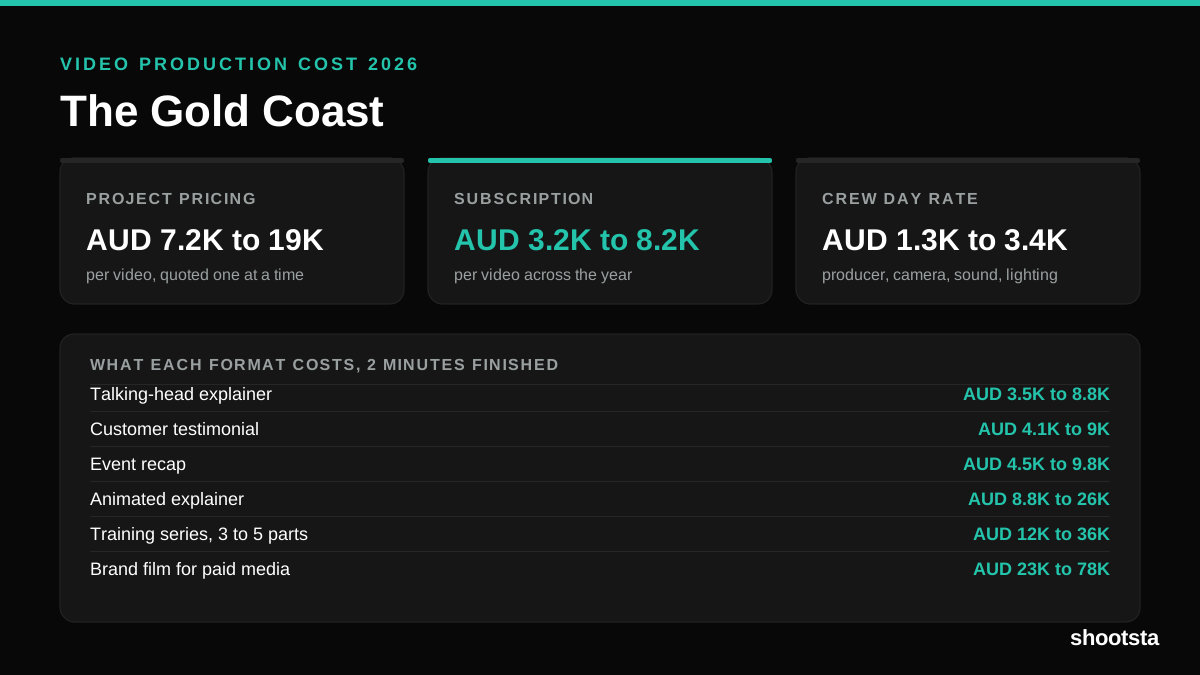
Video Production Cost on the Gold Coast 2026
Video production in the Gold Coast costs AUD 3,200 to AUD 8,200 per finished video on a subscription model, and AUD 7,200 to AUD 18,500 for one-off project work. Here is what you are paying for, and how the three pricing models compare.
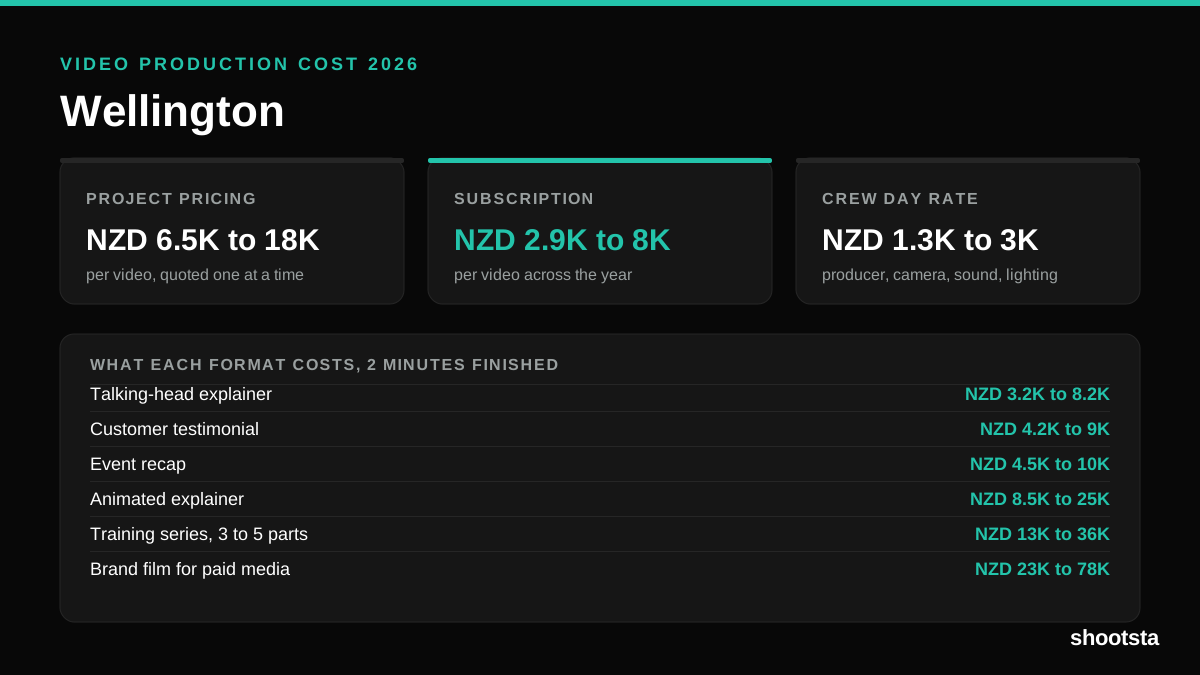
Video Production Cost in Wellington (2026)
Video production in Wellington costs NZD 2,900 to NZD 8,000 per finished video on a subscription model, and NZD 6,500 to NZD 18,000 for one-off project work. Here is what you are paying for, and how the three pricing models compare.
Video Production Cost in Berlin (2026)
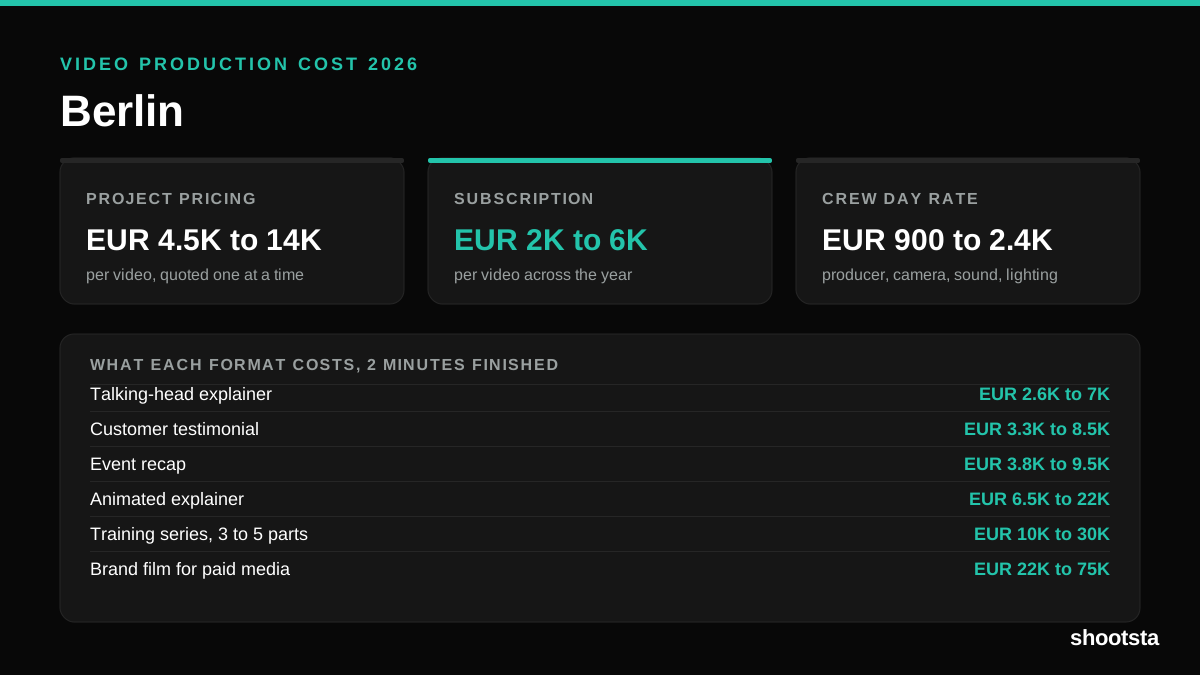
Video production in Berlin costs EUR 2,000 to EUR 6,000 per finished video on a subscription model, and EUR 4,500 to EUR 13,500 for one-off project work. Here is what you are paying for, and how the three pricing models compare.