
Freelance Video Editor vs Subscription
shootsta.
Freelance Video Editor vs Subscription
By Shootsta · Published August 5, 2026 · Updated September 2026
A freelance editor is great for a hero edit. A subscription is built for a constant edit queue. Here is how to choose and how the cost compares.
Is a freelance video editor or a subscription better?
A freelance video editor is better for a single high-craft edit you want shaped by one person. A subscription is better when you have a constant queue of edits to keep on brand and on schedule. The deciding factor is how many edits you need each month, not the quality of any one editor.
The question makes sense because editing is where most of the time goes. A great editor can lift footage you thought was ordinary into something that holds attention. For a hero piece, that craft is exactly what you want.
Where a freelance editor shines
A freelance editor brings taste and consistency to one project. They learn the footage, make considered choices about pacing and music, and give you direct conversation about the cut. For a brand film or a launch video, that close back-and-forth is worth a lot.
The limit is the same as any single person: one queue, one set of hands, and a turnaround that depends entirely on how busy they are. When two projects land in the same week, one of them waits.
A scenario: one launch, six cuts
Say a product launch needs the same core footage delivered six ways: a 60-second hero cut, a square version for social, three short feature clips, and a subtitled cut for a regional market. A freelance editor can produce all six well, but they produce them in series, one after another, around whatever else is in their queue. If the launch date moves up a week, the later cuts are the ones that slip.
A subscription handles the same six cuts as a batch against a fixed turnaround, with the brand kit already applied to each. The hero cut still benefits from a careful hand. The repetitive variations are where a system saves the most time.
What a subscription adds on top
A subscription does not replace that craft so much as add a system around it. Shootsta gives your team unlimited professional edits at a set turnaround, with brand templates applied across every cut so the tenth video looks like the first. Across 70,000+ videos, the point is repeatable output, not a single showpiece.
- Turnaround is fixed, so you can plan a content calendar around it. Our note on enterprise video turnaround time goes deeper.
- Revisions are not metered, so feedback does not become a line item.
- Brand consistency holds across editors because the kit travels with the work.
How much does a freelance editor cost per edit?
Freelance editors usually charge per project or per finished minute, and the rate moves with complexity: a simple talking-head trim is cheap, while motion graphics, color work, and multiple revision rounds push the figure up fast. The catch is that this price holds steady no matter how many edits you order, so twenty edits cost roughly twenty times one. A subscription folds all of those edits into one fee, which is why the cost-per-edit gap widens as your queue grows.
How to choose between them
Think X plus Y rather than either or. Keep a freelance editor for the flagship cut where one person's judgment matters most, and run a subscription for the volume behind it: the product clips, the sales videos, the internal updates that need to ship every week.
To compare the wider trade-off, read the video subscription versus videographer and editor pillar, and to put the editing cost in context, see how much hiring a videographer costs. When you want to model your own numbers, the enterprise video ROI calculator shows where a subscription beats per-edit pricing, or talk to the Shootsta team for a plan.
Sources
- Shootsta production across 70,000+ videos for enterprise teams.
- Shootsta subscription model: kit, training, and unlimited edits with set turnaround.
- Industry rate benchmarks for freelance videographers and editors (day rates and per-project quotes).
Whichever model you pick, run the ten checks for corporate video editing services against it first.
Take this article with you
Read the latest at shootsta.com/blog/freelance-video-editor-vs-subscription
You might also like
How to Plan Video Team Capacity Around Leave
Your only editor just booked two weeks off, and you already know which projects will slip. Chad Lakin explains how to plan video team capacity so the work keeps moving when someone is away.
Corporate Video Editing Standards: Full Guide
A two-page editing standard does more for consistency than a forty-page brand book. Here is what it should cover, who owns each part, and how to enforce it with an in-house editor or an outside partner.
Quality Control in Outsourced Video Editing
When editing leaves the building, quality has to be checked by a system rather than by whoever happens to look. Here is the system: acceptance criteria, two QA gates, counted revision rounds and a quarterly audit.
Video Production Cost on the Gold Coast 2026
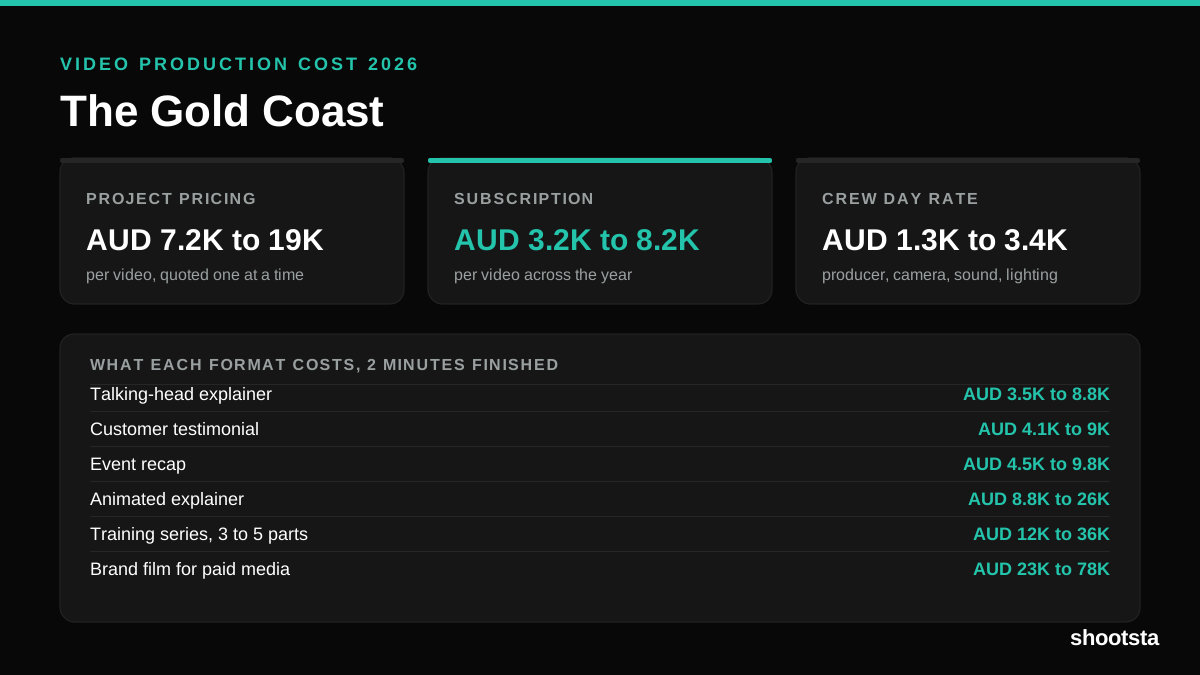
Video production in the Gold Coast costs AUD 3,200 to AUD 8,200 per finished video on a subscription model, and AUD 7,200 to AUD 18,500 for one-off project work. Here is what you are paying for, and how the three pricing models compare.
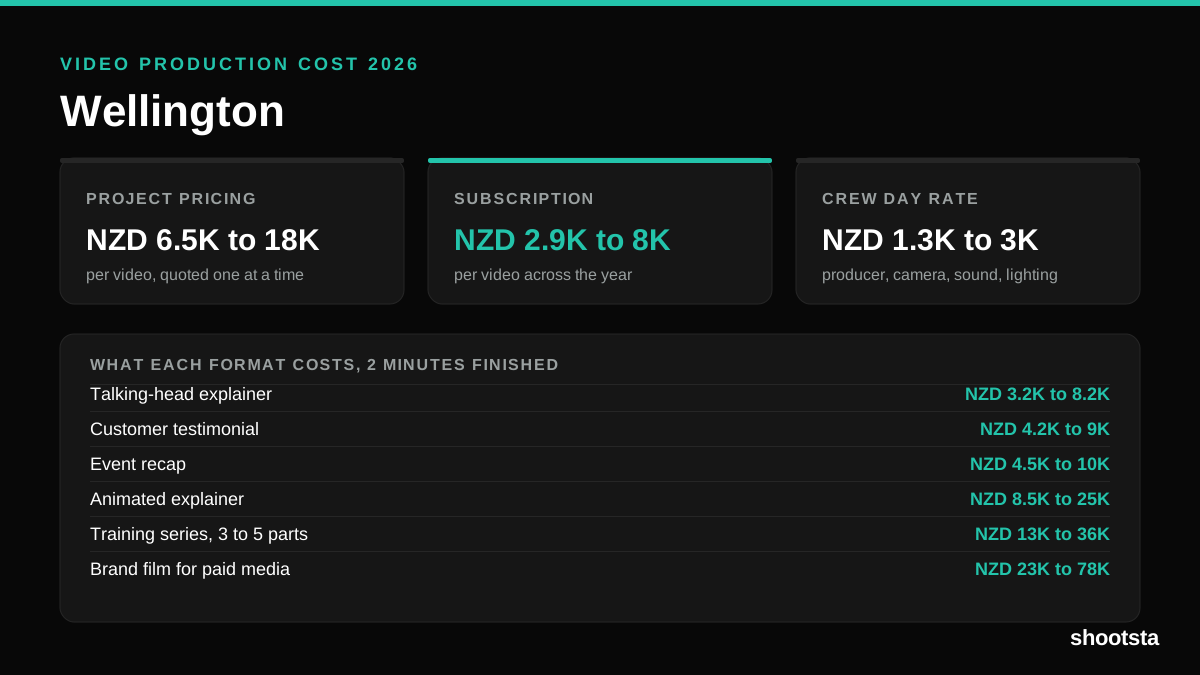
Video Production Cost in Wellington (2026)
Video production in Wellington costs NZD 2,900 to NZD 8,000 per finished video on a subscription model, and NZD 6,500 to NZD 18,000 for one-off project work. Here is what you are paying for, and how the three pricing models compare.
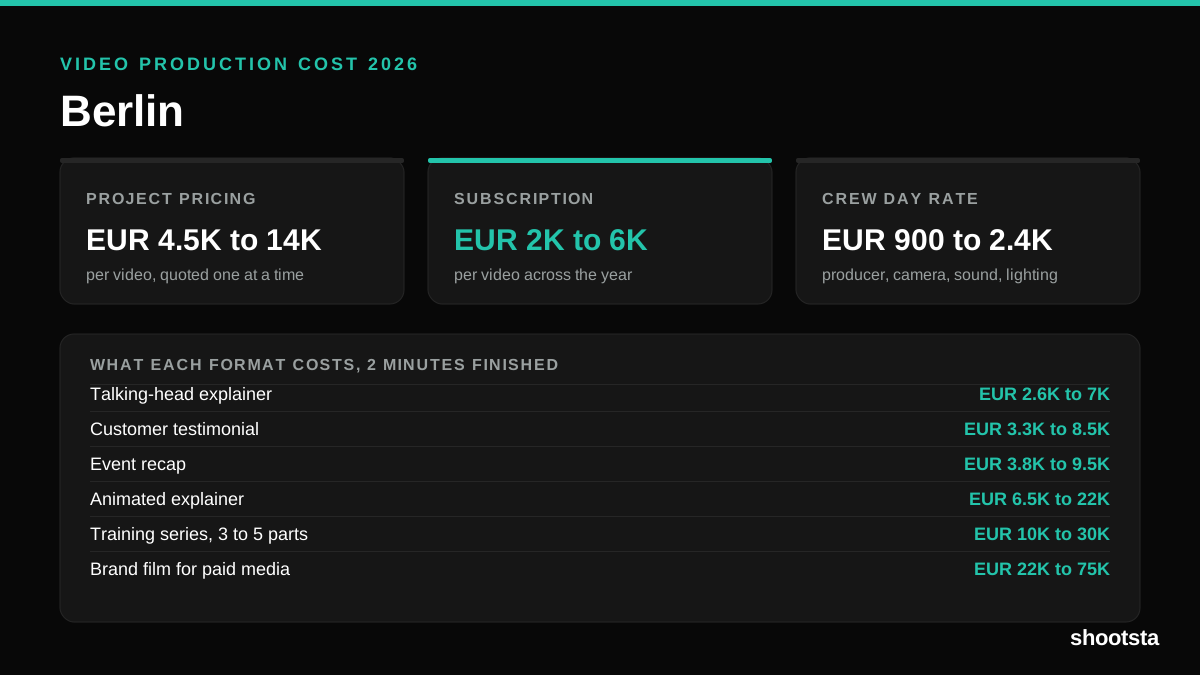
Video Production Cost in Berlin (2026)
Video production in Berlin costs EUR 2,000 to EUR 6,000 per finished video on a subscription model, and EUR 4,500 to EUR 13,500 for one-off project work. Here is what you are paying for, and how the three pricing models compare.