
Enterprise Video Playbook: 12 Videos to Make
shootsta.
Enterprise Video Playbook: 12 Videos to Make
By Shootsta · Published March 11, 2026 · Updated October 2026
A practical guide to the 12 video types that enterprise teams use most. From CEO updates to customer testimonials, here is what to produce first and why each format earns its place in your content program.
What videos should an enterprise team produce first?
If you run comms, marketing or training in a large company, you probably already know you need more video. The hard part is choosing where to start, because you can't produce everything at once with a small team and a full calendar. This playbook covers the 12 video types that do the most work for corporate teams, ranked by impact and ease of production.
The list comes from what we see across the 920+ brands we work with, from pharmaceutical companies running global comms programs to financial services firms producing compliance training. These are the formats that keep getting used and shared, and the ones clients ask for again at renewal.
1. How do CEO and leadership update videos build alignment?
Leadership updates are the single most requested video type in enterprise organizations. When a CEO or senior leader speaks directly to camera, the message lands differently than an email. Employees can read tone and conviction in a way that text can't carry.
These don't need to be polished. A 90-second video filmed on a phone in the leader's office carries more authenticity than a scripted production. What matters is that it comes often and speaks plainly. A monthly update keeps teams aligned on strategy without the cost of a town hall.
2. Why do employee onboarding videos reduce ramp-up time?
New hires at enterprise companies spend their first weeks absorbing information - company history, systems, processes, team structures, compliance requirements. Most of this is delivered through documents, slide decks, or back-to-back meetings.
Onboarding videos replace the repetitive parts. A 5-minute "welcome to the company" video from the CEO, a walkthrough of key systems, and a culture video from the team create a consistent experience for every new hire regardless of location or start date. When you use training video production for onboarding, new starters can rewatch the basics instead of asking the same questions in their first month.
3. How do product and feature announcement videos drive adoption?
When your product team ships a new feature or your company launches a new service, a short announcement video communicates the change faster and more clearly than a release note. Internal teams need to understand what changed and why. External customers need to see how it works.
A 60-second product demo video showing the feature in action, narrated by the product manager who built it, is more effective than a paragraph of documentation. It also gives your sales team an asset they can share directly with prospects.
4. What makes customer testimonial videos effective for enterprise sales?
Enterprise sales cycles are long. Prospects need proof that your solution works for companies like theirs. Written case studies help, but testimonial videos carry more weight because buyers can see and hear a real person describe their experience.
The best enterprise testimonials focus on a specific problem, how your product or service addressed it, and the measurable results. Keep them under 90 seconds. Film the customer where they work, whether that is an office or a factory floor. A real setting earns more trust than extra polish.
5. How does compliance and policy training video reduce risk?
Every enterprise has mandatory training - anti-bribery, data privacy, workplace safety, code of conduct. The traditional approach is a slide deck with a voiceover and a quiz at the end. Completion rates are technically high (because it's mandatory), but retention is low.
Short, scenario-based training videos perform better. Instead of reading a policy, employees watch a realistic situation play out and see the right response. This approach works for everything from cybersecurity awareness to diversity and inclusion training.
6. Why do sales enablement videos shorten deal cycles?
Sales teams at enterprise companies spend hours creating custom presentations for prospects. Sales enablement videos give them ready-made assets: product overviews, competitive comparisons, pricing explainers, and use-case walkthroughs that they can share before or after a meeting.
A library of sales enablement videos means reps spend less time building decks and more time selling. It also means every prospect gets a consistent, accurate message regardless of which rep they're working with.
7. How do internal communications videos replace the all-hands email?
Your company announcement lands in an inbox that is already full of other email, and it competes with all of it for attention. Internal communications video gives the message a face and a voice, which makes it easier to notice.
A 90-second video from the head of HR about a benefits change, or a 2-minute update from the operations team about a new process, tends to get more attention than the same news sent as an email. It works especially well for distributed teams where face-to-face communication isn't possible.
8. What role does employer branding video play in recruitment?
Enterprise companies compete for the same talent pools. Your careers page, job listings, and LinkedIn presence need to show candidates what a normal day at your company looks like. Recruitment videos - employee testimonials, day-in-the-life features, and team introductions - give candidates a reason to apply beyond the job description.
Video also helps the wrong candidates rule themselves out. When people see an honest view of the culture before they apply, the ones who do apply have a better idea of what they are signing up for.
9. How do event recap videos extend the value of corporate events?
Enterprise companies invest heavily in events - conferences, product launches, customer summits, internal offsites. An event video recap turns a one-day investment into weeks of content. Keynote highlights, attendee interviews, and behind-the-scenes footage can be distributed across social channels, email, and the company intranet.
For internal events, recap videos keep absent employees connected to what happened. For external events, they become the promo material for next year's edition.
10. Why do thought leadership videos build executive visibility?
Your subject matter experts have opinions and insights that your market cares about. Thought leadership videos - recorded interviews, commentary on industry trends, responses to market shifts - position your company as an authority in your space.
These work on LinkedIn, on your blog, and as content that sales reps share with prospects. A 2-minute video of your CTO explaining a technical trend carries more credibility than a ghost-written blog post.
11. How do process and how-to videos reduce support tickets?
Enterprise software companies field the same questions over and over, from resetting a password to changing a setting or exporting a report. A library of short how-to videos embedded in your help center and product UI answers these questions before they become support tickets.
This applies internally too. IT teams, HR departments, and operations teams can produce how-to videos for common processes - expense reporting, system access requests, leave applications - and reduce the volume of questions their teams handle daily.
12. What makes animated explainer videos useful for complex topics?
Animated video production fills a gap that live-action can't always cover. When you need to explain a complex process, visualize data, or simplify an abstract concept, animation gives you full creative control. You don't need a film crew, a location or anyone willing to appear on camera.
Enterprise teams use animated explainers for product overviews, investor presentations, regulatory explainers, and any scenario where a visual metaphor communicates better than footage of people talking.
Where should you start?
Don't try to produce all 12 types at once. Start with the formats that address your most immediate need. If employee alignment is the priority, begin with leadership updates and internal communications. If pipeline is the priority, start with testimonials and sales enablement. If you're hiring, start with recruitment videos.
The advantage of a video production subscription is that you can produce multiple formats from a single plan. Once you've proven one format works, add the next. Starting with two or three video types and adding more as each one earns its place is a sensible way to grow a program.
Take our video quiz to find out which video types will have the biggest impact on your business right now. You can also explore the best video maker tools for business teams to find the right production approach.
Take this article with you
Read the latest at shootsta.com/blog/enterprise-video-playbook-12-videos-every-corporate-team-needs
You might also like

How to Plan Video Team Capacity Around Leave
Your only editor just booked two weeks off, and you already know which projects will slip. Chad Lakin explains how to plan video team capacity so the work keeps moving when someone is away.
Corporate Video Editing Standards: Full Guide
A two-page editing standard does more for consistency than a forty-page brand book. Here is what it should cover, who owns each part, and how to enforce it with an in-house editor or an outside partner.
Quality Control in Outsourced Video Editing
When editing leaves the building, quality has to be checked by a system rather than by whoever happens to look. Here is the system: acceptance criteria, two QA gates, counted revision rounds and a quarterly audit.
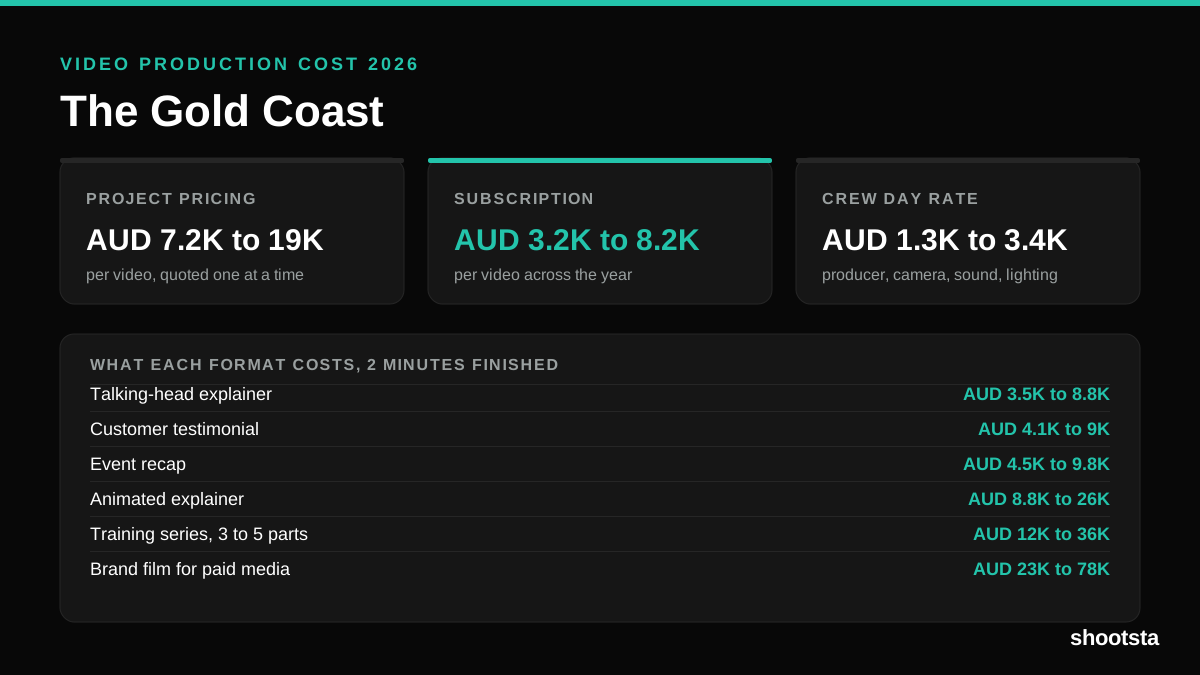
Video Production Cost on the Gold Coast 2026
Video production in the Gold Coast costs AUD 3,200 to AUD 8,200 per finished video on a subscription model, and AUD 7,200 to AUD 18,500 for one-off project work. Here is what you are paying for, and how the three pricing models compare.
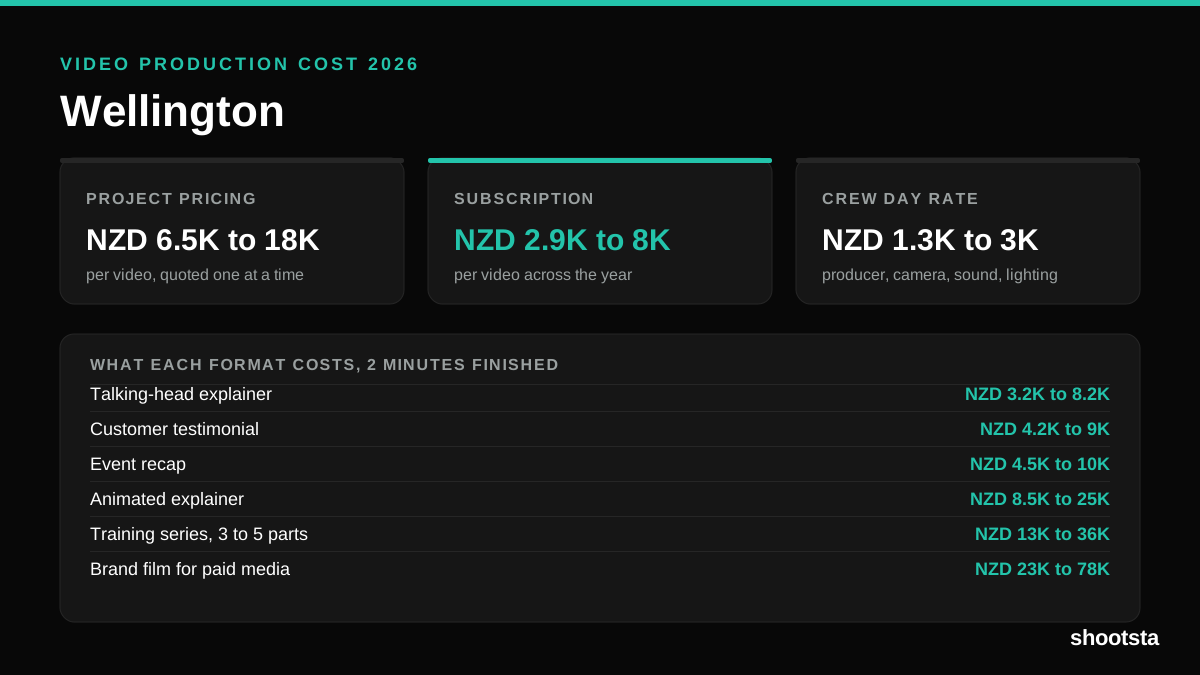
Video Production Cost in Wellington (2026)
Video production in Wellington costs NZD 2,900 to NZD 8,000 per finished video on a subscription model, and NZD 6,500 to NZD 18,000 for one-off project work. Here is what you are paying for, and how the three pricing models compare.
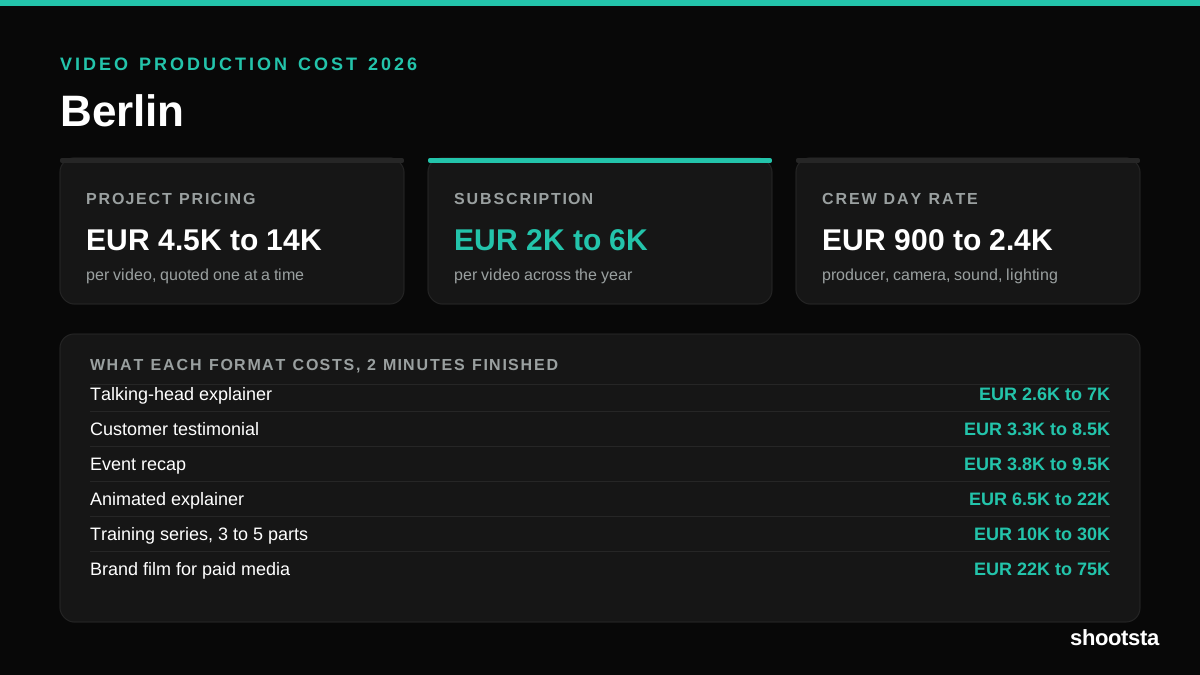
Video Production Cost in Berlin (2026)
Video production in Berlin costs EUR 2,000 to EUR 6,000 per finished video on a subscription model, and EUR 4,500 to EUR 13,500 for one-off project work. Here is what you are paying for, and how the three pricing models compare.