
Why Brand Video Goes Stale and How to Fix It
shootsta.
Why Brand Video Goes Stale and How to Fix It
By Shootsta · Published November 6, 2026 · Updated November 2026
How to find out-of-date videos, decide whether to re-edit or re-shoot, and keep your video library current with owners, review dates and brand templates.
Brand video goes stale when your business changes faster than your videos do. A new logo, a renamed product, a leader who has moved on or a price that no longer applies can each make a good video wrong overnight. The fix is to run your videos as a library with an owner, a review date and brand templates that make updates quick.
This matters most for teams that publish a lot. Marketing has campaign videos on the website and in sales decks, internal comms has leadership updates on the intranet, and L&D has training modules sitting in the LMS for years. This guide shows how to find the stale ones, decide what to fix first and keep the rest current without starting again.
Why does brand video go stale?
Most stale video comes from a handful of predictable changes. A rebrand changes your logo, fonts or palette, and every video made before it now looks off. People change too, so the CEO in your welcome video or the trainer in your onboarding module may have left.
Products and policies move as well. Screens in a product demo change with each release, and prices, policy terms or compliance steps go out of date. Formats age more slowly, but a landscape video built for a website can look out of place in a vertical social feed.
How do you know a brand video is out of date?
Start with what a viewer would notice. Check for an old logo, the wrong fonts, people who no longer work for you, product screens that do not match the current release and prices or terms that have changed. Any one of those is enough to flag the video for review.
Then look at the numbers you already have. A training module with falling completion rates in your LMS, or a sales video that reps have stopped sending, is often telling you it no longer fits. Ask the teams who use each video whether they still trust it, because they usually know first.
Which stale brand videos should you fix first?
Fix the videos where being wrong costs you the most. Customer-facing videos with old prices or claims come first, followed by compliance and safety training that no longer matches policy. These carry real risk, so they should not wait for the next budget cycle.
Next come your busiest videos, such as the homepage video, the main product demo and onboarding modules every new starter watches. A dated look on these reaches the most people. Older videos with little traffic can often be archived instead of fixed.
Should you re-edit an old brand video or re-shoot it?
Re-edit when the footage is still true. If the people, product and message are right but the branding has changed, an editor can swap the titles, lower thirds, captions and end card without a new shoot. The same applies when you need new language versions or a cut for a new format.
Re-shoot when the footage itself is wrong, such as when the speaker has left or the product looks different. Re-shooting does not have to mean a big production. A short piece to camera from a new leader, filmed by your own team, can replace the out-of-date section while the rest of the video stays as it is.
How do you keep brand video current?
Give every video an owner and a review date when it is published. The owner is the person who will notice when the product, policy or speaker changes. A yearly review works for most videos, with an extra check after any rebrand or restructure.
Build videos so they are easy to update. A video brand template lets an editor apply new branding across many videos at once. Keeping the intro, the end card and any figures in separate sections means a change touches one part of the video instead of all of it. Keep your raw footage and project files too, because updating from source is faster and cleaner than editing over a finished export.
It also helps to match the refresh rhythm to the type of video. In the Peak, Pulse and Presence model, Peak videos are big brand films that you review each year. Pulse and Presence videos, such as updates and team intros, are quick to make, so you replace them as often as the business changes. A clear video operating model sets who owns those reviews across teams.
How does Shootsta help keep videos current?
Brand template setup is part of every Shootsta plan. When your branding changes, Shootsta editors apply the new template, so updated videos match the rest of your library. Every project includes five rounds of feedback, and the first version of a standard edit comes back in around 48 hours.
Updates run on the same credits as new videos, because editing, animation and creative services all use credits. Your team can film any new sections itself, or you can book a Shootsta videographer. For the bigger refresh questions, read our guide to the enterprise video operating model or see how one team approached refreshing outdated financial services animations.
Frequently asked questions
How often should you review your brand videos?
Review most brand videos once a year, and check every customer-facing and compliance video after a rebrand, a product release or a policy change. Give each video an owner so someone is responsible for the review. Archive videos that get little use instead of updating them.
Can you update a video without re-shooting it?
Yes, as long as the footage is still accurate. An editor can replace titles, lower thirds, captions, end cards and language versions without a new shoot. You only need to re-shoot when the people or the product in the footage have changed.
What is the fastest way to rebrand a video library?
Set up the new video brand template first, then update your highest-traffic and highest-risk videos before the rest. Work from the original project files where you have them. Archive the videos nobody uses, so you only spend time on the ones that matter.
Take this article with you
Read the latest at shootsta.com/blog/why-brand-video-goes-stale
You might also like
Why Urgent Video Requests Go Sideways
Most urgent videos go sideways because nobody planned for urgent work to happen. Chad Lakin explains how comms teams build the process first, so a fast turnaround becomes routine.
The Real Risks of Outsourcing Video Production
The Real Risks of Outsourcing Video Production
Brand drift, slow approvals, hidden costs, footage security and supplier lock-in, with the questions that expose each risk before you sign.

How to Plan Video Team Capacity Around Leave
Your only editor just booked two weeks off, and you already know which projects will slip. Chad Lakin explains how to plan video team capacity so the work keeps moving when someone is away.
Corporate Video Editing Standards: Full Guide
A two-page editing standard does more for consistency than a forty-page brand book. Here is what it should cover, who owns each part, and how to enforce it with an in-house editor or an outside partner.
Quality Control in Outsourced Video Editing
When editing leaves the building, quality has to be checked by a system rather than by whoever happens to look. Here is the system: acceptance criteria, two QA gates, counted revision rounds and a quarterly audit.
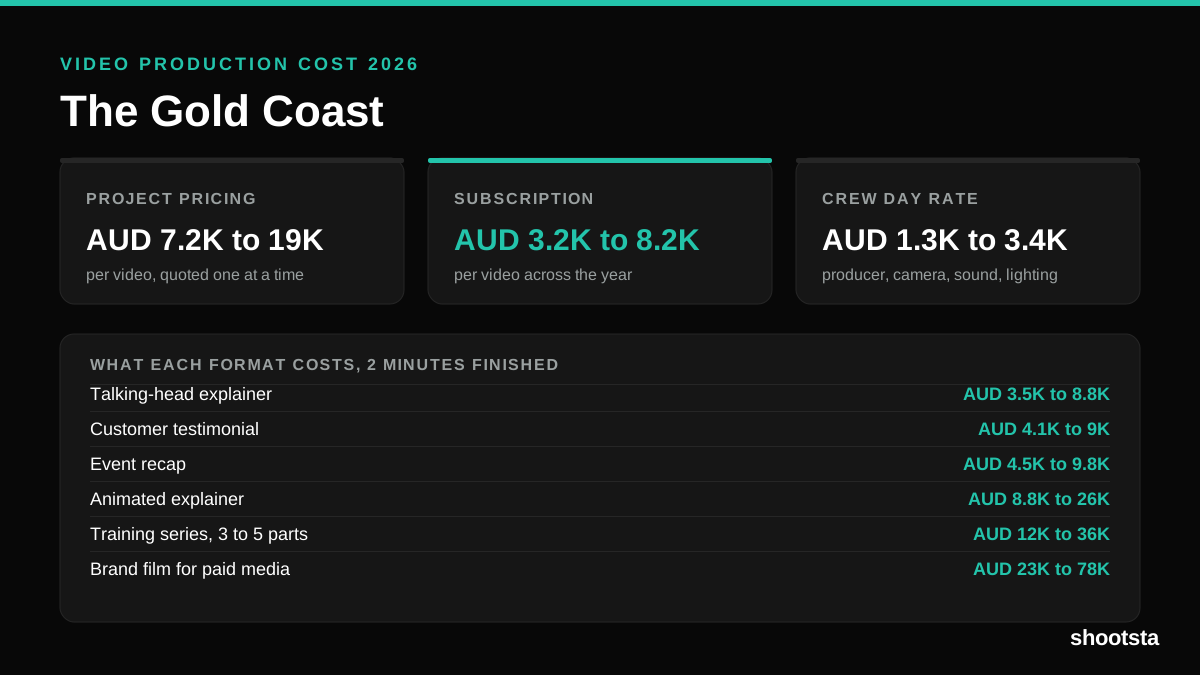
Video Production Cost on the Gold Coast 2026
Video production in the Gold Coast costs AUD 3,200 to AUD 8,200 per finished video on a subscription model, and AUD 7,200 to AUD 18,500 for one-off project work. Here is what you are paying for, and how the three pricing models compare.