
How to produce video for the public sector
shootsta.
How to produce video for the public sector
By Shootsta · Published April 15, 2026 · Updated October 2026
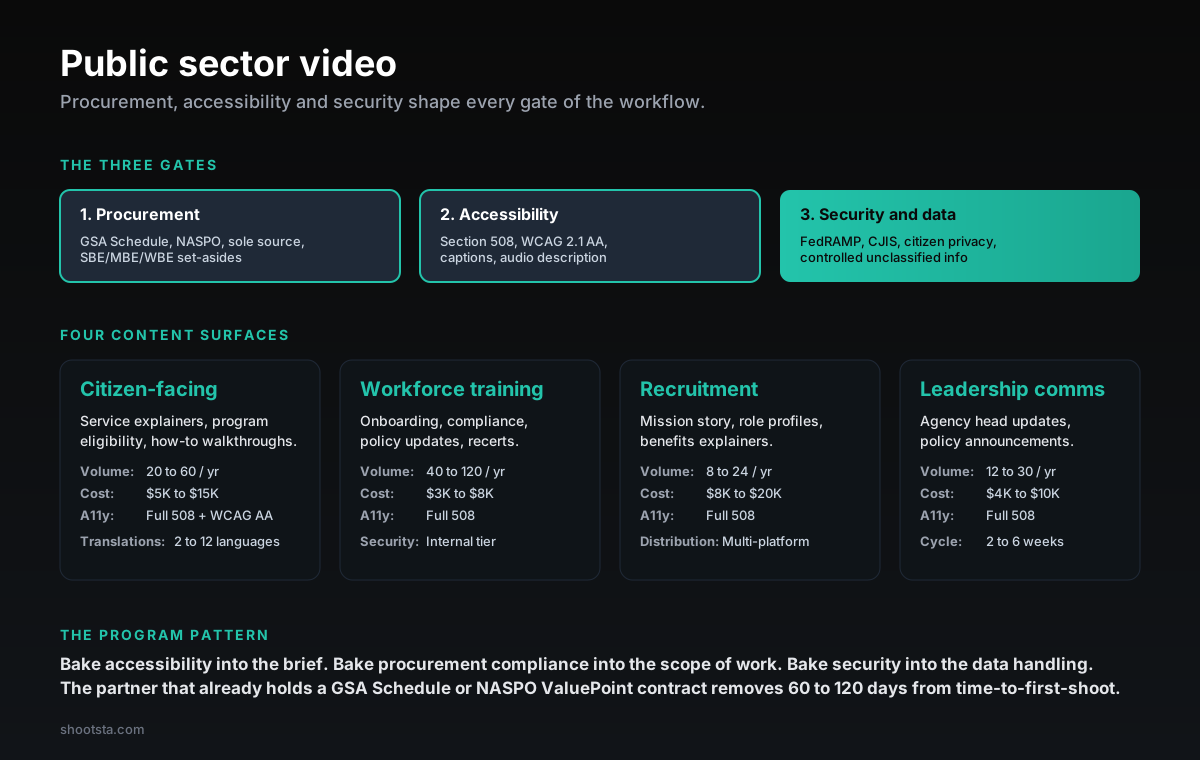
Public-sector video is shaped by three gates that do not apply in the commercial sector: procurement, accessibility and security. Four content surfaces (citizen-facing, workforce training, recruitment, leadership comms), the procurement vehicles that cut 60 to 120 days off time-to-first-shoot, and the accessibility and security patterns that hold up under FOIA and ombudsman review.
Why public-sector video carries a different production load
Public-sector video runs into three gates that do not apply in the commercial sector. The first is procurement. An agency cannot simply hire a production company, so the vendor has to hold a relevant contract vehicle or win a competitive solicitation.
The second gate is accessibility. Section 508 (US federal), WCAG 2.1 AA (state and local) and EN 301 549 (EU) require captions, transcripts, audio description and contrast standards on every asset that reaches citizens. The third is security. Controlled unclassified information (CUI), FOUO footage and citizen-identifiable material need controlled-access workspaces, defensible audit trails and storage that survives FOIA or sunshine-law inspection.
If you treat government video like commercial corporate video, these gates tend to show up late. Procurement drags on for months, accessibility rework eats into the post-production budget, and security gaps surface during an inspection. The better approach is to design the video program around all three gates from day one.
In practice that means you choose a partner already on the relevant contract vehicle. You build Section 508 into the standard delivery instead of adding it as a finishing step, and you treat sensitive footage the way you treat sensitive data. This post shows how to build or evaluate a program that handles these specifics.
The three gates
Gate 1: Procurement
Procurement is the biggest difference from commercial production. Federal agencies usually buy through the GSA Schedule (MAS), category management vehicles like 8(a) STARS III or OASIS+, agency-specific IDIQs, or sole-source justifications. State agencies use NASPO ValuePoint where the state has participating-addendum coverage, or they use state master agreements and competitive RFPs. Local agencies follow municipal procurement code, often with SBE/MBE/WBE set-asides.
A vendor not already on the relevant vehicle can face 60 to 120 days of procurement runway before the first shoot. If you select a vendor that already holds the vehicle, you skip that delay. For a video program at scale, the choice of contract vehicle is the decision that moves your schedule the most.
Gate 2: Accessibility
US federal work falls under Section 508 of the Rehabilitation Act. State and local work usually follows WCAG 2.1 AA through state digital accessibility law or municipal policy. In the EU, EN 301 549 is transposed from the Web Accessibility Directive. Elsewhere the rules vary by jurisdiction, such as the DDA in Australia, the ACA in Canada and JIS X 8341 in Japan.
For video, the minimum accessibility deliverables are open captions or closed captions with controllable display, a transcript, audio description for non-text content where required, enough contrast in on-screen text, and keyboard-accessible players where the video is embedded. Many citizen-facing programs also need language versions under agency language access plans. The accessibility load is often the largest single difference in post-production cost between commercial and public-sector video.
Gate 3: Security and data handling
CUI (controlled unclassified information), FOUO (for official use only) and citizen-identifiable material require controlled-access workspaces and defensible audit trails. Federal CUI workflows need FedRAMP-authorized storage, and law enforcement footage needs CJIS-compliant handling. State and local agencies have their own classification frameworks, while international public-sector work adds local data residency and GDPR-equivalent regimes.
Standard public-sector practice starts with a secure ingestion path and a restricted-access editorial workspace. From there, distribution is limited to approved channels, archives are encrypted, and an audit log records every access and approval. The partner has to handle the data correctly, because the agency cannot accept the risk of restricted material going public.
The four content surfaces
Surface 1: Citizen-facing service video
This surface covers service explainers, program eligibility walkthroughs, how-to-apply videos for benefits and permits, and public health and safety messages. It carries the heaviest accessibility load because the audience is the whole citizen population. These videos often ship in several languages under the agency's language access plan,.
Surface 2: Workforce training
Workforce training includes onboarding for new federal, state and local employees and compliance training on cybersecurity, ethics and anti-harassment. It also covers policy update videos and recertification modules. This is often the highest-volume surface, because the training library keeps growing. It sits on an internal security tier, but Section 508 still applies because the workforce includes employees with disabilities.
Surface 3: Recruitment and workforce branding
Recruitment video covers mission stories, role profiles, benefits explainers and day-in-the-life videos for federal civilian roles, state agency hiring and local government recruiting. They go out across USAJOBS, state hiring portals, social media and partner job boards.
Surface 4: Leadership communications
This surface includes agency head updates, program launch announcements, policy explainers, internal town hall video, and anniversary or milestone videos. Cycle time depends on policy complexity, because a policy explainer may need legal and communications sign-off before it can go out.
Public sector readiness checker
Is your agency ready for a video production partner?
Set your jurisdiction tier and check which controls are in place. The checker returns a readiness rating and the gaps to close before procurement.
Jurisdiction tier
GSA Schedule, Section 508, FedRAMP, CUI handling
Federal programs need a partner already on a contract vehicle. GSA Schedule is the fastest path; sole-source justifications take 60 to 120 days and rarely succeed.
Controls in place (0/6)
Readiness
Not ready
Must-have controls
0 / 4
Overall coverage
0 / 6 (0%)
Public sector readiness varies by agency, jurisdiction and contract vehicle. The checker is indicative; final procurement gates depend on the specific solicitation.
The procurement vehicles that cut time-to-first-shoot
US federal
GSA Multiple Award Schedule (formerly GSA Schedule 70 and 541) is the broadest commercial-acquisition vehicle. Agencies can place orders directly without re-competing the underlying contract, which removes the 60 to 120 day procurement runway. Category management vehicles (8(a) STARS III, OASIS+, Polaris, Alliant 2) cover specific socioeconomic or task-area categories. Sole-source justification under FAR 6.302 is available in theory, but it rarely succeeds for video production where commercial competition exists.
US state
NASPO ValuePoint cooperative purchasing covers state agencies in participating states, so check the state-specific addendum to see whether it is active. State master service agreements cover state-specific procurement. Competitive RFP is the default, and it usually takes several months from release to award.
US local and municipal
Local procurement code varies widely, and many jurisdictions piggyback on state cooperative vehicles. Purchases under the local small purchase threshold can go through a simpler process, while larger contracts need a formal RFP. SBE/MBE/WBE set-asides often decide which vendors are eligible.
International public sector
Frameworks vary a lot between countries: G-Cloud and DOS in the UK, EU framework agreements, BuyAndSell.gc.ca in Canada and AusTender in Australia. Many of them require a locally incorporated vendor or formal framework registration. Always confirm a vendor's registration status before you scope the work.
The accessibility workflow that holds at volume
Bake accessibility into the brief
Write the Section 508 / WCAG 2.1 AA requirements into the brief. On-screen text contrast, caption style, transcript format and audio description needs should all be locked before production starts. Programs that struggle tend to treat accessibility as a finishing step, while programs that ship cleanly settle it at the brief.
Standard delivery package
Every public-sector video should ship with open captions, a closed-caption file (WebVTT or SRT), a full transcript, an audio description track where required, alt-text for thumbnails and accessible player embed code. Treat this as the standard delivery for every video, with no premium tier for accessibility.
Multi-language pipeline
The pipeline covers translation, dubbing and regional caption files for every language your agency's language access plan requires. Federal citizen-facing video often ships in several languages, and some large state programs need many more. For a high-volume citizen-facing program, an efficient language pipeline is where you save the most time and budget.
Accessibility review gate
Before delivery, a reviewer trained in accessibility as well as video checks each asset against the Section 508 / WCAG checklist. This review catches contrast misses, caption-timing drift and audio-description gaps before the agency stakeholder review. Strong public-sector programs invest here, because a fix at this gate costs far less than a fix at agency review or, worse, after publication.
The security workflow that holds at inspection
Restricted-access workspace
The editorial workspace should have controlled access lists and an audit log of every file access, and footage should never be shared through public cloud links. CUI workflows need FedRAMP-authorized cloud storage and FIPS-validated encryption, and CJIS-relevant footage needs CJIS-compliant access controls. How a partner runs its workspace is one of the most important things to check when you select a vendor.
Audit trail per asset
Every access, approval and distribution decision should be logged with the user, a timestamp and a reason. That log defends the agency against FOIA, sunshine law, ombudsman and inspector general requests. Keep it for as long as the agency's records schedule requires.
Controlled distribution
Published video goes out only through approved channels, with the right accessibility files attached. The partner should not reuse agency material for its own promotion without explicit written permission. Standard public-sector vendor agreements include strict reuse restrictions and break clauses for non-compliance.
What changes for the production team working on public-sector content
The production team has to work differently in three ways once the client is a government agency.
Shift 1: Accessibility-fluent editing
You need editors, producers and graphics teams who understand Section 508 / WCAG 2.1 AA in detail. That covers on-screen text contrast, caption timing, where audio description fits in the gaps, and motion design that stays accessible. We covered the broader accessibility model in how to make enterprise video accessible; public-sector adds the regulator-enforcement layer.
Shift 2: Procurement-aware production scoping
Scopes of work need to line up with the procurement vehicle, including the contract type, performance work statement, deliverable structure and handling of government property. The producer who briefs the agency contracting officer should know the contract vehicle the work runs under.
Shift 3: Defensive data handling
Public-sector footage needs the same security discipline as military or healthcare work. That means restricted workspaces with controlled access lists and audit trails, and no casual file-sharing through commercial cloud services. We covered the broader contract pattern in video production contracts: what to look for; public-sector contracts add data-handling and audit-trail clauses.
Practical questions enterprise public-sector teams ask
How long does the procurement cycle take?
If your partner is already on a relevant vehicle (GSA, NASPO with addendum or an agency IDIQ), you can move from selection to first shoot in a matter of weeks. A competitive RFP takes months. A sole-source justification can take 60 to 120 days with no guarantee it succeeds, so the vehicle choice is often the largest variable in your schedule.
What is the accessibility cost premium?
If your agency is new to Section 508 / WCAG 2.1 AA delivery, expect accessibility to add a clear premium over equivalent commercial production. With a partner that already runs a mature accessibility workflow, the premium is much smaller. It drops once the workflow is in place, because most accessibility delivery becomes a standard step instead of bespoke work on each asset.
How do we handle multi-language requirements?
The standard pattern is to produce the master in the primary language, then derive regional caption translations and dubs from that master. If your language access plan covers many languages, a dedicated translation pipeline costs far less per language than ad-hoc translation.
What about footage with citizen-identifiable material?
Apply the same consent and handling standards you would use for healthcare patient testimonials. That means documented consent at recording, separate consent for distribution, and retention under the agency records schedule. The production workflow should tag every citizen-identifiable asset and route it through a consent check before publication.
How do we handle FOIA and sunshine law requests?
The production audit trail records who created each asset, when they did it and which approvals it went through. Final assets and supporting documents are kept under the agency records schedule. The partner's audit log is the agency's first line of defense against FOIA challenges to video, so choose a partner that treats the log as a core deliverable from day one.
Where to go next
For the broader accessibility framework that public-sector video extends, read how to make enterprise video accessible. For the contract patterns that govern public-sector vendor agreements, read video production contracts: what to look for. For the global production pattern that handles multi-jurisdiction public sector, read how to scale video across global offices.
To scope a public-sector video program with procurement, accessibility and security gates handled correctly, book a free consultation.
Take this article with you
Read the latest at shootsta.com/blog/how-to-produce-video-for-the-public-sector
You might also like
How to Brief an Animation Project
How to Brief an Animation Project
An animation brief is the document you send to your production partner before work starts. Get it right and you cut revision cycles in half. Get it wrong and you discover mid-production that everyone disagrees on what the video is for. This is what a complete brief looks like.
Animation for change management comms
Animation for change management comms
Animation handles change management communications better than live video for three reasons: no on-camera executives required during sensitive periods, scene-level updates when plans shift, and a single production that works across global teams with voiceover-only language swaps.
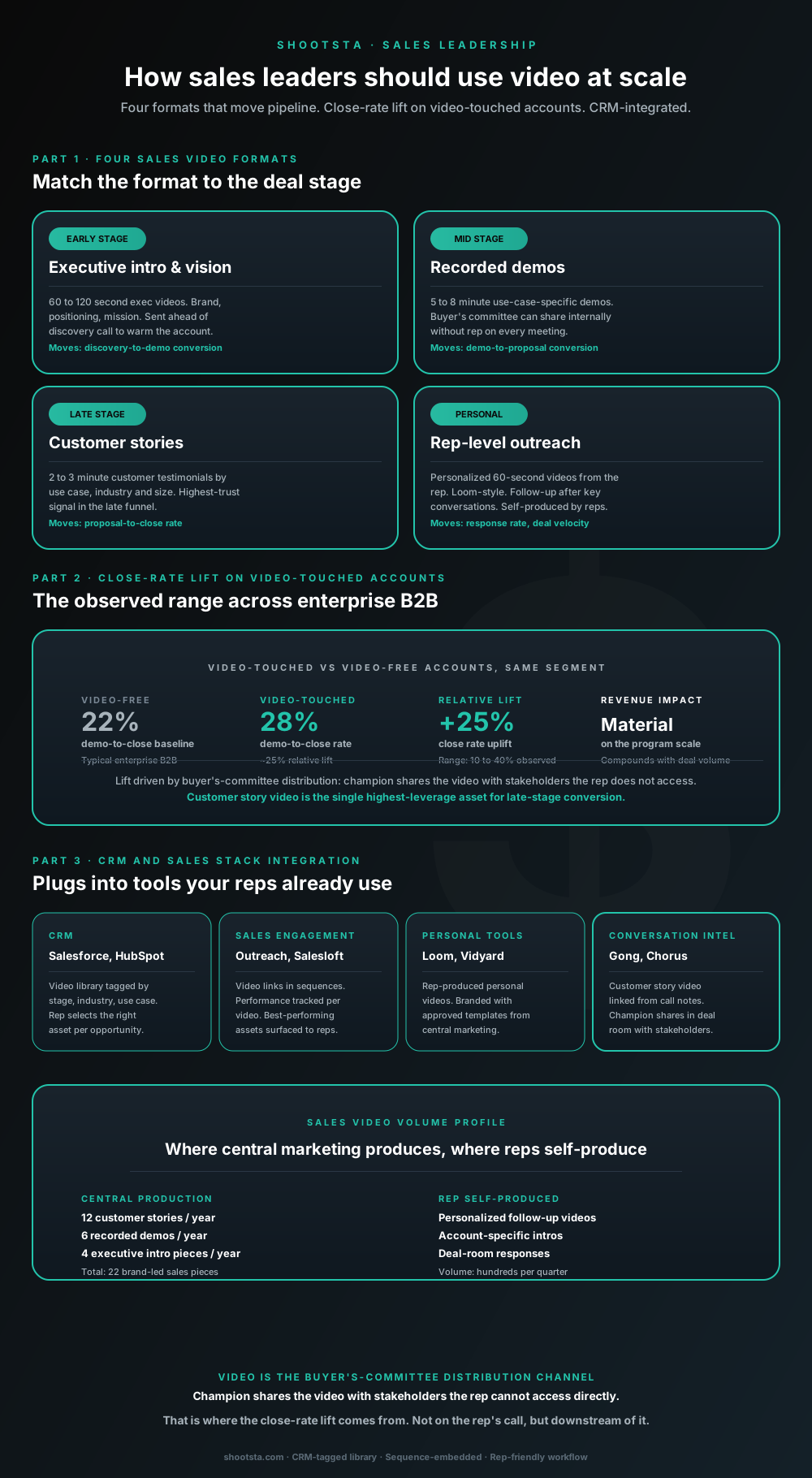
How sales leaders should use video at scale
Sales leaders mostly think about video as personalized rep outreach (Loom, Vidyard) or as marketing-produced customer stories. Both are useful. The bigger opportunity is the buyer's-committee distribution layer: assets the champion shares internally with stakeholders the rep does not access directly. That is where the close-rate lift compounds.
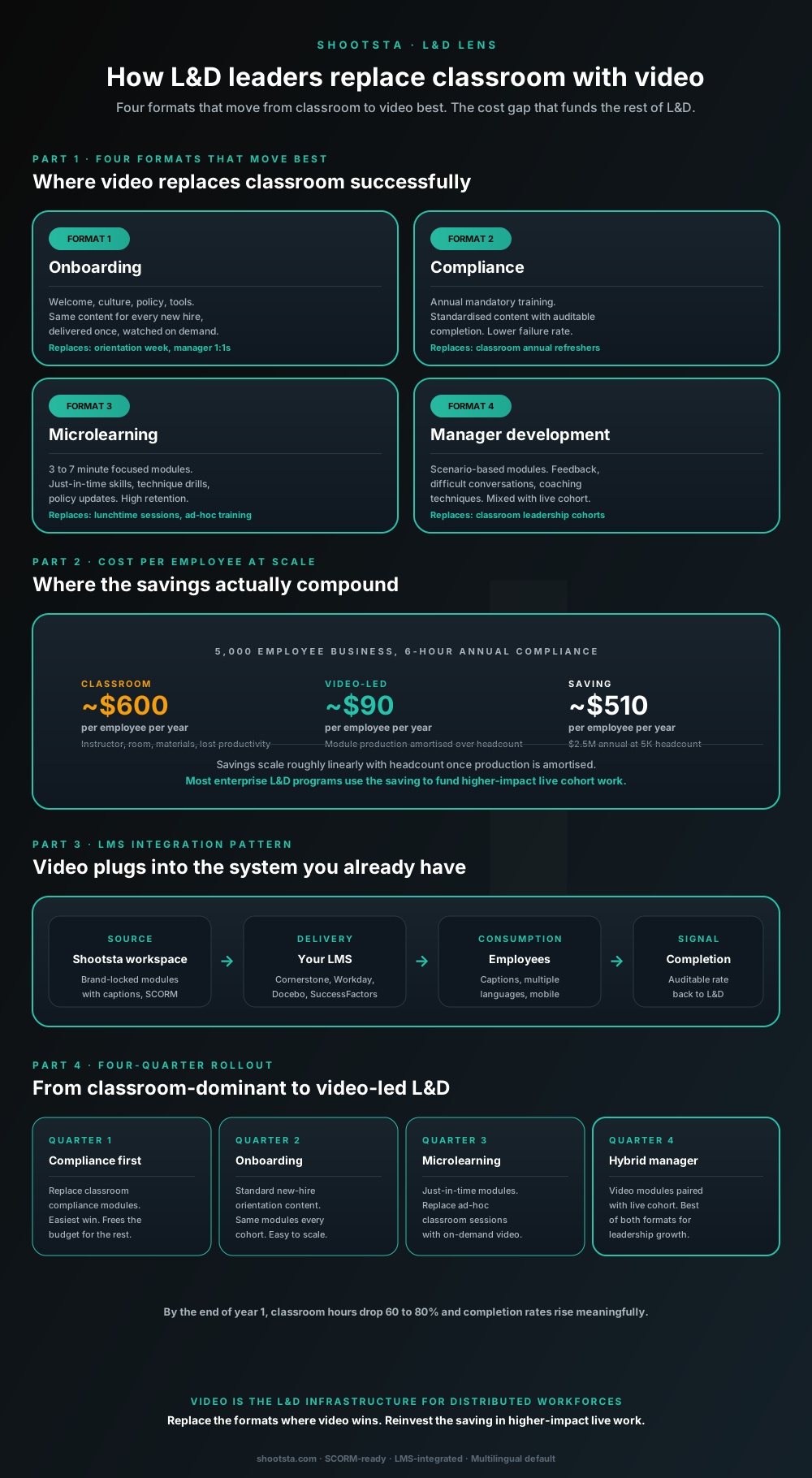
How L&D leaders replace classroom with video
L&D leaders running classroom-heavy training programs typically have the largest single opportunity in the business to free budget through format change. Four training formats move from classroom to video cleanly; the savings fund higher-impact live work. Here is the rollout that compounds learner adoption over four quarters.
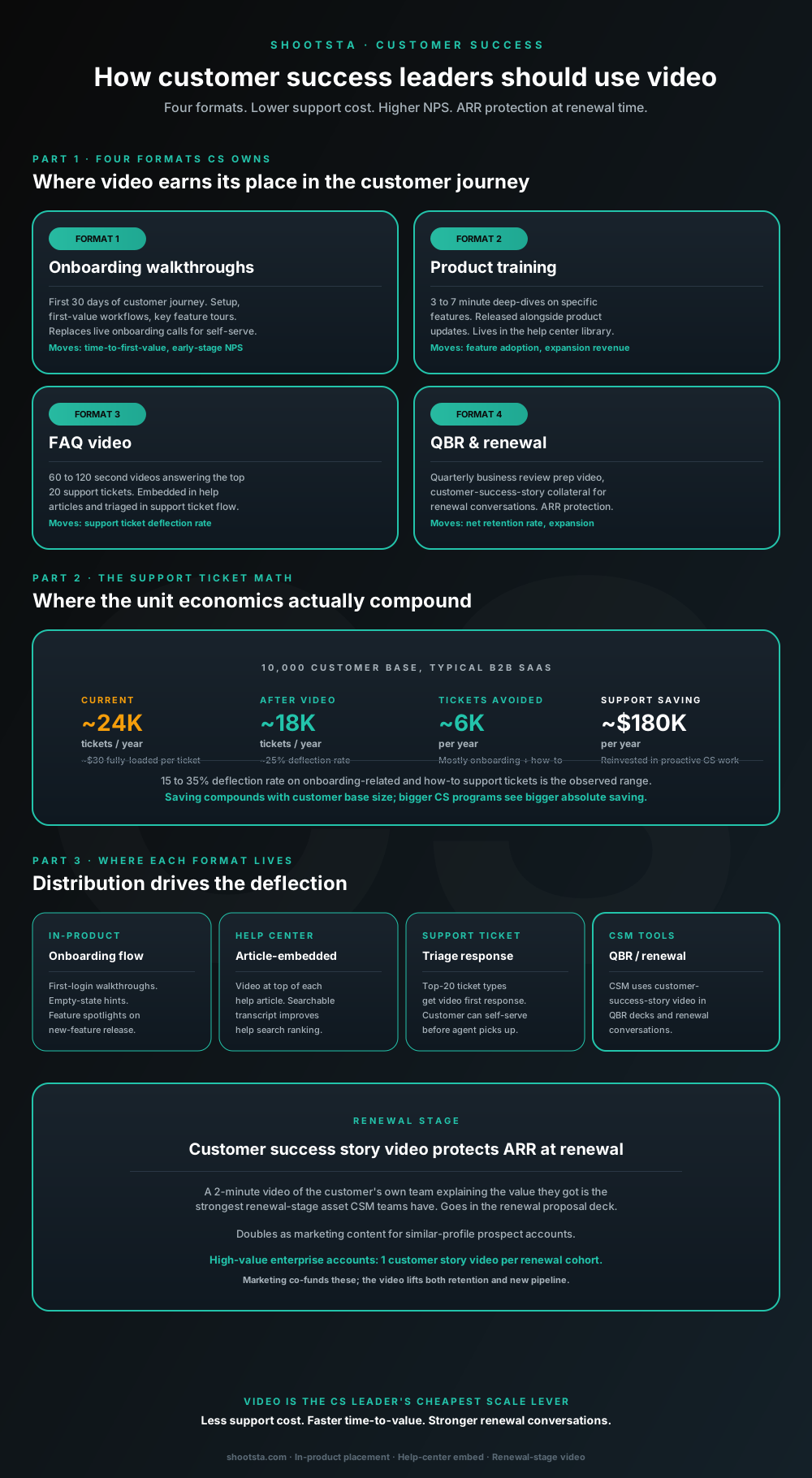
How customer success leaders should use video
Customer success leaders are usually under-resourced for both reactive support volume and proactive retention work. Video is the cheapest lever to fix both - 15 to 35% deflection on onboarding and how-to tickets, faster time-to-value, and renewal-stage customer story video that lifts net retention. Here is the four-format model and where each piece earns its place.
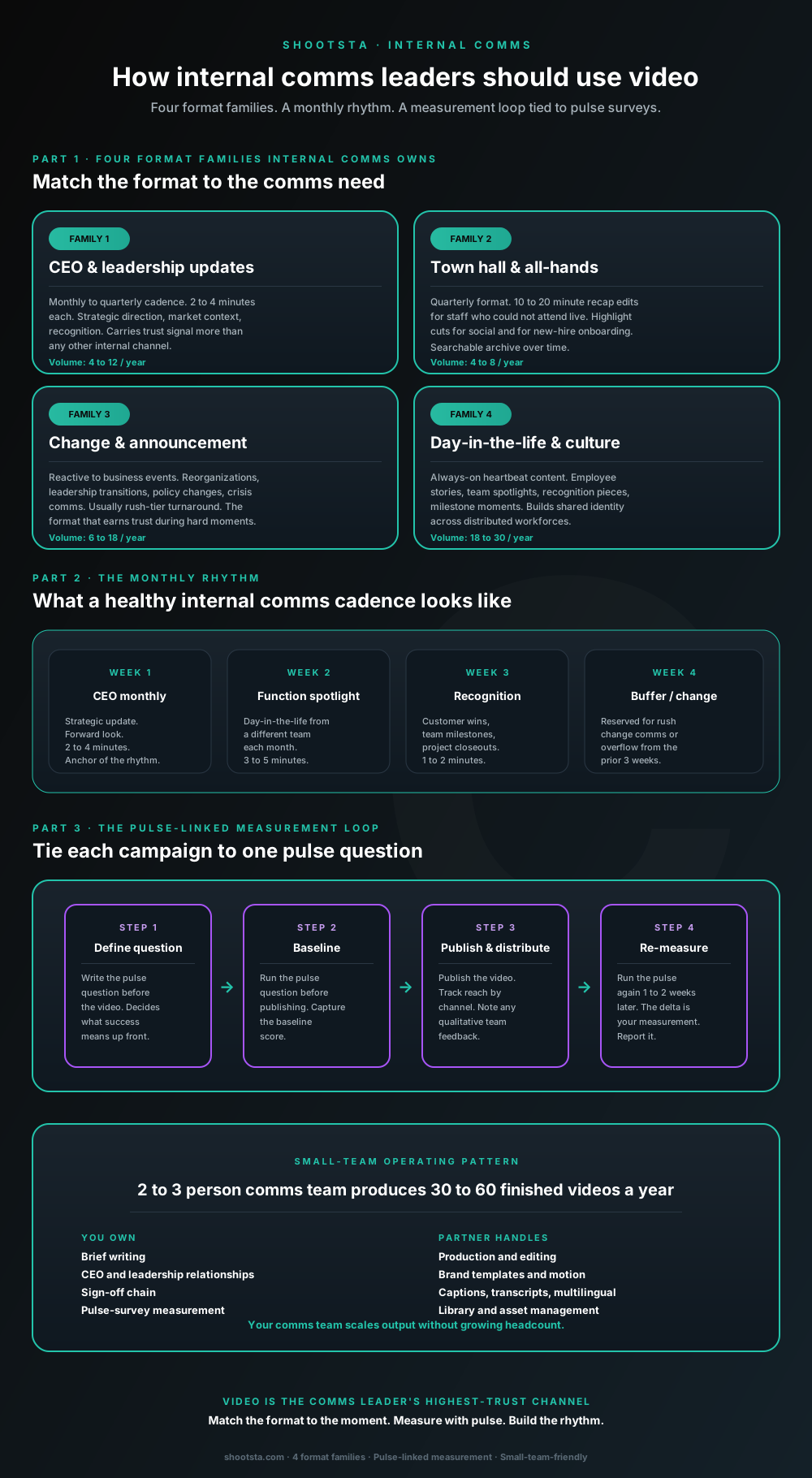
How internal comms leaders should use video
Internal comms leaders are usually under-resourced for the volume of video the business wants. The fix is not more headcount; it is structuring the program around four format families, a monthly rhythm, and a pulse-survey-linked measurement loop. Here is the operating pattern that lets a small comms team produce 30 to 60 finished videos a year.