
How to produce video for retail and ecommerce
shootsta.
How to produce video for retail and ecommerce
By Shootsta · Published April 16, 2026 · Updated October 2026
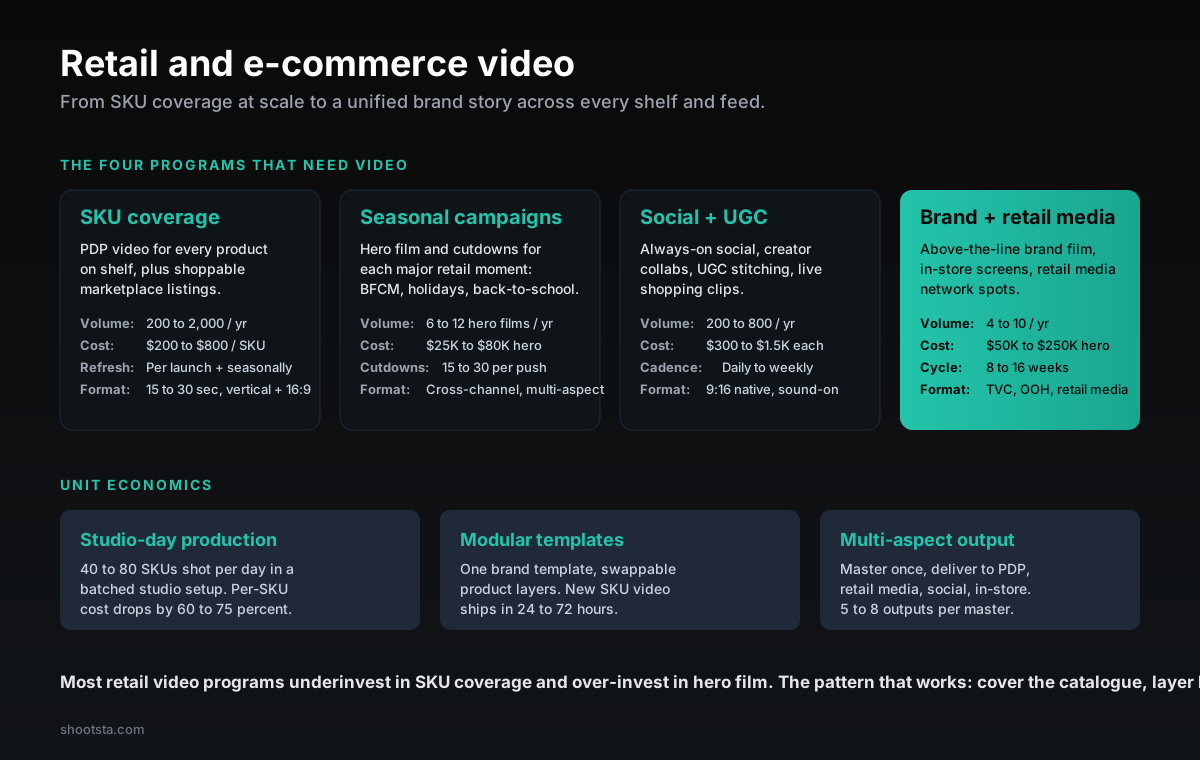
Retail and e-commerce video sits across four programs: SKU coverage at scale, seasonal campaign hero film, always-on social plus UGC, and brand plus retail media. Most retail programs underinvest in SKU coverage and over-invest in hero film. The unit economics for batched studio days and modular templates that cover hundreds to thousands of SKUs per year, plus the program pattern that lifts conversion without breaking budget.
Why retail video programs need to cover catalog and brand separately
In a typical retail and e-commerce video setup, you make a hero brand film once a season and some PDP (product detail page) video for top SKUs, and the agency handles social. These efforts do not connect. Much of the catalogue has no video, the brand work looks great but ships in small numbers, and social runs through a separate team with a different brief. Conversion falls short because shoppers need to see video on the SKU itself, as well as on the brand page.
The fix is to run catalogue coverage and brand work as separate programs that share one creative spine. SKU coverage runs as high-volume modular production, so each SKU costs little. Brand work runs as tier-1 production, where each asset costs far more. Always-on social and UGC sit between them with their own cadence, and seasonal campaigns run across all four. This post covers the four programs and the unit costs that hold up at retail scale.
The four programs
Program 1: SKU coverage
This program covers PDP video for every product on shelf, shoppable marketplace listings (Amazon, Wayfair, Target+) and video in the brand's own e-commerce app. It has by far the highest volume, which grows with the size of your catalogue. You refresh it with each launch and each season for hero categories. Each piece runs 15 to 30 seconds in vertical and 16:9, built to play muted on autoplay. Retail brands often underinvest in this program.
Program 2: Seasonal campaigns
This program makes a hero film and cutdowns for each major retail moment. Those moments include BFCM (Black Friday Cyber Monday), the holidays, back-to-school, summer and the brand's own seasonal pushes. Each hero film yields a large set of cutdowns across TV, OOH, social and retail media, in several aspect ratios. A large share of retail video budget goes here.
Program 3: Social and UGC
This program covers always-on social, creator collabs, UGC stitching and live shopping clips. You publish daily or weekly in native 9:16 with sound on and native captions. This is the program that keeps your audience engaged between seasonal pushes.
Program 4: Brand and retail media
This program covers above-the-line brand film, in-store screens and retail media network spots such as Walmart Connect, Roundel and Amazon Sponsored Display. Volume is low and each piece takes months, delivered as TVC, OOH and retail media. This tier-1 brand work sets the brand impression and frames how people see the rest of the program.
The SKU coverage program in detail
What good SKU coverage looks like
Every product on shelf has a PDP video. The video shows the product in use, puts a key benefit in on-screen text and has a clear hero shot for the thumbnail. It plays muted with captions on the e-commerce page and on marketplace listings. You deliver the same master in 9:16, 1:1 and 16:9 so it works across channels.
The production methods that scale
There are three methods, and each one suits a different catalogue size. Pick the one that matches how many SKUs you launch each year.
Ad-hoc external production is the standard agency model, and it has the highest cost per SKU. It works for a small catalogue. At scale it breaks down because each SKU costs too much.
Batched studio days shoot a large run of SKUs in a single day. This is the usual model for a mid-sized catalogue. The cost per SKU drops sharply compared with ad-hoc shoots.
A modular template with asset swap uses one brand template with product layers you can swap. New SKU video can ship quickly through this pipeline. It is the usual model for a large catalogue, and it cuts the cost per SKU again compared with studio days.
The multi-aspect output that matters
You edit the master once and deliver it to PDP (16:9 or 1:1), retail media (16:9), social (9:16), in-store screens (16:9 long-form) and live shopping (9:16 with overlay). Each master yields several outputs. This is how the SKU coverage program reaches every channel.
Retail SKU coverage calculator
Map your SKU coverage to annual video volume and spend
Set the active SKU count, the share you want covered with video and how often you refresh. The calculator picks the production method and returns annual assets, indicative spend and required studio days.
Active SKUs in catalogue: 800
Share covered with video: 60%
Refresh cycles per year: 2
Production method
Batched studio days: $280 / asset, ~50 assets / production day, ~48h cycle per asset.
SKUs covered
480
Annual assets
960
Production days
20
Indicative spend
$269K
Per-SKU costs are sector medians; large catalogues see further unit-cost improvement once modular templates and asset-swap pipelines are in place. Hero brand film and seasonal campaigns sit on top of these figures.
The seasonal campaign pattern
Each year brings several major retail moments. Each one gets a hero film and a library of cutdowns.
Hero film
The hero film anchors the campaign and runs 30 to 90 seconds. It has the highest production value and carries the seasonal story. It often uses talent, location shoots and custom music, so the budget depends on scope. Allow several weeks from brief to delivery.
Cutdown library
Each hero film is cut down for every channel. The set includes a 30 second TV cut, 15 second YouTube pre-roll, 15 second social, a 6 second bumper, a 9:16 social cut, a 1:1 feed cut, retail media spec cuts and an in-store screen cut. The cutdown library is how the money spent on the hero film reaches every channel.
Cross-channel scheduling
The hero film launches on all channels at campaign kickoff. Cutdowns then roll out across the campaign window, each on its channel's cadence. Retail media spend pairs with the retail media cuts. The pattern that holds is one creative spine, cut for each channel, with a planned launch and a steady run after it.
The social and UGC program
Retail brands often run social apart from PDP and brand work. These four streams make up a social program that works.
Always-on social calendar
You publish weekly or even daily. The mix includes trend-led posts that respond to platform moments, product-led posts that link to PDPs and brand-led posts that carry on the brand story. Each piece should move from idea to publish within days.
Creator collabs
Run creator partnerships each quarter or each month. The brand briefs the creator, the creator makes native content, and the brand reuses it under agreed rights. Cost per creator depends on audience size and exclusivity.
UGC stitching
Customer-made content, used with permission, is re-cut into brand-owned social. It often converts best of all social content, because shoppers trust other customers.
Live shopping clips
Live shopping events on TikTok Shop, Instagram Live Shopping and Amazon Live are re-cut into evergreen short-form clips. Each event can feed your social calendar for weeks.
The brand and retail media tier
This tier sits on top of the SKU coverage base. It carries the highest production value in the program.
Hero brand film
The hero brand film anchors the brand once or twice a year. It sets the visual language, casting approach and music direction that the rest of the year's work builds on. It is usually the most expensive single piece you make.
In-store screen content
Long-form video of 90 seconds to 5 minutes runs on in-store digital signage. It is often re-cut from the hero film with some added studio footage. It gives the brand a moment it controls in store and links the digital and physical experience.
Retail media network spots
Walmart Connect, Roundel (Target), Amazon Sponsored Display and Kroger Precision Marketing each have their own video formats. These spots are often co-funded from the retailer's trade marketing budget.
The program pattern that lifts conversion
Cover the catalog before the brand film
In retail video, PDP coverage across the catalogue does more for conversion than anything else. Many brands skip this step and go straight to a brand film. The catalogue work moves the conversion rate, while the brand film moves brand consideration. You need both, but start with PDP video because it pays back faster.
Match production method to volume
Use ad-hoc production for the hero brand work and batched studio days for mid-volume PDP work. Use a modular template with asset swap for the long tail of SKUs. If you run all volume through one method, you either burn the budget on SKU work or starve the hero work.
Multi-aspect output from day one
Every master is cut to several outputs at delivery, and editors plan those cuts before the shoot. Adding aspect ratios after delivery costs far more than doing them inside the first edit.
Modular brand templates
Build one brand template per category, such as apparel, beauty, home or food. Use it across SKU coverage, seasonal campaigns and social. The template keeps the brand consistent, while the content that changes carries the specific message.
What changes for the production team working on retail content
Your production team will need to make three practical shifts. Each one moves the work closer to a production line.
Shift 1: Studio-day discipline
Retail production at scale happens on studio days. Shooting a large run of SKUs in one day needs tight scheduling, several set zones, a shot list per SKU and asset tagging at capture. Teams struggle when they run creative-led production and treat each SKU as a small custom shoot.
Shift 2: Asset-swap editing pipelines
The pipeline uses one brand template, swappable product layers and automated rendering for every aspect ratio. It works more like a content management system than a traditional edit suite. At high volume, this is where the savings per unit add up.
Shift 3: Retail media spec literacy
Every retail media network has its own spec for frame counts, safe zones, captions and branding rules. The editor delivers to spec from the start, so nothing gets re-cut after the media-buy team rejects it. We covered the broader cross-channel format mapping in how to produce customer story video at scale.
Practical questions enterprise retail teams ask
What is the right ratio of catalog work to brand work?
By piece count, catalogue work should make up the bulk of an active retail program. Seasonal campaigns come next, and brand and retail media make up the smallest share. By spend the order flips, because each brand and seasonal piece costs far more than a SKU video. That imbalance is what makes the program pay for itself.
How do we handle product launches at scale?
A pre-launch studio day captures the launch SKUs before release. The modular template carries the launch creative, and a standard set of cutdowns covers every channel. Strong retail launch programs do the studio work early and spread the distribution after launch. We covered the launch playbook in how to produce video for a product launch.
What about live shopping?
Live shopping is growing fast in APAC and more slowly in the US and Europe. The pattern that works is a short, product-led live event with talent who knows the catalogue, re-cut into evergreen short-form clips afterward. Treat live shopping as a tier inside your social program rather than a program of its own. The live cuts feed the always-on social calendar.
How do we handle global versus local retail?
You produce master content once and adapt it for each region with the right language, regional offers and retailer-specific calls to action. Global retail programs usually keep a master content library plus an adaptation pipeline for each region. We covered the model in how to scale video across global offices.
What about creator-led content?
Creator content now sits close to the center of retail social. Treat creator partnerships as their own stream that feeds the always-on social program. The brand briefs the creator, the creator produces, and the brand holds usage rights so it can re-cut the footage. Cost per creator varies widely, so pilot a handful of creators before you commit to long-term partnerships with the few who perform.
Where to go next
For the customer story format that overlaps with creator content, read how to produce customer story video at scale. For the launch playbook that covers seasonal hero film, read how to produce video for a product launch. For the global production pattern that handles regional retail variation, read how to scale video across global offices.
To scope a retail or e-commerce video program with catalogue coverage and brand work both, book a free consultation.
Take this article with you
Read the latest at shootsta.com/blog/how-to-produce-video-for-retail-and-ecommerce
You might also like
How to Brief an Animation Project
How to Brief an Animation Project
An animation brief is the document you send to your production partner before work starts. Get it right and you cut revision cycles in half. Get it wrong and you discover mid-production that everyone disagrees on what the video is for. This is what a complete brief looks like.
Animation for change management comms
Animation for change management comms
Animation handles change management communications better than live video for three reasons: no on-camera executives required during sensitive periods, scene-level updates when plans shift, and a single production that works across global teams with voiceover-only language swaps.
How sales leaders should use video at scale
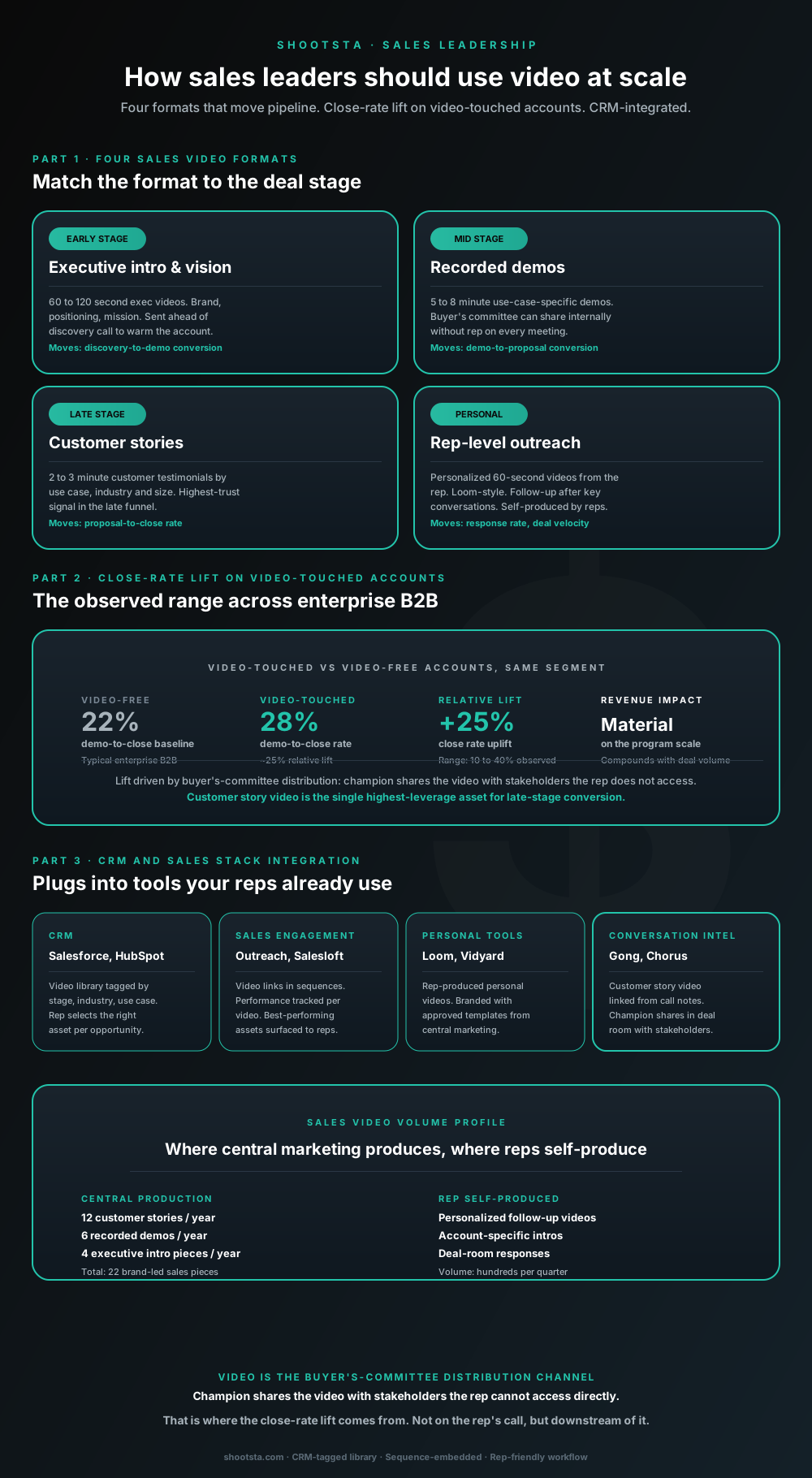
Sales leaders mostly think about video as personalized rep outreach (Loom, Vidyard) or as marketing-produced customer stories. Both are useful. The bigger opportunity is the buyer's-committee distribution layer: assets the champion shares internally with stakeholders the rep does not access directly. That is where the close-rate lift compounds.
How L&D leaders replace classroom with video
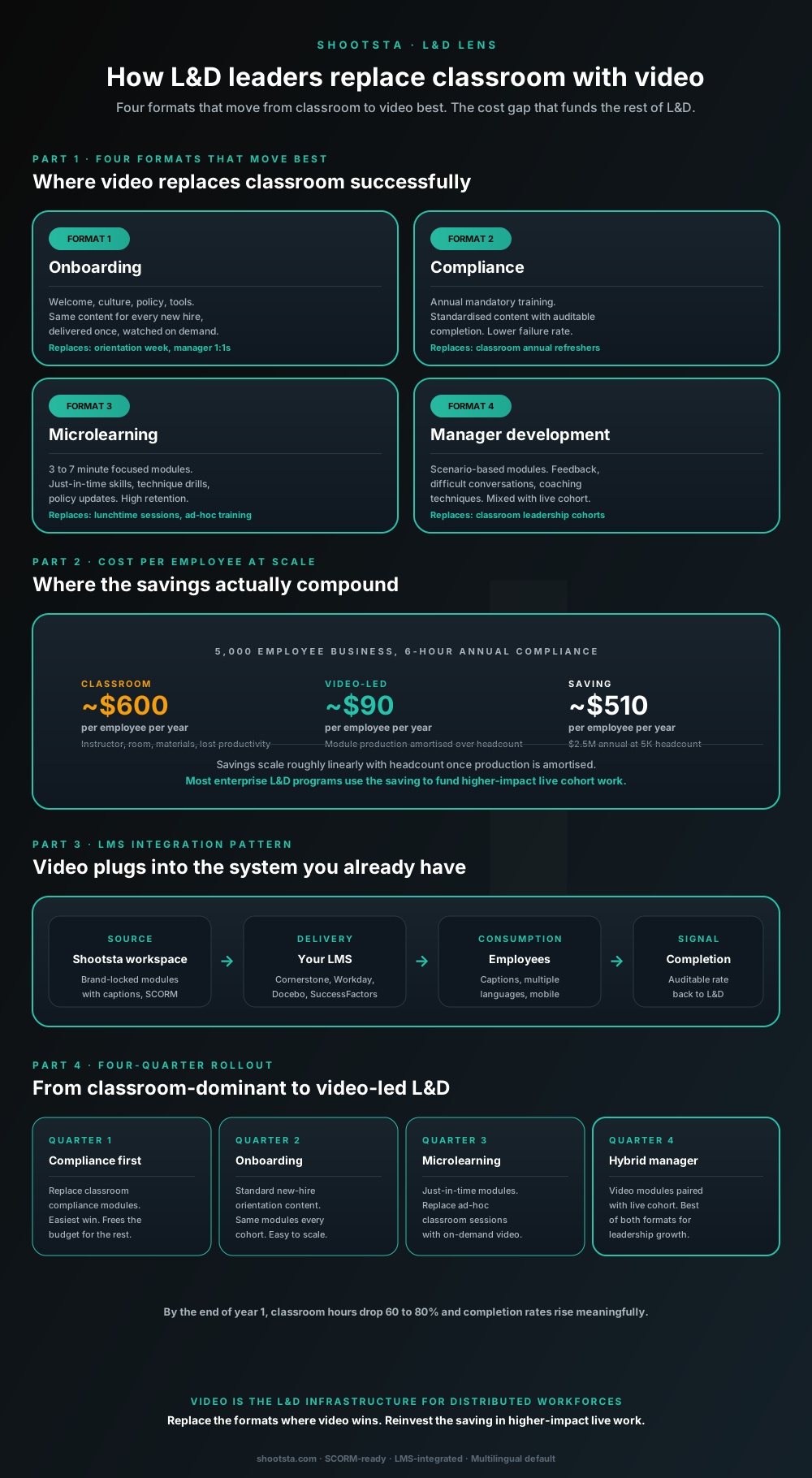
L&D leaders running classroom-heavy training programs typically have the largest single opportunity in the business to free budget through format change. Four training formats move from classroom to video cleanly; the savings fund higher-impact live work. Here is the rollout that compounds learner adoption over four quarters.
How customer success leaders should use video
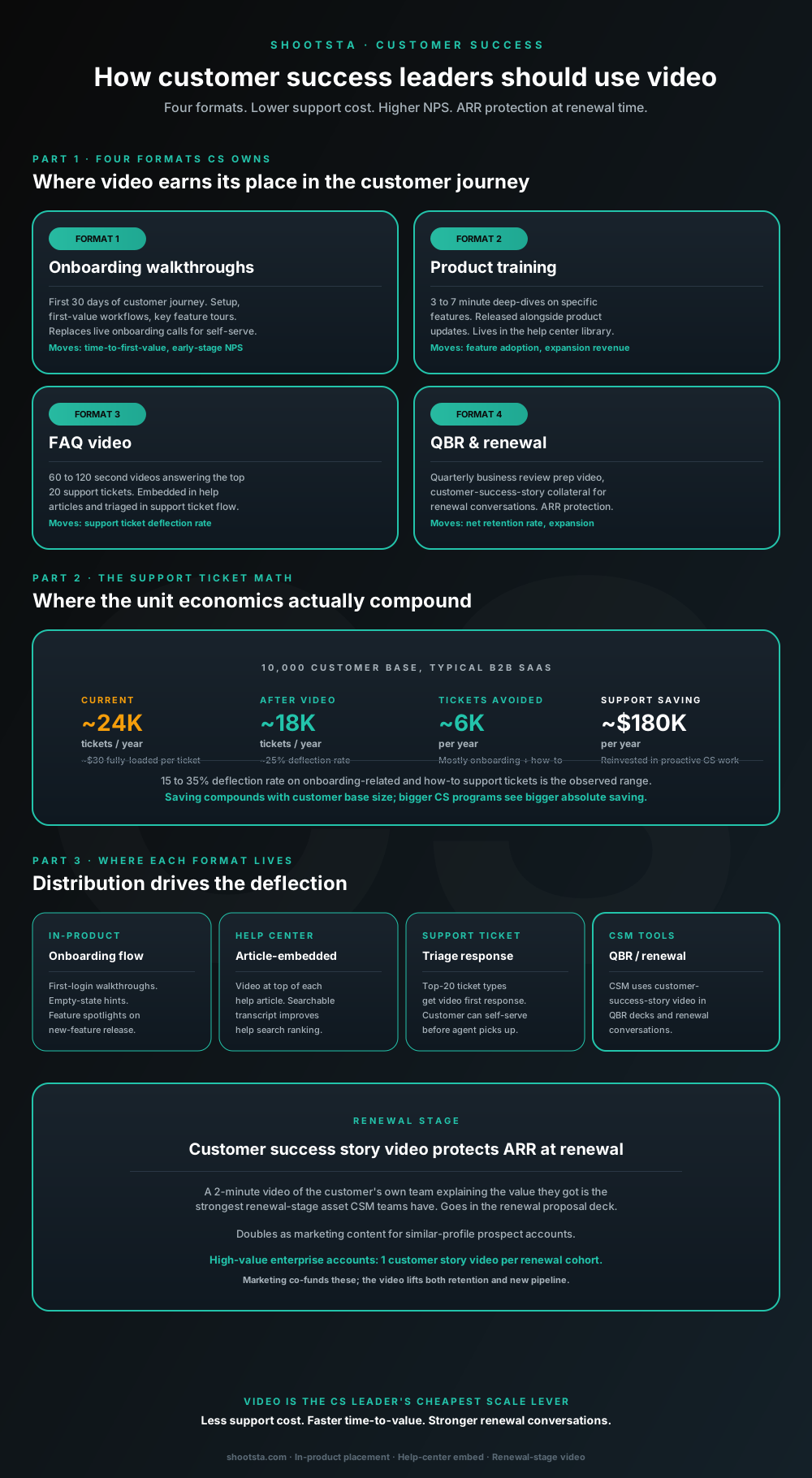
Customer success leaders are usually under-resourced for both reactive support volume and proactive retention work. Video is the cheapest lever to fix both - 15 to 35% deflection on onboarding and how-to tickets, faster time-to-value, and renewal-stage customer story video that lifts net retention. Here is the four-format model and where each piece earns its place.
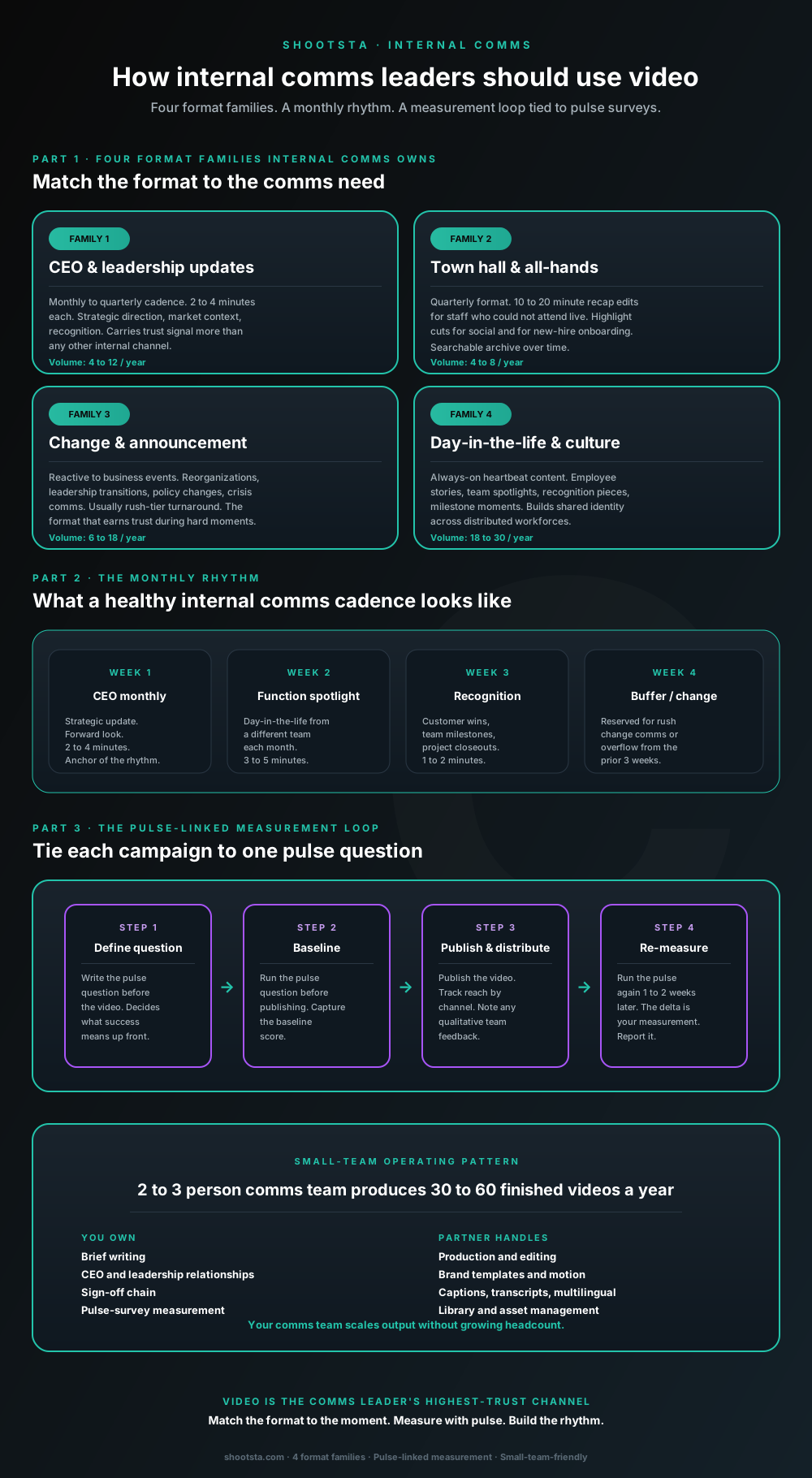
How internal comms leaders should use video
Internal comms leaders are usually under-resourced for the volume of video the business wants. The fix is not more headcount; it is structuring the program around four format families, a monthly rhythm, and a pulse-survey-linked measurement loop. Here is the operating pattern that lets a small comms team produce 30 to 60 finished videos a year.