
How to Hire an Editor to Fix AI Video
shootsta.
How to Hire an Editor to Fix AI Video
By Shootsta · Published November 8, 2026 · Updated November 2026
When an AI-generated video is worth handing to a human editor, what to send, how to brief the fix, what to ask before you agree a price, how to judge the result and the red flags to watch for.
AI tools like Sora, Veo, Runway, Kling, HeyGen and Synthesia can get a video most of the way there in an hour. The last stretch is where the time goes, with a face that drifts, a voice with odd stress, screen text that is almost readable and a logo that is not quite yours. At some point it is cheaper to hire an editor to fix AI video than to keep prompting and hoping the next take comes out right.
This guide covers when that point arrives, what to send, how to brief, what to ask, how to judge the result and the red flags to watch for. It also covers where your in-house team fits when you hire an editor to fix AI video, because handing out the clean-up queue is about protecting their week.
The short answer: hire an editor to fix AI video when it is going in front of customers, it carries your brand, or the fixes need real editing skill such as re-voicing, shot replacement or sound. Send the generated clips, the prompts, the script and your brand kit, and agree a fixed price before any work starts.
When should you hire an editor to fix AI video?
AI output is a fine starting point, and a human finish is what makes it publishable. The real question is whether that finish is a ten-minute job for someone on your team or a skilled one that needs an editor, and these signs point to the second.
- It is customer-facing, since ads, product videos and anything with your logo on it are judged harder than an internal draft.
- The voice is synthetic or the lip-sync is off, and re-voicing or re-syncing takes audio and editing skill that prompting cannot replace.
- Several shots break, because when hands, faces or products change shape across a few shots the fix is replacing and re-cutting rather than trimming.
- You need several versions, and reframing for 9:16, 1:1 and 16:9 without losing the subject is editing work.
- The queue keeps growing, so AI videos wait for a fix while other work slips, which is the clearest sign to hire an editor to fix AI video.
DoubleVerify's global study, released on 29 July 2026, found that 42% of consumers say low-quality or "uncanny" AI ads would hurt their opinion of a brand. Our post on why uncanny AI ads happen explains the tells an editor will be looking for.
When can you skip the editor?
Not every AI video needs a professional finish, and you do not need to hire an editor to fix AI video that only a few colleagues will see. A storyboard draft, a concept you are testing with stakeholders or a quick internal update can go out as it is, with a note that AI made it. If the only problem is one bad shot at the end, trim it yourself. Our guide on how to fix AI-generated video covers the fixes your own team can make.
What should you send when you hire an editor to fix AI video?
The more an editor has, the less they have to guess and the fewer rounds of changes you will sit through. When you hire an editor to fix AI video, put these files in one shared folder before the job starts.
- The generated clips, at the highest-quality export each tool allows, plus the final cut if you made one and the clips you did not use, because a rejected take can hold the shot the editor needs.
- The prompts and tool details, noting which tool and model made each clip and the prompt behind it, so an editor who needs a fresh generation can match the look.
- The approved script as text, with a note on any words that must be said a certain way, such as product names.
- Your brand kit, including logo files, fonts, brand palette values, lower-third templates, music rules and two or three past videos that show the look you want.
- Real footage and product shots, which give the editor a way to replace AI shots that cannot be saved.
- Output specs that list the platforms, aspect ratios, length limits, caption needs and any AI disclosure the platform requires.
How do you brief an editor to fix AI video?
A good brief is short and specific, and it starts with your own notes. Watch the video once with a notepad and write down what bothers you with a timestamp, such as "0:07, hand merges with cup" or "0:15, voice stresses the wrong word". Then add three short sections to the brief before you send it.
- What must stay, such as the structure, lines or shots that stakeholders have already approved.
- What can change, such as shots that can be replaced, lines that can be re-voiced and whether the length can move.
- What finished means, including the platform, the deadline and the person who signs off.
Our guide on how to write a video brief that gets results has a fuller template you can adapt for clean-up work.
What should you ask before you hire an editor to fix AI video?
Ask these questions before you agree to anything, because the answers tell you whether the price will hold and whether the result will match your brand.
- Is the price fixed per video, or hourly with a cap?
- What is included: re-voice, shot replacement, sound, grading, captions and extra aspect ratios?
- How many rounds of changes are included, and what does an extra round cost?
- Who does the work, and will the same editor handle your next video?
- What is the turnaround, and is faster work charged separately?
- What files do you get back, and in what formats?
Price is usually the first question when you hire an editor to fix AI video. Freelance video editors on Upwork charge about US$31 to US$60 an hour at mid-level and US$61 to US$150 at senior level, based on Upwork contract data. Our breakdown of AI video clean-up cost compares that with doing it in-house, using a clean-up service or reshooting.
Shootsta Snap founding intake
Get your AI video cleaned up by an editor
Shootsta editors fix the hands, text, lip-sync and voice that give AI video away. The first intake has 20 founding places, and each one comes with a free audit of one video.
How do you judge the work after you hire an editor to fix AI video?
Judge the result against your timestamped notes first, then watch it the way a viewer would. Play it at full size and on a phone, with the sound on and then off, since a lot of social video is watched muted, and check that a good fix passes these tests.
- Every note in your brief is resolved or has an explanation.
- No face, hand or product changes shape between shots.
- The voice sounds natural, and the lip-sync holds when a mouth is on screen.
- The grade, light and sound match from shot to shot.
- Every logo, product name and caption is correct and in your brand fonts.
For a pass or fail list you can share with stakeholders, use the AI video quality checklist.
What are the red flags when you hire an editor to fix AI video?
Demand for this work is growing fast, so the supply of editors offering it is growing too. Upwork reports that job posts for fixing AI-generated work are up 70% year on year. Freelancer.com listings for fixing AI output rose 87% to 10,760 between August 2025 and June 2026, with video editing among the top categories. Watch for these signs as you choose who to hire.
- Open-ended hourly billing, since AI fixes can grow once the editor opens the files, so agree a cap or a fixed price first.
- No questions about your brand, because an editor who asks for nothing beyond the clips will guess at your fonts and look.
- A promise to make AI "undetectable", when the goal is a video that looks finished and follows platform disclosure rules, which hiding AI from viewers can break.
- More AI as the only fix, since re-generating a broken shot can help but someone still needs to cut, voice and grade the result by hand.
- No price before work starts, when you should know the cost before you approve the job.
What if you already have an in-house team?
Keep them, because your team knows your brand, your stakeholders and your audience, and that is the work to protect. Clean-up is slow, repetitive work that lands on whoever has editing software open, and it pushes back campaigns, launch videos and the content only your team can make.
When you hire an editor to fix AI video, the in-house team still owns the idea, the script and sign-off. The outside editor clears the clean-up queue so your team gets its week back. Our post on how a video partner extends your in-house team covers the same model for wider video work.
Where does Shootsta Snap fit?
If you want to hire an editor to fix AI video at a set price, Shootsta Snap is an AI video clean-up service. You send a video made with tools like Sora, Veo, Runway, Kling, HeyGen or Synthesia, and a human editor fixes what makes it read as AI and returns a publishable, on-brand cut.
Founding prices start at US$99 per video for a Clean-up of up to 60 seconds. A Rebuild starts at US$249 for up to 3 minutes and includes re-voice, shot replacement, a re-cut and extra aspect ratios, and every quote is confirmed before work starts. The first intake opens in January 2027 and is capped at 20 founding customers, who get a free audit of one video, their price held for 12 months and first place in the queue. Registering costs nothing and takes no payment, so you can register for the AI video clean-up intake today or see how Shootsta Snap fixes AI video first.
Shootsta has produced 70,000+ videos, with editors in Sydney, London, Singapore and San Diego, and a 4.9/5 average rating across post-delivery surveys.
Frequently asked questions
Is it worth paying an editor to fix AI video?
It is worth it to hire an editor to fix AI video when the video is customer-facing or carries your brand, because uncanny AI video can cost trust. DoubleVerify found that 42% of consumers say low-quality AI ads would hurt their view of a brand. For internal drafts and tests, a quick in-house fix is usually enough.
Can an editor fix AI video without the original prompts?
Yes, because editing, re-voicing, sound and grading all work from the clips alone. Prompts help when a shot has to be generated again so it matches the rest of the video.
We already have an in-house video team. Why hire an outside editor?
Your team keeps the creative work, the brand calls and sign-off. An outside editor takes the clean-up queue that would otherwise eat their week, so they can stay on campaigns and the videos only they can make.
How we built the numbers in this post
This post draws on public research about AI clean-up work, published freelance rate data and Shootsta's own prices and claims. These are the sources for each figure.
- 42% of consumers say uncanny AI ads would hurt their view of a brand. DoubleVerify, Global Study: Poor-Quality AI Content Puts Brand Trust at Risk, 22,000 consumers and 2,020 marketers, 29 July 2026.
- AI-remediation job posts up 70% year on year. Upwork Research, AI-generated work is creating more work for humans.
- Freelancer.com listings for fixing AI output up 87% to 10,760. Platform data first reported by The Guardian and written up in the Search Engine Journal AI slop clean-up job listings report.
- Freelance editor rates of about US$31 to US$150 an hour. ManyPixels' summary of Upwork contract data in Video editing rates in 2026.
- Platform AI disclosure rules. YouTube Help on altered or synthetic content and TikTok Support on AI-generated content.
- Shootsta figures. Shootsta Snap founding prices for the first intake, and Shootsta's published claims of 70,000+ videos produced and a 4.9/5 average across post-delivery surveys.
Editorial standards
- Numbers cited are the most up-to-date figures we had at the time of writing. The "last updated" date on this page is when the numbers and sources were last reviewed.
- External benchmarks come from publicly available salary, labor and industry data. We name the source where possible and summarize where the underlying data sits behind a paywall.
- Figures and ranges come from the public sources cited on this page and from published market rates. Shootsta figures come from our published claims and our founding prices for Shootsta Snap.
- Where ranges are given, they cover variability across sector, geography and program maturity. Treat them as starting hypotheses for your own program rather than as warranties.
- Spotted a number you would challenge? Let our editorial team know what you are seeing in your business and the data behind it. Material updates get credited in the post footer.
Where to go next
For the background on what makes generated video read as AI, start with what AI slop video is. For where generated video belongs in a wider program, read how brands stay human as AI gets more capable.
Take this article with you
Read the latest at shootsta.com/blog/hire-an-editor-to-fix-ai-video
You might also like
AI Video Clean-Up Cost: 4 Options Compared
AI Video Clean-Up Cost: 4 Options Compared
What it costs to get an AI-generated video ready to publish: your own team's hours, freelancer rates, Shootsta Snap's founding prices and a full reshoot, with each number marked as a market range or a Shootsta price.
How to Brief an Animation Project
How to Brief an Animation Project
An animation brief is the document you send to your production partner before work starts. Get it right and you cut revision cycles in half. Get it wrong and you discover mid-production that everyone disagrees on what the video is for. This is what a complete brief looks like.
Animation for change management comms
Animation for change management comms
Animation handles change management communications better than live video for three reasons: no on-camera executives required during sensitive periods, scene-level updates when plans shift, and a single production that works across global teams with voiceover-only language swaps.
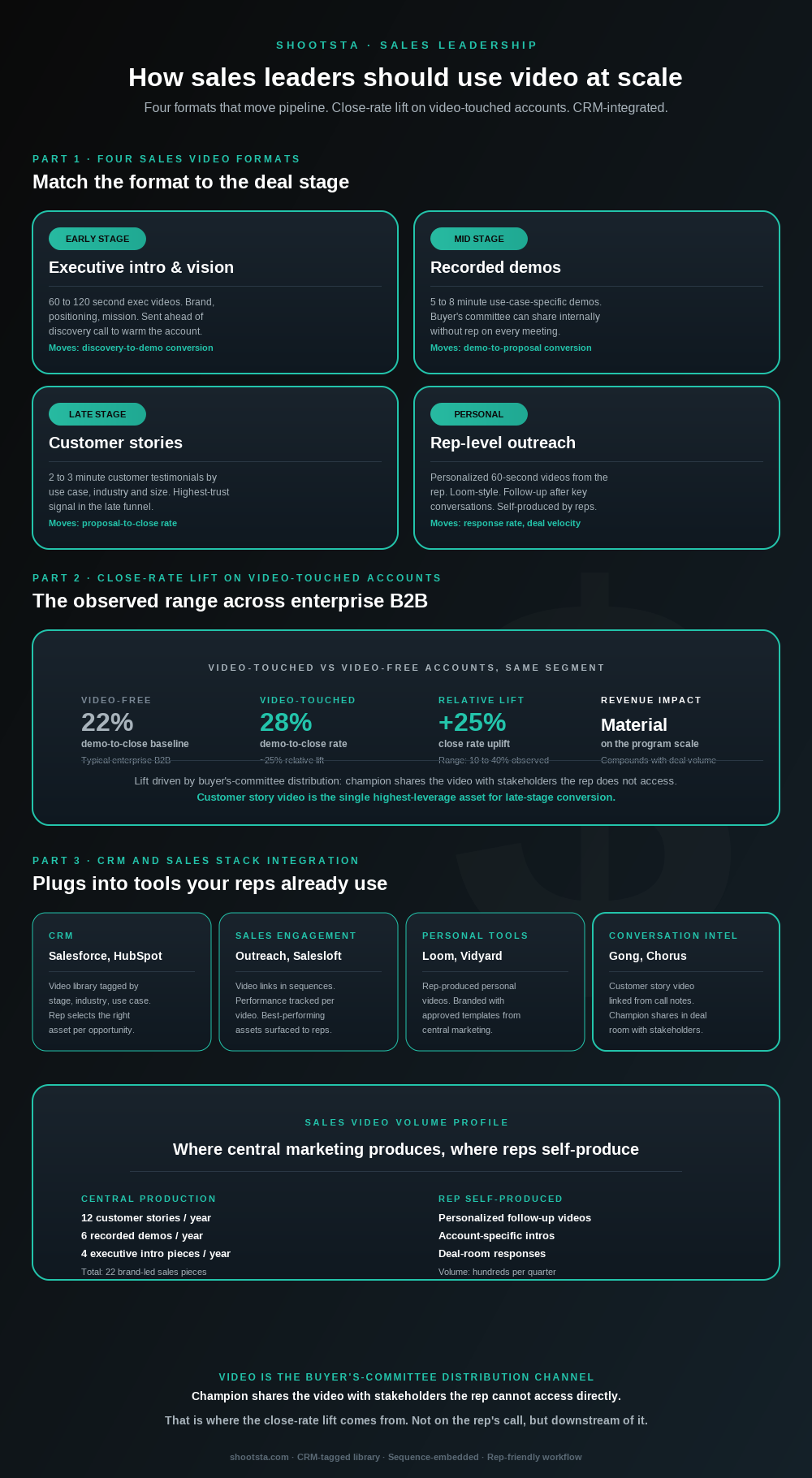
How sales leaders should use video at scale
Sales leaders mostly think about video as personalized rep outreach (Loom, Vidyard) or as marketing-produced customer stories. Both are useful. The bigger opportunity is the buyer's-committee distribution layer: assets the champion shares internally with stakeholders the rep does not access directly. That is where the close-rate lift compounds.
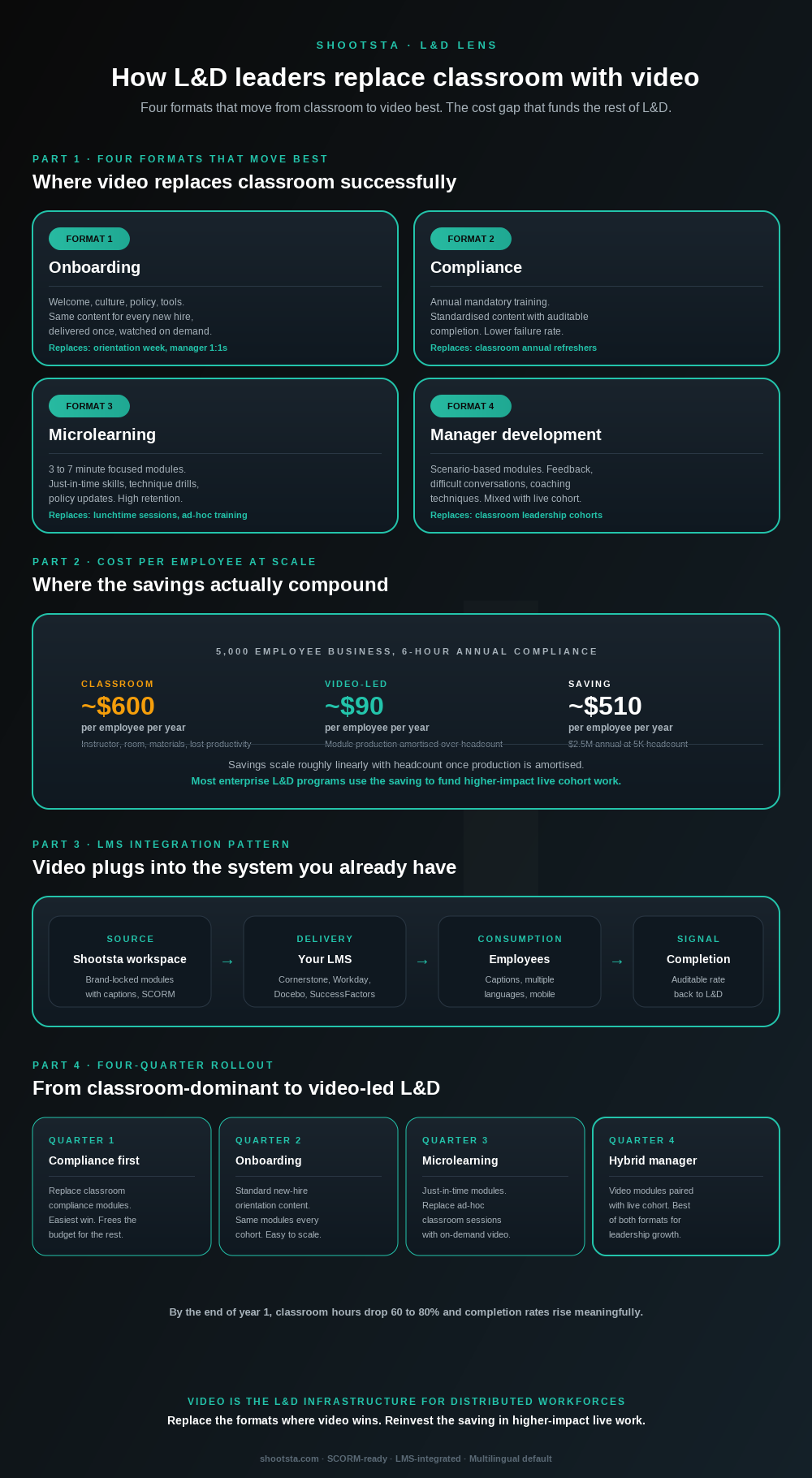
How L&D leaders replace classroom with video
L&D leaders running classroom-heavy training programs typically have the largest single opportunity in the business to free budget through format change. Four training formats move from classroom to video cleanly; the savings fund higher-impact live work. Here is the rollout that compounds learner adoption over four quarters.
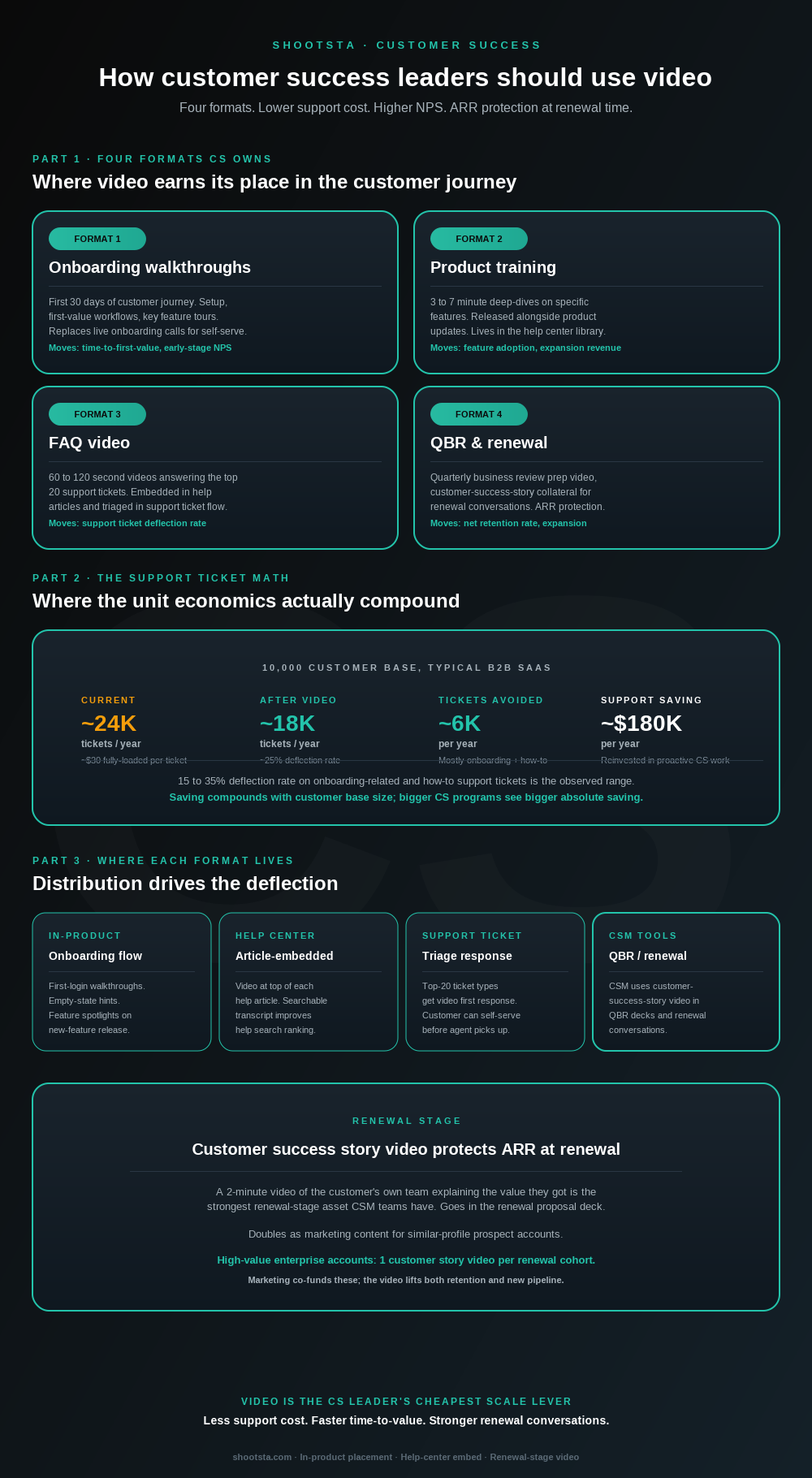
How customer success leaders should use video
Customer success leaders are usually under-resourced for both reactive support volume and proactive retention work. Video is the cheapest lever to fix both - 15 to 35% deflection on onboarding and how-to tickets, faster time-to-value, and renewal-stage customer story video that lifts net retention. Here is the four-format model and where each piece earns its place.