
What Slows Scalable Corporate Video Editing?
shootsta.
What Slows Scalable Corporate Video Editing?
By Shootsta · Published August 29, 2026 · Updated October 2026
The edit is rarely the slow part. Scalable corporate video editing stalls in review, in the brief, and in a queue nobody owns. Here are the eight delays, what each one costs, and how to fix them without hiring.
Short answer. Scalable corporate video editing is slowed by eight things, and the edit is almost never one of them. Review runs in series instead of in parallel, briefs arrive incomplete, brand rules sit in a document nobody opens, every video is treated as a project instead of a repeatable job, capacity is sized for an average month that never happens, footage arrives unusable, feedback is vague, and no single person owns the queue. Cutting a 2 minute video takes an editor 4 to 8 hours. Getting it out the door routinely takes 2 to 3 weeks, and almost all of that gap is waiting.
When you set out to scale corporate video editing, the obvious fixes are to hire another editor or buy a faster tool. Both sound reasonable and neither works, because the constraint was never editing speed.
Follow one corporate video from request to sign-off and look at where the days go. It spends a few hours in an editing timeline and days waiting for footage that was shot wrong. Then it waits for a stakeholder to open the link, and waits again while contradictory notes from different reviewers get reconciled.
This is a diagnosis of the eight places scalable corporate video editing stalls, with the fix for each. Work through them in order, because the early ones cost the most time.
What does scalable corporate video editing mean?
Scalable corporate video editing means output can rise without cost and turnaround rising alongside it. A light month and a heavy month run through the same workflow, and only the volume changes.
Scalable corporate video editing is a systems problem rather than a content problem. If your team makes a few good videos a quarter, you have proven you can make video. You have not proven anything about scale, because at that pace every bottleneck stays hidden. Push the same setup to several videos a week and they all show up at once.
What slows scalable corporate video editing down?
There are eight causes, listed roughly in order of how much calendar time they take out of scalable corporate video editing.
1. Review runs in series instead of in parallel
The cut goes to one stakeholder, who passes it to the next, who passes it to the next. If five reviewers each take two days, that is ten days of waiting before a single frame of the video changes.
To fix it, send the cut to everyone at once, with one deadline and one approver who breaks ties. In that example, parallel review turns ten days into two. It is the largest time saving available in scalable corporate video editing, and it costs nothing.
2. The brief arrives half-finished
The editor gets footage, a rough idea and no decision on length, audience, tone or where it will run, so they guess. The guess comes back wrong, and the first round of revisions is spent working out what the brief should have said in the first place.
The cheapest upgrade to scalable corporate video editing is a short standard brief with mandatory fields, filled in before footage moves. A handful of fields is enough. Our guide to writing video briefs that editors get right lists the ones that matter.
3. Brand rules live in a document nobody opens
Guidelines get emailed at kickoff and are never opened again. A few videos later the fonts have drifted and the lower thirds differ. Someone in brand raises it as a quality problem, but the cause is the system.
The fix is to move the rules out of the document and into the workspace. Locked templates with your fonts, titles, grade, intro and outro pre-loaded mean the on-brand version is the fastest version to produce. Brand stops depending on whether an editor remembered, which is what makes scalable corporate video editing safe for a tightly governed brand.
4. Every video is a project instead of a repeatable job
Each request restarts the whole cycle: a scoping call, a quote, a kickoff, a bespoke timeline. That is reasonable for a flagship brand film. It is ruinous for the routine videos that make up most of your library.
Instead, sort requests into types such as talking head, event recap, product update, training module and customer story. Give each type a fixed recipe with a brief template, a length, an edit template and a turnaround. Then the routine work stops consuming project management, and scalable corporate video editing becomes possible with the team you already have.
5. Capacity is sized for an average month that never arrives
Video demand clusters. Sales kickoff, town halls, event season and Q4 launches pack a large share of the year into three or four months. Staff for the average and you drop work in every spike, and staff for the peak and you carry idle capacity all year.
The better approach is to size the internal team to the quiet months and buy elastic capacity for the spikes. You pay for output rather than idle time, which is how scalable corporate video editing survives a spike month. Read how to absorb video demand spikes to see how to size each part.
6. Footage arrives unusable
The footage has bad audio, wrong framing and no B-roll, and some of it is shot vertically. The editor either spends hours rescuing the material or sends it back for a reshoot, and either way the clock restarts from zero.
Give anyone who shoots a one-page capture standard that covers the microphone, framing, lighting and minimum coverage. A short training session per person saves the editor from the same rescue job on every project. This matters more as you push filming out to regional teams, which is usually where scalable corporate video editing starts to come apart.
7. Feedback is vague and scattered
"Can we make it punchier" is not an instruction, and neither are notes spread across emails, a Teams thread and a meeting with no minutes. The editor ends up spending longer decoding the feedback than acting on it.
Keep comments in one place, timestamped against the video, with a rule that every note names a change. Cap it at two rounds so reviewers give their real notes the first time. The corporate video review workflow guide covers how to hold that line.
8. Nobody owns the queue
Requests arrive by email, in meetings and in hallway conversations, so nobody can say what is in flight, what is stuck or what is due. Priority goes to whoever asks loudest, and quiet but important work waits indefinitely.
Set up one intake form and one visible queue, and give the queue a single owner. That owner does not need to be a video specialist, but they do need the authority to sequence work and say no. Scalable corporate video editing needs a queue owner more than it needs another editor. Once someone owns the queue, you may find you had more capacity than you thought.
Interactive calculator
How many days of waiting could you save per year?
Move the sliders to compare your current turnaround against a 48-hour workflow at your annual volume. Time in market matters as much as cost per video.
Side-by-side turnaround
A 48-hour workflow ships your video 4.7x faster than your current cadence. Across the year, that compounds.
Days saved per video
11
brief to delivery
Days saved per year
528
24.0 work-months back
Speed multiple
4.7x
faster than today
What this means for the program
Every video reaches the audience 11 days sooner. At 48 videos a year, that is 528 days of distribution, reach and impact you are not getting back when production runs at agency speed. Cost matters. Time in market matters more.
See the 48-hour workflowAssumptions: 48-hour first-cut delivery plus one round of in-platform revisions yields a 3-day end-to-end average on subscription. Project agency turnaround estimated as a single stage; your end-to-end may include longer briefing and revision loops. Numbers are guides.
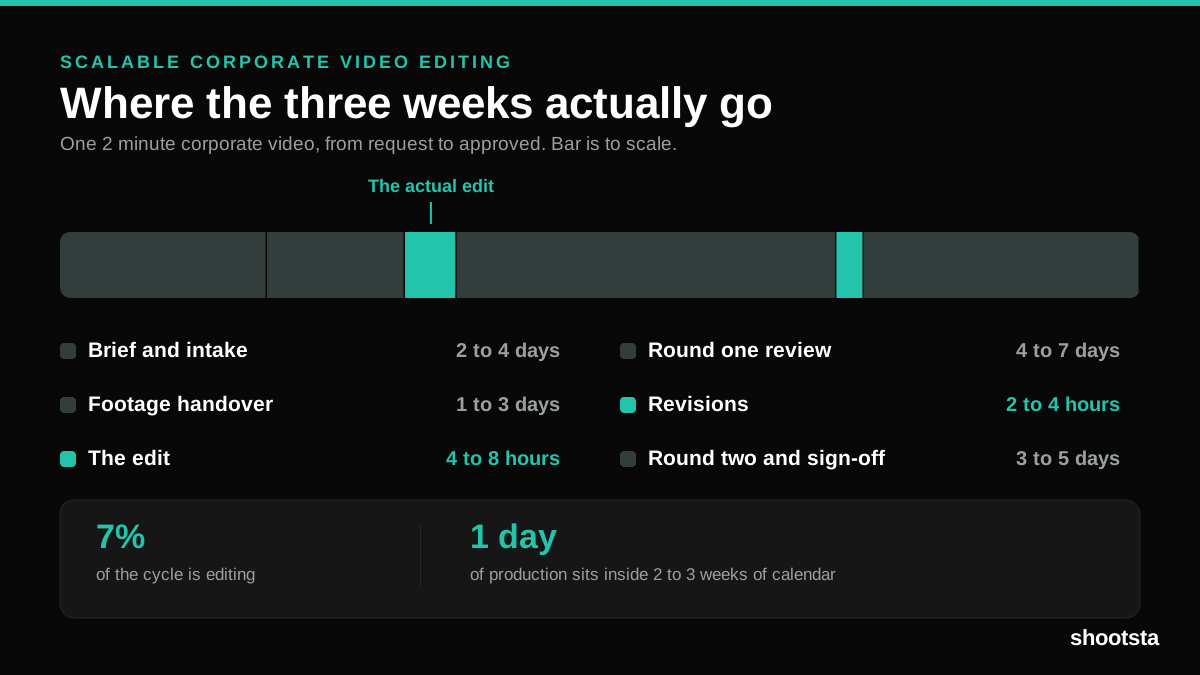
Where does the time in a typical cycle go?
Here is a rough picture of a standard 2 minute corporate video before any of the scalable corporate video editing fixes are in place. Treat the ranges as an illustration rather than a benchmark. Your own numbers will differ, but the shape is worth checking against your last few projects.
- Brief and intake: 2 to 4 days. Most of this is waiting for the requester to answer questions that a template would have asked up front.
- Footage handover: 1 to 3 days. Files are large, storage is scattered, and someone has to find them.
- The edit: 4 to 8 hours. This is the only stage of the process that is production work.
- Round one review: 4 to 7 days. Serial routing and busy calendars take up the time.
- Revisions: 2 to 4 hours. Changes go quickly once the notes are clear.
- Round two and sign-off: 3 to 5 days. The delay is often a late reviewer raising a point that belonged in the brief.
Add it up and roughly one working day of production sits inside two to three weeks of calendar. An hour saved in the edit comes off a number that was never the problem, while a day saved in review comes straight off the delivery date.
How do you fix this without hiring?
Build scalable corporate video editing in this order, because each step makes the next one cheaper.
Start with review. Set up parallel routing, one named approver, timestamped notes and a two-round cap. It needs no budget, and the serial waiting from the example above disappears from every video.
Then fix intake. Use one form with mandatory fields and one queue with one owner. This removes the days lost to back-and-forth before work even starts.
Then build templates. Sort your recurring videos into a small set of types and build a locked template for each. Brand consistency and speed arrive together, because they come from the same asset.
Then buy elasticity, not headcount. Once the workflow is clean, the only constraint left is editor hours in your spike months. That is the point to bring in a partner who extends your in-house team. Outsourcing a broken workflow earlier simply moves the delay somewhere else.
With all four in place, you can move from a handful of videos a quarter to a monthly cadence without adding headcount. That is what scalable corporate video editing looks like when it works.
Frequently asked questions
Is editing really the bottleneck in corporate video?
It rarely is. In the example above the edit takes 4 to 8 hours of a 2 to 3 week cycle, and review, intake and unusable footage take the rest. If you hire another editor to fix a review problem, you end up with two editors waiting on the same approvals. Work out where the calendar goes before you spend anything on capacity, because scalable corporate video editing is won in the gaps between stages rather than inside the timeline.
How many videos a month counts as scale?
Scale is less a number than the point where your workflow stops coping. Below that point, ad hoc coordination holds together well enough. Above it, anything not written down starts failing every week, and scalable corporate video editing becomes a process question rather than a staffing one. You will usually notice it first as a queue that never clears.
Can you scale corporate video editing with freelancers?
Freelancers can take you part of the way. They give you elastic hours, which solves the capacity problem on its own. What they do not solve is consistency, because a rotating pool has no shared template and no built-up knowledge of your brand. If you go this way, invest in locked templates first so the output holds together regardless of who edits.
Will AI editing tools fix the bottleneck?
They shorten the part that was already short. AI is useful for transcription, rough cuts, captions and versioning, and it takes real hours out of the timeline. What it cannot do is make a stakeholder open the review link. Use the tools by all means, but fix the review loop first or you will be waiting on the same approvals faster.
How do you measure whether it is improving?
Track total turnaround from request to approved video rather than editing time. Then track two supporting numbers: the average review rounds per video, and the share of briefs that arrive complete. Those three tell you whether the workflow is getting better or the team is just working harder.
How long does it take to build scalable corporate video editing?
Plan on about a quarter for the workflow and two or three for the habit. Parallel review and a standard brief can be in place within two weeks, and templates take about a month. What takes longer is the change in behavior, because stakeholders who are used to reviewing whenever they like need a couple of cycles to adjust to a deadline that holds.
Where should a small team start?
Start with parallel review and a brief template. Both take an afternoon to set up and cost nothing, and together they remove the two biggest sources of waiting. Everything else on this list is worth doing, but nothing else gives that return for so little effort.
Sources and further reading
The delays above match how operations and content teams describe the friction around scalable corporate video editing at volume. For wider context:
- Wistia State of Video report on rising production volume and the review load it creates.
- Vidyard business video benchmarks on output and turnaround across company sizes.
- Frame.io insights on timestamped review and version control.
- Content Marketing Institute research on workflow bottlenecks across distributed content teams.
- Lean Enterprise Institute on value stream mapping, which is the method behind timing each stage of the cycle.
On Shootsta's side, see enterprise video editing services, how to fix enterprise video editing bottlenecks, and why marketing teams cannot scale video editing.
Where to go next
If you have diagnosed the bottleneck and the answer is capacity, read the ten checks for corporate video editing services before you shortlist anyone. If review is your worst stage, go straight to how to speed up corporate video review workflows. For the benchmark to hold yourself to, read what a good video turnaround time looks like.
To work out which of the eight delays is costing your team the most, and what scalable corporate video editing would look like on your volume, book a free consultation.
If cuts keep coming back for fixable errors, the missing step is a QA pass before review. It is set out in the complete guide to video editing QA.
Take this article with you
Read the latest at shootsta.com/blog/what-slows-scalable-corporate-video-editing
You might also like

How to Plan Video Team Capacity Around Leave
Your only editor just booked two weeks off, and you already know which projects will slip. Chad Lakin explains how to plan video team capacity so the work keeps moving when someone is away.
Corporate Video Editing Standards: Full Guide
A two-page editing standard does more for consistency than a forty-page brand book. Here is what it should cover, who owns each part, and how to enforce it with an in-house editor or an outside partner.
Quality Control in Outsourced Video Editing
When editing leaves the building, quality has to be checked by a system rather than by whoever happens to look. Here is the system: acceptance criteria, two QA gates, counted revision rounds and a quarterly audit.
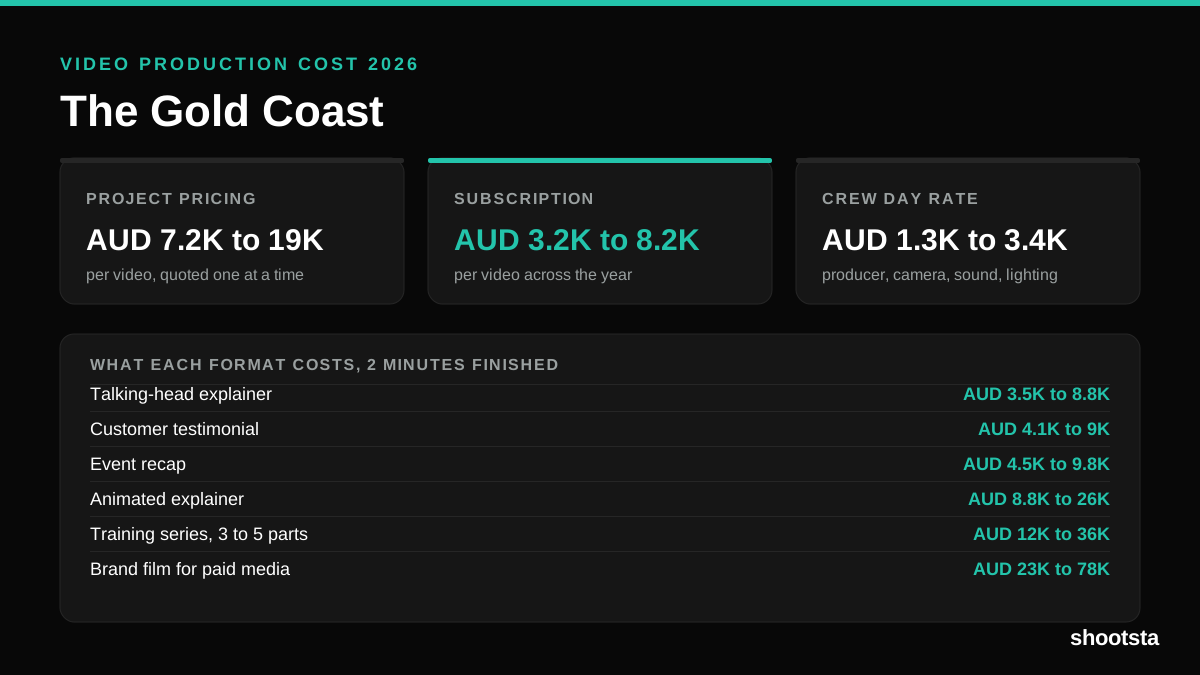
Video Production Cost on the Gold Coast 2026
Video production in the Gold Coast costs AUD 3,200 to AUD 8,200 per finished video on a subscription model, and AUD 7,200 to AUD 18,500 for one-off project work. Here is what you are paying for, and how the three pricing models compare.
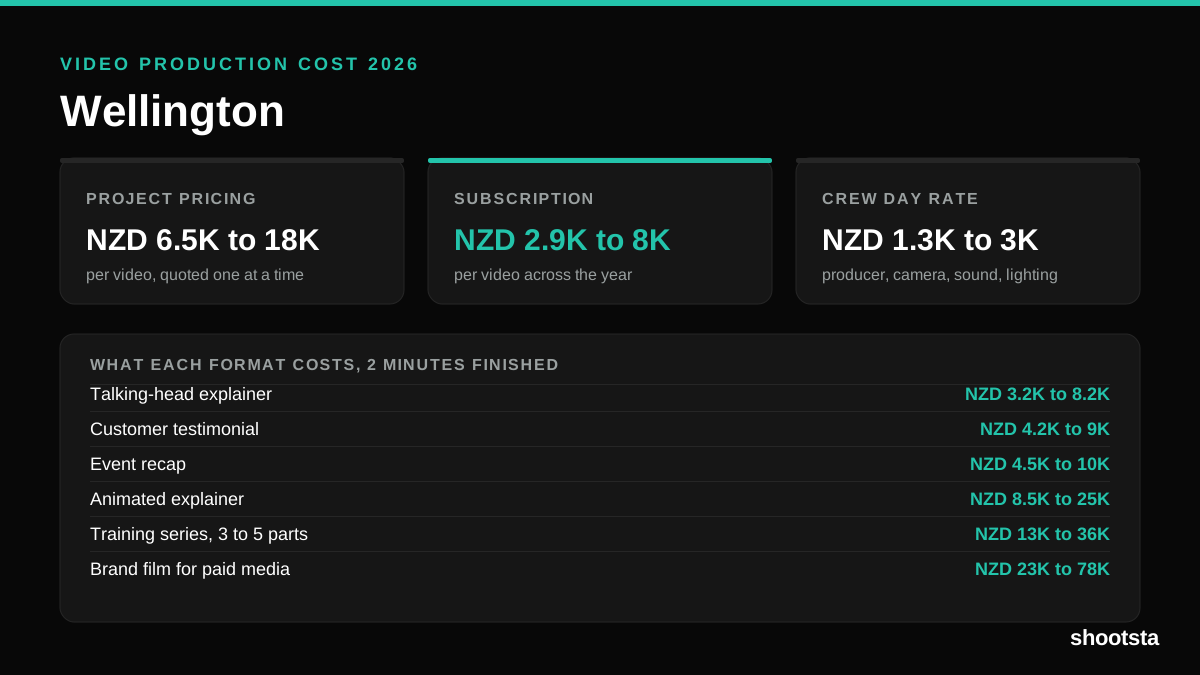
Video Production Cost in Wellington (2026)
Video production in Wellington costs NZD 2,900 to NZD 8,000 per finished video on a subscription model, and NZD 6,500 to NZD 18,000 for one-off project work. Here is what you are paying for, and how the three pricing models compare.
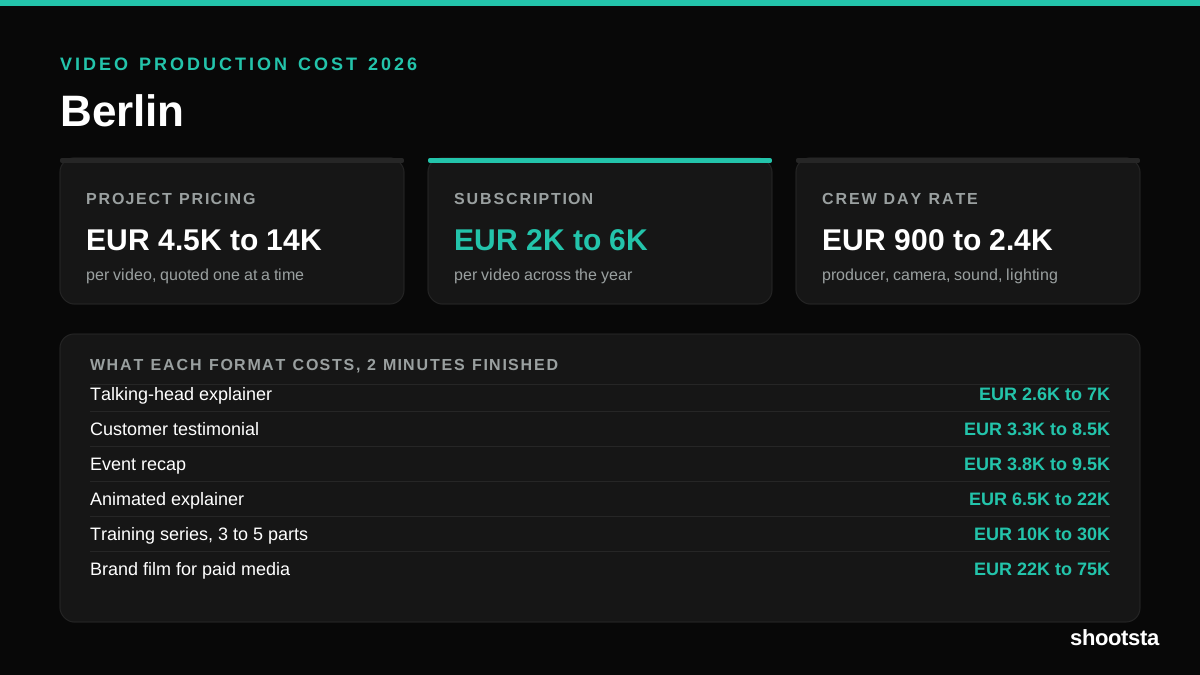
Video Production Cost in Berlin (2026)
Video production in Berlin costs EUR 2,000 to EUR 6,000 per finished video on a subscription model, and EUR 4,500 to EUR 13,500 for one-off project work. Here is what you are paying for, and how the three pricing models compare.