
Video Editing QA: The Complete 2026 Guide
shootsta.
Video Editing QA: The Complete 2026 Guide
By Shootsta · Published September 3, 2026 · Updated October 2026
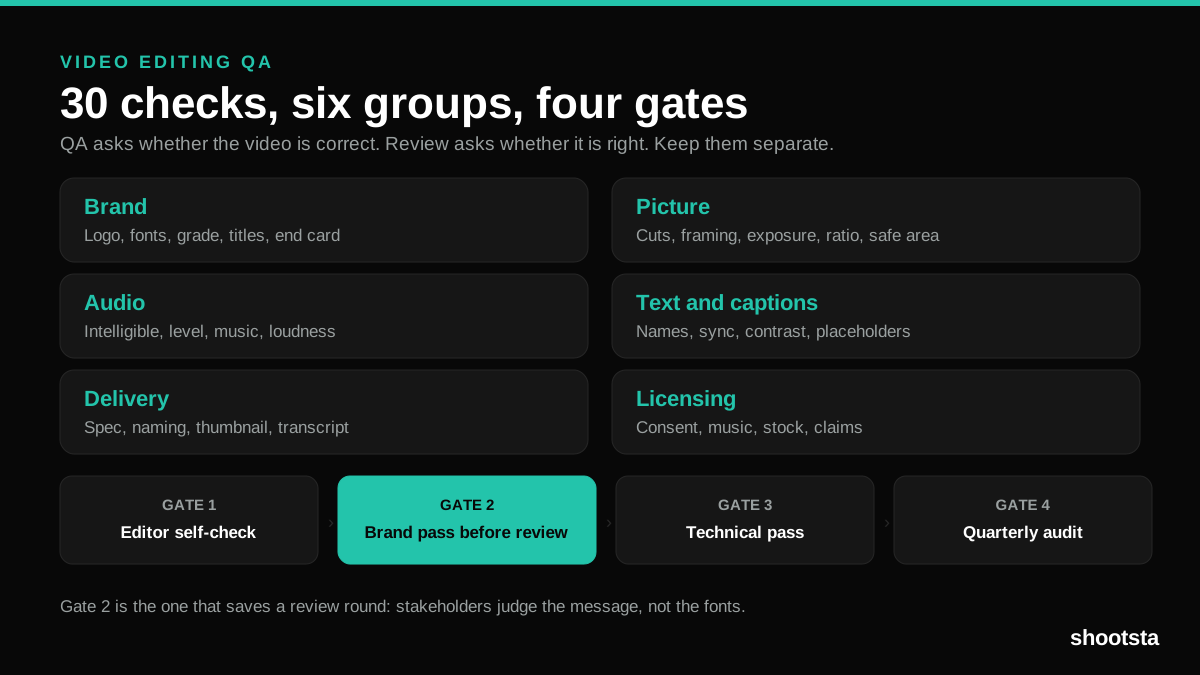
Video editing QA is the pass that catches brand drift, bad audio and wrong deliverables before stakeholders do. Here is the 30-point checklist, the four stage gates, and how to run it at 40 videos a month.
Short answer. Video editing QA is a structured check run against a fixed list before a video reaches a stakeholder or an audience. It covers six areas: brand, picture, audio, text and captions, delivery format, and licensing. Run it at four gates rather than once at the end, and the biggest one is a brand pass before stakeholder review, because it stops reviewers spending their round flagging fonts instead of judging the message. Teams that add video editing QA typically cut a review round from every project.
Most video problems are found by the wrong person at the wrong time. A stakeholder opens a first cut and spends their review flagging a stale logo and a misspelled job title. The message never gets discussed. The video comes back for another round, and everyone concludes that video is slow.
None of that is a review problem. It is a missing video editing QA step. This guide covers what video editing QA checks, who runs it, when it happens, and how to keep it working at volume.
What is video editing QA?
Video editing QA is a check against a fixed list, run before a video moves to the next stage. It is not an opinion about whether the video is good. It is a pass or fail on things that have a correct answer: whether the logo is the current one, whether the audio clips, whether the captions match the words.
That distinction is what makes video editing QA work. Review is subjective and belongs to stakeholders. QA is objective and belongs to whoever is producing. Keeping them separate means stakeholders stop doing unpaid proofreading and start judging the message, which is the job you brought them in for.
What does the video editing QA checklist cover?
Thirty video editing QA checks in six groups. Take this into your own process and cut what does not apply.
| Group | Checks |
|---|---|
| Brand | Logo is the current version, in the approved position. Fonts match the brand kit. Grading matches the house look. Lower thirds use the approved template. End card is current, with the right URL. |
| Picture | No black or flash frames at cuts. Framing is consistent across interview setups. Exposure holds shot to shot. Aspect ratio suits the destination. Titles sit inside the safe area. |
| Audio | Dialogue is intelligible throughout. Levels are consistent and never clip. Music sits under dialogue. No jumps in level at cuts. Loudness matches the rest of the library. |
| Text and captions | Names and job titles are spelled correctly and current. Captions are accurate and in sync. Captions stay readable against the picture. No placeholder text survives. Required disclaimers are present. |
| Delivery | Codec, resolution and frame rate match the spec. File naming follows the convention. A thumbnail is supplied. A transcript is supplied. A version exists for every destination. |
| Licensing and consent | Everyone on camera has consented. The music licence covers this use and territory. Stock licences are current. No unreleased product is visible. Claims match approved messaging. |
Five of the six groups have an external reference you can point at when someone disagrees. Only brand is entirely yours to define.
How do you QA brand?
Brand is the group that fails most often and costs the most, because drift compounds quietly across a library. The check is quick when the assets are locked in the editing workspace, and slow when an editor is working from a guidelines PDF.
If brand QA keeps failing, the problem is upstream of QA. Fix the templates rather than the checking, as set out in brand governance for outsourced video editing.
How do you QA picture and audio?
Audio matters more than picture for corporate video. Viewers forgive a soft image and switch off on echo or an unintelligible speaker. Check dialogue intelligibility first, then consistency of level across the whole piece, then the relationship between music and speech.
For technical standards, the reference bodies are the Society of Motion Picture and Television Engineers and the ITU, with ITU-R BT.709 covering the picture format most corporate video is delivered in. Agreeing one loudness target across your library is what stops viewers reaching for the volume between videos.
How do you QA captions and text?
Captions are the check most often skipped and the one with the clearest external standard. Automatic captions are a draft, not a deliverable: they mis-hear names, product terms and anything said with an accent, which is most of a global company.
The standards are set out in the W3C captions guidance, WebAIM and WCAG 2.2, with obligations under Section 508 and the Americans with Disabilities Act for many employers. Our guide to captioning business videos at scale covers the workflow.
How do you QA delivery and licensing?
Delivery failures are cheap to prevent and expensive to discover, because they surface at the moment of publishing. Confirm the spec for each destination in advance: the IAB guidelines for advertising placements, YouTube's caption specifications, and Google's video documentation plus schema.org VideoObject for anything going on your own site.
Licensing is the check that carries legal risk rather than quality risk. Music and stock licences are use-limited and territory-limited, and an internal-only licence does not survive the video being posted publicly. The basics are with the US Copyright Office, WIPO and IP Australia.
Interactive scorecard
What WCAG level does your video program reach today?
Toggle the accessibility layers you currently deliver on every video. The scorecard returns the WCAG conformance level reached and the gaps to close next.
Layers delivered on every video
Layers delivered
0 / 6
on every video
WCAG level reached
—
Below baseline
Gap to AA
3
3 layer(s) to add
Add these to reach WCAG 2.1 AA
- 1
Closed captions on every video
WCAG 2.1 SC 1.2.2. Default for ADA, Section 508, EAA, AODA.
- 2
Full text transcripts available
WCAG 2.1 SC 1.2.1. Foundation for audio-only and screen-reader users.
- 3
Audio description for visual content
WCAG 2.1 SC 1.2.5. Required for government, education, healthcare in many jurisdictions.
What level you actually need
WCAG 2.1 AA is the public-sector default across the US, UK, EU, Australia and Canada and is now the de-facto enterprise baseline for any video destined for the public web. AAA is required only for narrow public-interest content (broadcast, government information, some healthcare). Most enterprise programs aim for AA on every video and AAA on flagship pieces where appropriate.
Talk through your accessibility planWCAG conformance is multi-faceted; this scorecard maps the four video-specific success criteria most often cited in enterprise procurement. Full conformance requires meeting other criteria (color contrast, captions accuracy, etc) which are covered in the standard workflow. Numbers are guides.
Who runs video editing QA, and when?
Video editing QA runs at four gates. Each one catches a different class of problem, and skipping the second is what produces most rework.
| Gate | Who runs it | What it catches |
|---|---|---|
| 1. Editor self-check | The editor, before the cut leaves. | Placeholders, flash frames, obvious level jumps. |
| 2. Brand pass before review | Producer or brand owner. | This gate catches drift, stale logos and wrong titles, and it is the most valuable one. |
| 3. Technical pass before delivery | Producer. | Spec, captions, file naming, thumbnails, versions. |
| 4. Quarterly library audit | Brand owner. | Assets that aged out while nobody was looking. |
Gate two is the one worth arguing for. A stakeholder who opens a cut that has already passed a brand check has nothing to flag except the message, which is the only thing you needed them for. Teams that add this gate usually drop a full round from every project, which is covered further in how to speed up corporate video review workflows.
What does a QA failure cost?
A stale logo caught at gate two costs a few minutes. The same logo caught by a stakeholder costs a full review round, and on corporate video that round can take days. The same logo caught after publishing costs a re-edit, a re-upload, and a conversation about why it happened.
That ratio is why video editing QA pays for itself immediately. The check is measured in minutes and the failure is measured in days. It is also why QA belongs before review rather than after it.
How do you run video editing QA at 40 videos a month?
Three things change for video editing QA when volume rises, and each one is about keeping the process small enough that people keep running it.
- The list has to be short enough to run on every video. Thirty checks is about the ceiling for a per-video pass. If yours grows past that, move the recurring failures upstream into templates instead of adding checks.
- Some of it should stop being a check. Every item that fails repeatedly is a systems problem. Fonts that keep drifting mean the template is not locked. Captions that keep being wrong mean captioning is happening too late.
- Someone has to own it. QA that belongs to everybody happens sporadically. One named owner per gate is enough, and it does not need to be a senior person.
Automation helps at the technical end: loudness, spec and caption presence can all be checked mechanically. Brand, licensing and whether a job title is current still need a person. Anyone promising fully automated video editing QA is describing the easy third of it.
If you outsource editing, ask how the provider runs QA before the cut reaches you. It is check six in the ten checks for corporate video editing services, and the answer separates a managed service from a marketplace.
Frequently asked questions
What is video editing QA?
A structured pass against a fixed checklist, run before a video moves to the next stage. It covers brand, picture, audio, text and captions, delivery format and licensing. It is a pass or fail on objective things, which is what separates it from review, where stakeholders make subjective judgements about the message.
What is the difference between QA and review?
QA asks whether the video is correct. Review asks whether it is right. QA has answers you can check against a list: the logo version, the caption accuracy, the file spec. Review is where a stakeholder decides whether the message lands. Running them at the same time is why so many review rounds get spent on typos.
When should video editing QA happen?
At four gates: an editor self-check before the cut leaves, a brand pass before stakeholder review, a technical pass before delivery, and a quarterly audit of the library. The brand pass before review is the highest-value one, because it protects the stakeholder round for the discussion about the message.
Can video editing QA be automated?
Partly. Loudness, resolution, frame rate, file naming and whether captions exist can all be checked mechanically. Whether the captions are accurate, whether the job title is current, whether the music licence covers this use, and whether the video looks like your brand still need a person. Automate the technical third and keep a human on the rest.
Who should own video editing QA?
A producer or the brand owner, not the editor alone. An editor checking their own work misses the same things twice, which is the reason gate two exists. In a small team it can be one person wearing a different hat for ten minutes, so long as it is a separate pass rather than a continuation of editing.
How long should a QA pass take?
Five to ten minutes for a two to three minute corporate video once the checklist is familiar. If it takes longer, the list is too long or the upstream templates are not doing their job. The whole point is that the check costs minutes and the failure costs days.
Do we need QA if we use an outside editing partner?
You need to know theirs exists, and you still want gate two on your side. A good partner runs technical and brand QA before the cut reaches you, which is what makes a 48-hour first cut usable rather than merely fast. Your own pass then only has to cover the things only you know, such as whether a job title changed last week.
Sources and further reading
- Technical standards: SMPTE, ITU-T, ITU-R BT.709, NIST Information Technology Laboratory.
- Captions and accessibility: W3C captions guidance, W3C accessible media, WebAIM, WCAG 2.2, Section 508, ADA.
- Delivery and distribution specs: Google video documentation, schema.org VideoObject, YouTube captions, IAB guidelines.
- Licensing and consent: US Copyright Office, WIPO, IP Australia.
- Process and workflow: Frame.io, Lean Enterprise Institute, Scrum.org.
- Volume context: Wistia State of Video, Vidyard benchmarks, Content Marketing Institute.
Where to go next
If brand is where your video editing QA keeps failing, fix the system rather than the check: read brand governance for outsourced video editing. If QA is passing and things are still slow, the problem is elsewhere, and what slows scalable corporate video editing covers the eight usual causes. If you are choosing a partner, run the ten checks for corporate video editing services. For the quality system you run around an outside partner, including who owns which gate and the per-video scorecard, read quality control in outsourced video editing.
To see how video editing QA runs inside a managed production process, book a free consultation.
Take this article with you
Read the latest at shootsta.com/blog/video-editing-qa-guide
You might also like
Why Urgent Video Requests Go Sideways
Most urgent videos go sideways because nobody planned for urgent work to happen. Chad Lakin explains how comms teams build the process first, so a fast turnaround becomes routine.
How to Plan Video Team Capacity Around Leave
Your only editor just booked two weeks off, and you already know which projects will slip. Chad Lakin explains how to plan video team capacity so the work keeps moving when someone is away.
Corporate Video Editing Standards: Full Guide
A two-page editing standard does more for consistency than a forty-page brand book. Here is what it should cover, who owns each part, and how to enforce it with an in-house editor or an outside partner.
Quality Control in Outsourced Video Editing
When editing leaves the building, quality has to be checked by a system rather than by whoever happens to look. Here is the system: acceptance criteria, two QA gates, counted revision rounds and a quarterly audit.
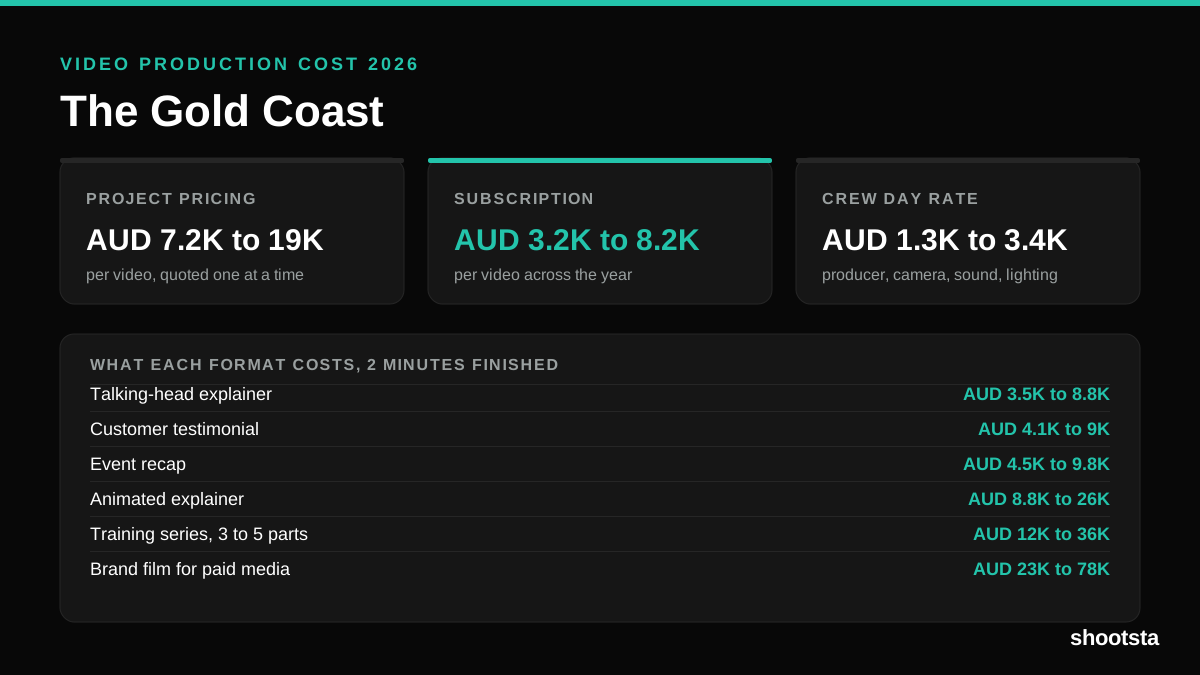
Video Production Cost on the Gold Coast 2026
Video production in the Gold Coast costs AUD 3,200 to AUD 8,200 per finished video on a subscription model, and AUD 7,200 to AUD 18,500 for one-off project work. Here is what you are paying for, and how the three pricing models compare.
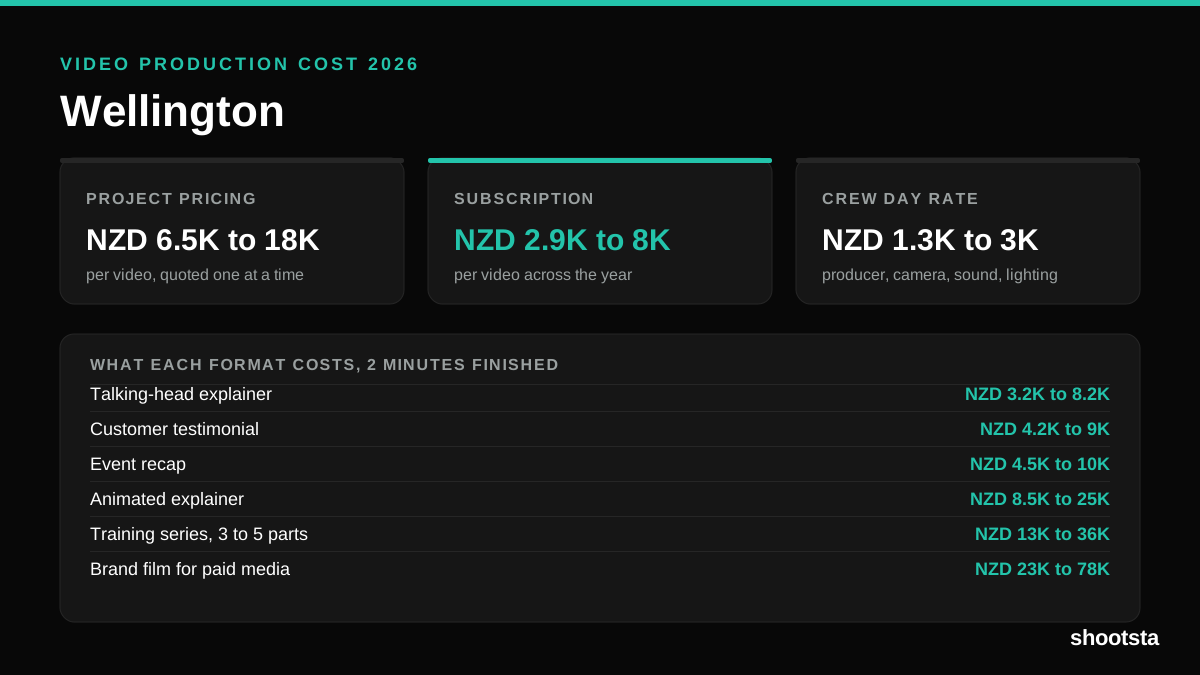
Video Production Cost in Wellington (2026)
Video production in Wellington costs NZD 2,900 to NZD 8,000 per finished video on a subscription model, and NZD 6,500 to NZD 18,000 for one-off project work. Here is what you are paying for, and how the three pricing models compare.