
shootsta.
How to Create On-Brand Video Templates for UK Teams
By Mark Ashworth · Published December 18, 2025 · Updated October 2026

Complete guide to developing video templates UK that embed brand standards, accelerate production, and ensure consistent professional quality across distributed teams.
UK organizations making video across multiple departments run into the same problem: inconsistent branding. Marketing creates polished content while HR uses whatever tools are handy. Regional teams read guidelines differently. External partners add their own creative spin.
This patchwork creates a messy brand identity that weakens the professional image your business has built.
Well-designed video templates UK fix this by building brand standards right into production workflows. Instead of hoping teams follow a PDF guide, templates make sure every video has the right logos, colors, fonts, and motion graphics by default.
This approach keeps things consistent while letting distributed teams create content fast, without needing design skills or constant oversight.
Why Traditional Brand Guidelines Fail for Video
Your organization probably has brand guidelines covering logos, colors, fonts and visual identity. Those documents were written for print and web, and they rarely work well for video production.
Static Guidelines for Dynamic Media
Traditional brand guidelines cover static uses like letterheads, slides, and print materials. Video adds motion graphics, transitions, animation timing, and audio identity. PDF documents struggle to explain these well. Teams that try to apply static rules to video make inconsistent choices, creating visual gaps across content.
Interpretation Variability
Even clear written rules leave room for guessing. What counts as "correct logo placement" or "on-brand color use" in a video? Different creators make different calls. These small differences add up across dozens or hundreds of videos, creating obvious inconsistency.
Accessibility and Discoverability
Brand guidelines buried in shared drives or intranet sites stay invisible to many content creators. Regional teams, external partners, or new hires often work without seeing current standards. They default to old materials or best guesses. If people cannot find the guidelines, they will not follow them.
Technical Complexity
Applying brand standards in video editing software takes technical skill that many content creators lack. Knowing how to format lower thirds, build compliant title sequences, or apply brand colors in editing tools is a barrier. Even motivated teams struggle when the process is too complex.
Template Advantage
Organizations using video templates UK see far fewer brand compliance issues than teams that rely on guidelines alone. Templates put the brand rules inside the production workflow, so the standards show up in every video your teams make.
Essential Components of Effective Video Templates UK
Good templates balance brand consistency with creative freedom. They allow diverse content while keeping a clear, consistent identity.
Core Brand Elements
Templates must lock in the brand elements that should never change. This includes approved logo versions with correct sizing and placement, exact brand color values, proper fonts, and standard motion graphics styles.
These locked elements set a baseline. Brand consistency holds no matter who creates the content.
Keeping visual consistency across video content needs a system that applies the rules for you, because manual checks miss things as volume grows.
Flexible Customization Areas
Templates should not lock down every creative choice. Define areas where teams can customize: text, images, pacing, and messaging. This freedom keeps templates from feeling like a straitjacket while brand guardrails stay in place. Be strict on core brand elements, flexible on content execution.
Format Variations
Modern video needs multiple formats. Good video templates UK include versions for each platform: horizontal 16:9 for YouTube and websites, square 1:1 for Instagram feed, vertical 9:16 for stories and TikTok. Pre-built format options keep brand consistency across all channels without manual reformatting.
Template Categories
Different content types need their own templates. Common categories include:
- Executive messages with professional backgrounds and lower thirds
- Employee spotlights featuring team members
- Product demos with clear feature callouts
- Social media clips sized for each platform
- Event recaps with dynamic pacing
- Training videos with clear instructional graphics
Purpose-built templates speed up production while keeping the right style for each use.
User-Friendly Design
Templates must be easy enough for non-experts. Clear instructions, simple customization points, and a foolproof structure let teams without video skills create professional results. If templates need advanced skills to use, people will not adopt them.
Building Your Video Template Library
Building templates step by step ensures you cover your real needs without creating a system too big to manage.
Audit Current Video Needs
Start by listing every video type your organization makes or should make. Review content from all departments. Find common formats, recurring use cases, and how often each type gets made. This audit shows which templates will have the biggest impact. No point building fancy templates for rare content while ignoring the stuff your team makes every week.
Prioritize High-Volume Applications
Start with templates for your highest-volume needs. If your team creates weekly executive updates, monthly employee spotlights, and daily social content, those templates come first. Quick wins from high-use templates build momentum and show the value that justifies further investment.
Design for Brand Compliance
Work with your brand team to make sure templates apply visual identity standards correctly. Define exact specs for logo placement and sizing, color use and combos, font hierarchy, motion graphics timing and style, and audio identity. Document these specs to guide template builds and future updates.
Test with Actual Users
Before rolling out templates company-wide, test them with real users from the target teams. Watch people use templates and spot where they get stuck or confused. Iterate based on feedback so the final templates work for the people who use them every week as well as the designers who built them.
Create Comprehensive Documentation
Templates need supporting docs that explain when to use each template, how to customize it, what must stay unchanged, and where to get help. Good docs speed up adoption and cut support requests. Include visual examples showing correct usage.
Common Template Mistakes
The biggest mistakes are: making templates too complex for non-experts, locking every creative decision so nothing feels flexible, building templates without user input so nobody wants to use them, and skipping platform-specific versions so teams have to reformat by hand. Each mistake kills template effectiveness no matter how good they look.
Implementation and Distribution Strategies
Building templates is only half the job. Getting teams to use them every time takes a planned rollout with training and support.
Centralized Template Management
Keep templates in a central, easy-to-find location. Cloud-based platforms make sure teams always get the current version instead of working from old downloads. When brand standards change or templates improve, updates reach everyone right away without manual distribution.
Modern platforms that support video at scale include template management as a core feature.
Training and Onboarding
Provide training on how to use templates, what can be customized, and why brand standards matter. Make the training hands-on, with people building a video from a template instead of watching a presentation. Recorded tutorials help with ongoing reference and new hire onboarding.
Support Infrastructure
Set up support channels for template questions, technical issues, or brand guidance. This could be a Slack channel, regular office hours, or named template champions in each department. Quick support stops frustration from killing adoption.
Enforcement and Incentives
Balance encouragement with clear expectations. Make templates the easiest path while setting firm rules that brand compliance is required. Highlight great examples from teams using templates well. When someone skips a template, help them use it next time rather than only pointing out the miss.
Continuous Improvement
Gather feedback regularly and improve templates based on actual use. Track which templates get heavy use and which ones sit idle. Ask users about pain points and the features that would help them. Regular updates keep templates useful instead of letting them go stale.
Benefits of Systematic Template Approaches
Investing in a full template system pays off well beyond just visual consistency.
Brand Consistency at Scale
Templates make sure every video meets brand standards no matter who makes it or where they are. This consistency strengthens brand recognition, shows professionalism, and kills the patchy look that hurts credibility. Audiences learn to recognize your content through a consistent visual language.
Accelerated Production
Templates cut production time by removing repeated design work. Instead of building graphics, titles, and brand elements for every video, teams start with a ready-made template and just add their content. This lets you make more videos with the same budget.
Democratized Creation
Good video templates UK let non-experts create professional content. Subject experts, regional teams, or junior staff produce brand-compliant videos without design skills or heavy training. This widens who can contribute to video programs.
Reduced Revision Cycles
Templates stop brand compliance issues before they cause revision rounds. When brand elements are baked into templates, teams cannot create off-brand content that needs fixing. This saves time, cuts frustration, and speeds final delivery.
Quality Assurance
Templates set a quality floor so even basic videos meet professional standards. Instead of accepting whatever quality distributed teams produce, templates guarantee a minimum acceptable look that upholds brand dignity across all content.
Measurable Impact
Organizations with full template systems spend less production time per video, make more videos and go through fewer revision rounds. Their brand compliance scores also rise. These gains add up across hundreds of videos a year, so the template investment pays back.
Technical Considerations for Video Templates UK
Good templates need solid technical foundations to stay compatible and usable.
Platform Selection
Pick template platforms that match your team's skill level and workflow needs. Options range from professional editing software templates (Adobe Premiere, Final Cut Pro) that need video expertise, to web-based platforms with simple interfaces for non-experts, to full video platforms that combine templates with production support.
File Format Standards
Set consistent technical specs across templates. This includes resolution (1080p minimum, 4K for flagship content), frame rates (25fps or 50fps for UK), aspect ratios for each platform, and export settings for quality and compatibility. Standard specs simplify workflows and prevent technical issues.
Asset Management
Templates need supporting assets like logos, fonts, graphics, and music. Keep these in organized libraries with clear naming and version control. When brand assets change, push updates through templates to stop outdated elements from showing up in new content.
Performance Optimization
Make sure templates run well on typical user hardware. Templates overloaded with effects or high-res elements may lag on standard laptops. Balance visual quality with performance to keep workflows smooth.
Template Development Checklist
Use this framework to build a template system that covers your organization's needs.
Video Template Success Checklist
Planning Phase:
- Audit of all video types and volumes across the organization
- Prioritized list of templates starting with highest-impact uses
- Brand specs documented for all visual and audio elements
- User needs gathered from the teams who will use the templates
Design Requirements:
- Core brand elements set up correctly and locked
- Flexible customization areas clearly marked and accessible
- Platform-specific versions for horizontal, square, and vertical
- User-friendly interface that needs minimal technical skill
- Full instructions and visual examples included
Technical Standards:
- Consistent resolution, frame rate, and format specs
- Optimized to run well on typical user hardware
- Organized asset libraries with clear naming conventions
- Version control system tracking template updates
- Compatibility tested across target platforms and devices
Implementation Support:
- Central template access through a cloud-based platform
- Training program covering usage and brand standards
- Support channels for questions and technical help
- Clear enforcement expectations and compliance rules
- Feedback channels for ongoing improvement
Ongoing Management:
- Regular usage tracking to spot adoption patterns
- Periodic reviews to update templates based on feedback
- New template development for emerging needs
- Brand compliance checks across template outputs
- Success metrics showing efficiency gains and quality improvements
Taking Action on Template Implementation
Building a good template system takes planning and structured execution, not ad hoc effort.
Start by getting stakeholders on board with the business case. Brand guardians care about consistency, and operations leaders want efficiency. Business teams want faster content. Templates address all of these needs, which makes them a strategic investment.
Run a full audit of video production across all departments. Note the formats that come up again and again, the teams that make the most videos and the places where brand problems happen. This data shows where templates will have the biggest impact.
Begin with pilot templates for high-volume uses. Rather than trying to cover everything at once, prove value through focused work. Success with executive updates or social content builds the case for broader template development.
Invest in user research to learn who will use templates and what skills they have. Templates made for video pros will not work for subject experts. Templates too simple will frustrate skilled creators. Match template complexity to actual user ability.
Pick the right tech platform. Professional editing software gives maximum creative control but needs expertise. Web-based tools provide easy access but may limit options. Full video platforms combine templates with production support, which is ideal for teams without in-house video skills.
Plan a full rollout with training, docs, and support. Templates without these resources will fail no matter how well designed they are. Invest in change management so teams understand, find, and adopt the new system.
Modern platforms that combine human creativity with AI tools provide ready-made template solutions. They embed brand standards while letting teams create content fast, with under 48-hour turnaround. These systems deliver professional quality at a scale that manual processes cannot match.
The organizations that succeed with video templates UK treat them as strategic tools, not one-time design projects. They invest in solid planning, user-centered design, strong rollout, and ongoing improvement. This approach turns templates into essentials that enable brand-consistent video at scale.
Frequently Asked Questions About Video Templates
What software should we use to create video templates UK?
It depends on your team's technical skills and workflow needs. Professional editing apps like Adobe Premiere Pro or Final Cut Pro offer the most creative control but need video expertise. That limits who can use the templates.
Web-based platforms like Canva or Animoto have simpler interfaces for non-experts but may limit creative flexibility. Full video platforms combine template tools with production support. Teams use simple templates for basic content and tap professional services for complex projects.
The best choice matches template complexity to actual user skills. Consider a hybrid approach: experienced teams use professional software while distributed teams use simpler web-based templates.
Evaluate platforms on ease of use, brand control, output quality, compatibility, scalability, and total cost including licenses, training, and support.
How many templates should we create initially?
Start with 3-5 templates for your most common video types. Audit your current output to find the formats that come up most often. These might be executive updates, employee spotlights, social content, or product demos.
Build templates for these first. Success with initial templates shows efficiency gains and justifies investing in more. Trying to build 20+ templates at once usually causes delays, overwhelm, and abandoned projects.
Phased development lets you improve based on real usage feedback. Early templates inform later designs. Plan your full template library but build it out over 6-12 months.
This staged approach manages change well while building skills and comfort with new workflows. Track usage to see which templates get used and which sit idle. Let that data guide your next builds.
How do we prevent templates becoming too restrictive?
Separate the must-not-change elements from the customizable ones. Lock core brand parts like logos, colors, fonts, and motion graphics style. Leave content areas fully open - messaging, images, pacing, and creative execution. This keeps brand identity intact while allowing variety.
Offer multiple template variants for different tones or contexts. Executive comms might have a formal and a casual version, both on-brand but fitting different message types.
Include clear docs on what stays fixed versus what teams can change. Test templates with real users and ask whether restrictions feel right or too tight. Some limits are the point - templates exist to keep standards. But too many restrictions kill adoption.
The goal is a clear brand identity across all content with room for variety in execution. Review regularly and adjust based on user feedback and brand changes.
How do we ensure teams use templates instead of creating from scratch?
Adoption starts with making templates easier than starting from scratch. If templates are clunky, teams will skip them no matter what the rules say. Design simple interfaces, write clear instructions, and test with real users to confirm they are easy to use.
Make templates easy to find through central platforms teams already use. No special logins or downloads. Provide hands-on training that shows the benefits in practice.
Set brand compliance rules that make template use required for certain content types. Enforce them consistently. Highlight great examples from teams using templates well to create positive peer pressure. Respond to non-compliance with support and training as well as feedback.
Track template usage to find teams that need extra help or templates that need work. Some pushback is normal during change. Steady education, quick support, and clear efficiency gains convert doubters into fans.
How often should we update our video templates UK?
Balance stability with steady improvement through planned reviews and responsive updates. Do a full template review once a year. Check whether designs still look current, whether user feedback suggests changes, whether brand standards have shifted, or whether new use cases have come up.
Make small updates each quarter to fix minor issues, add requested features, or refine based on usage data. Push emergency updates right away when brand standards change a lot, like a new logo or color refresh. Outdated brand elements in new content look bad.
Between reviews, keep feedback channels open to capture user ideas and problems. Avoid constant changes that cause fatigue where teams cannot keep up. Clear versioning and update notes help teams know what changed and why.
When big changes affect how templates work, provide refresher training so teams can use the updates well. Template systems need ongoing care after the first build. Plan resources for monitoring, feedback, improvements, and user support.
Keep reading
Take this article with you
Read the latest at shootsta.com/blog/on-brand-video-templates-uk
You might also like
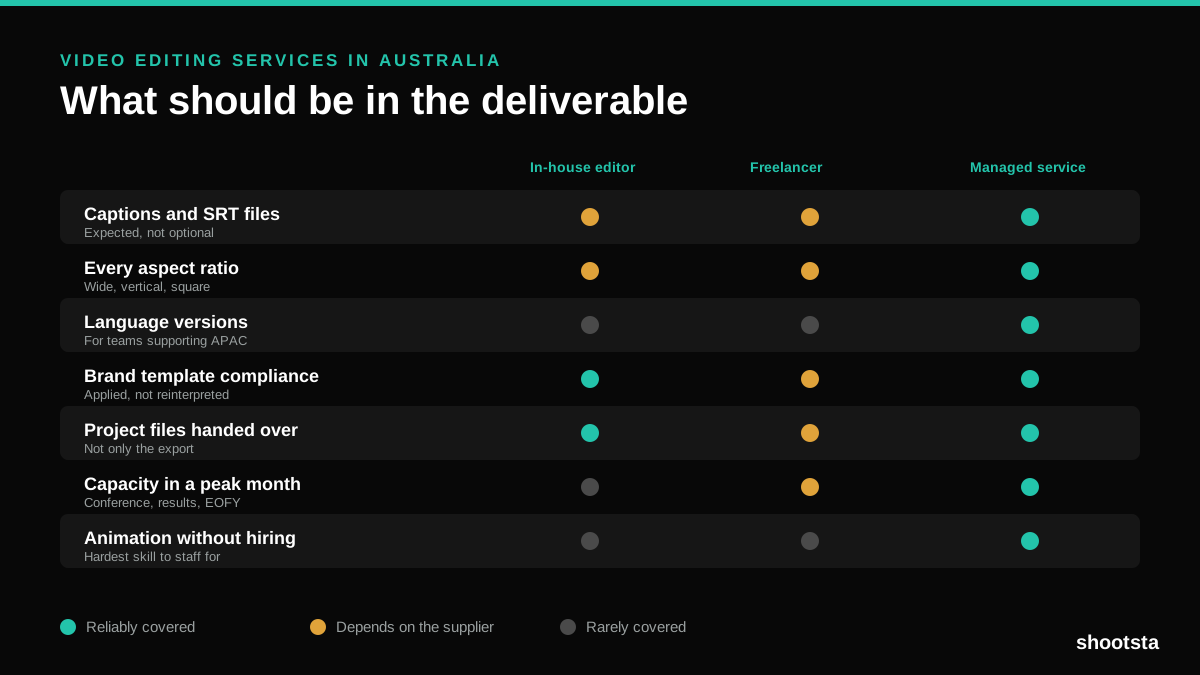
Video Editing Services in Australia
Australian teams are spread across time zones and offices, so the editing queue matters more than the editing. Here is what to expect on cost and turnaround.
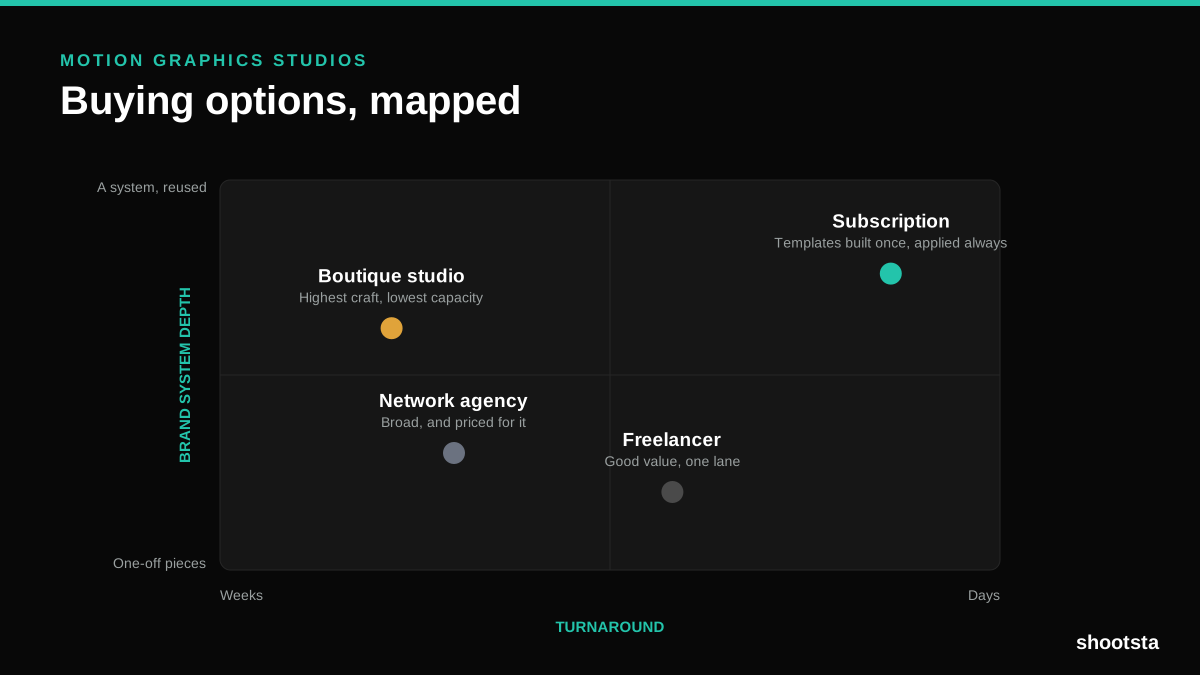
How to Choose Between Motion Graphics Studios
Every motion graphics studio has a good reel. The reel is the one thing that will not tell you how the fifth project goes. These ten criteria will.
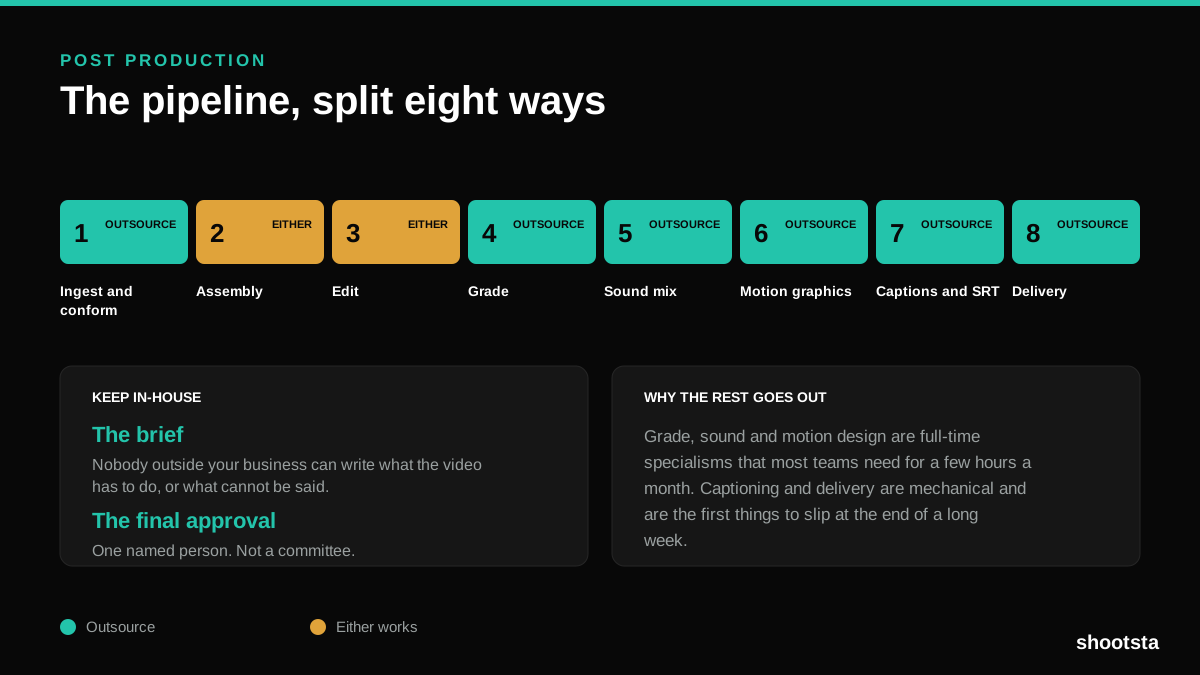
Post Production Agency or In-House Team?
Post production is eight stages, not one. Some of them need context only your team has. The rest are mechanical and are the first things worth handing over.
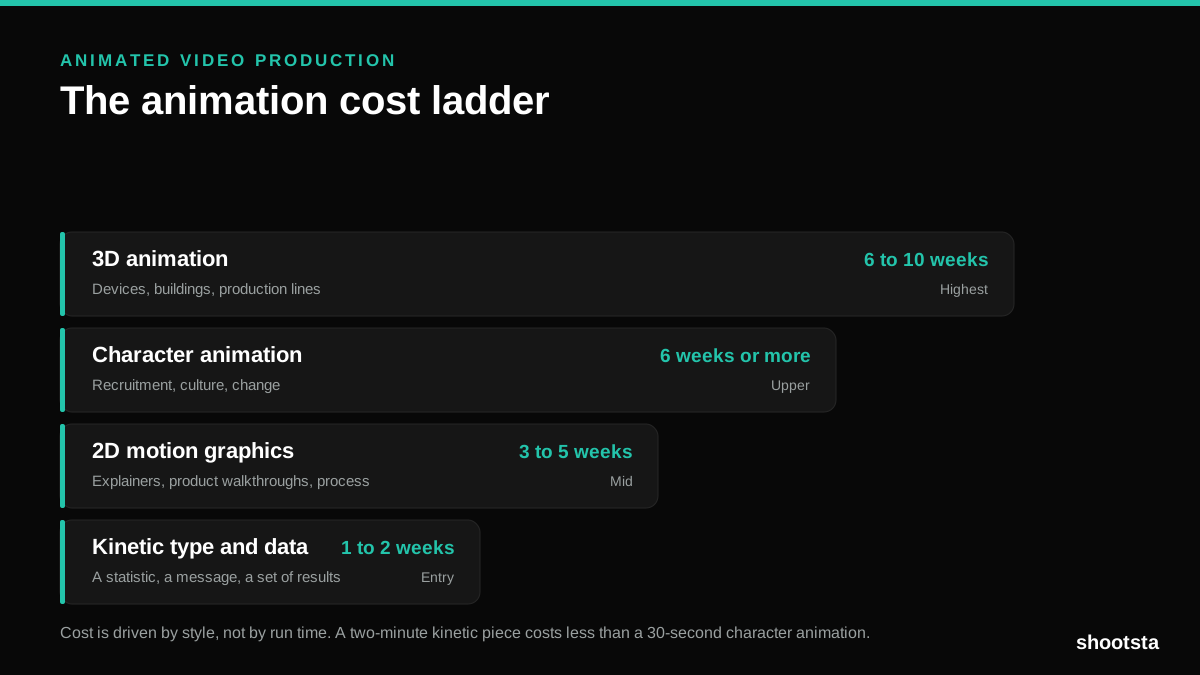
Animated Video Production Cost in the US
Animated video production costs move with style, not with length. Kinetic type, 2D motion, character and 3D sit on four rungs of a ladder. Here is what separates them.
How to Commission Medical Training Animation
Commissioning a medical training animation is mostly decisions you make before anyone animates a frame. The brief fields that matter, what to ask a studio, how much expert time to budget, and the contract terms that stop a rebuild in two years.
How to Write an Animation Brief
How to Write an Animation Brief
Most animation briefs cause delays because they over-specify the visual style and under-specify the outcome. Here are the nine fields an animation production team needs to quote accurately and start without rework.