
How to produce video for crisis comms
shootsta.
How to produce video for crisis comms
By Shootsta · Published April 21, 2026 · Updated October 2026
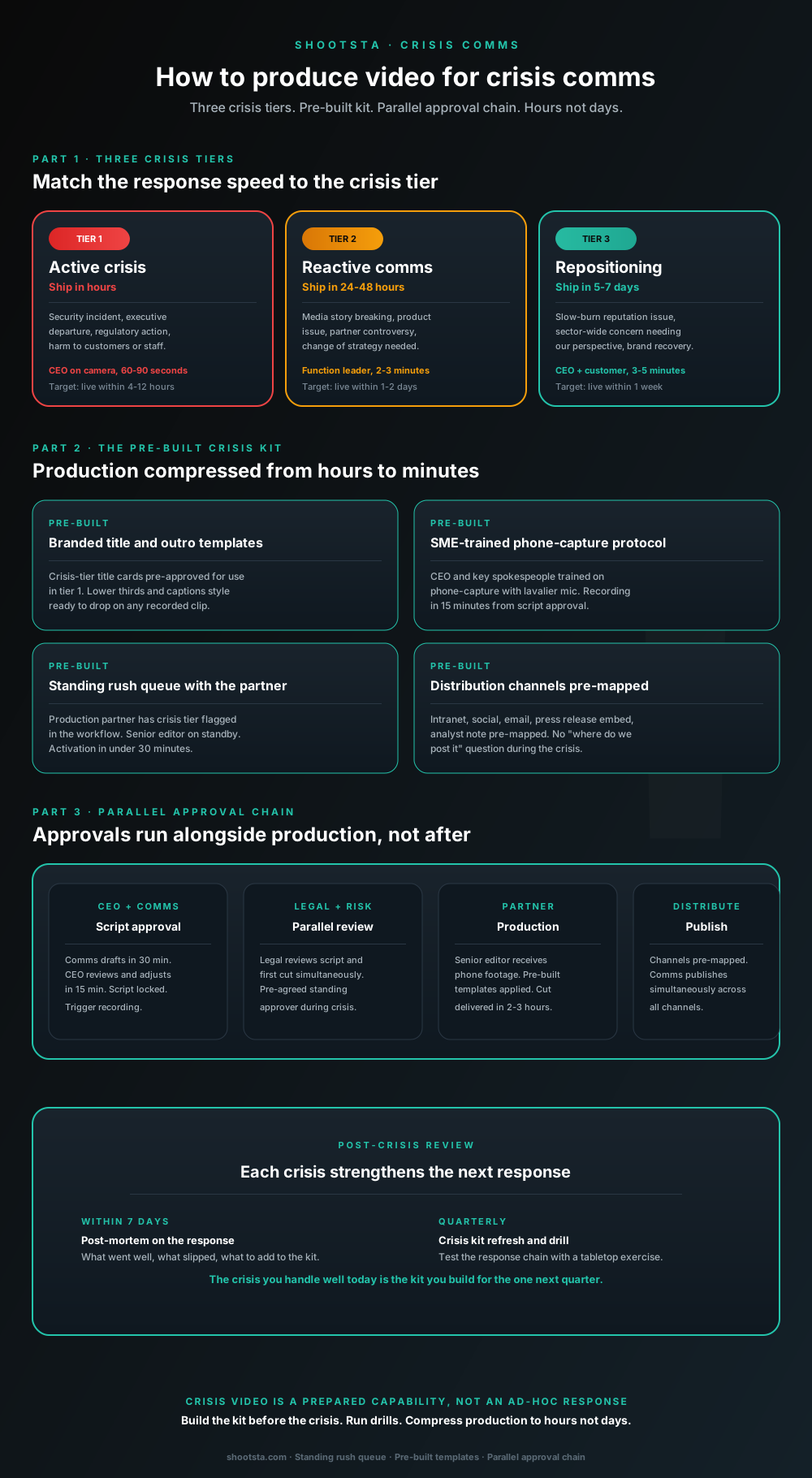
Crisis comms video is the format you build before you need it, not when the crisis lands. Three crisis tiers, a pre-built crisis kit that compresses production from 12 hours to under 2, a parallel approval chain that runs alongside production rather than gating it, and a quarterly drill that keeps the response chain warm.
Why crisis video is a prepared capability, not an ad-hoc response
A crisis often lands late in the afternoon and your comms team scrambles to draft a statement. The CEO is tied up for hours, and the production vendor needs a day or two to deliver. By the time the video ships, the news cycle has moved on, the regulator has put out its own statement or social media has settled on the wrong story. A video that lands the next morning is worth a fraction of the same video released that afternoon.
The fix is to treat crisis comms video as a prepared capability rather than an on-demand request. Build the kit and train the spokespeople before anything goes wrong. Agree the approval chain in advance, then run drills so each person knows their part. Each of these steps strips an avoidable delay out of the response, which cuts the time from incident to published video. The CEO statement that lands first sets the narrative, and the same statement hours later only follows whoever spoke before it.
The three crisis tiers
Tier 1: Active crisis (ship in hours)
This tier covers a security incident with customer impact, an executive leaving under a cloud, regulatory action against the company or harm to customers, staff or the community. In each case, silence in the first few hours becomes part of the story. The CEO goes on camera for 60 to 90 seconds, and the video ships within hours of the incident being detected. It protects your right to be heard before others define the story.
Tier 2: Reactive comms (ship in 24-48 hours)
Tier 2 covers a breaking media story that needs a response but is not unfolding live, or a product issue that is not a security or safety incident. It also fits a partner controversy or a strategy change made in response to the market. The relevant function leader goes on camera, such as the CRO for product issues, the CFO for strategy shifts or the CHRO for a partner controversy. The video runs 2 to 3 minutes and ships within 24 to 48 hours.
Tier 3: Repositioning (ship in 5-7 days)
Tier 3 handles a slow-burn reputation issue, a sector-wide concern where you want to give your view or a brand recovery campaign after a hard stretch. The CEO appears alongside a customer or third-party voice, the video runs 3 to 5 minutes and it ships within a week. This format shows you have thought carefully about your position instead of reacting defensively.
The pre-built crisis kit
Every element in the kit is built before the crisis lands. Each one shaves a specific window of time off the response.
Branded title and outro templates
Brand and legal approve the crisis-tier title cards in advance. Lower thirds and the caption style are ready to drop onto any recorded clip. Nobody has to ask what the title should look like in the middle of a crisis, so you skip a round of design and brand review when time is shortest.
SME phone-capture protocol
Train the CEO and spokespeople to record on a phone with a cheap lavalier mic. Once the script is approved, they can record a usable take within minutes. You do not need to send a crew, book a studio or wait for production, which removes crew setup and travel from the timeline.
Standing rush queue with the production partner
Your production partner flags the crisis tier in its workflow. A senior editor is on standby during business hours, and there is a documented escalation path for after hours. An editor can start on the job soon after you ask. You avoid the vendor onboarding and project setup that would otherwise eat into the response.
Distribution channels pre-mapped
Map every channel to the comms team's playbook ahead of time, including the intranet, social channels, email lists, press release embed targets and analyst note distribution. That saves the coordination time that usually follows a finished edit.
Together, the four kit elements take hours out of crisis time-to-publish. A crisis video that would ship in the evening without the kit can ship in the afternoon with it.
Interactive scorecard
How fast could you ship a crisis video today?
Toggle the crisis-readiness elements you have in place. The scorecard returns the expected time-to-publish given the current state and the specific gaps to close.
Crisis-readiness elements in place today
Readiness elements
0 / 6
in place today
Expected time-to-publish
~12 hrs
from incident to live video
Crisis tier ready
Not crisis-ready
Ship in 12+ hours
Gaps to close
Standing rush queue with the production partner (under 30 min activation)
Adding this saves ~120 minutes off crisis time-to-publish.
Pre-agreed legal / risk standing approver for crisis-tier review
Adding this saves ~120 minutes off crisis time-to-publish.
CEO and key spokespeople trained on phone-capture with lavalier mic
Adding this saves ~90 minutes off crisis time-to-publish.
Pre-built branded title, lower-third and outro templates ready to drop in
Adding this saves ~60 minutes off crisis time-to-publish.
Quarterly crisis comms drill that tests the response chain end-to-end
Adding this saves ~60 minutes off crisis time-to-publish.
Distribution channels pre-mapped (intranet, social, email, embed targets)
Adding this saves ~45 minutes off crisis time-to-publish.
Not ready for crisis video
Current state is below the crisis-readiness threshold. The first crisis at this readiness level usually exposes the gaps publicly. Build the kit before you need it.
Build a crisis comms video kitMinutes-avoided weights based on observed enterprise crisis response cycles. Baseline (zero readiness) assumes ~12 hours for first crisis video ship. Numbers are guides; your actual time-to-publish depends on crisis complexity and approver availability.
The parallel approval chain
The most common delay in crisis comms video is serial approval. Comms drafts the script and waits for the CEO, who approves it and then waits for legal. Legal signs off and hands over to production, and production delivers and waits for the CEO's final review. Every handoff adds time, and none of it needed to run in sequence.
Parallel design
Comms drafts the script quickly, and the CEO and legal review it at the same time in separate workstreams. Recording starts as soon as the CEO signs off on the script. Legal keeps reviewing the recording while the edit goes ahead, so the first cut and final approval land together. The approval chain then shrinks from most of a working day to an hour or two.
Pre-agreed standing approver
Ask legal to name a standing approver for crisis-tier video who can clear content under standard guidance without escalating. A crisis rarely needs a new legal judgment. What it needs is fast application of guidance you already have. Dropping the escalation step for routine crisis content takes hours out of the legal review.
The drill cycle that keeps the response chain warm
A crisis kit that has gone a year without a test will let you down when you need it. A drill cycle with three layers keeps it ready.
Quarterly tabletop exercise
The comms team, the CEO or a designated spokesperson, legal and the production partner work through a made-up crisis from start to finish. They draft the script, record the video without releasing it and run approvals on the real timeline. The exercise shows where friction has crept into the chain since the last drill.
Twice-yearly full drill
The full drill runs like the tabletop exercise, except the video goes out, usually to a small internal test group rather than the public. This tests the distribution channels and the post-publish process. It often exposes gaps in intranet publishing permissions, social account access or out-of-date email lists.
Post-real-crisis review
Within a week of any real crisis video going out, run a structured review of what worked and what slipped. Decide what to add to the kit and which approval steps to agree differently next time. Each crisis you handle well becomes the input for the kit you use on the next one.
What the CEO needs to know to perform well on camera in a crisis
Three practical points help a CEO hold up under pressure, and each is easy to rehearse.
Acknowledge first, explain second
In the first sentence, the CEO acknowledges the situation and the people affected. The second sentence says what the company is doing about it, and the third makes the commitment. Leading with explanation or context sounds defensive and wears away the trust the video is meant to build.
Stay short
Tier-1 crisis video should run 60 to 90 seconds. A long crisis statement signals nerves, while a concise one signals control. The CEO should leave the audience wanting to hear more, rather than feeling they have heard too much.
Stay still
Crisis video ends up in news segments, social clips and the company's own historical record. Body language counts as much as the words. The CEO should sit steady, look at the lens and keep gestures small, so the recording looks composed even when the situation is not.
How to handle the social-first crisis pattern
Some crises break on social media before your normal incident detection picks them up. In that case, the response follows a different pattern.
Acknowledge the issue on the same platform within minutes, with a text post from the official account. That buys time while you prepare the video response. Then publish the video in the tier-1 window. Posting text first and video second stops the social cycle from settling on the wrong story, and it still leaves room for a considered video.
A frequent mistake is to stay silent on social until the video is ready. Social moves faster than video production, so acknowledge on social first and then ship the considered video response.
Frequently asked questions
How often do enterprise comms teams need crisis video?
It depends on your sector. Heavily regulated sectors such as financial services and pharma tend to face crisis-tier moments more often than technology or consumer brands. Reactive tier-2 moments come up far more often than true crises for almost every enterprise. The kit pays for itself even at low use, because one mishandled crisis costs far more than keeping it ready.
What about late-night and weekend crises?
Your standing rush queue with the production partner needs a documented after-hours escalation path. A common setup names one senior editor or producer who can be reached directly for after-hours crisis activation. Agree and write down this contact when you set up the engagement, well before you need it.
Can the CEO refuse to be on camera for crisis video?
It is sometimes the right call, but usually it is not. A CEO who stays off camera during a crisis sends a signal of its own, and the audience will read it. The fair exceptions are a crisis where the CEO is personally implicated, when a different leader should respond, or where security threats rule out an on-camera appearance. Most other reasons for "the CEO is unavailable" point to weak crisis preparation rather than a principled choice.
How does crisis video integrate with the press release and PR response?
Tier-1 crisis video usually goes out at the same time as the press release or shortly after it, and each one points to the other. Tier-2 reactive video tends to follow the press release by a few hours or a day. Tier-3 repositioning video stands on its own, with supporting press around it as you would run for a launch campaign.
What about multilingual delivery in a global crisis?
Subtitles in your main workforce languages are produced alongside the master edit, usually as auto-subtitles checked by a linguist. For flagship regional markets where reading subtitles would weaken the message, replace the voiceover instead. If you operate globally, keep a standing subtitle service in place for the languages a large share of your staff speak.
How do we measure crisis video performance?
Start with time-to-publish from incident detection. Then run an internal pulse on whether employees felt informed during the crisis, and track external sentiment on the topic before and after the video ships. Do not judge crisis video on view count alone. Its audience is often smaller than for marketing video, but the attention it gets is far higher.
Where to go next
For the CEO video commitment that crisis tier-1 video draws on, read how to produce a CEO video update series. For the rush capacity model that the standing queue is part of, read how rush video production actually works. For the internal comms cadence that contextualises crisis response, read how internal comms leaders should use video.
To build a crisis comms video kit for your organization, book a free consultation.
Take this article with you
Read the latest at shootsta.com/blog/how-to-produce-video-for-crisis-comms
You might also like
How to Brief an Animation Project
How to Brief an Animation Project
An animation brief is the document you send to your production partner before work starts. Get it right and you cut revision cycles in half. Get it wrong and you discover mid-production that everyone disagrees on what the video is for. This is what a complete brief looks like.
Animation for change management comms
Animation for change management comms
Animation handles change management communications better than live video for three reasons: no on-camera executives required during sensitive periods, scene-level updates when plans shift, and a single production that works across global teams with voiceover-only language swaps.
How sales leaders should use video at scale
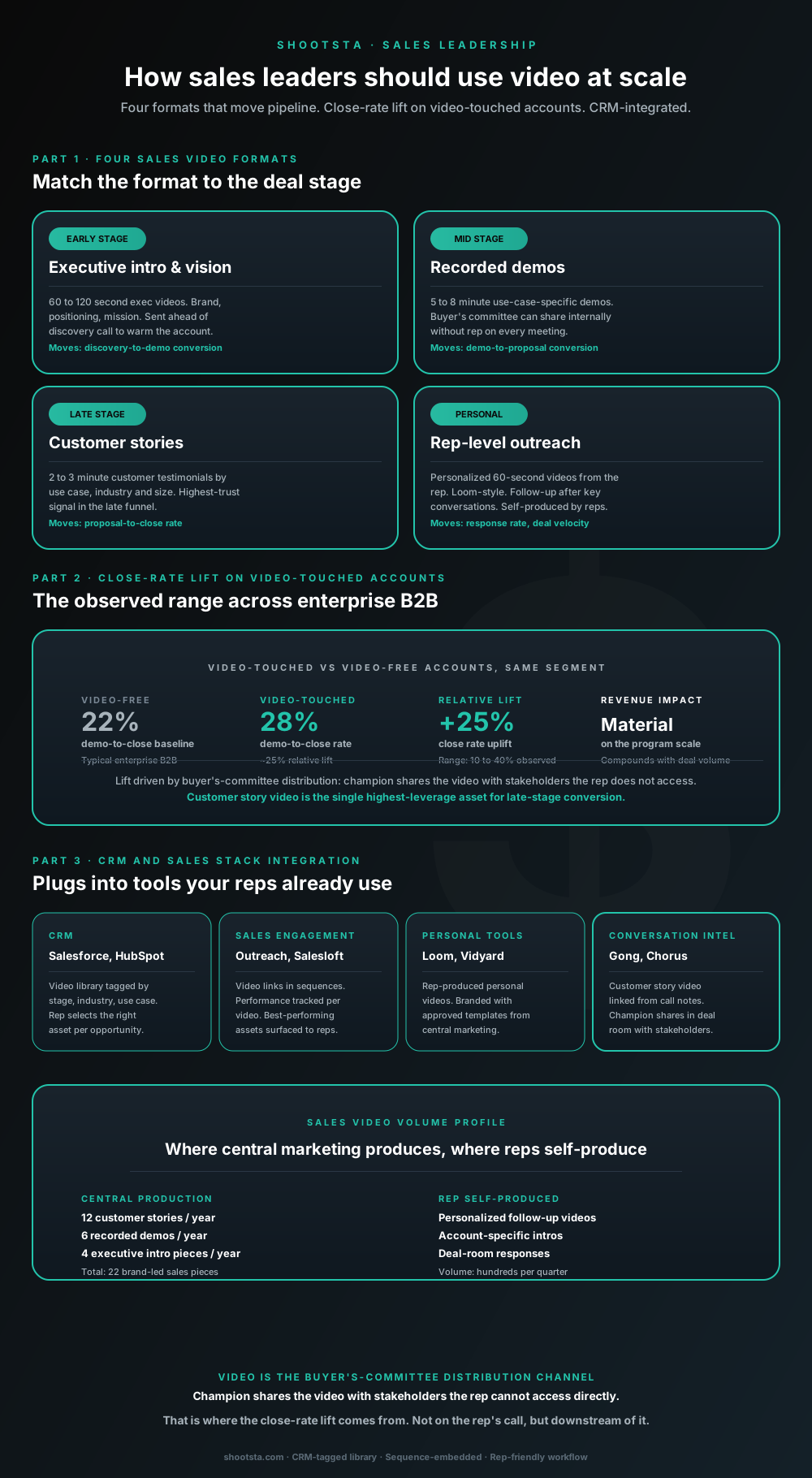
Sales leaders mostly think about video as personalized rep outreach (Loom, Vidyard) or as marketing-produced customer stories. Both are useful. The bigger opportunity is the buyer's-committee distribution layer: assets the champion shares internally with stakeholders the rep does not access directly. That is where the close-rate lift compounds.
How L&D leaders replace classroom with video
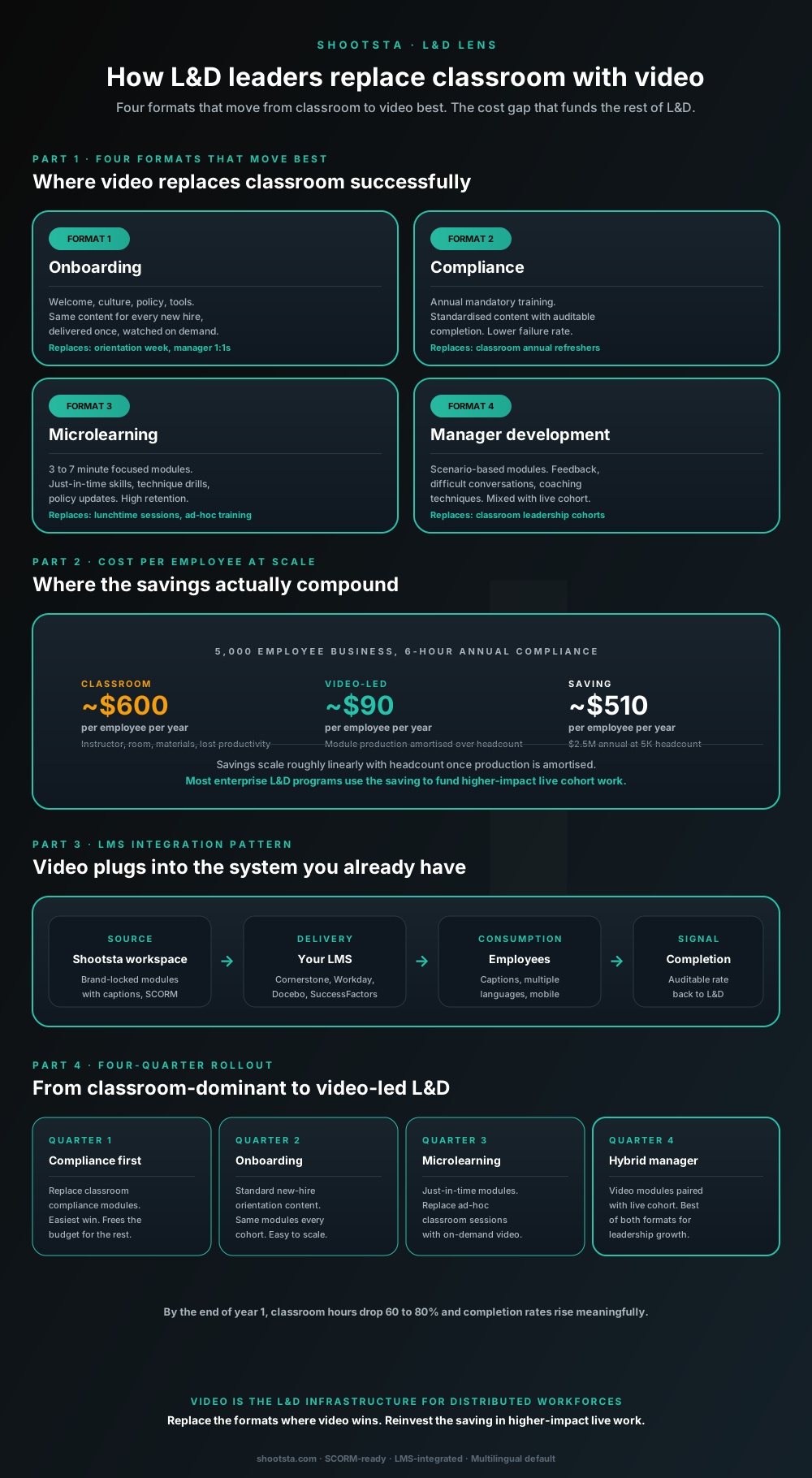
L&D leaders running classroom-heavy training programs typically have the largest single opportunity in the business to free budget through format change. Four training formats move from classroom to video cleanly; the savings fund higher-impact live work. Here is the rollout that compounds learner adoption over four quarters.
How customer success leaders should use video
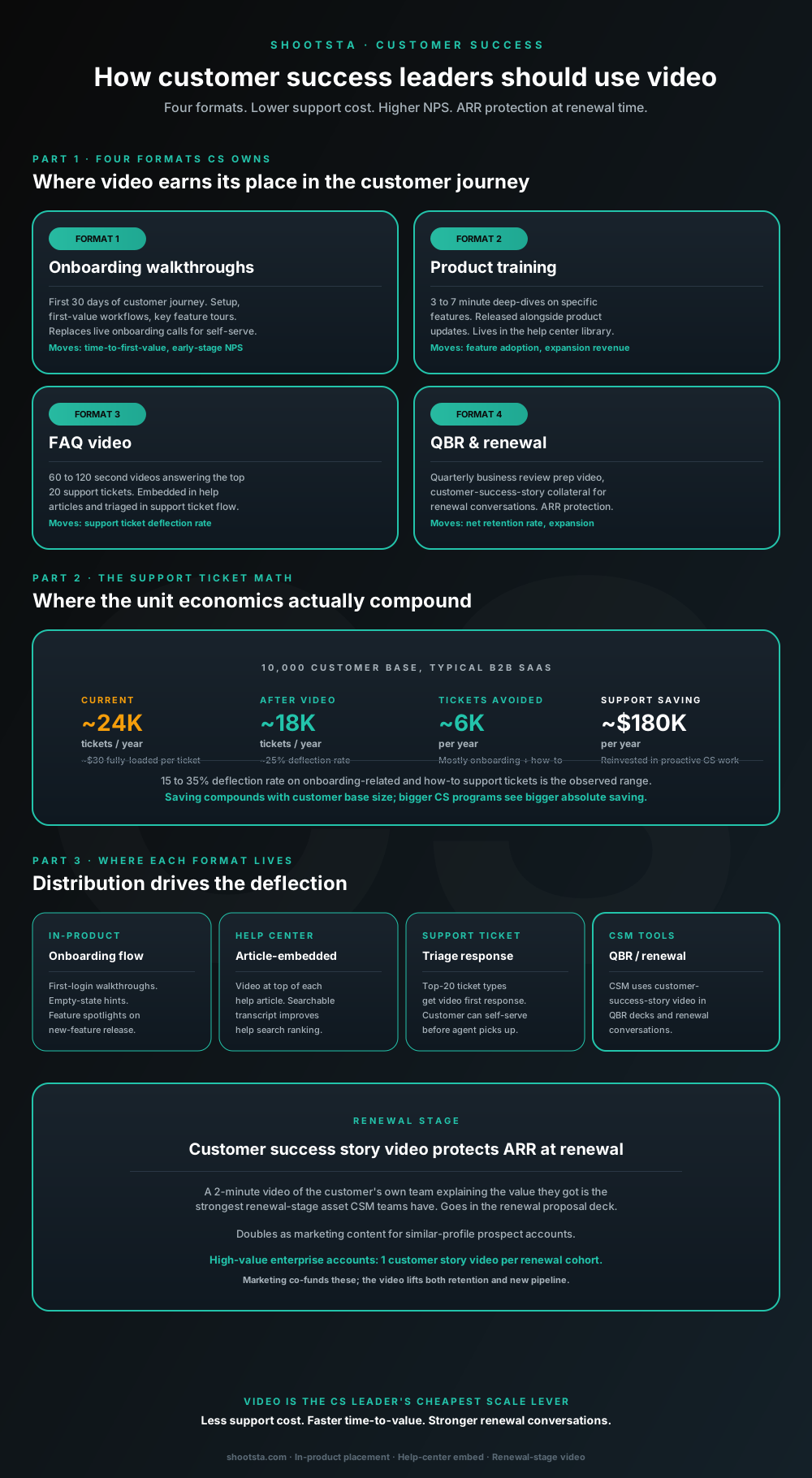
Customer success leaders are usually under-resourced for both reactive support volume and proactive retention work. Video is the cheapest lever to fix both - 15 to 35% deflection on onboarding and how-to tickets, faster time-to-value, and renewal-stage customer story video that lifts net retention. Here is the four-format model and where each piece earns its place.
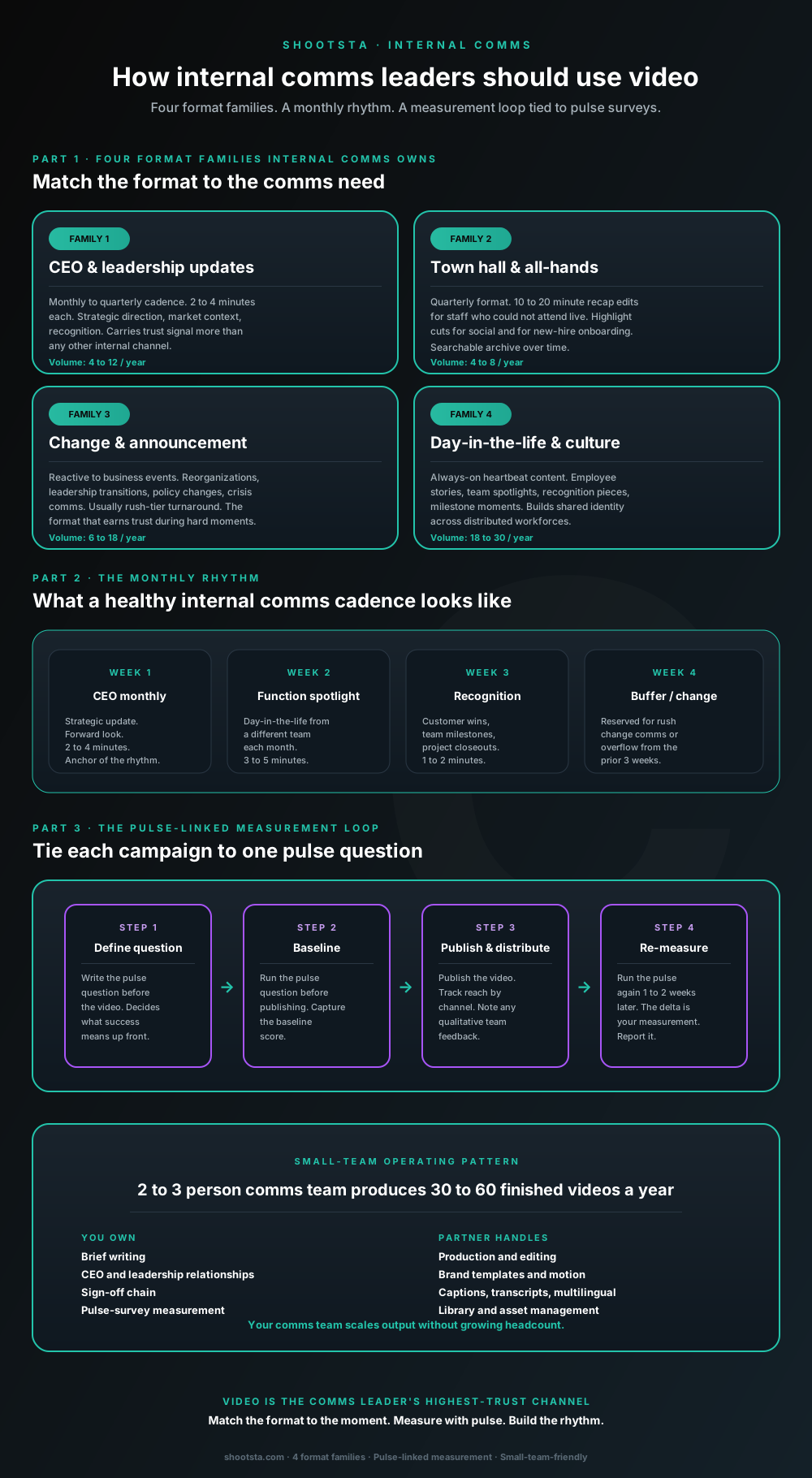
How internal comms leaders should use video
Internal comms leaders are usually under-resourced for the volume of video the business wants. The fix is not more headcount; it is structuring the program around four format families, a monthly rhythm, and a pulse-survey-linked measurement loop. Here is the operating pattern that lets a small comms team produce 30 to 60 finished videos a year.