
shootsta.
Mastering Video on Camera: Techniques for Business
By Mark Ashworth · Published June 2, 2025 · Updated October 2026
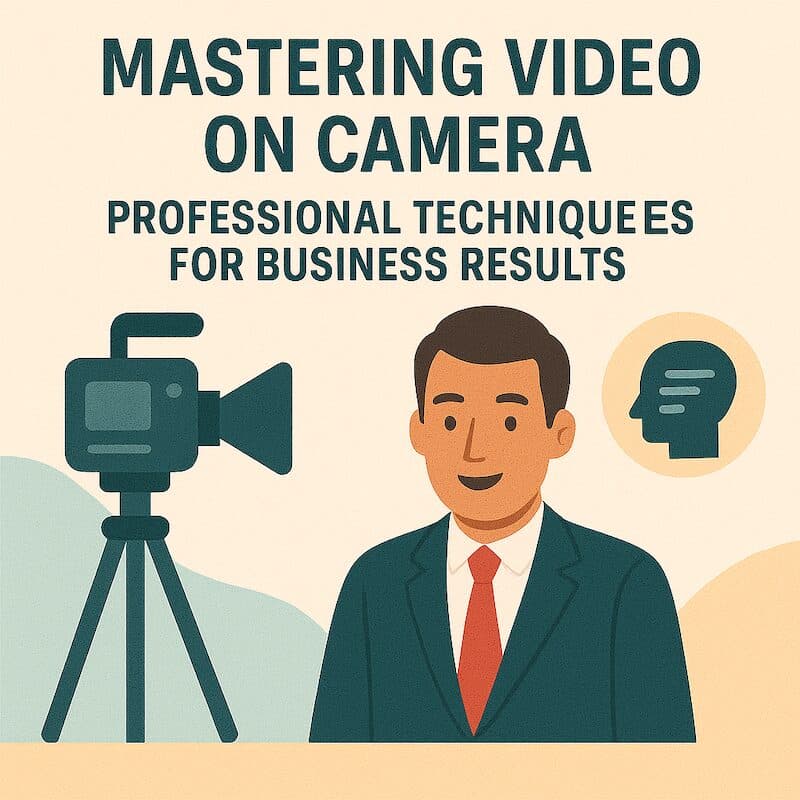
Professional video camera techniques for corporate video: framing, lighting, sound and movement, and how each one changes what your audience sees and remembers.
Understanding Professional Video on Camera Work
Video on camera work is a set of deliberate choices about composition, movement, focus and lighting. Together they hold the viewer's attention and carry the story. The job needs technical knowledge and a creative eye. A skilled operator points both at one goal, getting your message across, and that goal is how you should measure the result.Why Video on Camera Technique Matters for Business
Camera techniques for business affect how people judge your company. A clean frame reads as competent, and a sloppy one makes the message seem less trustworthy. The picture also affects how long people watch and what they remember. If your team knows these techniques, you can test a vendor's claims and give direction an operator can act on. You can also decide where corporate video filming needs the budget and where a simpler setup will do. Business Impact of Camera Excellence- Brand Perception: Professional video on camera work signals organizational quality and attention to detail influencing brand credibility
- Audience Engagement: Strategic camera techniques maintain viewer attention throughout content duration reducing abandonment rates
- Message Clarity: Intentional framing and focus direction guide viewer attention ensuring key messages register effectively
- Emotional Connection: Camera movement and composition choices create emotional resonance supporting persuasive communication
- Production Value: Technical excellence differentiates professional content from amateur videos crowding digital channels
- Competitive Advantage: Superior visual quality distinguishes brands in markets where video content proliferates
Camera Work Fundamentals for Corporate Video
Professional video camera work starts with four basics: a stable camera, correct exposure, sharp focus and a frame chosen on purpose. Amateur footage usually fails on at least one of them. These camera techniques for business hold true whatever equipment you use. They set a baseline that all corporate video filming should meet before anyone talks about style.Composition and Framing Techniques
Composition is how the parts of the picture sit inside the frame. It guides where the viewer looks and how easily they follow the message, and a well-composed shot keeps people watching. Good operators know the standard rules and bend them when the story calls for it. A leadership message and a product demo need different frames, and both should fit the brand.Rule of Thirds and Visual Balance
The rule of thirds splits the frame into nine equal boxes with two horizontal and two vertical lines. You place the important parts of the shot on those lines or where they cross, such as a speaker's eyes on the top line. Viewers find this layout natural. It also gives the frame more energy than a subject parked dead center, which can look flat in corporate video filming. Essential Composition Principles- Rule of Thirds: Positioning subjects and horizon lines along grid lines rather than dead center creates visual interest
- Leading Lines: Using architectural elements or natural lines to guide viewer eyes toward important subjects or information
- Headroom Management: Appropriate space above subjects preventing cramped framing while maintaining balanced composition
- Looking Room: Extra space in direction subject faces or moves creating comfortable, natural-feeling frames
- Depth Creation: Foreground, middle ground, and background elements adding dimension and visual interest to frames
- Symmetry and Patterns: Balanced compositions or repeating elements creating visually satisfying images for specific applications
Shot Types and Their Applications
Each shot type does a different job. A wide shot shows where you are. A medium shot suits conversation and people working together, and a close-up shows emotion or a small detail that matters. Knowing the shot types lets you check whether a video has enough variety. Cutting between sizes sets the pace and keeps the business message moving.Camera Movement and Stabilization
A moving camera adds energy as it reveals a space or follows a person. Every move needs a reason, because unmotivated movement in corporate video filming looks random. Professionals use support gear to keep movement smooth, because shake makes a business video look cheap.Strategic Camera Movement Types
Each kind of movement has its own use. A pan sweeps across a space and a tilt shows height. A dolly move adds depth, and a tracking shot follows a subject while keeping the frame smooth. Pick a move because the story needs it. Too much motion pulls attention from the message and makes camera techniques for business look amateur. Professional Movement Techniques- Static Shots: Locked-off camera providing stable, focused frames ideal for interviews and detailed information delivery
- Pan and Tilt: Horizontal or vertical camera rotation revealing environment or following subject movement smoothly
- Dolly Moves: Camera moving toward or away from subjects creating dimensional perspective changes
- Tracking Shots: Camera following subject movement maintaining consistent framing while revealing space
- Gimbal Stabilization: Smooth handheld movement combining mobility with professional stabilization quality
- Crane and Jib: High camera positions for dramatic reveals or establishing shots with production value
Stabilization Equipment and Techniques
Tripods, gimbals, sliders and dollies are the main stabilization tools. They remove shake and keep the look consistent across corporate video filming days. The right tool depends on the shot and the space. A tripod suits a meeting room, while a gimbal suits a walk through a factory, and the creative plan should decide the movement.Focus Control and Depth Management
Focus tells the viewer where to look. It separates the subject from the background and gives depth to video on camera work. A shallow depth of field blurs the background so the subject stands out, while deep focus keeps the whole frame sharp. Good camera techniques for business use both.Depth of Field Considerations
Depth of field is how much of the frame is in sharp focus. A shallow depth isolates the subject, and a deep depth suits a shot where the setting matters. The aperture, the focal length and the distance to the subject control it. An operator balances them against the look you want and the size of the room. Focus Control Techniques- Shallow Depth: Blurred backgrounds isolating subjects creating professional, cinematic appearance in interviews and portraits
- Deep Focus: Everything sharp throughout frame ensuring all visual information remains clear and accessible
- Rack Focus: Shifting focus between subjects directing viewer attention and creating visual interest within shots
- Follow Focus: Maintaining sharp focus on moving subjects requiring skill and appropriate equipment for professional results
- Split Diopter: Multiple focus distances within single frame maintaining sharpness in foreground and background simultaneously
- Autofocus Management: Understanding when autofocus helps versus when manual control ensures superior results
Lens Selection Impact
Each focal length has its own look. A wide-angle lens shows a broad view, a standard lens looks natural, and a telephoto lens squeezes the space and isolates the subject. The lens changes the depth of field and how close the viewer feels to the subject. In professional video camera work, it also decides how much room the crew needs.Lighting Interaction with Camera Settings
Camera settings have to match the light in the room. The operator balances exposure, white balance and dynamic range so corporate video filming keeps detail in bright windows and dark corners. If you understand how light and settings interact, you can judge a location before the shoot. Some rooms need extra lights for video on camera work to meet your standards.Exposure Management
Correct exposure means the subject is neither too dark nor too bright. The footage keeps detail in the shadows and in the highlights, which is a large part of what makes it look professional. The operator controls exposure with three settings: ISO, shutter speed and aperture. Each one has a side effect, such as grain or motion blur, so camera techniques for business video weigh them against the light and the look you want. Exposure Control Elements- ISO Settings: Sensor sensitivity adjustments allowing shooting in varied light conditions while managing noise levels
- Shutter Speed: Exposure duration affecting motion blur and overall brightness requiring strategic selection
- Aperture Control: Lens opening size affecting exposure and depth of field requiring careful balancing
- ND Filters: Neutral density filters reducing light enabling shallow depth in bright conditions
- Zebra Patterns: Exposure monitoring tools preventing blown highlights and underexposed shadows
- Dynamic Range: Camera capability capturing detail in bright and dark areas simultaneously
White Balance and Color Accuracy
White balance keeps the picture true to life. When it is wrong, the shot takes on a blue or orange cast, and it must stay the same through the whole video on camera piece. Accurate white balance means your brand palette shows up as it should on screen. Skin tones look natural too, which matters in any corporate video filming with people in it.Audio Considerations in Camera Work
The camera operator has to work with whoever records sound, so the microphones stay out of shot and the camera leaves room for audio gear. A beautiful shot is useless if the sound is poor. Planning picture and sound together stops the two teams working against each other.Coordinating Visual and Audio Requirements
On a professional shoot, the frame and the microphone are planned together. The boom mic needs to sit as close to the speaker as it can while staying just outside the frame. Getting that right is a routine part of camera techniques for business video. When the camera and sound crews talk early, they avoid clashes, such as a perfect angle that puts the speaker next to a noisy air vent. Audio-Visual Coordination- Boom Placement: Keeping microphones close for quality sound while remaining outside visible frame areas
- Wireless Mics: Lavalier microphones enabling flexible camera work without boom mic framing constraints
- Camera Noise: Managing equipment sounds that can interfere with audio recording quality
- Movement Coordination: Camera moves planned considering audio cable management and equipment positioning
- Environmental Sound: Camera positioning that avoids problematic audio reflections or ambient noise sources
- Interview Setup: Arrangements balancing visual composition with optimal audio capture positioning
Multi-Camera Production Techniques
A multi-camera setup gives the editor more choices. It also captures an event, interview or presentation from start to finish without stopping to move the camera or ask for another take. Knowing how multi-camera shoots work helps you judge whether a second camera is worth the extra cost. Better coverage and a faster edit often justify it, especially for live events.Camera Placement Strategy
Good placement gives each camera a different angle and shot size. The cameras must stay out of each other's frames, and the light and exposure should match across all of them. The crew plans placement around sight lines, backgrounds and lighting, so each camera in corporate video filming records footage the editor can use. Multi-Camera Considerations- Primary Coverage: Main camera capturing key action and providing primary footage for edit timeline
- Secondary Angles: Additional cameras providing cutaway options and visual variety for editing
- Close-Up Coverage: Dedicated camera maintaining tight shots of speakers or important details
- Wide Establishing: Camera capturing overall scene context and audience reaction when applicable
- Matching Settings: Consistent color and exposure across cameras so the cuts between angles do not jump
- Sync Considerations: Audio and timecode synchronization ensuring smooth multi-camera editing workflow
Common Camera Work Mistakes in Corporate Video
The same few camera mistakes turn up again and again in corporate video. If you know them, you can catch them on set, and you can use them as a checklist when you review a vendor's past work. Avoiding them keeps your corporate video filming professional and saves the editor from working around problems.Technical and Creative Errors
The usual culprits are movement with no purpose, soft focus and exposure that changes between shots. Busy backgrounds and the wrong shot for the moment do just as much harm to the finished video. Spot these problems while you are still filming. A fix on set takes a minute, but the same problem found in the edit can mean an expensive reshoot. Mistakes to Avoid- Unmotivated Movement: Camera motion without clear purpose appearing random and distracting viewers from content
- Crossing the Line: Violating 180-degree rule creating disorienting spatial relationships confusing viewers
- Poor Focus: Soft or misfocused footage appearing unprofessional and difficult to watch
- Inconsistent Exposure: Varying brightness between shots signaling technical incompetence and poor planning
- Distracting Backgrounds: Cluttered or inappropriate backgrounds drawing attention away from subjects and messages
- Inadequate Coverage: Insufficient shot variety limiting editorial options and resulting in repetitive viewing experience
Evaluating Camera Work Quality
You need a clear way to judge video on camera quality. It helps when you compare production partners, review a rough cut or decide whether to buy equipment for your own team. Judge the footage on its technical quality, on whether the creative choices fit, and on whether it serves the business goal. Keep the context in mind too. A quick internal update does not need the same standard as a brand film for your website.Quality Assessment Framework
Professional video camera work shows its skill in steady footage, correct exposure, sharp focus and a frame that was chosen with care. All of that should serve the story and keep the viewer watching to the end. When you assess footage, weigh the technical standard against how well it works creatively. Then factor in the context, the budget and the goal of the video. Those three decide what level of quality is right for this piece. Camera Work Quality Criteria- Technical Competence: Proper exposure, accurate focus, stable footage, and appropriate depth of field management
- Compositional Skill: Balanced, engaging frames utilizing established principles while serving communication needs
- Movement Quality: Smooth, purposeful camera motion supporting storytelling without distraction
- Shot Variety: Appropriate mix of angles and sizes maintaining visual interest and editorial flexibility
- Consistency: Matching exposure, color, and visual style across all footage for cohesive final product
- Creative Appropriateness: Camera choices supporting content objectives rather than showing off technical skill unnecessarily
Frequently Asked Questions
What camera equipment do professional corporate video productions typically use?
Most professional corporate shoots use a cinema camera or a high-end mirrorless camera. These give full manual control, 4K resolution, high dynamic range, flat picture profiles for grading and an output for an external monitor. You will often see the Sony FX6, Canon C70 or a Blackmagic Cinema Camera, paired with cinema lenses that perform the same way shot after shot. A professional crew also brings tripods, gimbals, lights and audio gear, which matter as much as the camera.How can businesses evaluate whether production partners have adequate camera expertise?
Start with the portfolio. Look for steady technical quality across every piece, a good mix of shots, smooth movement and framing that helps tell a business story. Then ask direct questions about the gear they use, how they handle light and exposure, and where they put the cameras. Ask how they keep the look consistent when a shoot runs over several days. Request references from similar projects and find out how they plan shots and make sure they get enough coverage. A strong vendor should explain how their video on camera work serves your message, as well as the specs.What camera techniques work best for different types of corporate videos?
Interview videos work best with a shallow depth of field to isolate the speaker. Keep the camera still or move it only a little, and add a second angle so the editor has options. Product videos need careful lighting to bring out detail, plus several angles and some gentle movement to show the shape of the product. Training videos need clear, bright footage so learners can see each step of a process, with steady framing and shots close enough to show the detail. Event coverage calls for several cameras. Use wide shots to set the scene and close-ups to catch key moments and the speakers' faces.How much does professional camera work impact video production costs?
Camera work is one of the bigger lines in a production budget. You pay for the equipment hire, the operator's day rate, any support crew and the extra time it takes to set up each shot well. Rates vary a lot by market and by how complex the project is, so ask for a day rate for both gear and operator in your city. Each extra camera adds to the bill, though it also gives you fuller coverage and can shorten the shoot. Good camera work often lowers the total cost, because usable footage means no reshoots and a faster edit.Can businesses create professional-looking video using consumer cameras or smartphones?
A modern smartphone or consumer camera can record a decent image in good conditions. What it lacks is full manual control, lens choice and the features a demanding corporate shoot needs. A professional look also depends on much more than the camera. You need good lighting, decent microphones, something to keep the shot steady and an operator who understands composition and exposure. Phones are fine for quick, casual videos, such as an informal team update. For videos that shape how people see your brand, or that carry an important business message, professional video camera work is worth the spend because it keeps the quality consistent.Video on Camera Technique Checklist
Use this framework to evaluate video on camera work quality in your corporate videos: Camera Work Quality Assessment Technical Standards- All footage correctly exposed without blown highlights or crushed shadows
- Focus maintained accurately on intended subjects throughout shots
- Camera movement smooth and stable without distracting shake or vibration
- Depth of field appropriate for content type and communication objectives
- White balance consistent and accurate maintaining natural color representation
- Image quality sharp and clear meeting professional broadcast standards
- Composition balanced and engaging following established visual principles
- Shot variety adequate providing editorial flexibility and maintaining visual interest
- Camera angles appropriate supporting subject matter and communication tone
- Movement purposeful serving storytelling rather than appearing random
- Visual style consistent throughout production supporting brand identity
- Coverage comprehensive ensuring adequate footage for effective editing
- Camera work supports communication objectives without distraction
- Visual quality reflects organizational standards and brand positioning
- Production approach appropriate for content type and distribution channels
- Technical execution enables effective message delivery and audience engagement
Next Steps for Camera Work Excellence
Knowing video on camera techniques makes you a better buyer. You can judge production partners, work with them on the creative and decide where your corporate video filming budget will do the most good. It pays off in practical ways. You pick vendors with more confidence and give them clearer direction. You also set realistic expectations for what each shoot needs, which keeps your video plan on track. Practical Application Steps- Portfolio Review: Evaluate production partner work assessing camera technique quality and creative appropriateness
- Technical Discussion: Ask specific questions about camera approach and equipment for your projects
- Quality Standards: Establish clear expectations about technical requirements and visual standards
- Creative Collaboration: Provide meaningful input about composition and camera work supporting objectives
- Review Process: Evaluate footage using technical and creative criteria ensuring quality standards
- Continuous Learning: Build team knowledge about camera techniques improving decision-making over time
Partner with Camera Excellence Experts
Shootsta pairs professional video camera work with a fast production process. You get corporate video filming that meets a high technical standard, planned around what the video needs to achieve for your business. Shootsta has produced more than 70,000 videos, and our crews bring that experience to each shoot. Professional Camera Work Solutions:- Experienced camera operators bringing technical mastery and creative sensibility to corporate projects
- Professional equipment packages including cinema cameras, lenses, and stabilization tools
- Strategic production planning ensuring appropriate camera coverage for content objectives
- Consistent quality standards across all productions maintaining brand visual identity
- Efficient workflows combining professional excellence with practical business timelines
Keep reading
Take this article with you
Read the latest at shootsta.com/blog/premier-video-camera-techniques-professional-results
You might also like
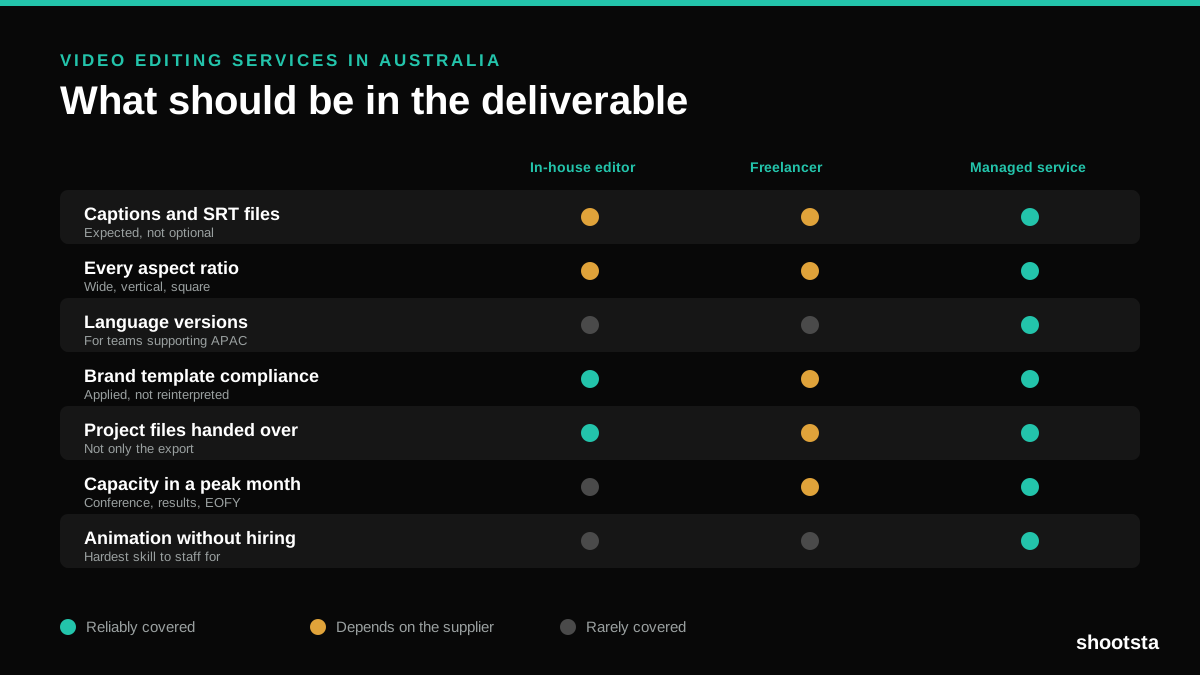
Video Editing Services in Australia
Australian teams are spread across time zones and offices, so the editing queue matters more than the editing. Here is what to expect on cost and turnaround.
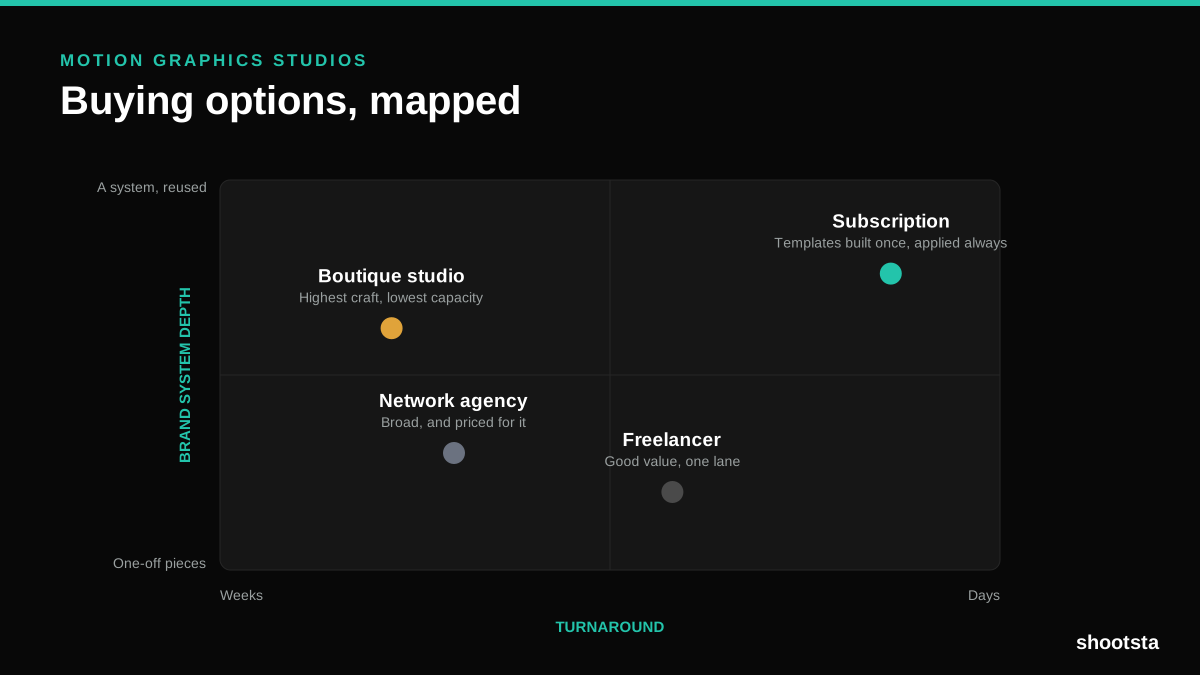
How to Choose Between Motion Graphics Studios
Every motion graphics studio has a good reel. The reel is the one thing that will not tell you how the fifth project goes. These ten criteria will.
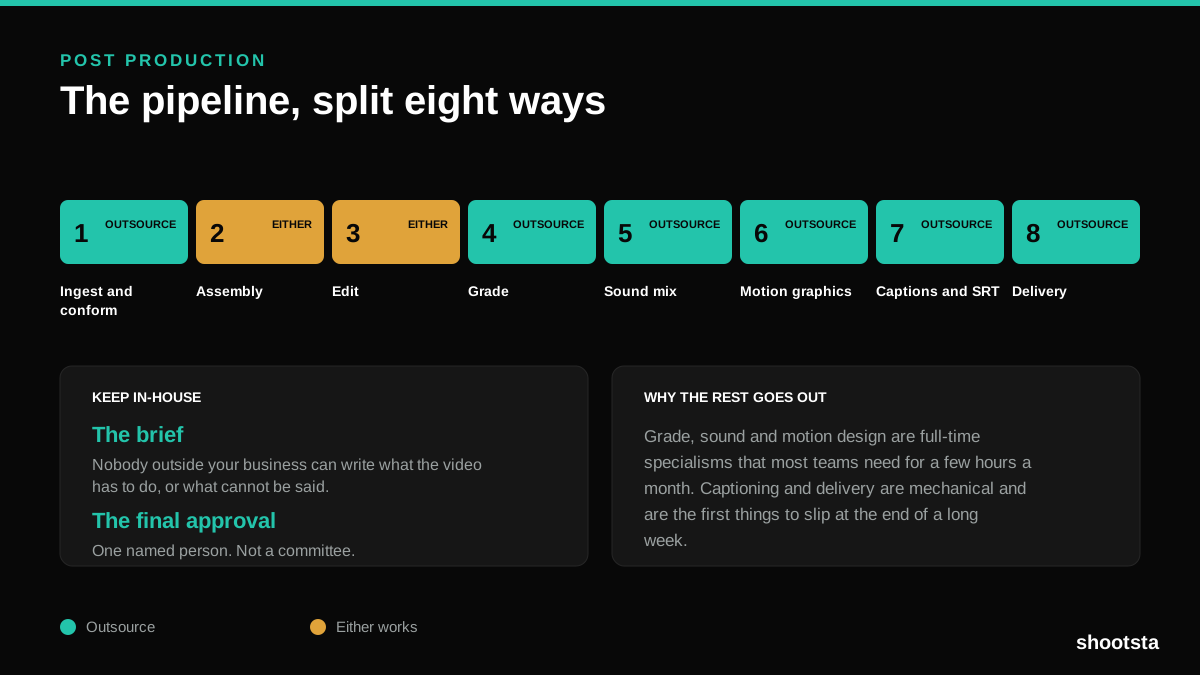
Post Production Agency or In-House Team?
Post production is eight stages, not one. Some of them need context only your team has. The rest are mechanical and are the first things worth handing over.
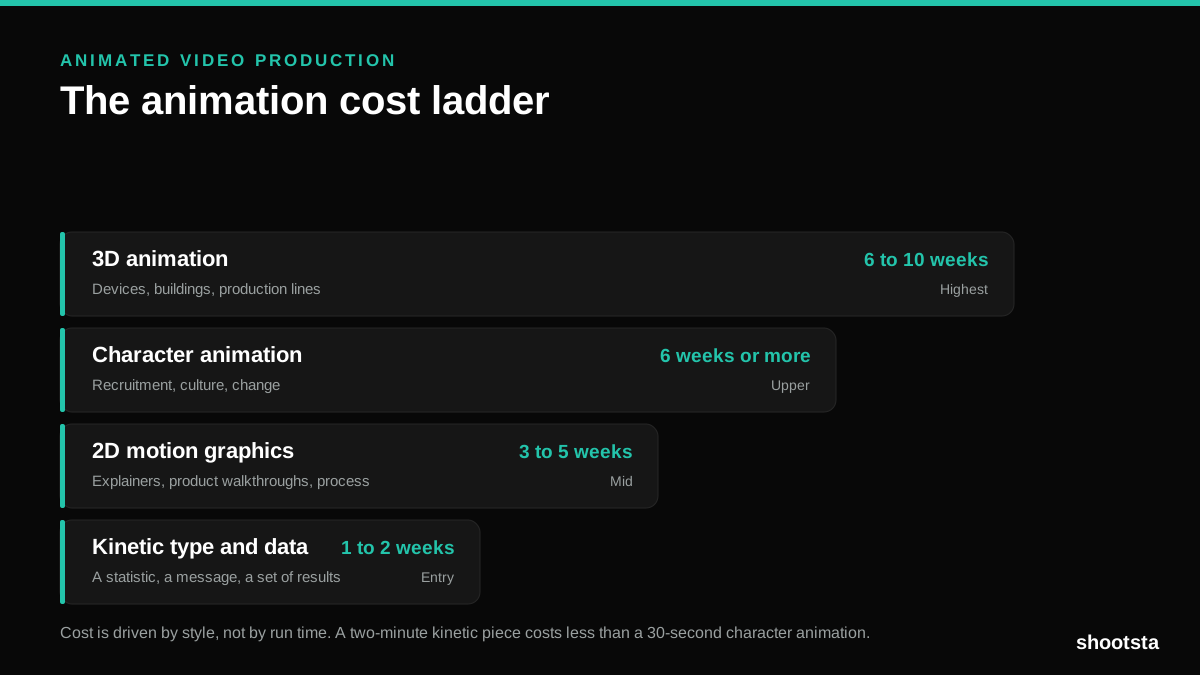
Animated Video Production Cost in the US
Animated video production costs move with style, not with length. Kinetic type, 2D motion, character and 3D sit on four rungs of a ladder. Here is what separates them.
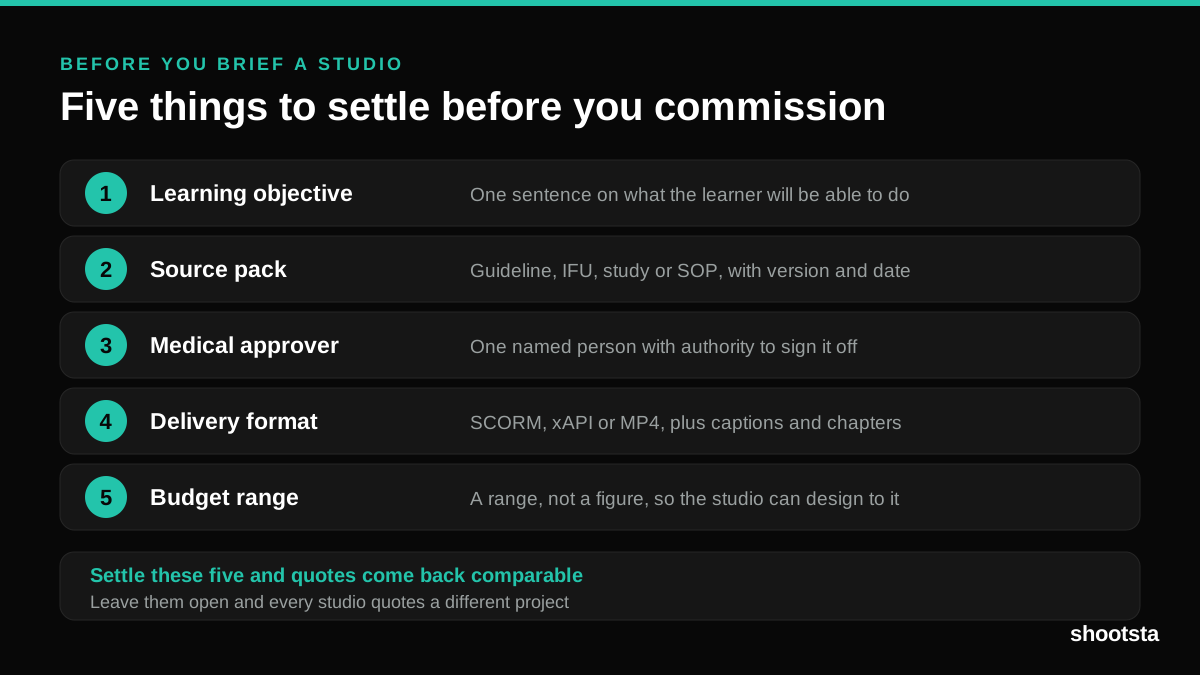
How to Commission Medical Training Animation
Commissioning a medical training animation is mostly decisions you make before anyone animates a frame. The brief fields that matter, what to ask a studio, how much expert time to budget, and the contract terms that stop a rebuild in two years.
How to Write an Animation Brief
How to Write an Animation Brief
Most animation briefs cause delays because they over-specify the visual style and under-specify the outcome. Here are the nine fields an animation production team needs to quote accurately and start without rework.