
8 Questions for Video Editing Subscriptions
shootsta.
8 Questions for Video Editing Subscriptions
By Shootsta · Published July 19, 2026 · Updated October 2026
Every provider calls itself a video editing subscription, and the gap between them shows up three months in, not on the sales call. Eight questions separate a real production partner from a queue with a monthly invoice: throughput, turnaround SLA, revisions, brand ownership, review workflow, volume spikes, confidentiality, and offboarding.
A video editing subscription is only as good as the answers you get before you sign. Eight questions separate a real production partner from a queue with a monthly invoice: throughput, turnaround and SLA, revisions, brand ownership, review workflow, volume spikes, confidentiality, and offboarding.
Many corporate teams now buy video at volume through a video editing subscription. You pay a fixed monthly fee, your footage goes into a pipeline that returns finished cuts, and nobody haggles over each project. The catch is that every provider calls itself a subscription. The gap between them rarely shows on the sales call, and you tend to feel it about three months in.
Below are the eight questions to ask before you commit, with what a strong answer sounds like for each one.
The 8 questions to ask about a video editing subscription
1. What is the real monthly throughput, by asset type?
"Unlimited" usually means unlimited requests in a queue, not unlimited finished videos. Ask how many completed cuts you can expect in a month, broken down by type: a 60-second talking head is not the same lift as a multi-camera event edit. A strong answer gives you a realistic number for each format, and a weak one gives you a slogan.
2. What is the first-cut turnaround, and is it backed by an SLA?
Turnaround is where subscriptions live or die. Ask for the standard time from footage upload to first cut, and whether that time is a service-level agreement or a hope. A useful benchmark is a 48-hour first cut with revisions in hours. When your publish dates are fixed, a turnaround SLA is the thing that keeps the calendar honest.
3. How do revisions work, and what counts as a new project?
Some providers count every change as a fresh request that goes to the back of the queue. Others include revisions in the original turnaround. Ask exactly where that line sits, because it decides whether a two-round review takes two days or two weeks.
4. Who owns brand consistency across every cut?
At volume, brand drift is the failure nobody notices until it is everywhere. Ask whether your brand kit (logos, fonts, colors, lower thirds, music, intro and outro) is enforced at the editor level on every video, or whether consistency depends on your team catching mistakes in review. Brand governance that the editors enforce gets stronger with every cut, while manual checking wears your reviewers down over time.
5. How do multi-stakeholder reviews and approvals work?
Corporate video usually stalls in sign-off rather than in the edit. Ask how the provider handles feedback from several reviewers, how versions are tracked, and whether they deliver into a review tool you already use. It is also worth watching for the signs a review process is about to break, and comparing the services built for corporate review.
6. What happens when volume spikes?
Campaign season, a product launch, or an event week can triple your video demand overnight. Ask what happens to turnaround when you send several times your usual number of requests in one week. A partner with surge capacity keeps the same turnaround, and a thinner operation lets the queue back up while your wait time quietly grows.
7. How is confidential or pre-launch footage handled?
Internal comms and product video often include restricted material. Ask about NDA-bound editors, access controls on project files, and secure delivery. If the answer is vague, you should treat it as a no.
8. What does offboarding look like, and who owns the files?
Before you sign, know how you leave. Ask who owns the project files and finished assets, how you export them, and what notice period applies. A provider who is confident in the service will answer this without flinching.
How the subscription model compares to the alternatives
A subscription is one of several ways to buy video, and it does not suit every team. If you are weighing it against hiring or one-off projects, we broke down the trade-offs in video agency versus video subscription and a subscription versus a videographer and editor. For a ranked view of providers, see the best video editing subscription services for corporate teams.
Frequently asked questions about video editing subscriptions
What is a video editing subscription?
A video editing subscription is a fixed monthly service that turns your footage into finished, on-brand videos without per-project pricing. You supply the raw material, and the provider handles editing, revisions, brand governance, and delivery, usually with a set turnaround per cut. It suits teams producing steady volume rather than one film a year.
How much does a video editing subscription cost?
The monthly fee depends on how many cuts you need, which formats they are and how fast you need them back. The useful number is the cost per finished video, so divide the fee by the cuts you can expect in a month. Self-serve editing software is cheaper per seat, but it shifts the editing work back onto your team.
Is a video editing subscription worth it for enterprise teams?
If your team makes video every month across marketing, internal comms, training or social, a subscription is usually cheaper per video than a project agency and faster than hiring. The break-even point depends on your volume and how quickly you need each cut. If you only make a handful of videos a year, per-project pricing can work out simpler.
If you are scoping a subscription now, you can compare the leading providers, read our guide to managing multi-stakeholder review, or book a free consultation to pressure-test your video volume against the model.
For the wider evaluation, including security, file ownership and offboarding, read the ten checks for corporate video editing services.
Take this article with you
Read the latest at shootsta.com/blog/video-editing-subscription-questions
You might also like
How to Plan Video Team Capacity Around Leave
Your only editor just booked two weeks off, and you already know which projects will slip. Chad Lakin explains how to plan video team capacity so the work keeps moving when someone is away.
Corporate Video Editing Standards: Full Guide
A two-page editing standard does more for consistency than a forty-page brand book. Here is what it should cover, who owns each part, and how to enforce it with an in-house editor or an outside partner.
Quality Control in Outsourced Video Editing
When editing leaves the building, quality has to be checked by a system rather than by whoever happens to look. Here is the system: acceptance criteria, two QA gates, counted revision rounds and a quarterly audit.
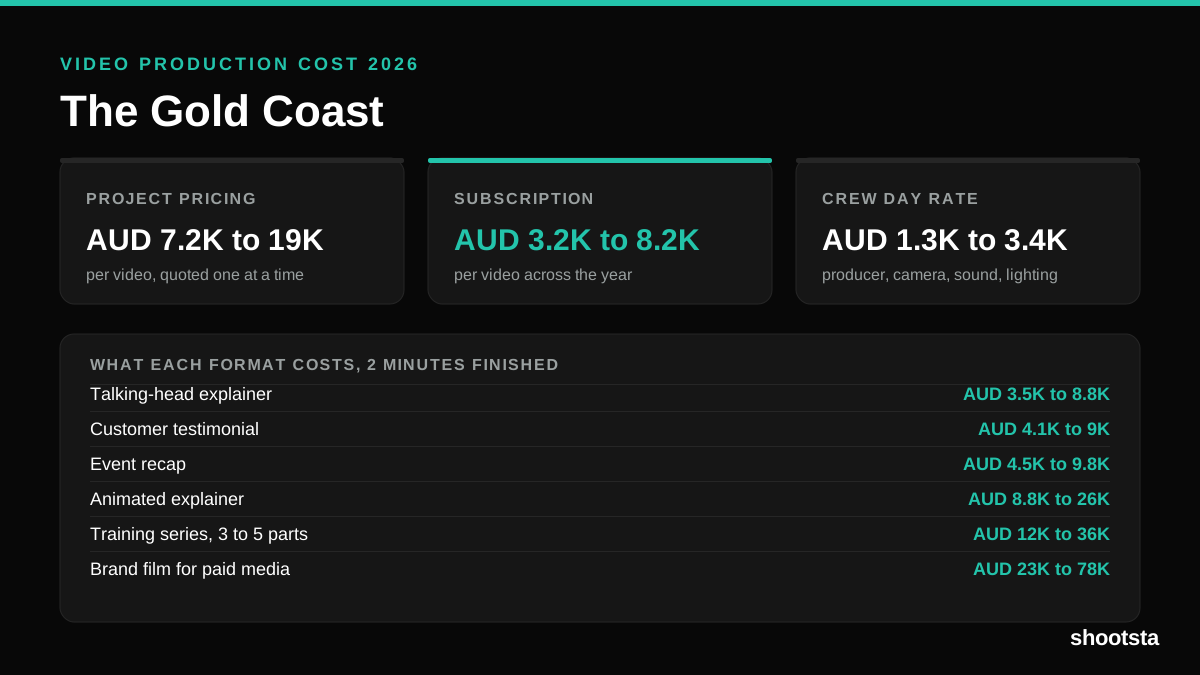
Video Production Cost on the Gold Coast 2026
Video production in the Gold Coast costs AUD 3,200 to AUD 8,200 per finished video on a subscription model, and AUD 7,200 to AUD 18,500 for one-off project work. Here is what you are paying for, and how the three pricing models compare.
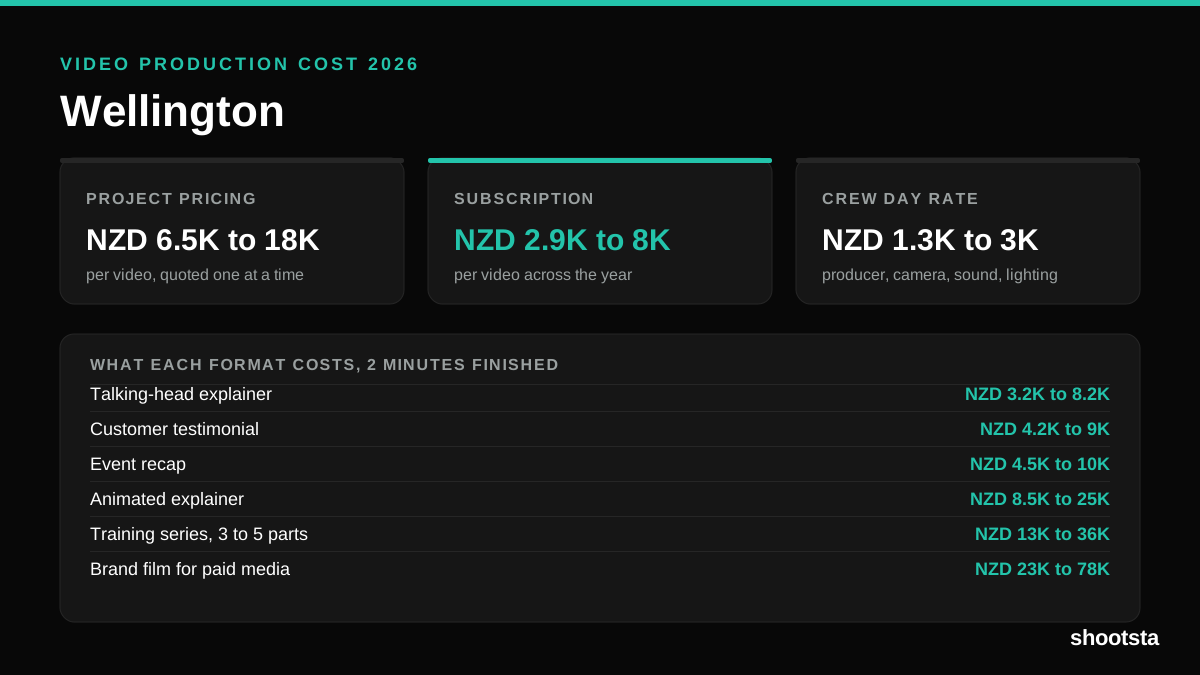
Video Production Cost in Wellington (2026)
Video production in Wellington costs NZD 2,900 to NZD 8,000 per finished video on a subscription model, and NZD 6,500 to NZD 18,000 for one-off project work. Here is what you are paying for, and how the three pricing models compare.
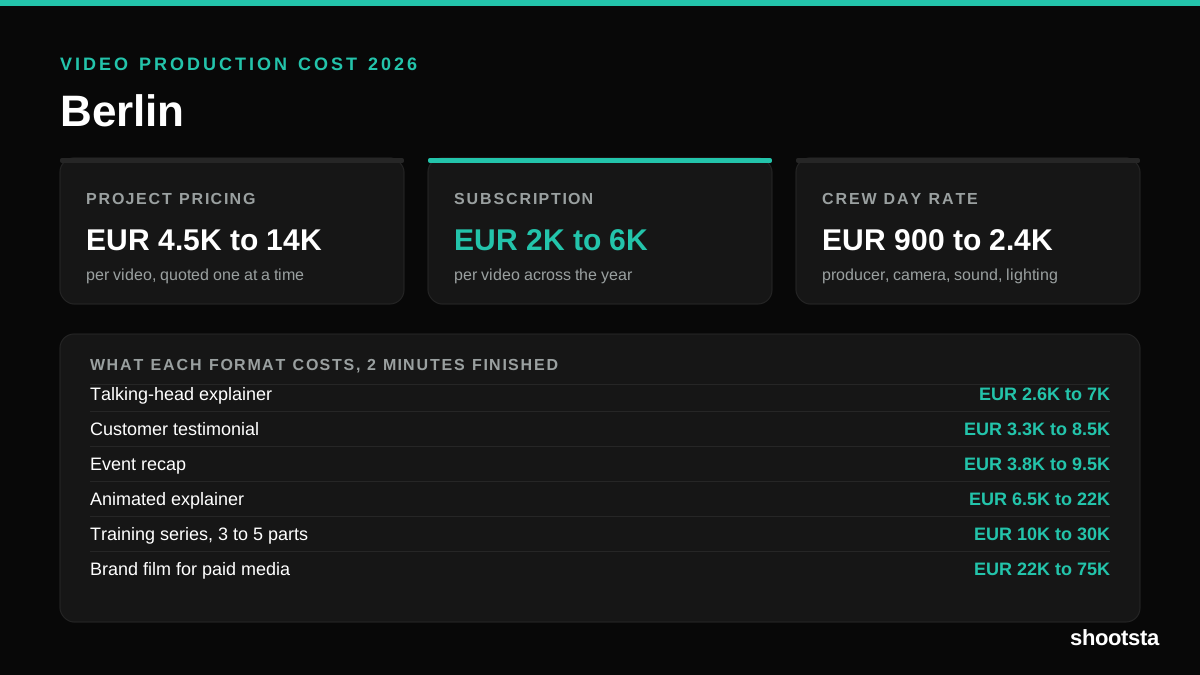
Video Production Cost in Berlin (2026)
Video production in Berlin costs EUR 2,000 to EUR 6,000 per finished video on a subscription model, and EUR 4,500 to EUR 13,500 for one-off project work. Here is what you are paying for, and how the three pricing models compare.