
shootsta.
How to 10x Your Video Content
By Shootsta · Published March 7, 2026 · Updated October 2026
One shoot can produce 10 pieces of content if it is planned that way. Here is the workflow for getting more out of every video your team makes.
Why most video teams under-ship
The camera is rarely what holds a video team back. The planning usually is. If you treat each video as a one-off job, it goes from brief to shoot to edit to post and then stops. A team with the same budget and the same gear can ship many times more if it plans for repurposing from day one, and the effort stays about the same.
You need a different way of thinking about a shoot rather than a trick. The rule is to plan once and cut many times.
The atomic content idea
An atom is the smallest piece of content that stands alone. For video, atoms are usually 15 to 60 seconds. In the atomic workflow, you plan the shoot to produce 8 to 12 atoms rather than one polished long-form piece. Each atom can be cut for a different platform, audience, or message.
A 30-minute interview shoot, planned this way, can produce:
- 1 long-form YouTube cut (12 to 15 minutes)
- 4 to 6 short LinkedIn cuts (60 to 90 seconds each)
- 3 to 5 vertical TikTok or Reels cuts (15 to 45 seconds)
- 2 to 3 audio clips for podcast distribution
- 1 to 2 blog posts written from the transcript
- An email newsletter feature
- Quote graphics for static social posts
That adds up to 12 or more pieces from one 30-minute conversation. Most of the work happens in planning the conversation so those cuts exist, and the shoot itself is the easy part.
How to plan a shoot for repurposing
Write the cut list before the shoot
The shoot brief should list every piece of content the shoot will produce. If a 60-second LinkedIn cut on a specific topic is on the list, the interview question that produces that cut goes in the shot list. Without this step, the team gets to the edit and discovers the cut they wanted doesn't exist.
Frame for multiple aspect ratios
Shoot 16:9 with safe-zone framing for 9:16 and 1:1 crops. The same setup, lit and framed correctly, produces every aspect ratio without re-shooting. Our aspect ratio guide walks through the safe zones.
Capture clean audio for the audio cut
If the plan includes a podcast version, the audio has to stand alone. That means a lavalier mic on every speaker, room treatment, and a recording level the editor can work with. Skipping this on shoot day kills the audio cut later.
Build a transcript-first workflow
Get every shoot transcribed. The transcript becomes the raw material for blog posts, email features, social copy and clip selection. An editor who starts from the transcript can find the strongest lines quickly, without scrubbing through hours of footage.
Two shorts that reinforce the point
The recycle layer
Old footage still has value after you have worked through the cut list. You can re-cut a shoot from last year with new framing, new captions and a new angle. A flagship customer story can be re-released as a series of "did you know" Shorts. The cost of re-cutting is a fraction of the cost of re-shooting.
The teams that ship the most video are rarely the ones with the biggest crews. They treat every shoot as a source of many cuts and every old asset as something they can use again. For the operating model behind this, see our video operating system guide.
Common 10x mistakes
- Cut list written after the shoot. Backfilling a cut list rarely works, because the footage did not capture what the cut needed.
- One editor, no system. A single editor doing every cut becomes the bottleneck. Templates, presets and shared editing standards let more people share the work.
- Same content, every channel. Posting the same 90-second cut to LinkedIn, TikTok, and YouTube is repurposing the wrong way. Each channel needs a native edit.
- Forgetting the email and blog atoms. It is easy to remember the social cuts and forget the longer-form atoms. Those longer pieces often do more for your brand.
FAQs about scaling video content
How many atoms should one shoot produce?
An interview shoot should give you 8 to 12 atoms, and a piece-to-camera shoot about 4 to 6. A customer event or all-hands shoot with several speakers and locations can produce 15 or more.
Do I need a bigger team to 10x output?
No. The same team can ship far more once the planning and editing systems are right. If you add people without changing the system, the bottleneck just gets more expensive.
What's the right tool to manage all these cuts?
Look for a platform with versioning, brand templates and approval workflows. Our breakdown of what to look for is in the best video maker for business teams guide.
Take this article with you
Read the latest at shootsta.com/blog/how-to-10x-your-video-content
You might also like
How to Plan Video Team Capacity Around Leave
Your only editor just booked two weeks off, and you already know which projects will slip. Chad Lakin explains how to plan video team capacity so the work keeps moving when someone is away.
Corporate Video Editing Standards: Full Guide
A two-page editing standard does more for consistency than a forty-page brand book. Here is what it should cover, who owns each part, and how to enforce it with an in-house editor or an outside partner.
Quality Control in Outsourced Video Editing
When editing leaves the building, quality has to be checked by a system rather than by whoever happens to look. Here is the system: acceptance criteria, two QA gates, counted revision rounds and a quarterly audit.
Video Production Cost on the Gold Coast 2026
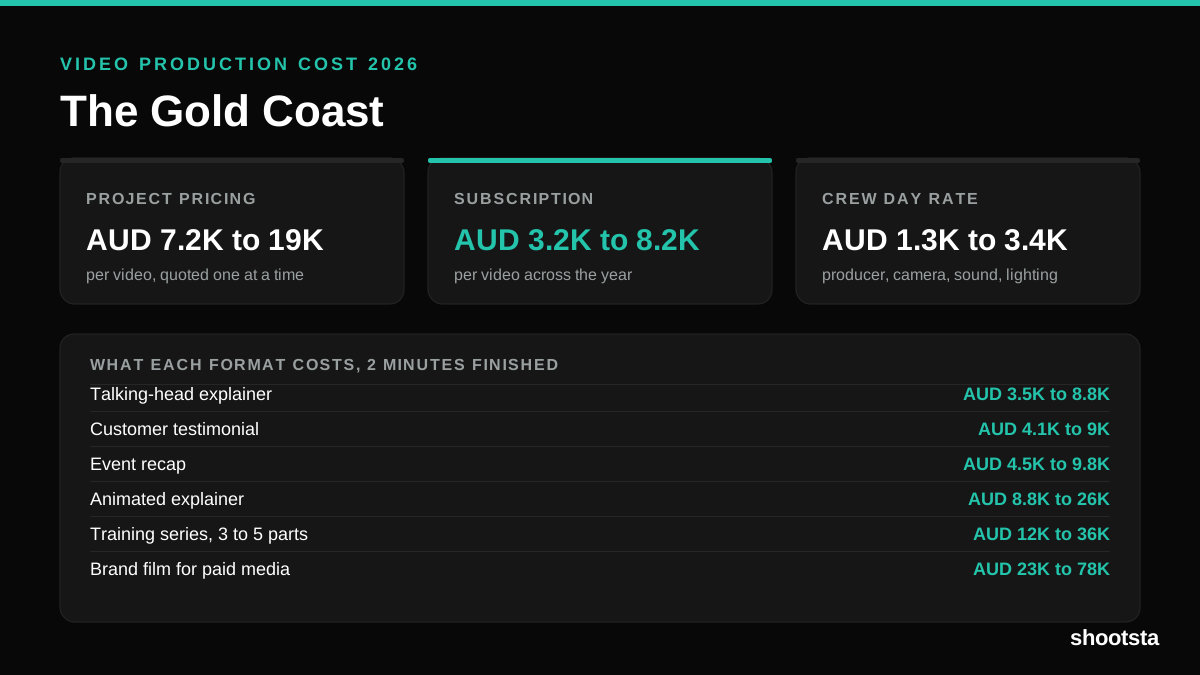
Video production in the Gold Coast costs AUD 3,200 to AUD 8,200 per finished video on a subscription model, and AUD 7,200 to AUD 18,500 for one-off project work. Here is what you are paying for, and how the three pricing models compare.
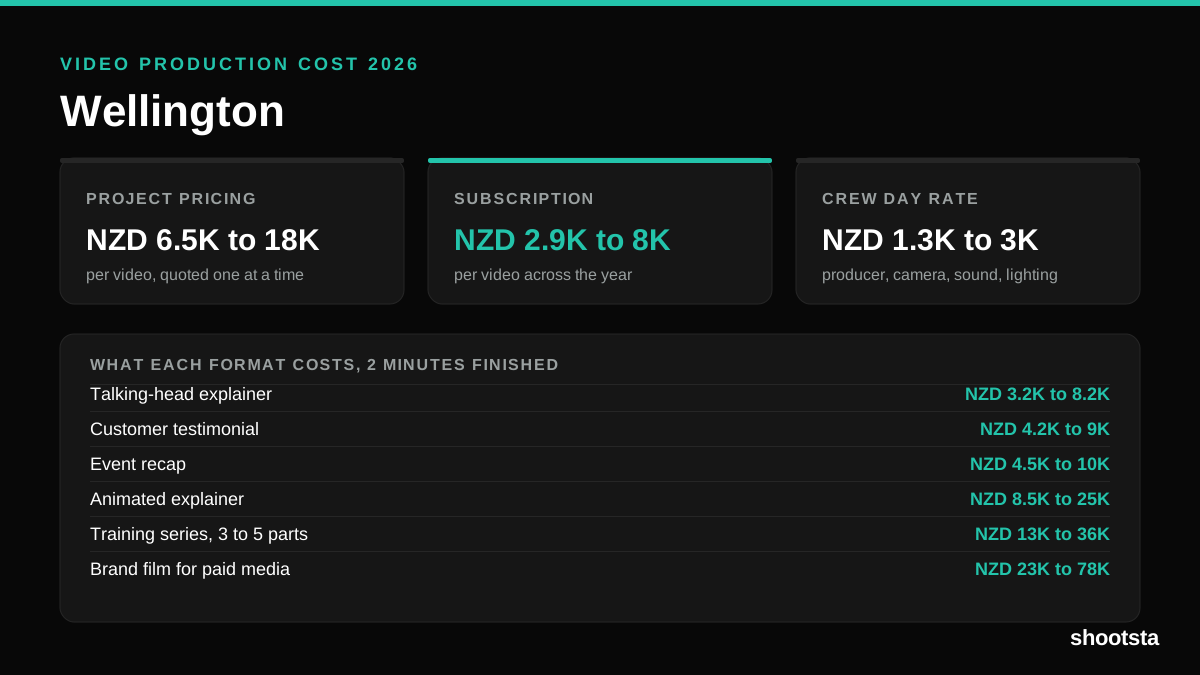
Video Production Cost in Wellington (2026)
Video production in Wellington costs NZD 2,900 to NZD 8,000 per finished video on a subscription model, and NZD 6,500 to NZD 18,000 for one-off project work. Here is what you are paying for, and how the three pricing models compare.
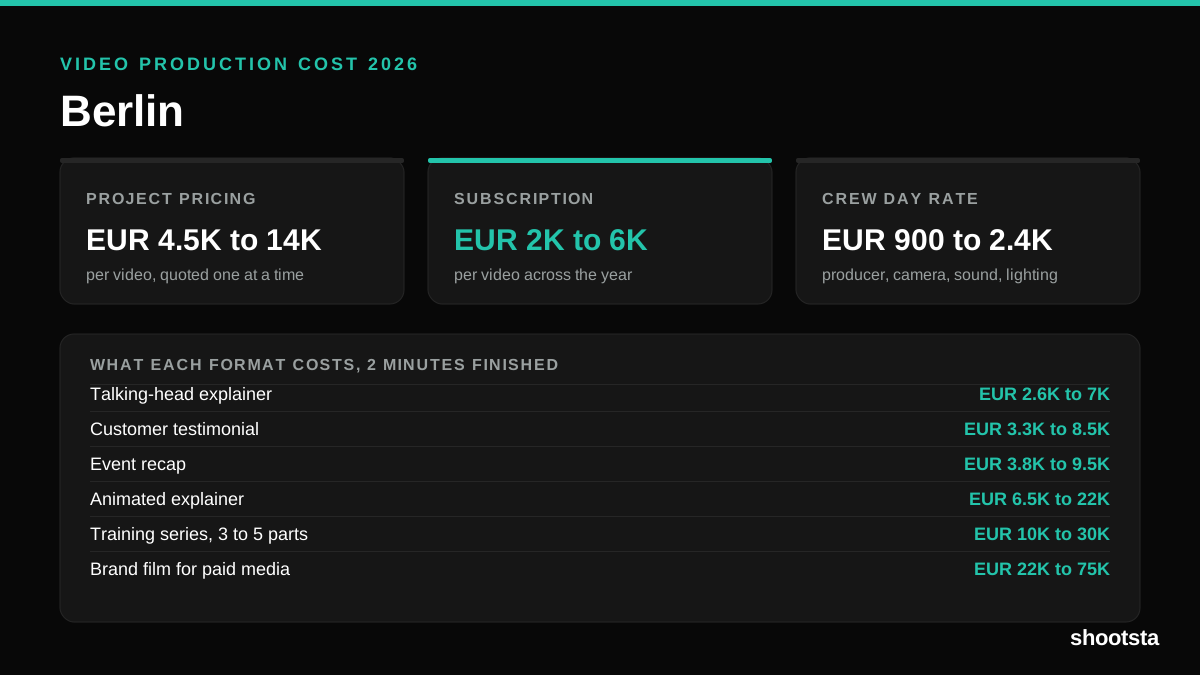
Video Production Cost in Berlin (2026)
Video production in Berlin costs EUR 2,000 to EUR 6,000 per finished video on a subscription model, and EUR 4,500 to EUR 13,500 for one-off project work. Here is what you are paying for, and how the three pricing models compare.