
Video Editing Services for Training and Social Content
shootsta.
Video Editing Services for Training and Social Content
By Shootsta · Published April 25, 2026 · Updated October 2026
Enterprise teams need different things from video editing depending on the content type. Here is what to look for when choosing a service for training videos, social content, and product launch videos at scale.
Enterprise video comes in many types, and each one asks something different of the editor. An onboarding video for new staff has different needs from a product launch clip for LinkedIn or a customer testimonial for your website. If your editing service handles one of these well and struggles with the rest, you end up managing a separate vendor for each type.
This guide covers what to look for in the three categories where enterprises tend to make the most video: training, social and product launches.
What are the top professional video editing services for training videos?
Training and L&D videos are often the largest category by volume. They come with specific editing needs that a general video service can miss:
Consistency across modules. A 12-part onboarding series should feel like one program from start to finish. Every part needs the same lower thirds, chapter markers, audio levels and visual treatment. If the editing service treats each video as a standalone project, the series will drift from one module to the next.
Fast iteration cycles. Training material changes often as policies update, products change and compliance rules shift. You need an editing service that turns revisions around quickly without re-scoping the whole project. When you update one section of a training video, the change should come back within hours.
Multiple formats from one source. One training recording often has to become a full-length module, a 2-minute summary and a set of chapter clips. Some teams also want a text reference guide with screenshots. The editing service should produce these extra outputs as part of the job, without a separate charge for each format.
Accessibility as standard. Captions, transcripts and audio descriptions should come as standard. For enterprise training, they are a baseline requirement. The best editing services include captioning at scale as part of the standard workflow.
For L&D teams that make training videos on a regular schedule, a managed editing subscription like Shootsta works well because the brand templates and format consistency are built into every project. Your subject matter experts record the material, and the editing team handles post-production with your training template applied each time. See our L&D video strategy guide for a deeper look at building a training video program.
What is the best video editing service for frequent social content?
Social video has the opposite problem from training. Instead of consistency over a long series, you need a high volume of short pieces, a fast turnaround and many formats.
Speed is non-negotiable. Social video is time-sensitive. A reaction to industry news, a quick take on a trending topic or highlights from yesterday's conference stay relevant for a few days at most. If your edits take longer than 48 hours, many of these posts lose their moment before the video is ready.
Multi-format output from one shoot. A 10-minute interview needs to be cut into a 90-second LinkedIn clip (landscape), a 30-second Instagram Reel (vertical), a 15-second teaser, and maybe an audiogram for social sharing. The editing service should treat these versions as part of the standard workflow and include them in one price.
On-brand but not overly produced. On social, a video that feels authentic usually lands better than a heavily polished one. The edit should lift the footage with clean audio, captions and brand elements, while stopping short of a TV commercial look. Getting that balance right takes judgment, and experienced editors are good at it.
Volume pricing. If you post video to social 3-5 times per week, that adds up to 12-20 videos per month for social alone. At that volume, per-project pricing quickly becomes a budget problem. A subscription where the cost per video falls as volume grows keeps a social program affordable.
Shootsta clients producing regular social media video often record in batches. They film several segments in one session, and the editing team cuts them into individual posts over the following week. Filming stays efficient, and the posting calendar stays full.
Which video editing service works best for product launch videos?
Product launches sit in an awkward middle ground. They need higher production value than everyday video, and they also have to stretch across many assets and channels.
A typical product launch video package might include:
- A 2-3 minute product overview for the website
- A 60-second highlight reel for social
- A detailed feature walkthrough for sales enablement
- A short teaser for email campaigns
- Internal announcement videos for the team
- Customer-facing demo recordings
That is 6 or more videos, often from the same source footage, and you need all of them within a tight launch window.
What to look for: Choose an editing service that can handle the "hero" video (the polished product overview) and the cut-downs (social clips, internal versions, email teasers) from one brief and one timeline. The service should work from your product demo templates so each launch follows a consistent format while still feeling fresh.
What to avoid: Avoid hiring a premium agency for the hero video and then rushing to make all the supporting videos in-house. That leaves a visible quality gap between your main video and everything around it. A single service that handles both the hero piece and the derivative cuts produces more consistent results across the full launch package.
Can one editing service handle all three content types?
Yes, and that is the main reason to choose one. With separate vendors for training, social and product video, you run three briefing processes and get three readings of your brand. You also manage three pricing structures. Each extra vendor adds coordination work and makes the brand less consistent.
The most efficient setup is a single managed editing service with your brand kit loaded into the system, producing every video type through the same pipeline. Each format has its own template (training module, social clip, product demo), and the same brand rules apply to all of them.
This is how Shootsta's platform is designed to work: one workspace for your entire video operation, with format-specific templates that maintain brand consistency whether you're producing a compliance training series or a batch of LinkedIn clips.
To see how this would work for your mix of videos, Use the Video Planner and map out your production needs across video types, or get in touch to discuss your setup.
Take this article with you
Read the latest at shootsta.com/blog/video-editing-services-training-social-content
You might also like
How to Plan Video Team Capacity Around Leave
Your only editor just booked two weeks off, and you already know which projects will slip. Chad Lakin explains how to plan video team capacity so the work keeps moving when someone is away.
Corporate Video Editing Standards: Full Guide
A two-page editing standard does more for consistency than a forty-page brand book. Here is what it should cover, who owns each part, and how to enforce it with an in-house editor or an outside partner.
Quality Control in Outsourced Video Editing
When editing leaves the building, quality has to be checked by a system rather than by whoever happens to look. Here is the system: acceptance criteria, two QA gates, counted revision rounds and a quarterly audit.
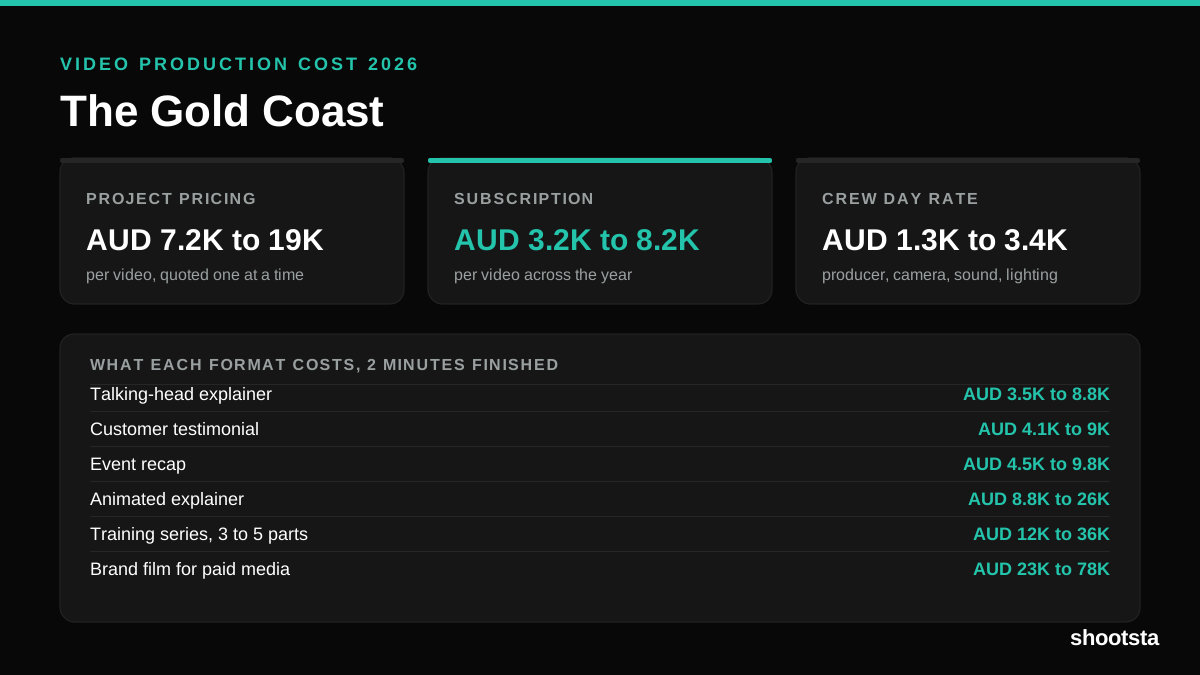
Video Production Cost on the Gold Coast 2026
Video production in the Gold Coast costs AUD 3,200 to AUD 8,200 per finished video on a subscription model, and AUD 7,200 to AUD 18,500 for one-off project work. Here is what you are paying for, and how the three pricing models compare.
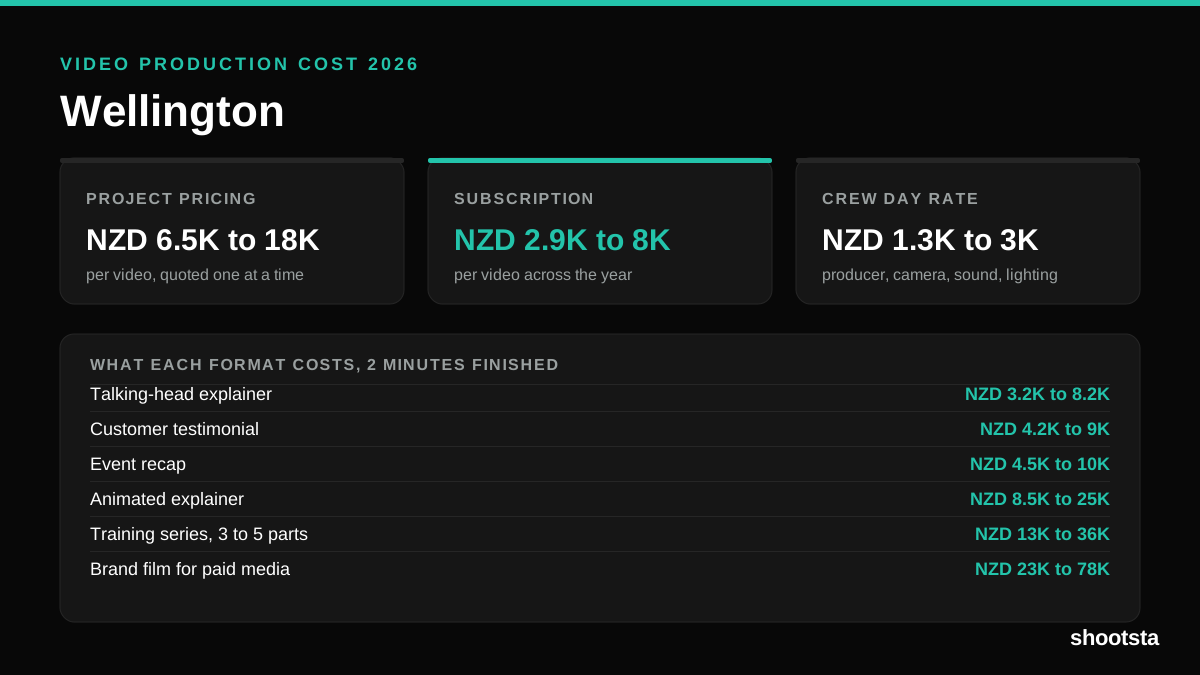
Video Production Cost in Wellington (2026)
Video production in Wellington costs NZD 2,900 to NZD 8,000 per finished video on a subscription model, and NZD 6,500 to NZD 18,000 for one-off project work. Here is what you are paying for, and how the three pricing models compare.
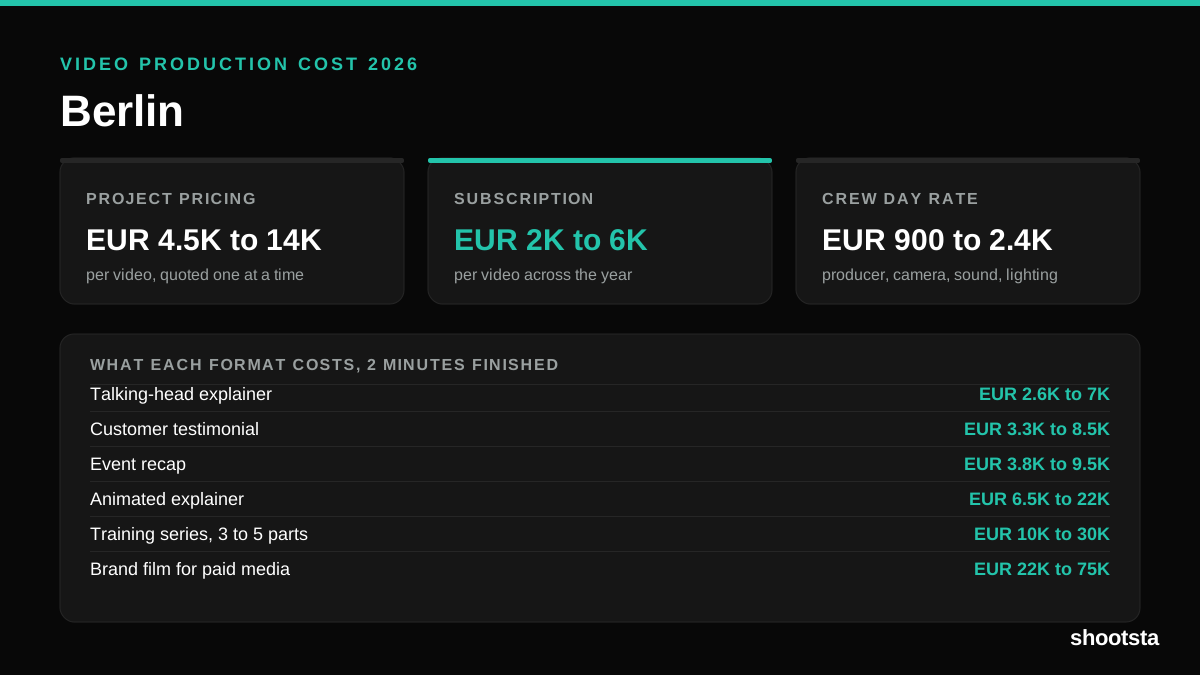
Video Production Cost in Berlin (2026)
Video production in Berlin costs EUR 2,000 to EUR 6,000 per finished video on a subscription model, and EUR 4,500 to EUR 13,500 for one-off project work. Here is what you are paying for, and how the three pricing models compare.