
The Video Operating System for Business Teams
shootsta.
The Video Operating System for Business Teams
By Shootsta · Published March 19, 2026 · Updated October 2026
Most companies treat video as a series of one-off projects. The ones producing 50+ videos a month treat it as a system. Here is how to build a video operating system that runs like any other business function.
What is a video operating system?
A video operating system is the people, processes, and tools that let an organization produce video continuously without relying on ad-hoc projects. Instead of treating every video as a standalone production, you run video like you run marketing ops, sales ops, or IT - with defined workflows, clear ownership, and measurable output.
Companies that produce 5 videos a year treat video as a project. Companies that produce 50 videos a month treat it as a system. What separates them is the operating model, and budget has less to do with it than you might expect.
Why do ad-hoc video projects fail at volume?
When video is project-based, every request starts from scratch. Someone has an idea, they write a brief, they find a vendor or internal resource, they negotiate scope and timeline, they wait for delivery, they request changes, and eventually a video ships. The whole process takes 4-8 weeks.
That works for a brand film or an annual report video. It doesn't work when your marketing team needs weekly LinkedIn content, your L&D team needs monthly training modules, your comms team needs quarterly leadership updates, and your sales team needs tailored prospect videos on demand.
Ad-hoc video production also creates inconsistency. Different teams hire different vendors, use different styles, and produce content that doesn't look like it comes from the same company. Each project reinvents the wheel because there's no shared system.
What does a video operating system look like in practice?
A working video OS has five layers. You don't need to build all five at once, but understanding the full picture helps you know where to start.
Intake and prioritization
Every video request enters through a single channel - a form, a Slack command, a shared board. The request captures: who needs the video, what it's for, who the audience is, and when it's needed. A video operations lead (or a rotating champion) reviews incoming requests weekly and prioritizes based on business impact.
Without intake, the loudest voice gets their video first. With intake, the highest-impact video gets produced first.
Production workflow
Each video type follows a defined workflow. A leadership update might be: brief (5 min) > film on phone (10 min) > upload (2 min) > editing (48 hours) > review (24 hours) > publish. A product demo might add a script review step. A customer testimonial might add scheduling and interview prep.
The point is that workflows are predefined. Nobody has to figure out "how do we make this video?" every time. They follow the playbook for that video type.
Brand and quality standards
Start with a brand kit that includes video-specific guidelines: approved intro sequences, lower third templates, brand palettes, a music library and a tone-of-voice guide. Professional editors apply these automatically so the person filming doesn't need to worry about branding.
Quality standards should cover minimum requirements for footage: good enough audio, adequate lighting, steady framing. Footage that doesn't meet the bar gets sent back with specific feedback on what to fix.
Distribution and publishing
Each video type needs a set home after production. Internal comms videos go to the intranet and Slack. Marketing videos go to YouTube, LinkedIn, and the website. Training videos go to the LMS. Sales videos go to the CRM or a shared library.
Defining distribution at the system level means videos reach their audience immediately after production, instead of sitting on someone's desktop waiting to be uploaded.
Measurement and iteration
Track production metrics (videos produced per month, time to delivery, cost per video) and performance metrics (views, completion rates, pipeline influenced, leads generated). Review these numbers once a month, then put more effort into the formats that work and rework or drop the ones that don't.
Who owns the video operating system?
This is the question that determines whether the system works or dies. Video without an owner becomes everyone's side project and nobody's priority.
Video ops usually sits within one of three teams, and the right home depends on what the videos are mostly for:
Marketing owns it when the primary use case is external content - campaigns, social, website, ads. This works well when the marketing team has the bandwidth to serve other departments too.
Corporate communications owns it when the primary use case is internal - leadership updates, change management, culture content. Comms teams are used to managing messaging across the organization.
A dedicated video or content operations team owns it when the volume justifies a standalone function. You see this in enterprises that publish video every week across several departments.
Regardless of who owns it, every department should have a video champion - someone who coordinates requests, briefs, and filming within their team. The central video ops team handles editing, brand governance, and platform management.
How do you build a video OS from scratch?
Month 1: pick one use case and prove it
Choose the video type with the most immediate demand and the clearest business case. In many companies that means leadership updates (high internal demand) or sales enablement videos (direct revenue impact). Produce 5-10 videos using your new workflow. Measure time to delivery, cost, and satisfaction.
Month 2: add a second use case and refine
Once the first workflow is running smoothly, add a second video type. This is where the system starts to prove itself - the intake process, brand kit, and editing pipeline already exist. The new use case plugs into what you've built.
Month 3: open it up to other departments
With two proven workflows and a functioning system, invite other departments to submit requests. Run a short internal launch - show examples of what's been produced, explain the process, and make the intake form easy to find.
Month 6: optimize and scale
By now you should have data on which video types get the most requests, which have the highest business impact, and where the bottlenecks are. Use this data to allocate resources, adjust workflows, and set production targets for each quarter.
What tools do you need?
A video OS doesn't require a massive technology investment. The core stack is:
You need a filming platform with guided prompts, so people outside the video team can film. You need an editing service or team that knows your brand, and a 48-hour turnaround is the benchmark to hold it to. Add a hosting platform for distribution and analytics (Wistia, Vidyard or similar). Finally, use a project management tool for intake and tracking, and even a shared spreadsheet works at low volume.
Shootsta's platform covers the first two pieces - filming and editing - in a single subscription. Pair it with your existing hosting and project management tools and you have a working video OS.
Read our enterprise video playbook for a breakdown of the 12 video types you can run through this system, or take the video quiz to see which formats will deliver the most value for your teams.
Take this article with you
Read the latest at shootsta.com/blog/video-operating-system-run-video-like-business-function
You might also like

How to Plan Video Team Capacity Around Leave
Your only editor just booked two weeks off, and you already know which projects will slip. Chad Lakin explains how to plan video team capacity so the work keeps moving when someone is away.
Corporate Video Editing Standards: Full Guide
A two-page editing standard does more for consistency than a forty-page brand book. Here is what it should cover, who owns each part, and how to enforce it with an in-house editor or an outside partner.
Quality Control in Outsourced Video Editing
When editing leaves the building, quality has to be checked by a system rather than by whoever happens to look. Here is the system: acceptance criteria, two QA gates, counted revision rounds and a quarterly audit.
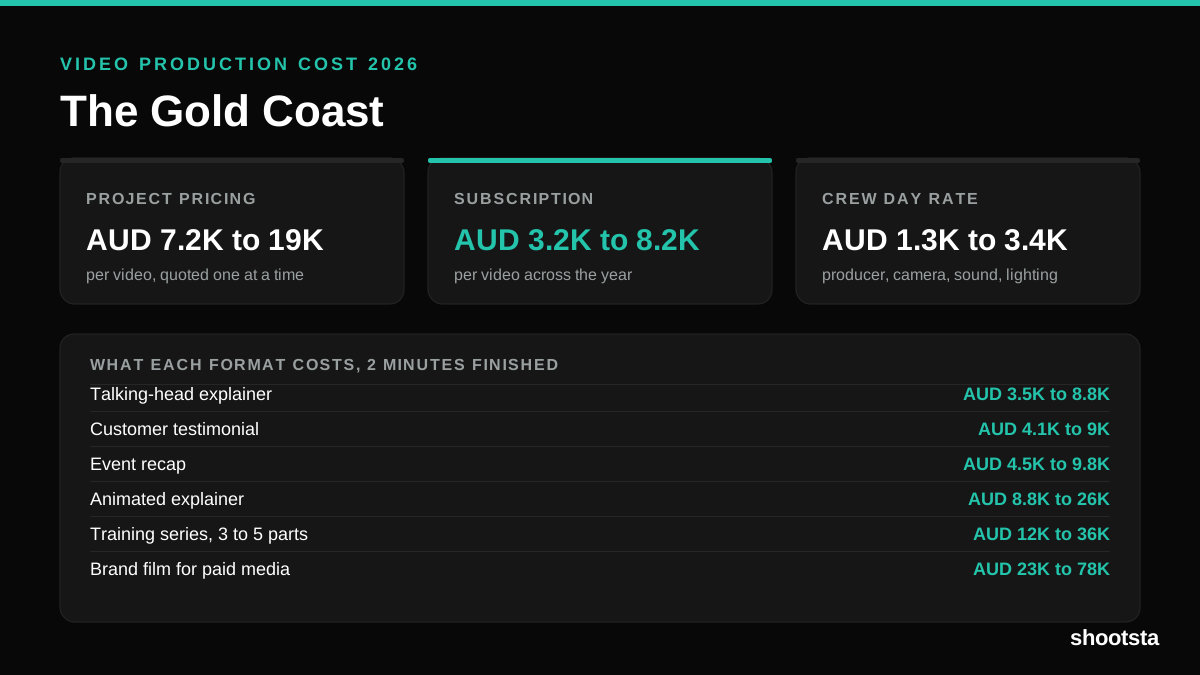
Video Production Cost on the Gold Coast 2026
Video production in the Gold Coast costs AUD 3,200 to AUD 8,200 per finished video on a subscription model, and AUD 7,200 to AUD 18,500 for one-off project work. Here is what you are paying for, and how the three pricing models compare.
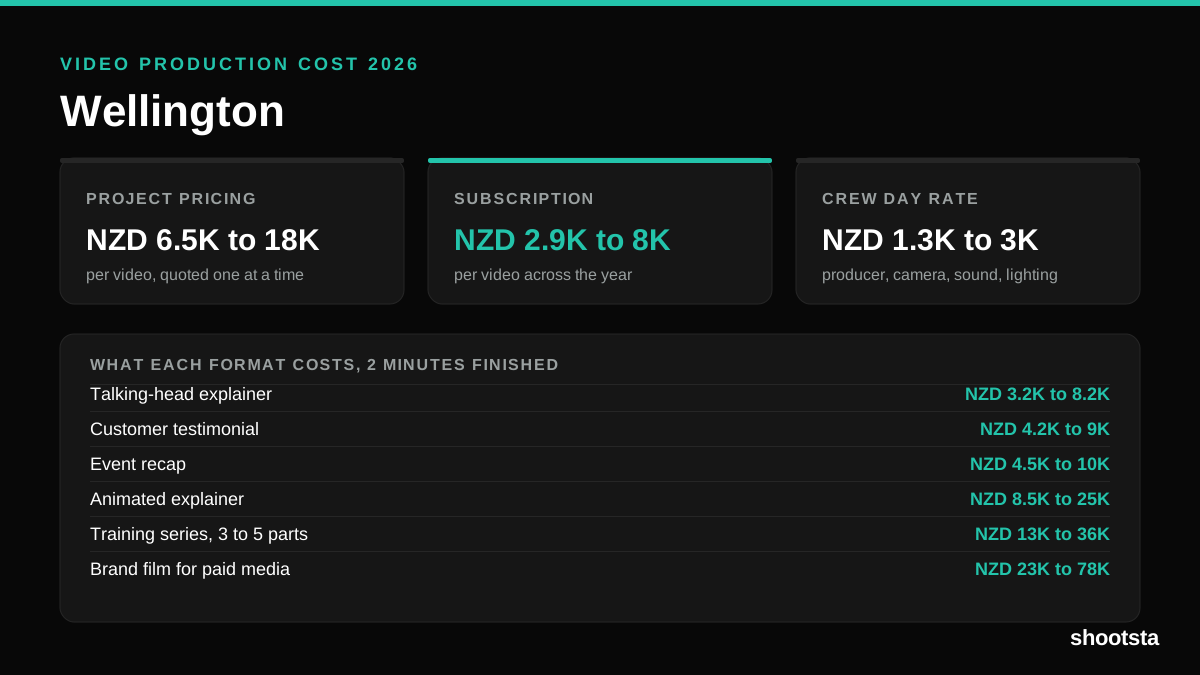
Video Production Cost in Wellington (2026)
Video production in Wellington costs NZD 2,900 to NZD 8,000 per finished video on a subscription model, and NZD 6,500 to NZD 18,000 for one-off project work. Here is what you are paying for, and how the three pricing models compare.
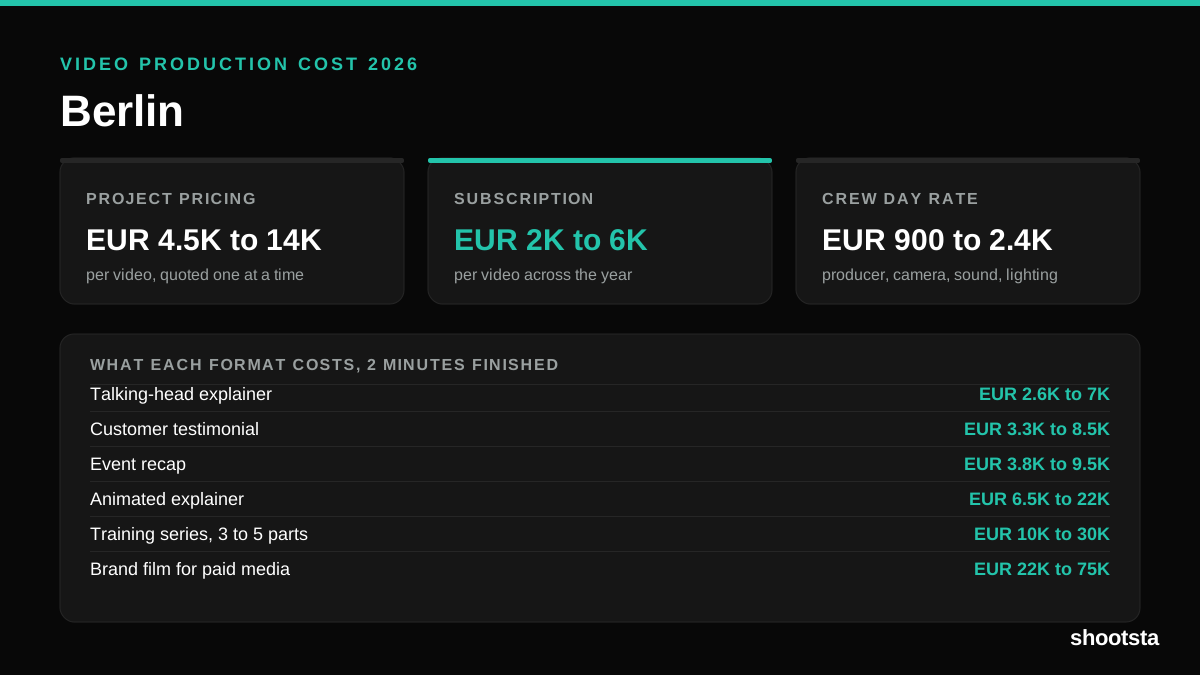
Video Production Cost in Berlin (2026)
Video production in Berlin costs EUR 2,000 to EUR 6,000 per finished video on a subscription model, and EUR 4,500 to EUR 13,500 for one-off project work. Here is what you are paying for, and how the three pricing models compare.