
Animated Video for Change Management
shootsta.
Animated Video for Change Management
By Shootsta · Published June 17, 2026 · Updated October 2026
Animated video helps enterprise teams communicate organizational change - restructures, system migrations, policy updates - with a consistent message across every site and time zone. This guide covers when animation is the right format, which style to choose, and what a typical project looks like end to end.
Animated video for change management is the use of motion graphics or 2D character animation to communicate organizational change to employees who need to understand and act on it. The format works because animation delivers a fixed, approved message at scale without varying by site, manager, or time zone - and because it makes abstract processes like system migrations or org restructures visible in a way a written brief cannot.
Why does change communication so often fail at scale?
Change communication usually breaks down in the delivery. The message may be right, yet the medium cannot carry it the same way across a large workforce. A manager-delivered briefing varies by site, by team, and by the manager's own read of the change. An email gets skimmed or deleted. A town hall Q&A creates questions that branch into conversations leadership never intended.
The consistency problem is real. When 3,000 employees receive a restructure message through 30 different managers, they do not receive the same message. Animation closes that gap, because every viewer watches the same thing, hears the same framing, and sees the same visual explanation. The message does not degrade across reporting lines.
In the change programs we run with enterprise clients, comms teams tell us that an animated explainer cuts the follow-up questions a written brief alone tends to trigger. The visual format closes gaps in interpretation before they turn into tickets for HR or IT.
How does animation solve problems that other formats cannot?
Animation handles three communication challenges that live action cannot solve as cheaply or as consistently.
The first is abstraction. Many organizational changes involve systems, structures, or processes that do not photograph well - a new approval workflow, a revised org structure, a phased integration plan. Animation makes invisible structures visible. You can show employees exactly how information moves through a new system without building out live footage.
The second is tone control. Live-action video carries the body language, setting, and implicit authority of whoever appears on screen. During a merger or restructure, that can create unintended signals. Animation lets you set the tone deliberately - calm, matter-of-fact, forward-looking - without a presenter's physical presence complicating the read.
The third is speed of reach. A 90-second animated explainer can carry the essential facts of a change faster than a written document can be read with full attention. The combination of narration and visuals means viewers process two information streams at once, and the format works just as well on a phone as on a desktop.
Which animation style fits change management briefs?
The answer depends on what the change involves and how sensitive the communication is.
For process or system changes - new software rollouts, approval chain changes, compliance updates - motion graphics is usually the right call. It handles data and process logic cleanly, produces quickly, and costs less than character-based animation. A 60-second motion graphics piece explaining a new expense approval system can move from brief to delivery in 10-14 working days.
For people-centered changes - restructures, culture initiatives, workforce transitions - 2D animation with characters tends to land better. A character going through the change alongside the viewer creates more identification than moving shapes and icons. The emotional register is warmer, which matters when employees are anxious about what a change means for them.
For announcements that need a leadership voice, some teams combine animation with a brief live-action opener - a 10-second clip of an executive introducing the change, followed by an animated explainer covering the detail. The combination preserves the human connection while giving the detail a controlled, consistent format.
For a full breakdown of the animation styles available for business video, read the different kinds of video animation for business.
What does a change management animation project look like in practice?
A typical project has four stages, and it starts with the brief.
Briefing. You need a single document that covers what the change is, why it is happening, what it means for employees, and what employees need to do differently. The briefer the source material, the faster production moves. Two pages of approved messaging beats a 30-page internal briefing document that has not been through sign-off.
Scripting and storyboard. The script captures the final approved narrative - usually 120-180 words per minute of animation. A storyboard then maps out each scene, and both go through legal and communications review before production starts. This is where the consistency advantage of animation becomes tangible: the review is on a fixed document, not on individual manager talking points.
Production. For motion graphics, a 90-second piece takes 10-14 working days. For 2D animation, expect 4-8 weeks depending on whether a character library already exists. If this is the first animation in a new visual style, add 2-3 weeks for style development.
Approval and delivery. Plan for two rounds of revisions, which is what enterprise clients usually need. Final output includes a web-ready MP4, captions in required languages, and source files for future updates.
For the step-by-step production workflow from brief to delivery, read how to produce an animated explainer video.
Frequently asked questions
How long does a change management animation take when timing is tight?
Motion graphics for a 60-90 second piece can reach delivery in 10-14 working days when the script is approved before production begins. If script review takes an additional week, add that to the timeline. 2D animation with an existing brand library runs 4-5 weeks. Without an existing library, budget 8-10 weeks for the first piece.
What if the message is still being finalized internally?
Start production on the elements that are certain - brand assets, visual style, background environments - and hold the script for last. This approach reduces timeline risk when the message catches up to the production schedule. An experienced studio will work with a phased brief if you flag the dependency at the start.
Can one animation work for multiple employee audiences?
A single animation works when the change affects everyone in the same way. If different employee groups face materially different implications - for example, a system migration that hits operations differently from sales - separate short-form versions for each group are usually more effective than one longer piece that tries to address everyone and partially loses each audience.
Can we update the animation if the details change after launch?
Yes, with caveats. Motion graphics animations are easier to update because they are built from editable layers and text fields. 2D character animations are harder to update because changes to timing or character positions require re-animating scenes. If you expect updates after launch, flag this at briefing stage so the studio builds with edits in mind.
Where to go next
If you are planning your first change management animation, start with a one-page brief covering the change facts, your target audience, and your timeline. For internal communications teams who commission animation as part of a broader video program, see how enterprise teams use animation for internal communications.
To scope a change management animation project with the Shootsta team, send us your brief.
Take this article with you
Read the latest at shootsta.com/blog/animated-video-change-management
You might also like
Why Urgent Video Requests Go Sideways
Most urgent videos go sideways because nobody planned for urgent work to happen. Chad Lakin explains how comms teams build the process first, so a fast turnaround becomes routine.
How to Plan Video Team Capacity Around Leave
Your only editor just booked two weeks off, and you already know which projects will slip. Chad Lakin explains how to plan video team capacity so the work keeps moving when someone is away.
Corporate Video Editing Standards: Full Guide
A two-page editing standard does more for consistency than a forty-page brand book. Here is what it should cover, who owns each part, and how to enforce it with an in-house editor or an outside partner.
Quality Control in Outsourced Video Editing
When editing leaves the building, quality has to be checked by a system rather than by whoever happens to look. Here is the system: acceptance criteria, two QA gates, counted revision rounds and a quarterly audit.
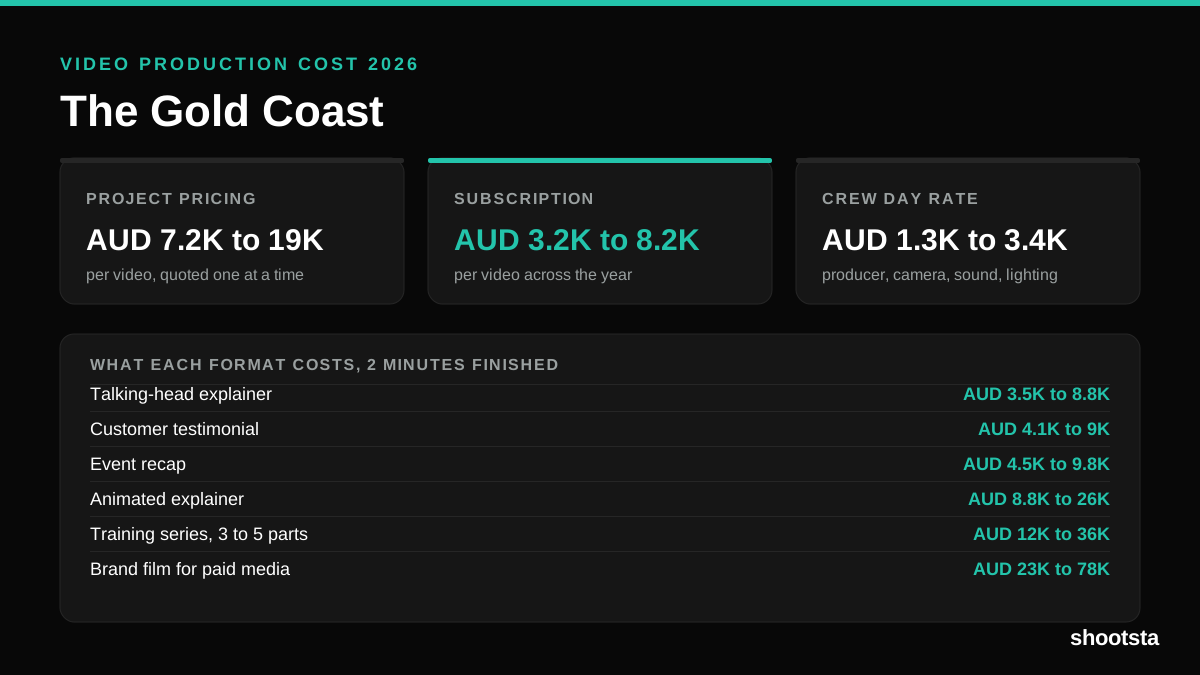
Video Production Cost on the Gold Coast 2026
Video production in the Gold Coast costs AUD 3,200 to AUD 8,200 per finished video on a subscription model, and AUD 7,200 to AUD 18,500 for one-off project work. Here is what you are paying for, and how the three pricing models compare.
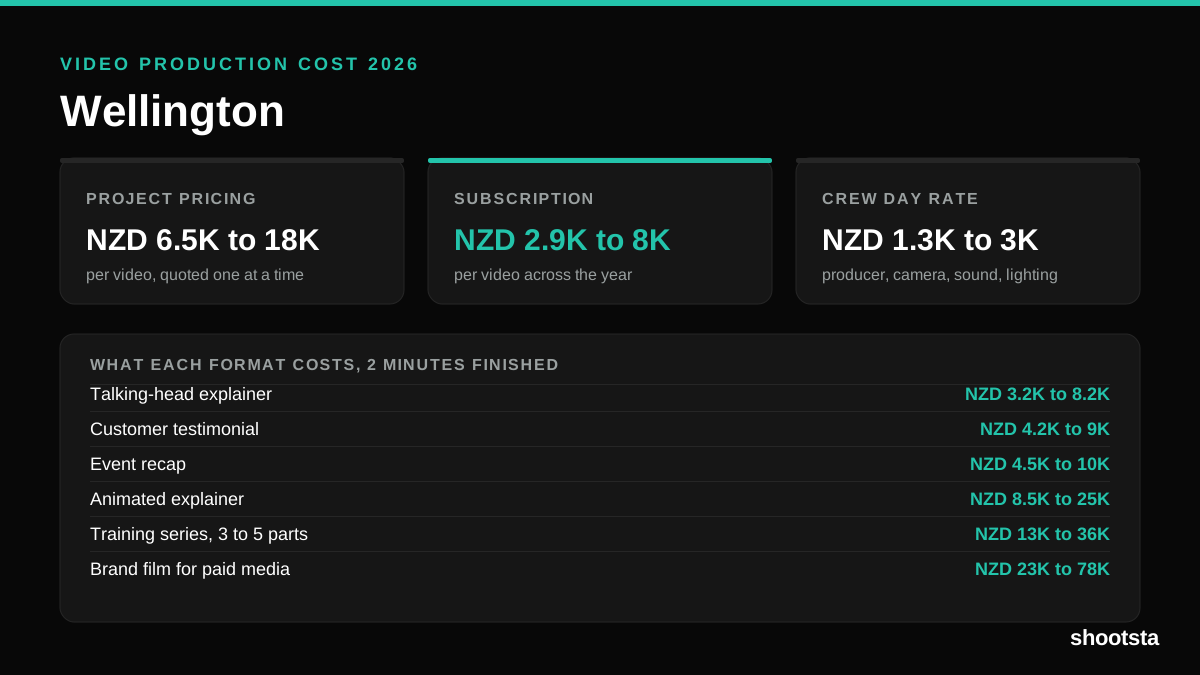
Video Production Cost in Wellington (2026)
Video production in Wellington costs NZD 2,900 to NZD 8,000 per finished video on a subscription model, and NZD 6,500 to NZD 18,000 for one-off project work. Here is what you are paying for, and how the three pricing models compare.