
shootsta.
Key Messages That Land in Business Video
By Shootsta · Published March 1, 2026 · Updated May 2026
A key message is the one thing the viewer should remember. Here is how to define it, test it, and protect it from scope creep.
What is a key message in video?
A key message is the one thing you want the viewer to remember after the video ends. Not three things. Not the full feature list. One thing. If the viewer can't repeat it 30 seconds after watching, the video failed at the only job that mattered.
Why one message?
Memory is narrow. People retain about one idea per piece of short-form content, and only if that idea is delivered clearly. Trying to communicate three messages usually delivers zero, because the viewer has nowhere to put them. The discipline of "one message per video" is what separates videos that get shared from videos that get scrolled past.
The companion discipline is "one video per message." If the team has three messages, that's three videos. This sounds expensive. It is, in fact, cheaper, because three focused videos outperform one bloated video by a wide margin.
How to find your key message
The 30-second rule
Imagine the viewer just finished watching. Someone asks them, "What was that about?" Write the one sentence they'd say back. That's the key message. If the team can't write it before drafting the script, the video isn't ready to write yet.
The substitution test
Try replacing the company name in the message with a competitor's name. If the message still works, the message is too generic. "We help businesses make video" works for everyone. "We help comms teams ship video in 24 hours without a production company" only works for Shootsta.
The "so what" test
For every line in the script, ask "so what?" If the answer doesn't tie back to the key message, cut the line. Most first-draft scripts have 30 to 50% material that doesn't survive this test.
Key message vs supporting points
Once the key message is locked, the rest of the video is in service of it. Supporting points are evidence: data, examples, proof, demonstration. They aren't competing messages. They're reasons to believe the one message.
A useful structure:
- Hook (3 seconds). Earns the next 30 seconds.
- Key message (10 to 15 seconds). Said clearly, said early.
- Proof (40 to 90 seconds). Two or three pieces of supporting evidence.
- Restate and CTA (10 to 15 seconds). The key message, the action.
For the call to action that closes the video, see our CTA writing guide.
Two reinforcements from Shootsta Academy
How to defend a key message from scope creep
The hardest part of key messaging isn't writing the message. It's protecting it. Stakeholders will ask to add "just one more thing." Each addition halves the message's clarity.
A useful response: "Yes, that's a great point. Let's add it to the next video on the topic." Most additions die quietly when the team realises a separate video is being proposed. The few that survive are usually worth keeping. The script document needs a "parking lot" section so good ideas don't get lost.
Lock the key message in the brief. Anchor every script review to that one sentence. If the brief and the script disagree, the brief wins, or the brief gets formally updated. The full brief framework is in our video brief guide.
FAQs about key messages
Can a video have more than one key message?
Long-form (5+ minutes) can support a primary message with two or three sub-messages. Short-form cannot. For anything under 3 minutes, one message wins.
What if stakeholders disagree on the key message?
That's a brief problem, not a script problem. Pause the production. Run a 30-minute alignment session. The cost is small, and the cost of finding out in the edit room is large.
How do I test if my key message lands?
Show a draft to three people who weren't in the planning. Ask them, 30 seconds after watching, "What was that about?" If two of three repeat the message back, the video is working.
Take this article with you
Read the latest at shootsta.com/blog/crafting-key-messages-for-business-video
You might also like
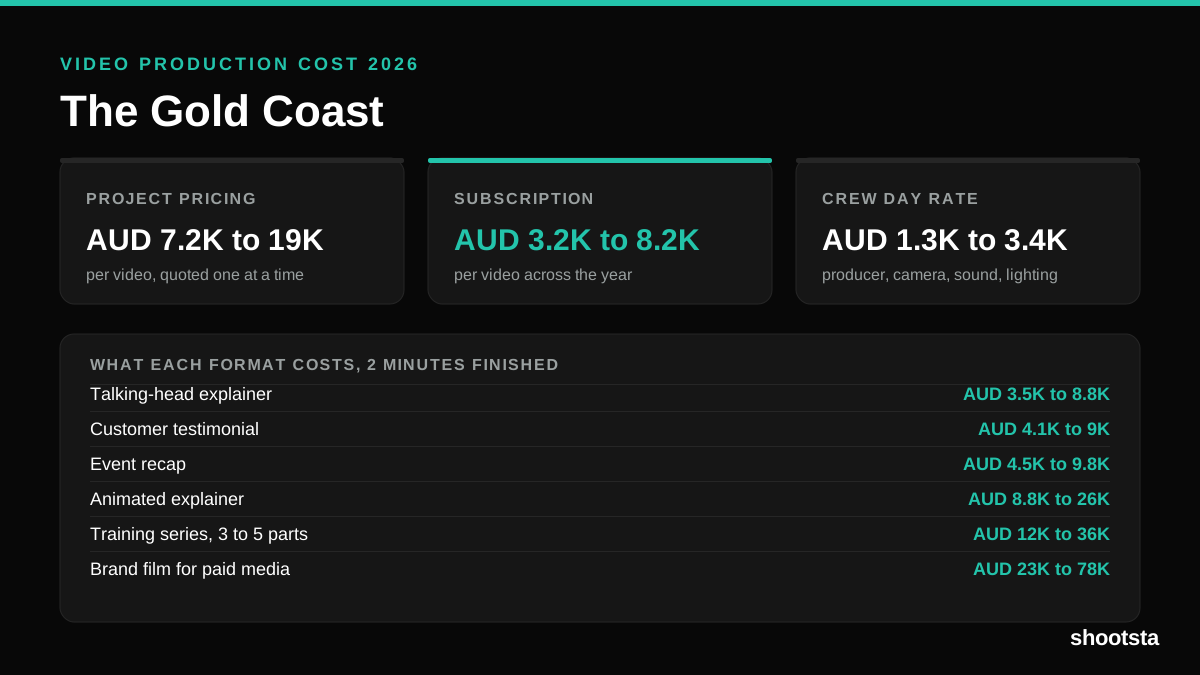
Video Production Cost on the Gold Coast 2026
Video production in the Gold Coast costs AUD 3,200 to AUD 8,200 per finished video on a subscription model, and AUD 7,200 to AUD 18,500 for one-off project work. Here is what you are paying for, and how the three pricing models compare.
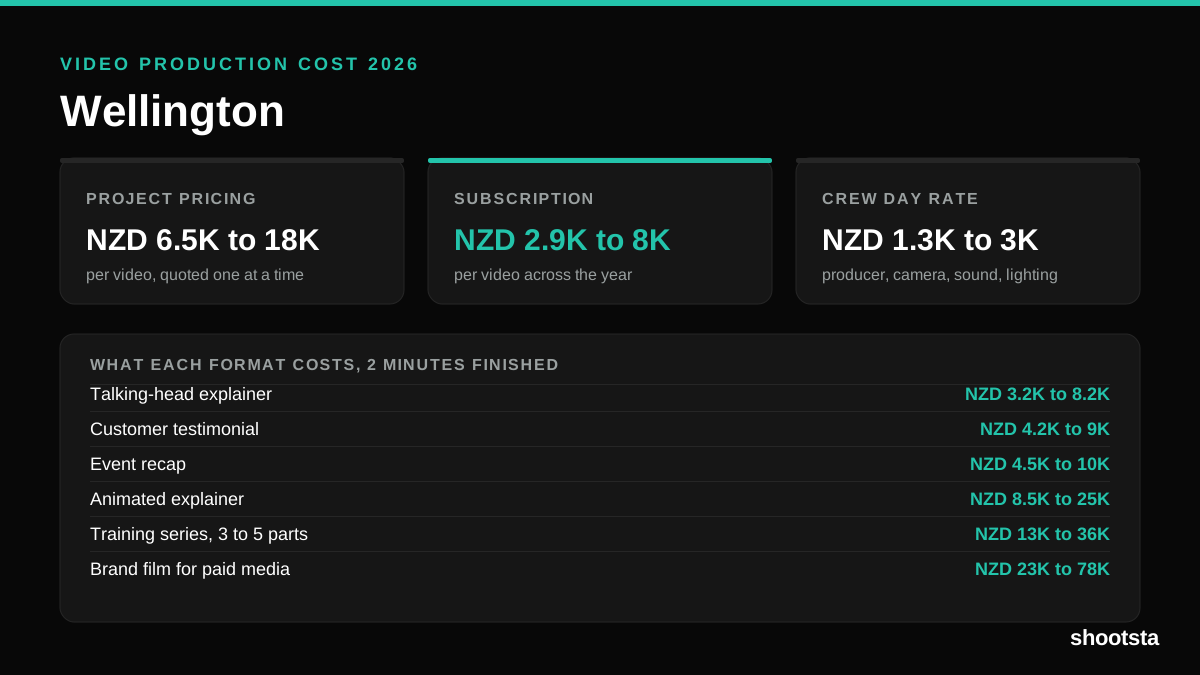
Video Production Cost in Wellington (2026)
Video production in Wellington costs NZD 2,900 to NZD 8,000 per finished video on a subscription model, and NZD 6,500 to NZD 18,000 for one-off project work. Here is what you are paying for, and how the three pricing models compare.
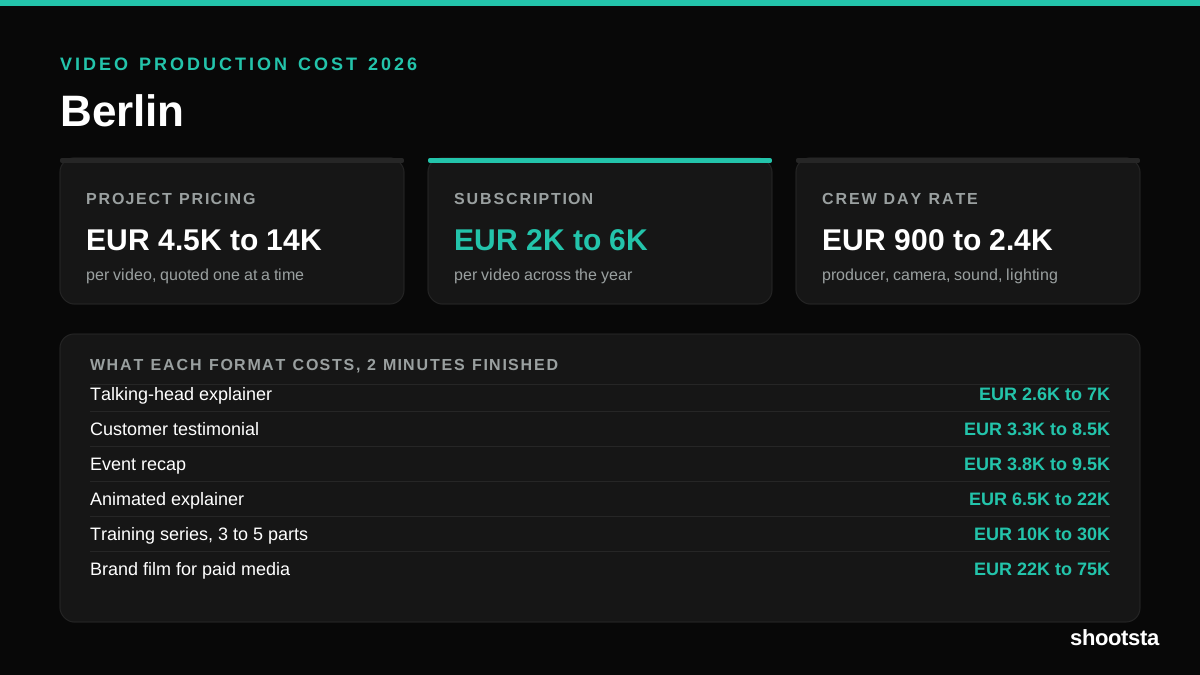
Video Production Cost in Berlin (2026)
Video production in Berlin costs EUR 2,000 to EUR 6,000 per finished video on a subscription model, and EUR 4,500 to EUR 13,500 for one-off project work. Here is what you are paying for, and how the three pricing models compare.
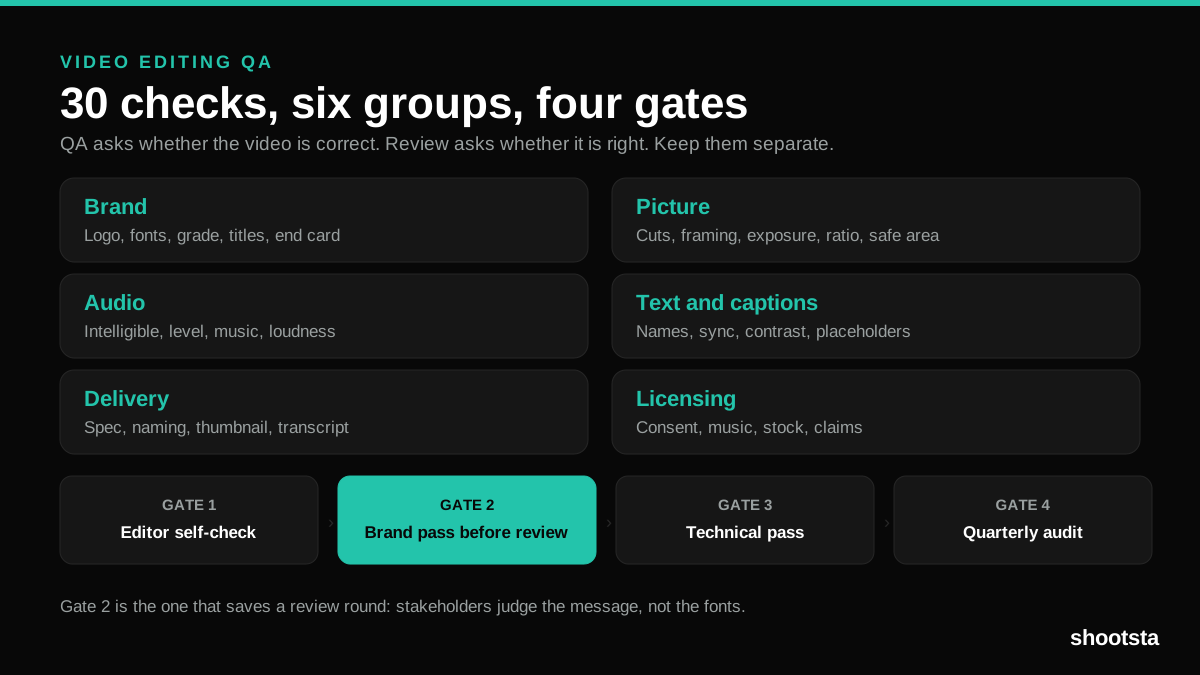
Video Editing QA: The Complete 2026 Guide
Video editing QA is the pass that catches brand drift, bad audio and wrong deliverables before stakeholders do. Here is the 30-point checklist, the four stage gates, and how to run it at 40 videos a month.
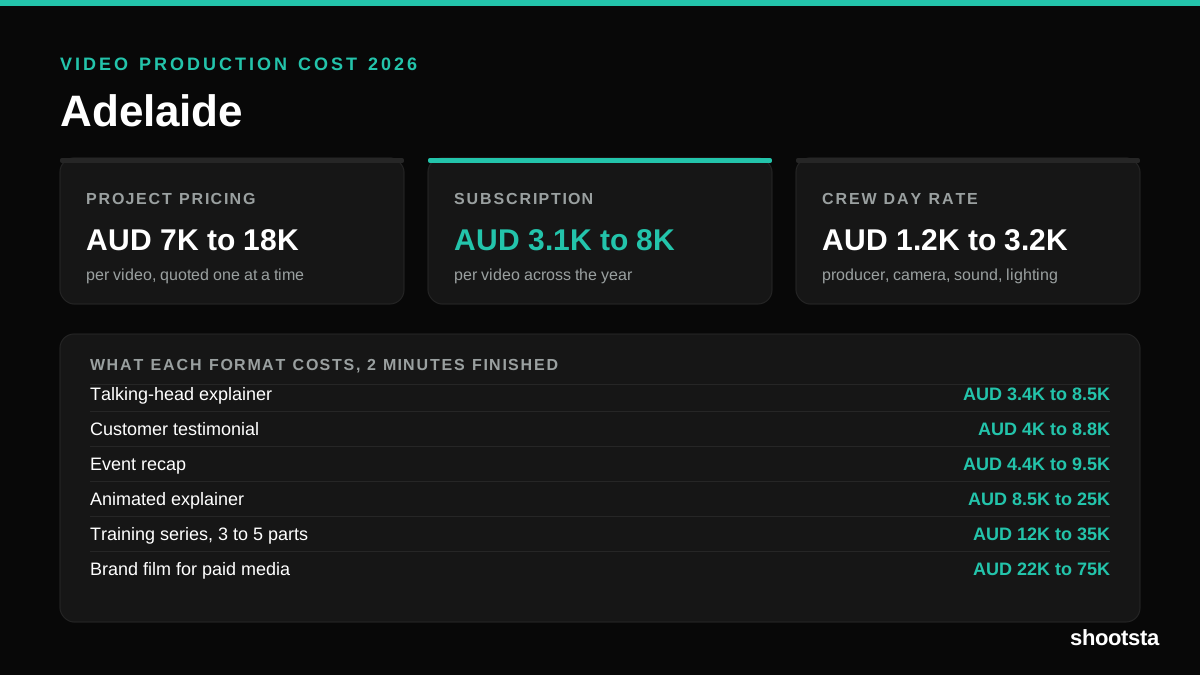
Video Production Cost in Adelaide (2026)
Video production in Adelaide costs AUD 3,100 to AUD 8,000 per finished video on a subscription model, and AUD 7,000 to AUD 18,000 for one-off project work. Here is what you are paying for, and how the three pricing models compare.
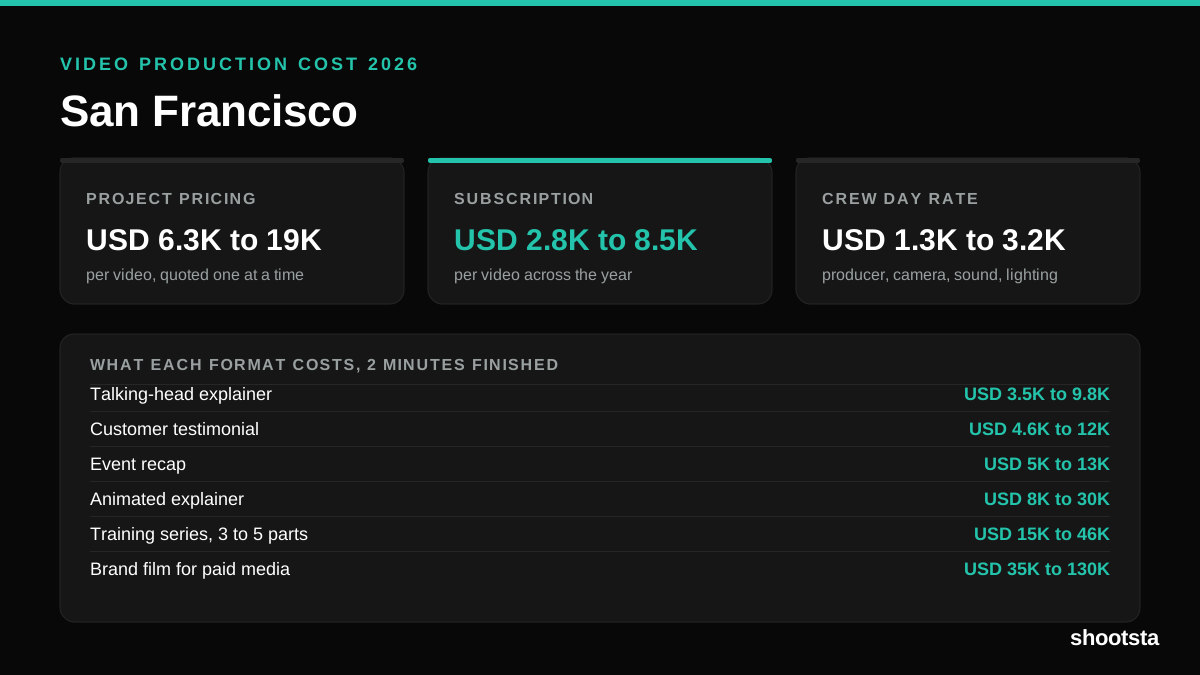
Video Production Cost in San Francisco 2026
Video production in San Francisco costs USD 2,800 to USD 8,500 per finished video on a subscription model, and USD 6,300 to USD 19,100 for one-off project work. Here is what you are paying for, and how the three pricing models compare.