
Alternatives to Storyboards in Video Production
shootsta.
Alternatives to Storyboards in Video Production
By Shootsta · Published May 6, 2026 · Updated October 2026
AI storyboard generators, animatics, 3D pre-visualization, and interactive mood boards are replacing hand-drawn storyboards in modern video production. Here is how to pick the right one for your project.
The static, hand-drawn storyboard is no longer the default starting point for a video project. Production teams now build initial concepts using a mix of AI storyboard generators, 3D pre-visualization software, animatics, and interactive mood boards. The choice depends on budget, timeline, and how much the concept needs to communicate before the shoot.
This guide covers what video teams use instead of traditional storyboards in 2026, why the shift happened, and which alternative fits which type of project. If you want to skip the reading and try one of the modern alternatives now, the Shootsta AI storyboard generator turns a brief into a full set of panels in under a minute.
What are video teams using instead of traditional storyboards?
Modern video teams use one of five alternatives to hand-drawn storyboards: AI storyboard generators that turn a script or brief into illustrated panels in seconds, 3D pre-visualization software that builds a rough animated version of the scene, animatics that combine still frames with timing and voiceover, interactive mood boards that organize visual references in a shared space, and script-to-video tools that generate a draft video directly from text. Each replaces a different part of what the static storyboard used to do.
Many production teams use two or three of these together. A live-action shoot might start with an AI storyboard, move to an animatic for client review, and finish with a shot list. An animation project might skip storyboards entirely and go straight to a 3D pre-viz pass.
Why traditional storyboards stopped being the default
Three things changed at once. Production timelines compressed, the average video budget shrank, and AI tools made the rough visual pass cheap. A senior storyboard artist still costs $300 to $1,500 per day. An AI storyboard tool can produce a useful first pass in 90 seconds for a few dollars in compute.
The other change is communication. Static panels worked when the next person in the chain was a director who could fill in the gaps. Modern productions involve clients, brand teams, legal reviewers, and translators, all of whom need to understand the concept without a meeting. Animatics and interactive mood boards do that better than a sketch.
Hand-drawn storyboards still have a place in narrative film, complex animation, and any project where a single artist sets the visual language. For most corporate, marketing, and social video, they have been replaced.
AI storyboard generators
The fastest-growing category. AI storyboard generators take a script, brief, or rough concept and return illustrated panels with shot directions, framing, and sometimes character consistency across scenes. The output is good enough to share with a client for early sign-off, and the iteration cost is near zero.
Common tools in 2026: Boords (cloud-based, includes an AI generator and team review), Storyflow and StoryboardHero (read project context to suggest scenes), LTX Studio (full 3D-style storyboards from a single prompt), and the Shootsta AI storyboard generator (free, reads a brand URL for tone and audience, no sign-up required). For a fuller breakdown, see our guide to the best AI storyboard generators in 2026.
Where they fit best: corporate video, marketing campaigns, social content, brand films, and any project where the storyboard needs to communicate a concept to non-creative stakeholders quickly.
3D pre-visualization software
Pre-viz software builds a rough animated version of the scene in 3D space. Camera angles, blocking, lighting direction, and timing all get locked in before a single frame is shot. Originally a film and broadcast tool, it has filtered down to commercial work as the software has gotten cheaper.
Common tools: Unreal Engine (real-time pre-viz, used heavily in virtual production), Cinema 4D, Blender (open-source, increasingly used for commercial pre-viz), and Maya. Newer entrants like Wonder Studio and Move.ai add motion capture and AI-driven character animation.
3D pre-viz is the right call for visual effects shots, complex camera moves, virtual production, animated explainers where the final video is also 3D, and any project where blocking has to be approved before a costly shoot day.
Animatics and motion mood boards
An animatic is a storyboard with timing. Still frames are sequenced to match a voiceover or music track, with rough transitions and on-screen text. The result is a low-fidelity version of the final video that runs in real time, which makes it the closest preview a client gets before the shoot.
Tools used to build animatics: Adobe After Effects, DaVinci Resolve, Final Cut Pro, Boords (built-in animatic export), and increasingly AI tools like Runway and Pika that turn storyboard frames into short animated clips. The line between an animatic and a script-to-video preview is blurring fast.
Animatics work best on ad campaigns where pacing and timing matter, voiceover-led explainers, and anything that has to be signed off by multiple stakeholders before production.
Free AI Storyboard Tool
Try the modern way to storyboard
Turn a brief into a shareable storyboard in minutes with Shootsta's AI tool. It is free to try in your browser.
Interactive mood boards and visual references
Sometimes the team does not need a frame-by-frame breakdown. They need a shared visual language: tone, color, lighting, location feel, costume direction. Interactive mood boards do that without forcing a single illustrated narrative.
Common tools: Milanote, Pinterest (still widely used), Frame.io for moving reference, Notion with embedded images, and Figma for teams already living there. Newer tools like Cosmos and Savee aggregate creative references across film, photography, and design.
Mood boards fit documentary work, lifestyle shoots, brand films where the look matters more than the structure, and the discovery phase of any project before a script exists.
Script-to-video and AI video preview tools
Script-to-video tools are the newest category. They generate a draft video directly from text input, skipping the storyboard step entirely. The output is often rough, but it is fast enough that creative teams can test several concepts in the time it used to take to brief a single storyboard.
Common tools: Runway Gen-3, Sora, Pika, Synthesia (for talking-head explainers), and Kling. Most are still better as concept exploration than as final output, but the gap is closing every six months.
Script-to-video tools are useful for early-stage concept exploration, internal pitches, social-first content where the production value is intentionally low-fi, and AI-generated video as a final format.
Which storyboard alternative fits which video type?
Here is a practical mapping, based on how production teams work in 2026:
- Corporate video and marketing campaigns: AI storyboard generator for the concept pass, animatic for client sign-off if pacing matters.
- Social content and short-form video: AI storyboard, or skip the storyboard entirely and use a script outline plus a mood board.
- TV commercials and brand films: AI storyboard for the rough pass, animatic for the agency review, sometimes 3D pre-viz for complex shots.
- Animated explainers: Storyboard plus animatic, or skip straight to 3D pre-viz if the final video is 3D animation.
- Documentary and lifestyle: Mood board for tone, shot list for structure, no traditional storyboard required.
- Visual effects and virtual production: 3D pre-viz is non-negotiable. Animatic on top if there is dialogue or voiceover.
The pattern across all of them is the same. The storyboard step has not gone away, but the tool that does it is now usually not a pencil and paper.
How much do storyboard alternatives cost?
A rough cost ladder, lowest to highest:
- Free AI storyboard tools (including the Shootsta AI storyboard generator): $0
- Paid AI storyboard tools (Boords, Storyflow, LTX Studio): $20 to $80 per user per month
- Mood board tools (Milanote, Frame.io): $10 to $30 per user per month
- Script-to-video tools (Runway, Pika, Sora): $20 to $100 per user per month, plus per-generation credits
- 3D pre-viz software (Unreal, Blender, Cinema 4D): free to $250 per month, plus the cost of a 3D artist
- Traditional storyboard artist: $300 to $1,500 per day, $50 to $200 per panel
For a typical corporate project, an AI storyboard tool plus a mood board covers most of the work that used to need a paid artist. For the breakdown of which AI tool fits which use case, read the best AI storyboard generators in 2026.
Storyboard alternatives FAQs
Do you still need a storyboard for a video?
Yes, for any video with more than three or four shots, but the storyboard does not have to be hand-drawn. An AI-generated set of panels, an animatic, or a 3D pre-viz pass all serve the same function. The point is to lock the visual plan before production, not to produce a particular kind of artifact.
What is the fastest way to build a storyboard now?
Start with an AI storyboard generator. Tools like the Shootsta AI storyboard generator turn a script or brief into a full set of illustrated panels in under a minute. For a comparison of the available tools, see the best AI storyboard generators in 2026.
Are AI storyboards good enough to show clients?
For most corporate and marketing video, yes. The output is consistent, on-brand if the tool reads brand context, and good enough for early-stage sign-off. For high-end brand films and TV commercials, AI storyboards are usually a first pass that an artist or creative director refines.
What is the difference between a storyboard and an animatic?
A storyboard is a sequence of still frames that show the shots in order. An animatic adds timing, voiceover, music, and rough transitions, so the result plays in real time. Animatics are a step closer to the finished video and are usually the format clients sign off on before the shoot.
Are traditional storyboards obsolete?
Not in narrative film, animation, and projects where a single artist owns the visual language. For corporate video, marketing campaigns, social content, and most commercial work, hand-drawn storyboards have been replaced by AI tools and animatics. The skill is shifting from drawing to editing the AI output and directing the visual language.
Can I plan a video without a storyboard at all?
For short-form social, lifestyle shoots, and documentary work, often yes. A clear script, a shot list, and a mood board are usually enough. For anything with a buying committee, multiple stakeholders, or complex shots, you still need a visual plan even if it is not called a storyboard.
Build your concept in under a minute
The fastest of the modern alternatives to a hand-drawn storyboard is an AI storyboard generator. The Shootsta AI storyboard generator takes a script, brief, or rough idea and returns illustrated panels with shot directions, framed for your brand, in about a minute. It is free to try with no sign-up. For deeper context, read our breakdown of the best AI storyboard generators in 2026 or how to storyboard a corporate video with or without a designer.
Take this article with you
Read the latest at shootsta.com/blog/alternatives-to-storyboards-modern-video-pre-production
You might also like
Why Urgent Video Requests Go Sideways
Most urgent videos go sideways because nobody planned for urgent work to happen. Chad Lakin explains how comms teams build the process first, so a fast turnaround becomes routine.
How to Plan Video Team Capacity Around Leave
Your only editor just booked two weeks off, and you already know which projects will slip. Chad Lakin explains how to plan video team capacity so the work keeps moving when someone is away.
Corporate Video Editing Standards: Full Guide
A two-page editing standard does more for consistency than a forty-page brand book. Here is what it should cover, who owns each part, and how to enforce it with an in-house editor or an outside partner.
Quality Control in Outsourced Video Editing
When editing leaves the building, quality has to be checked by a system rather than by whoever happens to look. Here is the system: acceptance criteria, two QA gates, counted revision rounds and a quarterly audit.
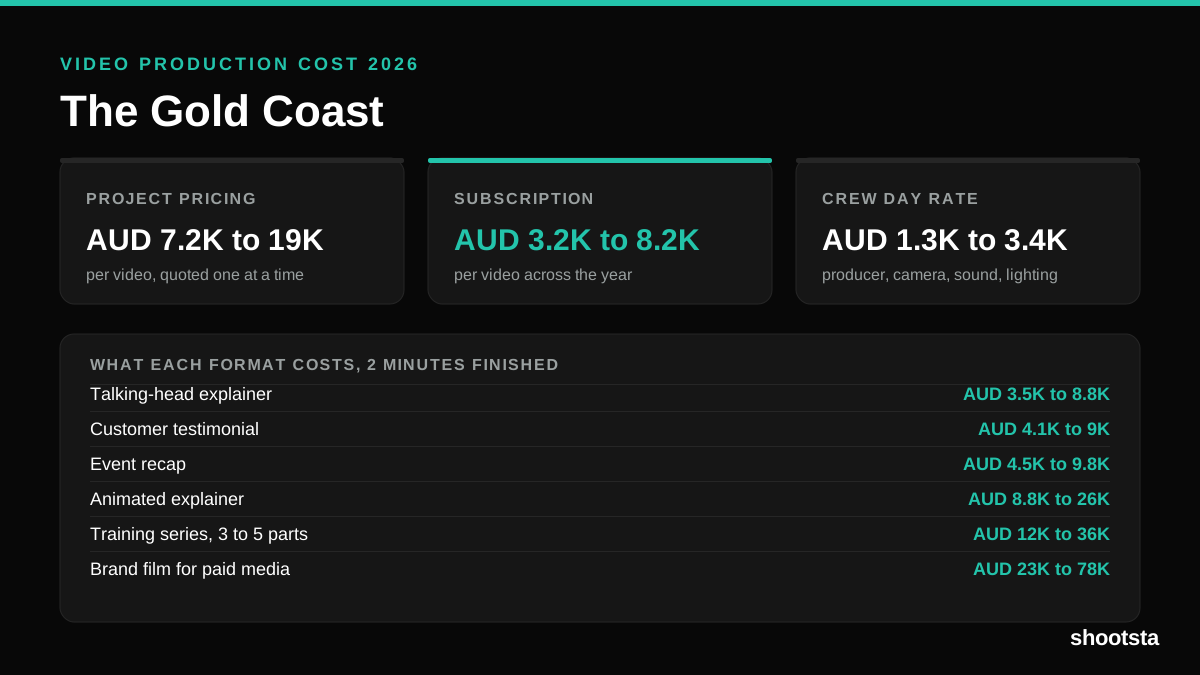
Video Production Cost on the Gold Coast 2026
Video production in the Gold Coast costs AUD 3,200 to AUD 8,200 per finished video on a subscription model, and AUD 7,200 to AUD 18,500 for one-off project work. Here is what you are paying for, and how the three pricing models compare.
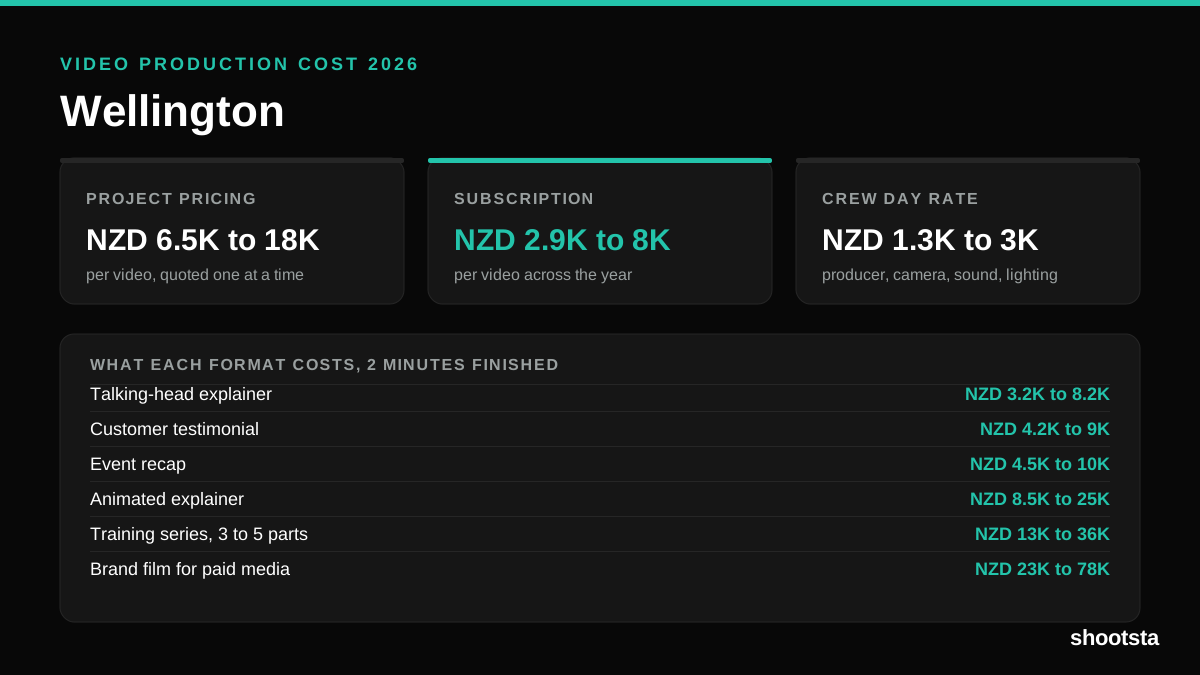
Video Production Cost in Wellington (2026)
Video production in Wellington costs NZD 2,900 to NZD 8,000 per finished video on a subscription model, and NZD 6,500 to NZD 18,000 for one-off project work. Here is what you are paying for, and how the three pricing models compare.