
Video ROI Calculator: How to Measure Your Return
shootsta.
Video ROI Calculator: How to Measure Your Return
By Shootsta · Published March 29, 2026 · Updated October 2026
Calculating video production ROI is simpler than most teams think. Use our free calculator to model your return, and learn which inputs matter.
Why do most teams struggle to calculate video ROI?
Video production feels expensive because the costs are visible - you can see the invoice from your agency or the subscription fee on your P&L. The returns are harder to see. A prospect watched your product demo before booking a meeting, but the CRM credits the meeting to the SDR's email. A new hire watched your onboarding videos and ramped faster, but nobody measured the difference.
The result is that video gets treated as a cost center instead of a revenue driver. Marketing knows it works - they see the engagement. But when the CFO asks "what are we getting for this spend?" the answer is usually vague.
A video ROI calculator fixes this by forcing you to put numbers to both sides of the equation: what you spend and what you get back.
What inputs does a video ROI calculation need?
The math itself is simple. The hard part is gathering honest inputs. Here are the numbers you need.
Production costs
What are you spending on video production per month or per year? Include everything: agency fees, subscription costs, internal team time, equipment, software. If you use a video production subscription, this number is your monthly fee. If you use agencies, add up your invoices. If you have an in-house team, include salaries, equipment depreciation, and software licenses.
Videos produced
Count the videos you produce each month. That count gives you your cost per video, which is the unit cost you need to compare one production model with another. If you're spending $15,000 per month and producing 3 videos, your cost per video is $5,000. If you switch to a model that produces 15 videos for the same spend, your cost per video drops to $1,000.
Leads or contacts generated
Next, work out how many leads your videos bring in. Count form fills on gated video content, demo requests from pages with embedded video, and contacts who list video as their source. If you don't track this yet, start with a "how did you find us" field on your contact form.
Pipeline influenced
Pipeline influenced is the value of open deals where a contact watched a video before the deal closed. It is broader than leads generated, because it includes prospects who watched a testimonial before their sales call, or who viewed a product demo that your rep shared. Your video KPI tracking setup determines how accurately you can measure this.
Revenue attributed
This is the closed-won revenue that came from deals where video played a part. Rough attribution still beats none at all. Say 20% of your closed deals had video views somewhere in the contact history, and those deals totaled $500K. In that case video-attributed revenue is $100K (at 20% attribution weighting).
How do you use the calculator?
Our free Video ROI Calculator walks you through each input and models three scenarios: conservative, expected, and best case. You'll get a clear picture of:
Your cost per video under your current model versus a subscription model. Your expected ROI based on your pipeline and close rates. Your payback period - how long until the investment pays for itself. The break-even point - how many leads or deals video needs to generate to cover its costs.
Look hard at the conservative scenario, since that is the one your finance team will trust. Production costs are fixed once a video is made, while the video can keep bringing in views and leads month after month.
What does good ROI look like for video?
Benchmarks vary by industry and deal size, but here are directional targets.
For B2B companies with average deal sizes of $20-50K, a handful of influenced deals a year can cover the production budget. Once the program is running, set a target multiple of attributed revenue to spend and check it each quarter.
For enterprise companies with larger deal sizes: the ROI can be much higher because a single influenced deal can cover a full year of production costs. A single $200K deal that traces back to a product demo video can pay for several years of a video subscription.
Video ROI also builds over time. A video you produce in March still generates views and pipeline in September. Unlike paid ads where you stop getting impressions the moment you stop paying, video content works for you long after the production cost is paid.
What if you are just starting with video?
If you don't have historical data yet, the calculator can still help. Use industry benchmarks and conservative assumptions to model what video could deliver. This is exactly what you need for a business case to your CFO - a projection based on reasonable assumptions with clear sensitivity analysis.
Start tracking from day one. Tag video-sourced leads in your CRM. Connect your video hosting platform to HubSpot or Salesforce. Add a source field to your forms. Within 3 months you'll have enough real data to replace the projections with actuals.
Try the calculator
Run your numbers through our free Video ROI Calculator to see what video production could return for your business. It takes a few minutes and gives you a shareable report you can take to your leadership team.
If you want help interpreting the results or building a business case around them, talk to our team. We can walk through comparable results from companies in your industry.
Take this article with you
Read the latest at shootsta.com/blog/video-roi-calculator-measure-your-return
You might also like

How to Plan Video Team Capacity Around Leave
Your only editor just booked two weeks off, and you already know which projects will slip. Chad Lakin explains how to plan video team capacity so the work keeps moving when someone is away.
Corporate Video Editing Standards: Full Guide
A two-page editing standard does more for consistency than a forty-page brand book. Here is what it should cover, who owns each part, and how to enforce it with an in-house editor or an outside partner.
Quality Control in Outsourced Video Editing
When editing leaves the building, quality has to be checked by a system rather than by whoever happens to look. Here is the system: acceptance criteria, two QA gates, counted revision rounds and a quarterly audit.
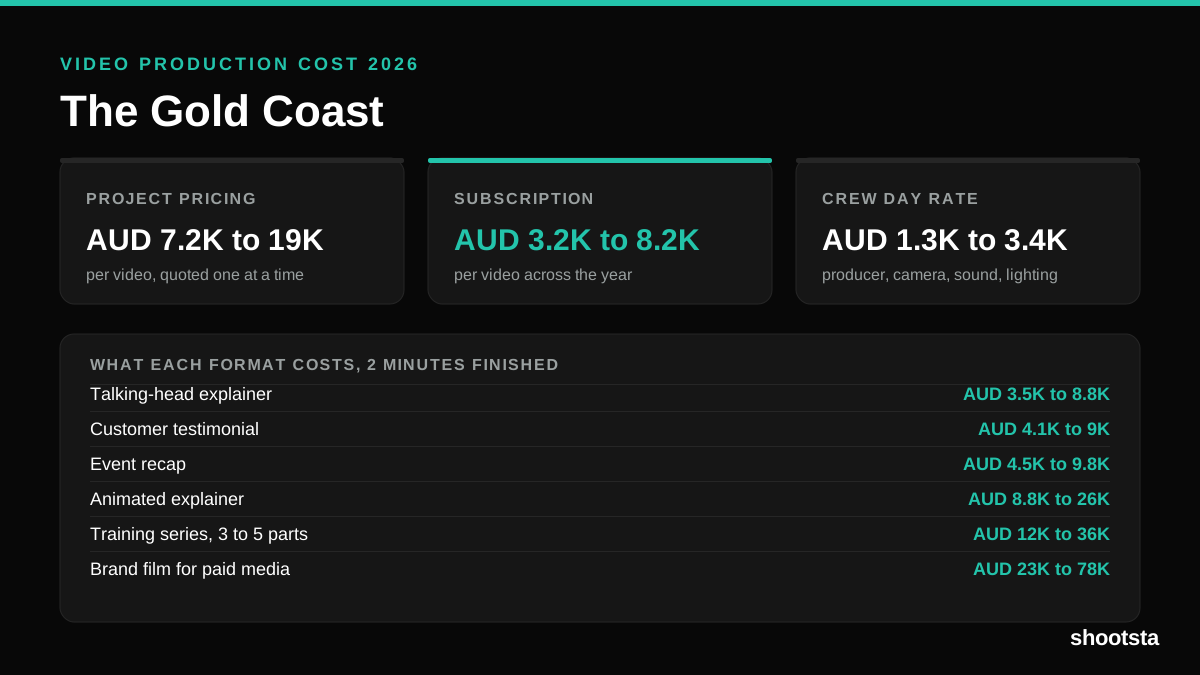
Video Production Cost on the Gold Coast 2026
Video production in the Gold Coast costs AUD 3,200 to AUD 8,200 per finished video on a subscription model, and AUD 7,200 to AUD 18,500 for one-off project work. Here is what you are paying for, and how the three pricing models compare.
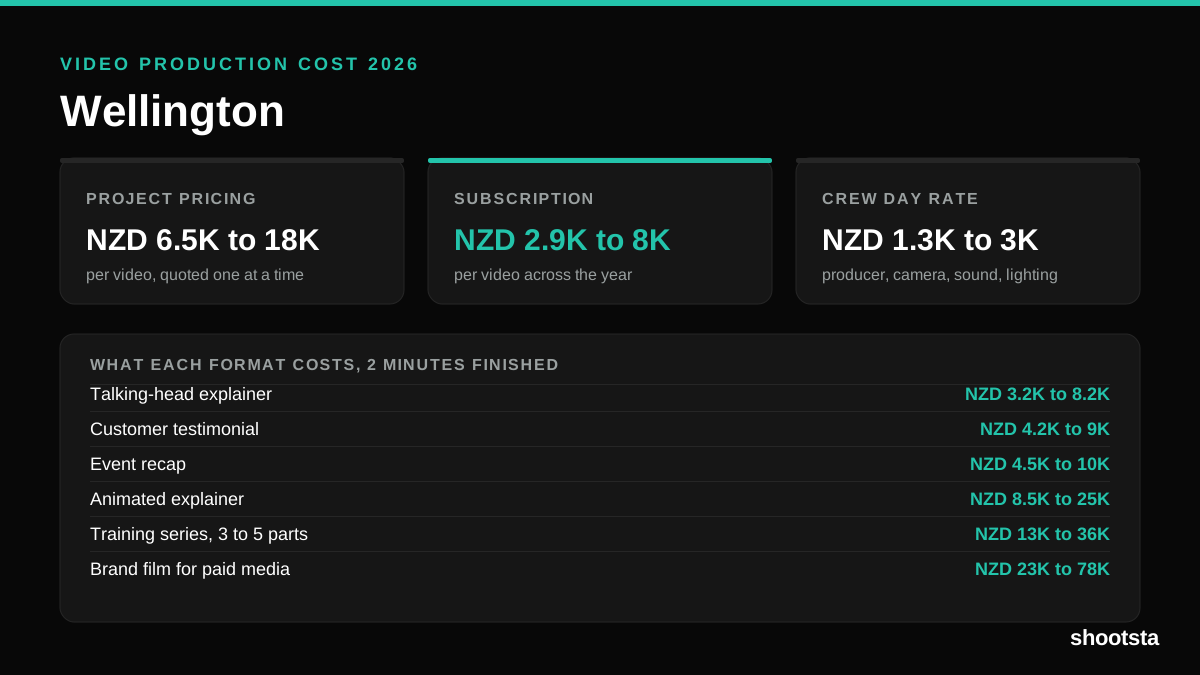
Video Production Cost in Wellington (2026)
Video production in Wellington costs NZD 2,900 to NZD 8,000 per finished video on a subscription model, and NZD 6,500 to NZD 18,000 for one-off project work. Here is what you are paying for, and how the three pricing models compare.
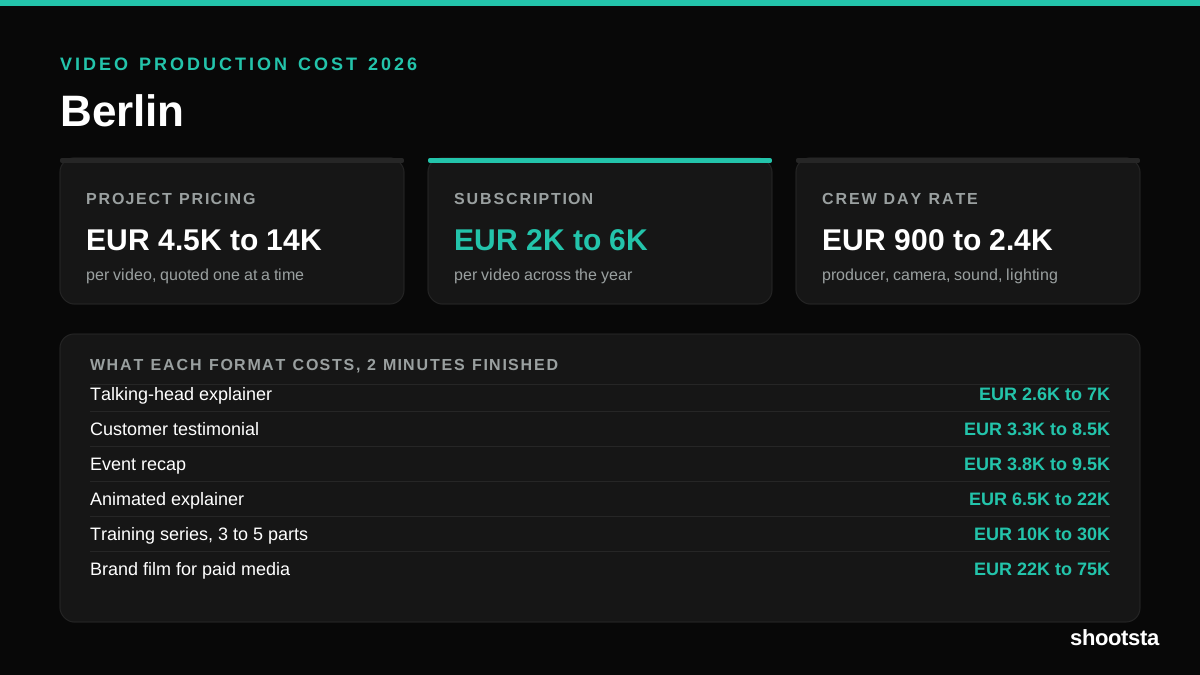
Video Production Cost in Berlin (2026)
Video production in Berlin costs EUR 2,000 to EUR 6,000 per finished video on a subscription model, and EUR 4,500 to EUR 13,500 for one-off project work. Here is what you are paying for, and how the three pricing models compare.