
From Ad-Hoc to Always-On: Building a Video Content Program
shootsta.
From Ad-Hoc to Always-On: Building a Video Content Program
By Shootsta · Published March 27, 2026 · Updated October 2026
If your team makes video only when someone asks for it, the backlog sets your calendar. Here is how to move from ad-hoc video requests to an always-on video content program that ships every week.
What is the difference between ad-hoc video and an always-on program?
Ad-hoc video production works like this: someone in the organization needs a video. They write a brief, find budget, hire a vendor, wait 4-8 weeks, and receive a finished product. The video ships, gets some views, and the process resets to zero until the next request.
An always-on video program works differently. Video is produced continuously across the organization - weekly social content, monthly training updates, quarterly leadership communications, ongoing sales enablement assets. There's a standing workflow, a dedicated editing pipeline, and a content calendar that runs without needing someone to kick-start every project.
Volume for its own sake is not the point. The gain is that continuous production builds on itself, because each video feeds your website, your social channels, your sales library and your internal knowledge base. Over time the library answers prospect questions and trains new hires around the clock, without anyone pressing record again.
Why does ad-hoc video production limit your results?
Three structural problems make ad-hoc production self-defeating, and each one gets worse the longer the model runs.
Every video starts from zero
When there's no standing workflow, each video project requires its own scope, budget approval, vendor selection, and timeline negotiation. The overhead per video is high. A 90-second customer testimonial shouldn't take 6 weeks of project management, but in an ad-hoc model it often does.
Content gaps compound silently
If your competitors publish video every week and you produce four videos a year, the gap grows with every week you stay quiet. The gap isn't visible until a prospect tells your sales rep "I found the answer on [competitor's] website" or your organic search rankings drop because your pages have less media than competing pages.
No institutional learning
When each video is a standalone project, you never build the muscle. The team doesn't learn what works, what doesn't, which formats get engagement, or which topics drive pipeline. An always-on program generates data month over month that makes every subsequent video more effective.
How do you transition from ad-hoc to always-on?
Step 1: audit what you have
Before building something new, list what already exists. Count the videos your company produced in the last 12 months, note where each one lives, and check whether it is still relevant. Then mark the ones that got the most views, leads or internal use. This audit usually shows two things: you have more content than you think (scattered across departments), and most of it is outdated or inaccessible.
Step 2: define your content pillars
An always-on program needs structure. Pick 3-5 content pillars - recurring themes that align with your business goals. For a company like Shootsta, these might be: "how-to" production tips, customer success stories, industry trends, product updates, and team culture. Every video you produce fits into one of these pillars.
Pillars prevent the common trap of producing random one-off videos that don't connect to each other or to a larger strategy.
Step 3: set a sustainable cadence
Start with a cadence your team can keep up. Producing 2 videos per week beats committing to 5 and burning out after a month. Here is a realistic starting cadence for a team that is new to this:
Weekly: 1-2 social clips or short-form content pieces. Monthly: 1 longer-form piece (interview, how-to guide, webinar recording). Quarterly: 1 hero piece (brand film, campaign video, major case study).
This cadence gives you more than one video a week across the year. That is enough to keep your social channels active, your blog enriched with video, and your sales team equipped with fresh assets.
Step 4: build the production pipeline
An always-on program needs an always-on pipeline, and that pipeline has three parts.
First, you need a filming model that doesn't depend on booking crews. Use smartphones, webcams and non-creative filmakers across your organization. Second, you need an editing service that turns footage around in about 48 hours, because an edit that takes 3 weeks can't keep up with a weekly cadence. Third, a video production subscription gives you predictable monthly costs and a creative team on call.
Step 5: assign ownership
One person should own the content calendar, review the queue each week and track what has been produced and what is coming. This can be an existing marketing manager, a content lead, or a fractional video operations person. The role doesn't need to be full-time, but it does need to be defined.
What does always-on video content look like week to week?
Here's a sample month from a company running an always-on program with Shootsta.
Week 1: CEO films a 90-second market commentary (phone, office). Marketing films a customer testimonial (remote capture). Both edited and published within 48 hours.
Week 2: Product manager records a feature update (screen capture + talking head). HR films a "meet the team" spotlight. Sales rep records a tailored video for one prospect.
Week 3: L&D uploads footage for a compliance training module. Marketing films behind-the-scenes at a client shoot. Social team cuts 3 short clips from existing long-form content.
Week 4: Leadership records a quarterly business update. Marketing publishes a blog post with embedded video. Customer success films a quick product tip.
That's 12-15 pieces of video content in a month, covering corporate communications, marketing, training, sales, and employer branding. Each piece follows a predefined workflow. Nobody had to brief an agency or approve a purchase order.
How do you measure whether the program is working?
Track three categories of metrics. The first is production health, which tells you whether you are hitting your cadence targets. If you committed to 8 videos per month and you're producing 3, the pipeline has a bottleneck, and your next job is to find it.
The second is content performance, which shows the videos people watch, share and act on, and you measure it with views, completion rates and click-throughs. For gated content, track form fills. For sales videos, track reply rates.
Business impact: connect video activity to pipeline and revenue using the framework in our B2B video ROI guide. The goal is to show that video-influenced leads and deals are increasing quarter over quarter.
What if leadership pushback says "we don't have time for this"?
That's a sign the filming model is wrong, not that the program doesn't work. If filming a video requires booking a studio, preparing a script, and clearing a half-day, nobody has time. If filming means spending 10 minutes in front of a phone with guided prompts and having a finished video 48 hours later, everyone has time.
Aim to keep filming under 15 minutes per person. The editing, branding, and distribution happen in the background. The subject matter expert's only job is to show up and talk about what they know.
Take our video quiz to identify which video types to start with, or explore how Shootsta works to see how the production pipeline fits together.
Take this article with you
Read the latest at shootsta.com/blog/ad-hoc-to-always-on-building-video-content-program
You might also like

How to Plan Video Team Capacity Around Leave
Your only editor just booked two weeks off, and you already know which projects will slip. Chad Lakin explains how to plan video team capacity so the work keeps moving when someone is away.
Corporate Video Editing Standards: Full Guide
A two-page editing standard does more for consistency than a forty-page brand book. Here is what it should cover, who owns each part, and how to enforce it with an in-house editor or an outside partner.
Quality Control in Outsourced Video Editing
When editing leaves the building, quality has to be checked by a system rather than by whoever happens to look. Here is the system: acceptance criteria, two QA gates, counted revision rounds and a quarterly audit.
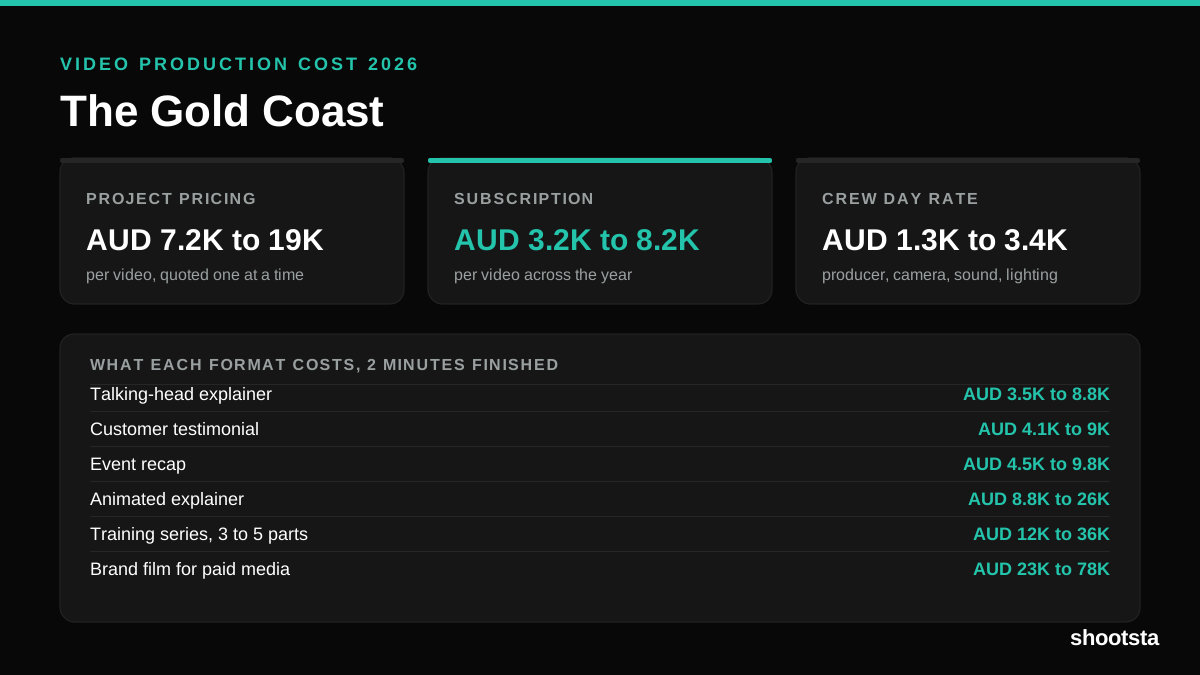
Video Production Cost on the Gold Coast 2026
Video production in the Gold Coast costs AUD 3,200 to AUD 8,200 per finished video on a subscription model, and AUD 7,200 to AUD 18,500 for one-off project work. Here is what you are paying for, and how the three pricing models compare.
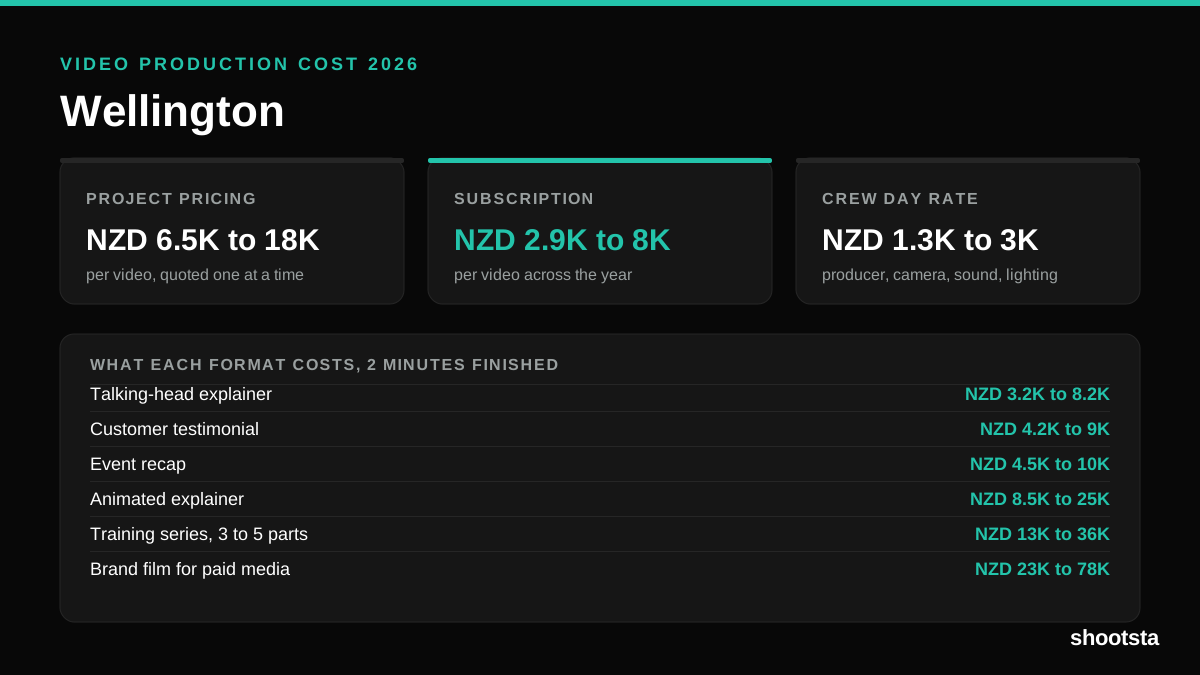
Video Production Cost in Wellington (2026)
Video production in Wellington costs NZD 2,900 to NZD 8,000 per finished video on a subscription model, and NZD 6,500 to NZD 18,000 for one-off project work. Here is what you are paying for, and how the three pricing models compare.
Video Production Cost in Berlin (2026)
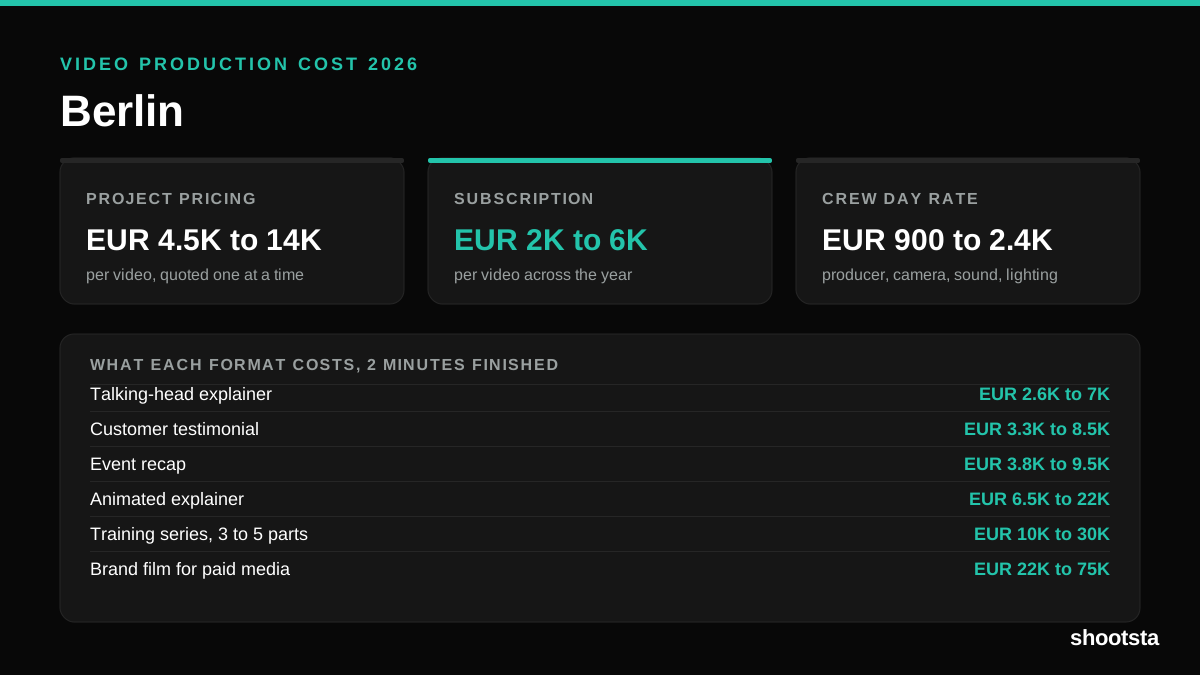
Video production in Berlin costs EUR 2,000 to EUR 6,000 per finished video on a subscription model, and EUR 4,500 to EUR 13,500 for one-off project work. Here is what you are paying for, and how the three pricing models compare.