
Explainer Videos: When to Use Them and How to Produce Them
shootsta.
Explainer Videos: When to Use Them and How to Produce Them
By Shootsta · Published April 7, 2026 · Updated October 2026
Explainer videos turn complex ideas into clear, short content. Here is when they work, when they don't, and how to produce them without spending $20K on a single animation.
What is an explainer video?
An explainer video is a short video (typically 60-120 seconds) that explains a product, service, process, or concept in a clear, visual way. Most are animated, but some use live-action, screen recording, or a mix. The goal is to take something complex and make it understandable in under 2 minutes.
They're popular because they work. Prospects who watch an explainer video are more likely to understand your product and take the next step. That's why you see them on SaaS homepages, product pages, landing pages, and in sales decks.
When should you use an explainer video?
When the product is hard to visualize
Software platforms, financial products and technical services are things you can't point a camera at. Animation lets you show abstract concepts, data flows, and user journeys that would be impossible to film. This is the classic explainer video use case.
When you need to simplify a complex process
Think of insurance claims, supply chain logistics or regulatory compliance workflows. If your customer or employee needs to understand a multi-step process, an animated walkthrough is clearer than a written guide or a flowchart.
When you want to control the message exactly
With live-action, you work with what happens on the day. With animation, every frame is intentional. If the message needs to be precise - for investor presentations, regulatory explanations, or product positioning - animation gives you full control.
When live-action isn't practical
Maybe your product hasn't been built yet, or the subject is sensitive and you can't film real people. The scenario might involve risk or danger, or the concept might be abstract. Each of these is a good reason to use animation instead of forcing a live-action approach.
When should you NOT use an explainer video?
Some videos work better without animation. If authenticity and human connection matter, as they do in customer testimonials, leadership updates and recruitment videos, live-action video is more effective. A CEO talking to camera builds more trust than an animated avatar of a CEO.
Explainer videos also aren't a substitute for a clear product. If your team can't explain what the product does in one sentence, an animated video won't fix that. The script is the hardest part of an explainer video, and a confused script produces a confused video regardless of how good the animation is.
What types of explainer videos exist?
2D animated explainers
This is the most common format. Flat illustrations, characters and icons are animated to tell a story. Production is fairly fast and costs less than 3D, and the style works well for SaaS products, fintech, healthcare and education.
Motion graphics
Motion graphics animate text, shapes, charts and data visualizations with kinetic typography and transitions. There are no characters or storylines, so the video is pure visual information design. It suits data-heavy topics, financial reports and technical explanations.
3D animation
3D animation uses photorealistic or stylized renders. It costs more to produce and has more visual impact. It works well for physical products, architectural visualization, and technical engineering content. Here is an example:
Whiteboard animation
A hand draws illustrations on a whiteboard as a voiceover narrates. This was popular around 2015-2018 and has become somewhat dated, but still works for educational content where the "being drawn" visual metaphor adds value.
Screen recording with animation overlay
A hybrid format that combines real product screenshots or recordings with animated annotations, callouts, and transitions. Good for software walkthroughs that need more visual explanation than a raw screen recording provides.
How much do explainer videos cost?
The range is wide and depends on style, length, and production model.
Freelance animator: $1,000-$5,000 for a 60-second 2D explainer. Quality and turnaround vary significantly. You manage the project yourself.
Specialist agency (like Wyzowl): $5,000-$20,000 per video. Wyzowl and similar agencies do strong work in this space - they handle scripting, storyboarding, animation, and voiceover as a full-service package. The trade-off is cost and timeline (4-8 weeks typical).
Subscription platform: with Shootsta's animation production, you get animated explainers as part of a broader video subscription. This works well for companies that need explainers alongside live-action content, training videos, and social clips - you produce everything under one plan.
How do you write an explainer video script?
The script is most of the work. A well-scripted explainer with mediocre animation outperforms a poorly-scripted explainer with premium animation every time.
Follow this structure:
Hook (5-10 seconds): State the problem your audience faces. Make them nod.
Problem (15-20 seconds): Expand on the pain. What happens if this problem goes unsolved?
Solution (30-40 seconds): Introduce your product and show how it solves the problem. Be specific and show the real workflow or process the viewer will use.
Proof (10-15 seconds): A stat, a customer result, or a trust signal that validates the solution.
CTA (5 seconds): Give one clear next step, such as booking a demo, starting a trial or visiting the website.
That adds up to 60-90 seconds. At a natural speaking pace of 150 words per minute, the script runs to 150-225 words. Explainer video scripts are often too long, so keep cutting until each line earns its place.
How do you get started?
If you need a single explainer video for a product launch, a specialist agency or freelancer is a reasonable choice. If you need explainers as part of an ongoing video program that also includes marketing content, training videos, and testimonials, a subscription model is more cost-effective.
Explore animated video production with Shootsta, or read the enterprise video playbook to see how explainers fit into a broader content program. Take the video quiz to find out if an explainer video is the right format for your situation.
If you plan to run animation as more than a one-off, The Business Animation Playbook lays out how teams scale it into a repeatable program.
Which explainer video company should you shortlist?
Prices in this category run from $2,000 to $50,000 for what looks like the same 60 seconds, and the spread is mostly about who writes the script, how many revision rounds you get before the meter starts, and whether source files are included. Read the best explainer video companies compared for price bands, turnaround and the extras that push a quote past the number you approved.
Take this article with you
Read the latest at shootsta.com/blog/explainer-videos-when-to-use-how-to-produce
You might also like

How to Plan Video Team Capacity Around Leave
Your only editor just booked two weeks off, and you already know which projects will slip. Chad Lakin explains how to plan video team capacity so the work keeps moving when someone is away.
Corporate Video Editing Standards: Full Guide
A two-page editing standard does more for consistency than a forty-page brand book. Here is what it should cover, who owns each part, and how to enforce it with an in-house editor or an outside partner.
Quality Control in Outsourced Video Editing
When editing leaves the building, quality has to be checked by a system rather than by whoever happens to look. Here is the system: acceptance criteria, two QA gates, counted revision rounds and a quarterly audit.
Video Production Cost on the Gold Coast 2026
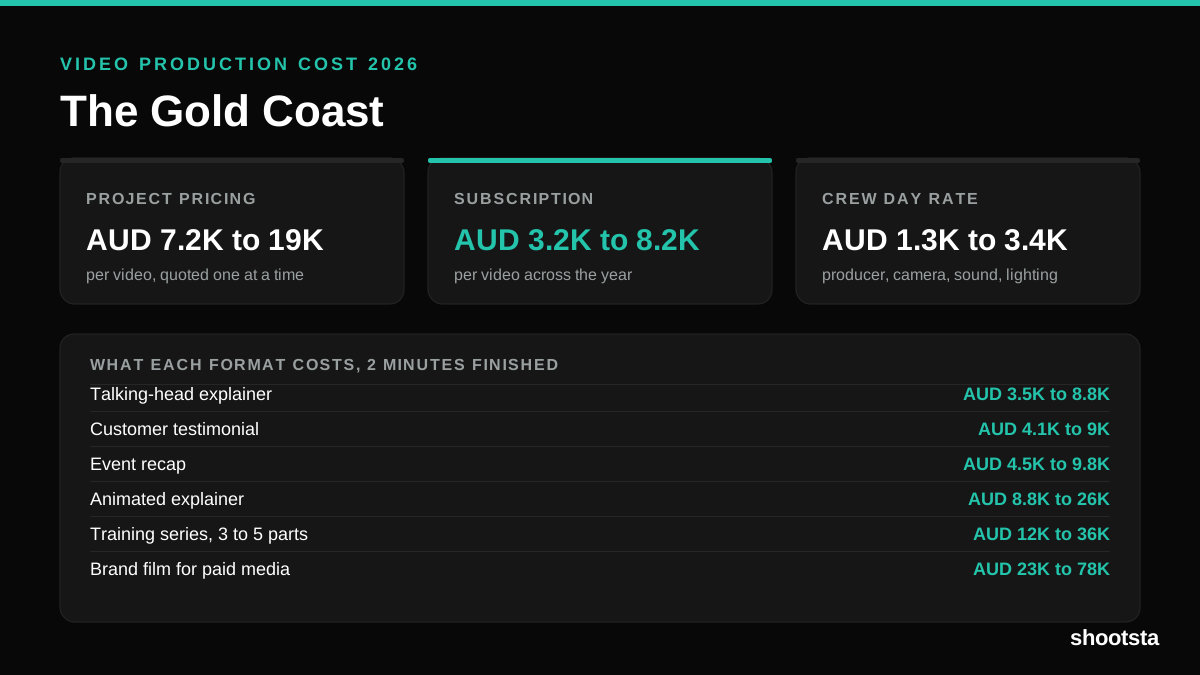
Video production in the Gold Coast costs AUD 3,200 to AUD 8,200 per finished video on a subscription model, and AUD 7,200 to AUD 18,500 for one-off project work. Here is what you are paying for, and how the three pricing models compare.
Video Production Cost in Wellington (2026)
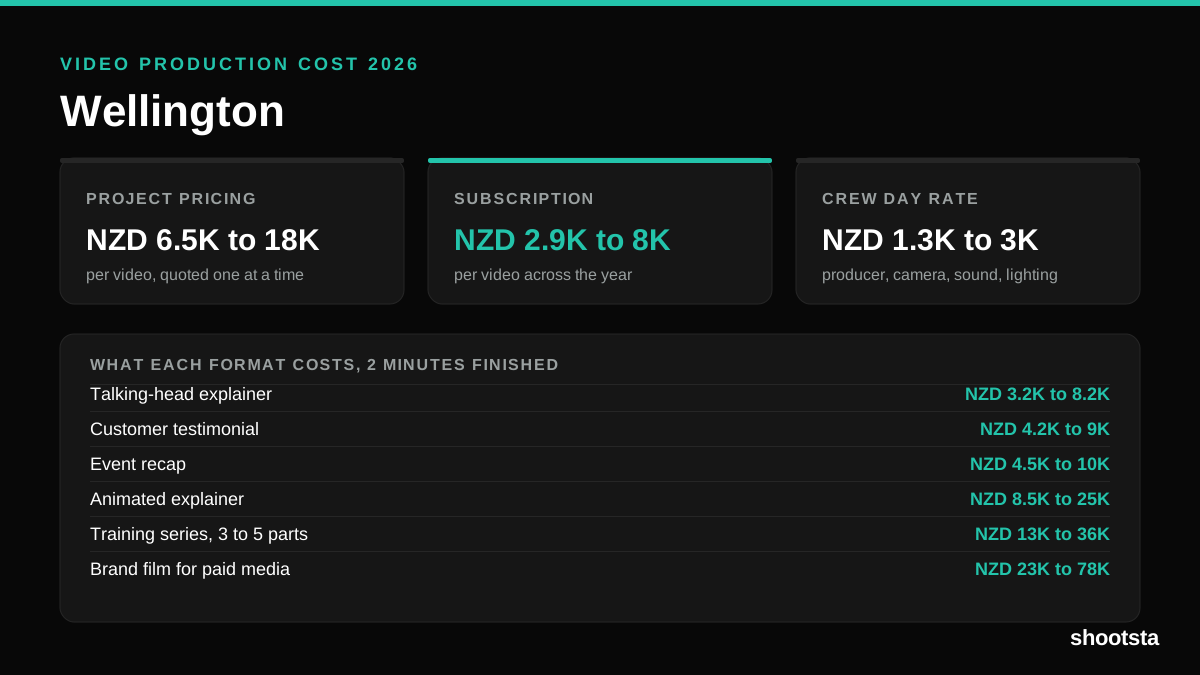
Video production in Wellington costs NZD 2,900 to NZD 8,000 per finished video on a subscription model, and NZD 6,500 to NZD 18,000 for one-off project work. Here is what you are paying for, and how the three pricing models compare.
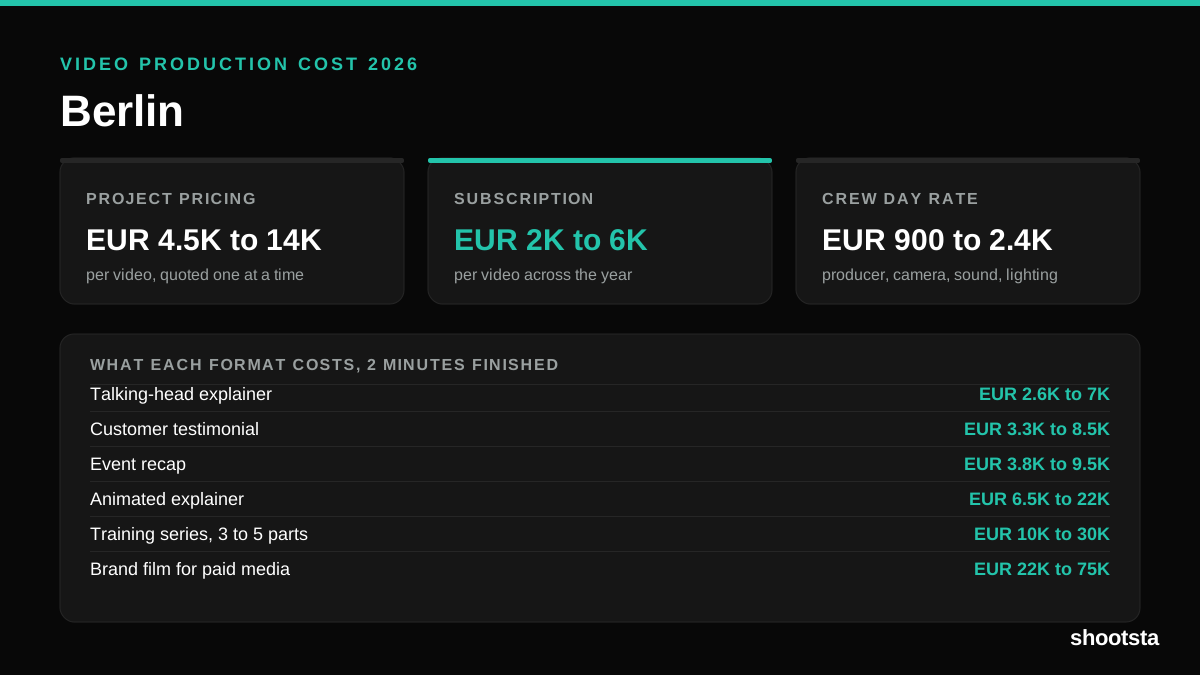
Video Production Cost in Berlin (2026)
Video production in Berlin costs EUR 2,000 to EUR 6,000 per finished video on a subscription model, and EUR 4,500 to EUR 13,500 for one-off project work. Here is what you are paying for, and how the three pricing models compare.