
AI Video in the Enterprise: A Practical Guide
shootsta.
AI Video in the Enterprise: A Practical Guide
By Shootsta · Published March 21, 2026 · Updated October 2026
AI video tools promise to do everything from scriptwriting to full production. Here is what works in an enterprise setting, what does not, and where the real productivity gains are.
What can AI do for enterprise video production?
AI video tools have gone from novelty to headline in about 18 months. Text-to-video generators, AI avatars, automated editing, synthetic voiceovers - the demos are impressive. But enterprise video buyers need more than demos. They need to know what works at their scale, with their compliance requirements, and for their audiences.
The honest answer is that AI handles some parts of video production well and others poorly. Understanding the difference saves you from buying tools that look good in a pitch but fail in production.
Where does AI video work well right now?
Script drafting and content planning
AI is good at generating first drafts. Give it a topic, a target audience, and a desired length, and you'll get a script that covers the key points. It won't be perfect - the tone will be generic and the structure will be predictable - but it gives your subject matter expert something to react to instead of staring at a blank page.
This cuts the scripting phase from days to hours. The SME reviews the draft, adds their voice, cuts the AI filler, and you're left with a script that's 80% faster to produce than starting from scratch.
Automated captioning and transcription
AI-generated captions have reached the point where they're accurate enough for most business video. Tools like Whisper, Rev, and built-in platform features transcribe spoken content with 95%+ accuracy. This matters because captions improve accessibility, SEO, and engagement - viewers are more likely to watch a video with captions, especially on social media where most videos autoplay on mute.
B-roll and stock footage suggestions
Some AI editing tools can analyze your script or voiceover and suggest relevant B-roll footage from stock libraries. This speeds up the editing process because the editor doesn't need to manually search through thousands of clips. The suggestions aren't always right, but they're a useful starting point.
Repurposing and reformatting
AI is strong at taking a long video and cutting it into shorter clips for different platforms. A 10-minute webinar recording can be automatically segmented into 60-second highlight clips for LinkedIn, 15-second teasers for Instagram, and a 2-minute summary for email. Tools like Descript and Opus Clip do this reasonably well.
Where does AI video fall short for enterprises?
AI-generated avatars and synthetic presenters
AI avatar tools (Synthesia, HeyGen, etc.) can produce videos of realistic-looking digital humans speaking from a script. The output quality has improved dramatically. But enterprise audiences can tell the difference. Internal communications from a digital CEO feel disconnected. Customer-facing content from an AI presenter raises trust questions. And compliance and legal teams at large organizations have concerns about deepfake liability and brand representation.
Avatars have a place in certain use cases - localized versions of training content, quick explainers where no on-camera talent is available - but they shouldn't replace real people for content where authenticity matters.
Fully AI-generated video (text-to-video)
Tools like Sora, Runway, and Pika can generate video clips from text prompts. The results are visually impressive but inconsistent. Characters change appearance between shots, objects move in ways physics does not allow, and hands often look wrong. For brand-sensitive enterprise content, this inconsistency is a dealbreaker.
Text-to-video works for abstract b-roll, background visuals, and creative concepts. It doesn't work for anything that needs to look real or represent your actual product, people, or locations.
End-to-end automated production
No AI tool can currently take a brief and produce a finished, on-brand enterprise video without human involvement. The technology handles individual steps well (scriptwriting, captioning, clip selection) but can't make the judgment calls that an experienced editor makes: pacing, tone, emotional beat, brand alignment, what to cut and what to keep.
How should enterprises think about AI video strategy?
The most productive approach is to use AI where it saves time on tasks that don't require human judgment, and keep humans where judgment matters.
Use AI for: first-draft scripts, captions and transcription, content repurposing, metadata and tagging, analytics and performance reporting.
Keep humans for: on-camera talent (authenticity), editorial judgment (what stays, what goes), brand governance (tone, style, appropriateness), final quality review, and anything customer-facing where trust is at stake.
This hybrid model is where the real productivity gains are. A video team using AI tools can produce 2-3x more content without adding headcount, because the repetitive tasks are automated while the creative and strategic work stays human.
What about compliance and legal risks?
Enterprise legal and compliance teams are right to ask questions about AI video. Here are the main considerations.
Intellectual property
AI-generated content exists in a gray area of copyright law. If your AI tool was trained on copyrighted material (most were), who owns the output? For enterprise content that might be used in advertising, on your website, or in sales materials, this is a real question. Check your AI tool's terms of service and get legal sign-off.
Deepfake and misrepresentation risks
Using AI to generate realistic video of real people (even your own executives) raises ethical and legal questions. Some jurisdictions are introducing legislation around synthetic media. If your AI avatar video of the CEO says something the CEO never said, that's a liability.
Data privacy
If you're uploading internal footage - employee interviews, office environments, proprietary product shots - to a cloud-based AI tool, where does that data go? Enterprise procurement teams should evaluate AI video tools with the same data privacy scrutiny they apply to any SaaS vendor.
What should you do this quarter?
If you haven't started using AI in your video workflow, here are three practical steps.
First, use AI for captions on every video you produce. This is zero risk, saves editing time, and improves accessibility. Most video hosting platforms offer this as a built-in feature.
Second, try an AI scriptwriting tool for your next 5 video briefs. Compare the time to produce a script with and without AI. Track the hours on both versions, and count the time your team spends fixing the AI draft before you decide.
Third, test an AI repurposing tool on your next long-form video. Take a webinar or interview and see what the tool produces as social clips. The quality won't be perfect, but it will show you where automated editing can save time and where it needs human oversight.
The full shift to AI-assisted video production is gradual. Start with the easy wins, measure the time saved, and expand from there. Pair AI tools with a professional video production platform like Shootsta for the best of both worlds - AI speed where it helps, human quality where it matters.
Take this article with you
Read the latest at shootsta.com/blog/ai-video-enterprise-practical-guide
You might also like
How to Plan Video Team Capacity Around Leave
Your only editor just booked two weeks off, and you already know which projects will slip. Chad Lakin explains how to plan video team capacity so the work keeps moving when someone is away.
Corporate Video Editing Standards: Full Guide
A two-page editing standard does more for consistency than a forty-page brand book. Here is what it should cover, who owns each part, and how to enforce it with an in-house editor or an outside partner.
Quality Control in Outsourced Video Editing
When editing leaves the building, quality has to be checked by a system rather than by whoever happens to look. Here is the system: acceptance criteria, two QA gates, counted revision rounds and a quarterly audit.
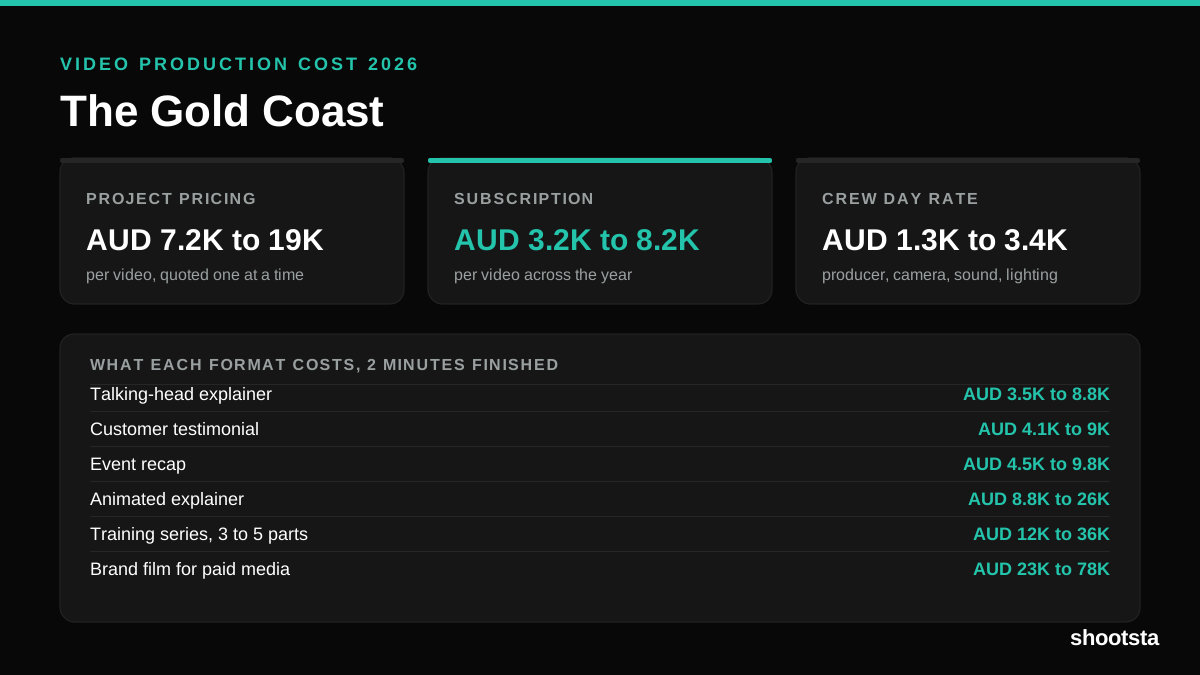
Video Production Cost on the Gold Coast 2026
Video production in the Gold Coast costs AUD 3,200 to AUD 8,200 per finished video on a subscription model, and AUD 7,200 to AUD 18,500 for one-off project work. Here is what you are paying for, and how the three pricing models compare.
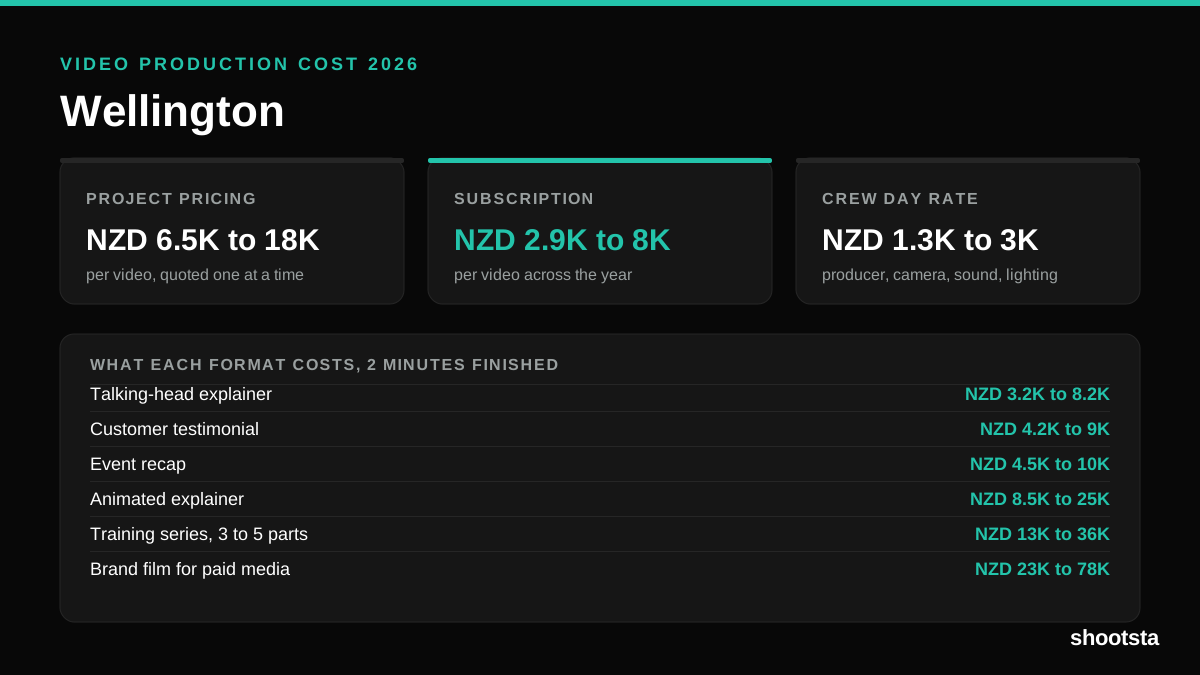
Video Production Cost in Wellington (2026)
Video production in Wellington costs NZD 2,900 to NZD 8,000 per finished video on a subscription model, and NZD 6,500 to NZD 18,000 for one-off project work. Here is what you are paying for, and how the three pricing models compare.
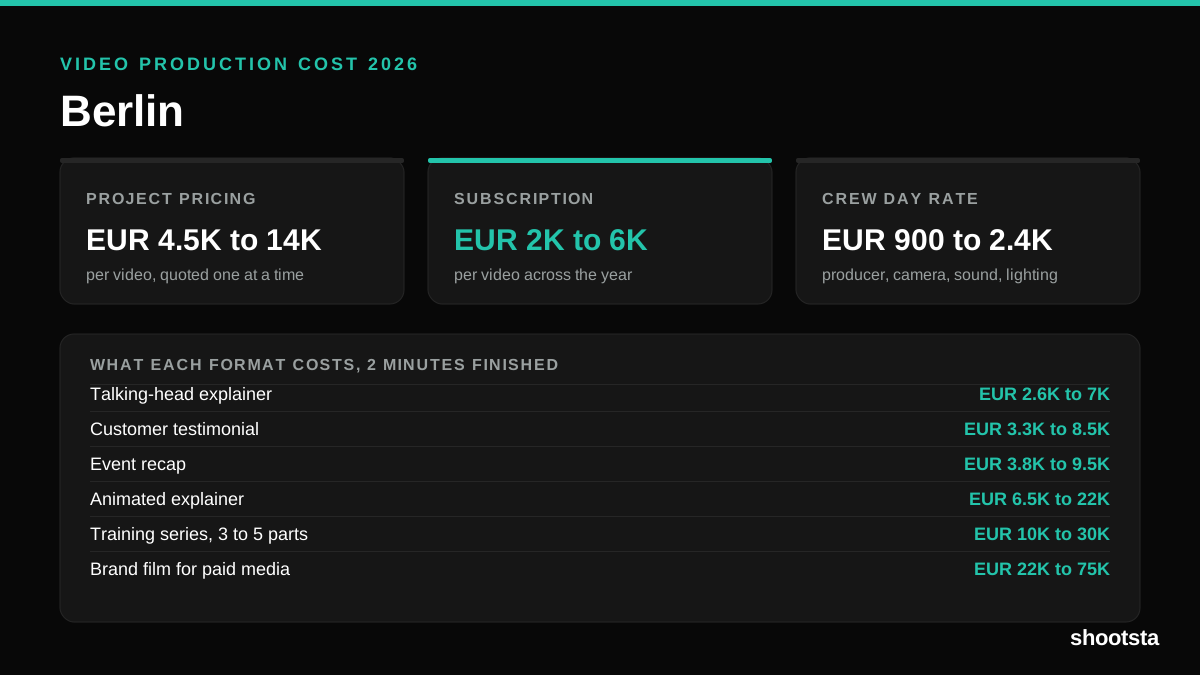
Video Production Cost in Berlin (2026)
Video production in Berlin costs EUR 2,000 to EUR 6,000 per finished video on a subscription model, and EUR 4,500 to EUR 13,500 for one-off project work. Here is what you are paying for, and how the three pricing models compare.