A game from Shootsta Snap
Spot the AI slop
Find the melted hands, bent lines and garbled logos hidden in real video frames, then pick the AI twin out of the uncanny valley. Your score goes on today's leaderboard, and your link lets your team try to beat it.

Six rounds, about three minutes
Every frame comes from a real Shootsta shoot, and we hid AI defects in them for you to find.
1
Runs today
1,562
Top score today
No runs yet
Your best
Start today
Your streak
Shootsta Snap AI clean-up
Shootsta editors clean up the AI slop in your videos
In Animoto's State of Video 2026 report, 36% of consumers said AI-generated videos lower their trust in a brand. Shootsta editors fix the hands, faces, garbled text, lip-sync and robotic voices in your AI video, then match it to your brand so it is ready to publish.
We are opening AI video clean-up to 20 founding customers first, so each job gets a senior editor and we learn what your videos need. Places go in the order people register, and the first intake opens in January 2027.
- A free audit of one videoYou get timestamped notes on everything that gives your video away, with a fixed quote to fix it.
- Your price held for 12 monthsFounding prices stay the same for your first year, whatever the standard rates become after launch.
- First place in the queueWhen the editors' schedule fills up, founding customers go ahead of later sign-ups.
Want the full details first? Read how the AI video clean-up service works.
Who spots AI slop fastest?
The daily board resets at midnight UTC, so there is a fresh top spot every day. Play a run, put your name on it and send your link to the team. Whoever opens it plays your exact frames, which settles the argument about who has the sharpest eye in the office.
Play a run nowLeaderboard
Best score per name. The daily board resets at midnight UTC.
What gives AI video away?
Most AI slop fails in the same few places, and the game trains you on all of them. Once you know where to look, you start noticing them in ads, explainers and training videos everywhere. For the full checklist with examples, read our guide to AI slop video and how to spot it.
Hands that do not add up
Count the fingers whenever a hand moves, because AI models draw hands as texture rather than bones, and fingers double, fuse or bend the wrong way between frames.
Straight lines that wobble
Door frames, shelves, lamp stands and horizons should stay straight, but each AI frame is generated on its own, so the edges ripple in a way a real camera lens never produces.
Objects that melt or repeat
Small detailed objects like clocks, bottles and cups lose their shape or turn up twice in one shot, because the model guesses at background detail instead of tracking it.
Text that only looks like text
Logos, signs, labels and on-screen notes come out as shapes that read as letters from a distance, but up close the words turn out to be nonsense.
Faces that are too perfect
Mirror-even features, airbrushed skin and glassy eyes push an AI presenter into the uncanny valley, and viewers feel it long before they can explain it.
Words a chatbot would write
A script full of stock chatbot phrases gives a video away as fast as a sixth finger does, and the fix is a line that names something the viewer can picture.
The uncanny valley
What is the uncanny valley in AI video?
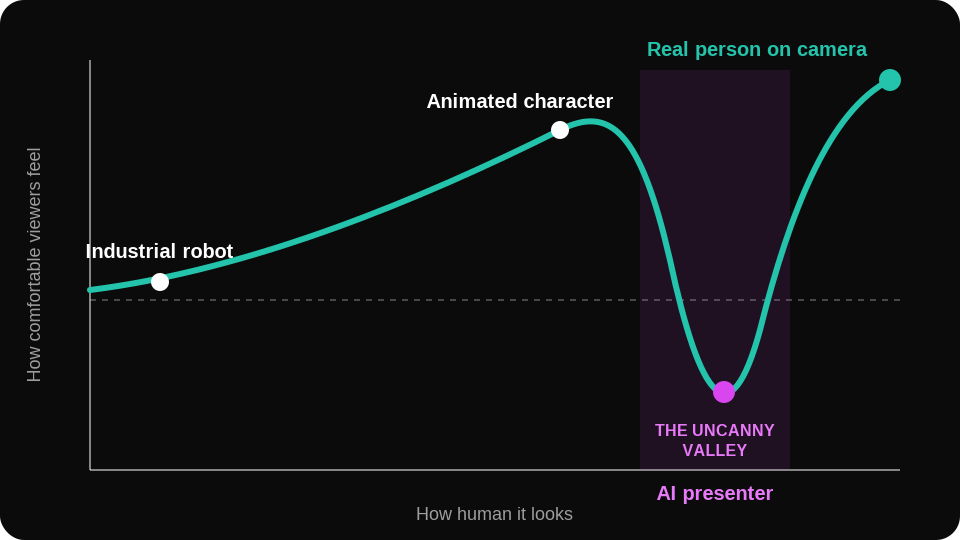
The uncanny valley is the drop in comfort people feel when something looks almost human but not quite. The Japanese roboticist Masahiro Mori described it in 1970. He noticed that people warm to robots and characters as they look more human, until the likeness gets close. Then comfort falls sharply, and a near-perfect face feels stranger than a cartoon.
AI presenters sit at the bottom of that dip. Their skin is too smooth, their faces are too even and their eyes do not quite track, while their lips drift out of sync with the voice. Viewers rarely name the problem, but they trust the video less, which is why we made the uncanny valley a round of its own.
See how this plays out in paid campaigns in our article on why AI video ads look uncanny and how to fix them.
Questions about the game
Are the frames in Spot the AI Slop real?
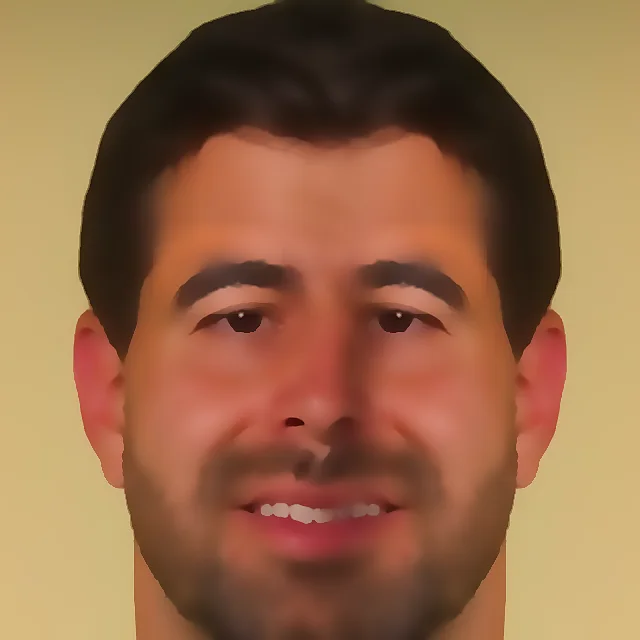
Every frame comes from a real Shootsta shoot, including behind-the-scenes footage, our Premier brand film and our Pro overview. We added the AI-style defects ourselves, such as doubled fingers, melted clocks and garbled signs, so you can practise spotting them. The faces in the uncanny valley round are real presenters next to an AI-style twin we made from the same frame.
How is the score worked out?
You earn points for each tell you find, with a combo bonus for finding several in a row and a time bonus for clearing a frame early. A miss costs 20 points, and in the choice rounds you score for each right answer, with more for fast answers and a streak bonus, while the boss frame counts double. Your answers are scored again on our server before they go on the leaderboard.
How does a challenge link work?
When you finish, your share link carries your run. Anyone who opens it plays the exact same six rounds you played, sees your score as the one to beat and finds out at the end whether they beat you.
What is AI slop?
AI slop is low-effort AI-generated content that goes out without a human checking it. In video it shows up as warped hands, wobbling backgrounds, garbled text, robotic voices and presenters that feel slightly wrong. Our guide to AI slop video covers the full list.
Can Shootsta fix the AI slop in my videos?
Shootsta Snap is a human clean-up service that fixes AI-generated video before it goes out. Our editors fix hands and faces, rebuild garbled text and logos, repair lip-sync, replace robotic voiceover and match the video to your brand. Founding customers get a free audit of one video with timestamped notes and a fixed quote.
We already have an in-house editor. Why send AI video to Shootsta?
Your editor can fix AI video, but clean-up is slow, frame-by-frame work that pulls them off the projects only they can do. Snap takes the clean-up off their desk, so your team keeps making the main videos while the AI drafts come back ready to publish.
Want to check a video before it goes out? Work through our AI video quality checklist or read how to fix AI-generated video shot by shot.